1. Introduzione
This manual provides essential instructions for the safe and efficient use of your Xiaomi Mi Portable Bluetooth Speaker. Please read this manual thoroughly before using the product and retain it for future reference. The speaker features high-quality sound, True Wireless Stereo (TWS) capability, Bluetooth 5.0 connectivity, and IPX7 waterproofing, making it suitable for various environments.

Immagine: Angolata view of the Xiaomi Mi Portable Bluetooth Speaker, highlighting its compact design and control panel.
2. Contenuto della confezione
Assicurarsi che tutti gli articoli siano presenti nel pacco:
- Xiaomi Mi Portable Bluetooth Speaker x1
- Charging Cable x1 (USB-C)
- Manuale utente x1
3. Caratteristiche del prodotto
- Suono di alta qualità: Fornisce un audio chiaro e bilanciato.
- Stereo senza fili (TWS): Connect two speakers for an immersive stereo experience.
- Bluetooth 5.0: Connettività wireless stabile ed efficiente.
- IPX7 impermeabile: Protected against immersion in water up to 1 meter for 30 minutes.
- Tempo di riproduzione lungo: Approximately 13 hours of playback at 50% volume.
- Microfono incorporato: Per chiamate in vivavoce.
- Ingresso AUX: Per la connessione audio cablata.
4. Controlli e indicatori
Familiarize yourself with the speaker's control buttons and indicators:
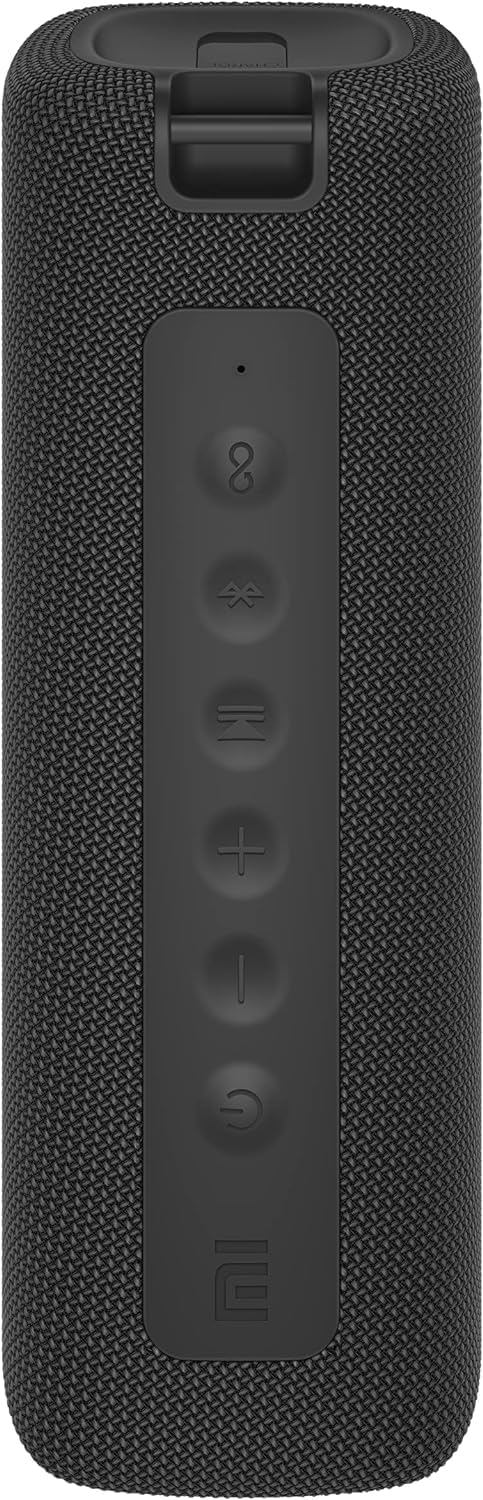
Immagine: Frontale view of the speaker with clearly visible control buttons.
| Pulsante/Indicatore | Funzione |
|---|---|
| Pulsante di accensione (⏻) | Press and hold for 2 seconds to power on/off. Short press to play/pause music or answer/end calls. |
| Abbassa il volume (−) | Premere brevemente per diminuire il volume. Tenere premuto per tornare alla traccia precedente. |
| Alza il volume (+) | Premere brevemente per aumentare il volume. Tenere premuto per la traccia successiva. |
| Pulsante Bluetooth (Ⓑ) | Premere brevemente per accedere alla modalità di associazione Bluetooth. |
| Pulsante TWS (∞) | Press to initiate True Wireless Stereo pairing with another Mi Portable Bluetooth Speaker. |
| Indicatore LED | Indica lo stato di alimentazione, lo stato di carica e lo stato di associazione Bluetooth. |
5. Impostazione
5.1 Ricarica dell'altoparlante
- Collegare il cavo di ricarica USB-C in dotazione alla porta di ricarica dell'altoparlante.
- Connect the other end of the cable to a 5V 1A USB power adapter (not included) or a computer's USB port.
- L'indicatore LED mostrerà lo stato di carica (ad esempio, rosso durante la carica, spento quando la carica è completa).
- Una carica completa richiede circa 4 ore.
5.2 Accensione/spegnimento
- Per accendere: Press and hold the Power button for 2 seconds. You will hear an audible prompt, and the LED indicator will light up.
- Per spegnere: Press and hold the Power button for 2 seconds. You will hear an audible prompt, and the LED indicator will turn off.
5.3 Associazione Bluetooth
- Ensure the speaker is powered on. The LED indicator will flash blue, indicating it's in pairing mode.
- Sul tuo dispositivo (smartphone, tablet, computer), attiva il Bluetooth e cerca i dispositivi disponibili.
- Select "Mi Portable Bluetooth Speaker" from the list of devices.
- Una volta effettuato l'accoppiamento, l'indicatore LED diventerà blu fisso e verrà emesso un suono di conferma.
- L'altoparlante si connetterà automaticamente all'ultimo dispositivo associato quando viene acceso, se si trova nel raggio d'azione.
5.4 Accoppiamento True Wireless Stereo (TWS)
To pair two Xiaomi Mi Portable Bluetooth Speakers for stereo sound:
- Assicurarsi che entrambi gli altoparlanti siano accesi e non connessi ad altri dispositivi Bluetooth.
- Su un altoparlante (che sarà l'altoparlante principale), premere brevemente il pulsante TWS (∞). The LED indicator will flash.
- On the second speaker, short press the TWS button (∞).
- The two speakers will automatically connect to each other. You will hear a confirmation sound, and the LED indicators on both speakers will turn solid blue.
- Now, connect your device to the primary speaker via Bluetooth as described in section 5.3. The sound will play in stereo through both speakers.
5.5 Collegamento AUX
Per la riproduzione audio cablata:
- Connect a 3.5mm audio cable (not included) from your audio source to the AUX IN port on the speaker.
- L'altoparlante passerà automaticamente alla modalità AUX.
- Controlla la riproduzione e il volume dal tuo dispositivo sorgente audio.
6. Istruzioni per l'uso
6.1 Riproduzione di musica
- Riproduci/Pausa: Premi brevemente il pulsante di accensione.
- Aumenta volume: Premere brevemente il tasto Volume Su (+).
- Volume basso: Short press the Volume Down (−).
- Traccia successiva: Premere e tenere premuto il tasto Volume su (+).
- Traccia precedente: Premere e tenere premuto il tasto Volume giù (−).
6.2 Gestione delle chiamate
- Rispondi/Termina chiamata: Short press the Power button when a call comes in or during a call.
- Rifiuta chiamata: Quando si riceve una chiamata, tenere premuto il pulsante di accensione per 2 secondi.
7. Manutenzione
- Pulizia: Pulisci l'altoparlante con un morbido, damp panno. Non usare detergenti abrasivi o solventi.
- Magazzinaggio: Conservare l'altoparlante in un luogo fresco e asciutto, lontano dalla luce solare diretta e da temperature estreme.
- Resistenza all'acqua: The speaker is IPX7 waterproof. Ensure the charging port cover is securely closed before exposure to water. Do not submerge the speaker for extended periods or beyond specified depths.
- Cura della batteria: Per prolungare la durata della batteria, evitare di scaricare completamente l'altoparlante frequentemente. Ricaricarlo regolarmente, anche se non lo si utilizza per lunghi periodi.
8. Risoluzione Dei Problemi
| Problema | Possibile soluzione |
|---|---|
| L'altoparlante non si accende. | Assicurarsi che la batteria sia carica. Collegare a una fonte di alimentazione e riprovare. |
| Impossibile effettuare l'associazione tramite Bluetooth. |
|
| Nessun suono o volume basso. |
|
| L'associazione TWS non riesce. |
|
| Qualità del suono scadente. |
|
9. Specifiche

Immagine: In basso view of the speaker, displaying model number and certifications.
| Parametro | Valore |
|---|---|
| Modello | MDZ-36-DB |
| Dimensioni del prodotto | W 213 x D 74 x H 74 mm (approx. 8 x 3 x 3 inches) |
| Connettività | Bluetooth 5.0, 3.5mm AUX IN |
| Potenza nominale | 2 x 8 W (16 W totali) |
| Signal-to-Noise Ratio | ≥ 70 dB |
| TWS Connection Range | ≤ 5 metri |
| Grado di impermeabilità | Grado di protezione IPX7 |
| Tipo di batteria | Agli ioni di litio, 3.7 V |
| Capacità della batteria | 2600mAh |
| Tempo di ricarica della batteria | Circa 4 ore |
| Tempo di riproduzione | ca. 13 ore (al 50% del volume) |
| Gamma di frequenza | Da 80 Hz a 20 KHz |
| Impedenza nominale | 4Ω |
| Distanza di trasmissione | 15 metri |
| Ingresso nominale | 5V 1A |
| Peso dell'articolo | 500 grammi (1.1 libbre) |
10. Garanzia e supporto
Per informazioni dettagliate sulla garanzia, fare riferimento alla scheda di garanzia inclusa con il prodotto o visitare il sito ufficiale Xiaomi websito.
If you encounter any issues not covered in this manual, please contact Xiaomi customer support or visit their official support channels for assistance.


