1. Introduzione
Grazie per l'acquistoasing the beFree Sound BFS-855 5.1 Channel Surround Sound Bluetooth Speaker System. This manual provides essential information for the safe and efficient operation of your new audio system. Please read these instructions thoroughly before use and retain them for future reference.
2. Istruzioni di sicurezza
- Fonte di energia: Garantire l'alimentazione voltage matches the requirements specified on the unit (110V/60Hz).
- Ventilazione: Non ostruire le aperture di ventilazione. Mantenere uno spazio adeguato attorno all'unità per un corretto flusso d'aria.
- Acqua e umidità: Non esporre l'unità a pioggia, umidità o liquidi che gocciolano/spruzzano. Non posizionare oggetti contenenti liquidi, come vasi, sull'unità.
- Calore: Tenere l'unità lontana da fonti di calore quali radiatori, bocchette di riscaldamento, stufe o altri apparecchi (inclusi amplificatori) che producono calore.
- Pulizia: Scollegare l'unità dalla presa di corrente prima di pulirla. Utilizzare un panno morbido e asciutto. Non utilizzare detergenti liquidi o spray.
- Manutenzione: Non tentare di riparare questo prodotto da soli. Affidare tutte le operazioni di manutenzione a personale di assistenza qualificato.
3. Contenuto della confezione
Verifica che tutti gli articoli elencati di seguito siano inclusi nel tuo pacchetto:
- 1 subwoofer
- 5 altoparlanti satellitari
- 4 cavi audio
- 1 antenna FM
- 1 x telecomando
- 1 x Manuale utente (questo documento)

Image: Various audio cables and an FM antenna included with the system.
4. Prodotto finitoview
Familiarize yourself with the components of your beFree Sound BFS-855 system.
4.1. Subwoofer Unit

Immagine: frontale e laterale view of the main subwoofer unit, featuring the beFree logo and a sleek black finish.

Immagine: Lato view of the subwoofer, showing the USB port, SD card slot, and auxiliary input jacks.

Image: Rear panel of the subwoofer, detailing the optical input, coaxial input, AUX audio input, FM antenna port, DVD audio input, LED power, audio output for satellite speakers, and power switch.
4.2. Satellite Speakers
The system includes five satellite speakers: a center speaker, two front speakers, and two rear speakers.

Image: A compact satellite speaker, typically used for front or rear channels.

Image: The horizontal center channel speaker, designed for clear dialogue.
4.3. Controllo remoto

Image: The remote control unit, featuring buttons for input selection, volume, channel tuning, and various audio adjustments.
5. Impostazione
5.1. Posizionamento degli altoparlanti
- Subwoofer: Place the subwoofer on the floor, preferably near the front of your listening area.
- Altoparlante centrale: Position the center speaker directly above or below your television/monitor.
- Altoparlanti anteriori: Place the front left and right speakers equidistant from your listening position, to the left and right of your television/monitor.
- Altoparlanti posteriori: Position the rear left and right speakers behind your listening position, facing towards you.
5.2. Collegamento degli altoparlanti
Connect the satellite speakers to the corresponding output jacks on the rear panel of the subwoofer. Ensure correct polarity (red to red, black to black) for optimal sound quality.
5.3. Collegamento delle sorgenti audio
Your system supports multiple audio input options:
- Bluetooth: For wireless connection from compatible devices.
- Ingresso AUX: Use the provided audio cables to connect devices with a 3.5mm or RCA audio output.
- Ingresso ottico: For high-quality digital audio from TVs, game consoles, or DVD/Blu-ray players.
- Ingresso coassiale: Another option for digital audio connection.
- USB/scheda SD: Insert a USB drive or SD card into the designated slots on the subwoofer for direct media playback.
- Antenna FM: Connect the included FM antenna to the FM ANT port for radio reception.
5.4. Collegamento elettrico
After all audio connections are made, connect the power cord to the subwoofer and then plug it into a standard 110V/60Hz electrical outlet. Turn on the power switch located on the rear panel of the subwoofer.
6. Istruzioni per l'uso
6.1. Accensione/spegnimento
Press the 'POWER' button on the remote control or the power switch on the rear of the subwoofer to turn the system on or off.
6.2. Selezione ingresso
Press the 'INPUT' button on the remote control to cycle through available input sources: Bluetooth, AUX, Optical, Coaxial, USB, SD, FM.
6.3. Controllo del volume
Use the 'VOL+' and 'VOL-' buttons on the remote control to adjust the master volume. Individual channel volumes (FL, FR, CEN, SL, SR, SW) can also be adjusted using their respective buttons on the remote.
6.4. Accoppiamento Bluetooth
- Select 'Bluetooth' as the input source. The display will indicate 'BT'.
- Abilita il Bluetooth sul tuo dispositivo mobile o computer.
- Cercare 'BFS-855' in the list of available devices.
- Select 'BFS-855' to pair. Once connected, a confirmation sound will play.
6.5. Funzionamento della radio FM
- Selezionare 'FM' come sorgente di ingresso.
- Press the 'AUTO' button on the remote to automatically scan and save available FM stations.
- Use 'CH+' and 'CH-' buttons to navigate through saved stations.
- Use 'TUNE+' and 'TUNE-' buttons for manual frequency adjustment.
6.6. Riproduzione tramite scheda USB/SD
- Inserire un'unità USB o una scheda SD nello slot corrispondente.
- The system will automatically switch to USB/SD input and begin playback. If not, select 'USB' or 'SD' input manually.
- Use the 'PLAY/PAUSE', 'PREV', and 'NEXT' buttons on the remote for media control.
7. Manutenzione
Per garantire la longevità e le prestazioni ottimali del tuo sistema di altoparlanti, segui queste linee guida per la manutenzione:
- Pulizia: Regularly wipe the surfaces of the speakers and subwoofer with a soft, dry, lint-free cloth. Avoid using abrasive cleaners, waxes, or solvents.
- Polvere: Keep the ventilation openings free from dust accumulation. Use a soft brush or vacuum cleaner with a brush attachment to gently remove dust.
- Magazzinaggio: If storing the system for an extended period, unplug it from the power outlet and store it in a cool, dry place, away from direct sunlight and extreme temperatures.
8. Risoluzione Dei Problemi
Se riscontri problemi con il tuo sistema di altoparlanti, fai riferimento ai seguenti problemi comuni e alle relative soluzioni:
| Problema | Possibile causa | Soluzione |
|---|---|---|
| Nessun potere | Power cord not connected; Power switch off; Outlet malfunction | Ensure power cord is securely plugged in; Turn on power switch; Test outlet with another device. |
| Nessun suono | Incorrect input selected; Volume too low; Speaker cables loose; Mute function active | Select correct input source; Increase master volume; Check all speaker connections; Press 'MUTE' on remote. |
| Il Bluetooth non si connette | Speaker not in Bluetooth mode; Device not discoverable; Already connected to another device | Ensure 'BT' input is selected; Make sure device Bluetooth is on and searching; Disconnect from other devices. |
| Scarsa ricezione FM | Antenna FM non collegata o posizionata male | Collegare saldamente l'antenna FM; regolare la posizione dell'antenna per un segnale migliore. |
9. Specifiche
- Nome modello: BFS-855
- Tipo di altoparlante: Sistema audio surround
- Configurazione del canale audio surround: 5.1
- Potenza di uscita: 50W (Subwoofer) + 15W x 5 (Satellites) = 125 Watts Total
- Diametro subwoofer: 8 pollici
- Dimensioni dell'altoparlante satellitare: 3.5 pollici (x5)
- Risposta in frequenza: 40Hz - 20KHz
- Separazione: >50 dB
- Rapporto segnale/rumore: >75 dB
- Fonte di energia: Corded Electric (110V/60Hz)
- Tecnologia di connettività: Bluetooth, USB, SD Card, Optical, Coaxial, AUX (RCA)
- Metodo di controllo: Telecomando
- Dimensioni del prodotto (subwoofer): 21"P x 11"L x 21"A
- Peso dell'articolo: 33 libbre
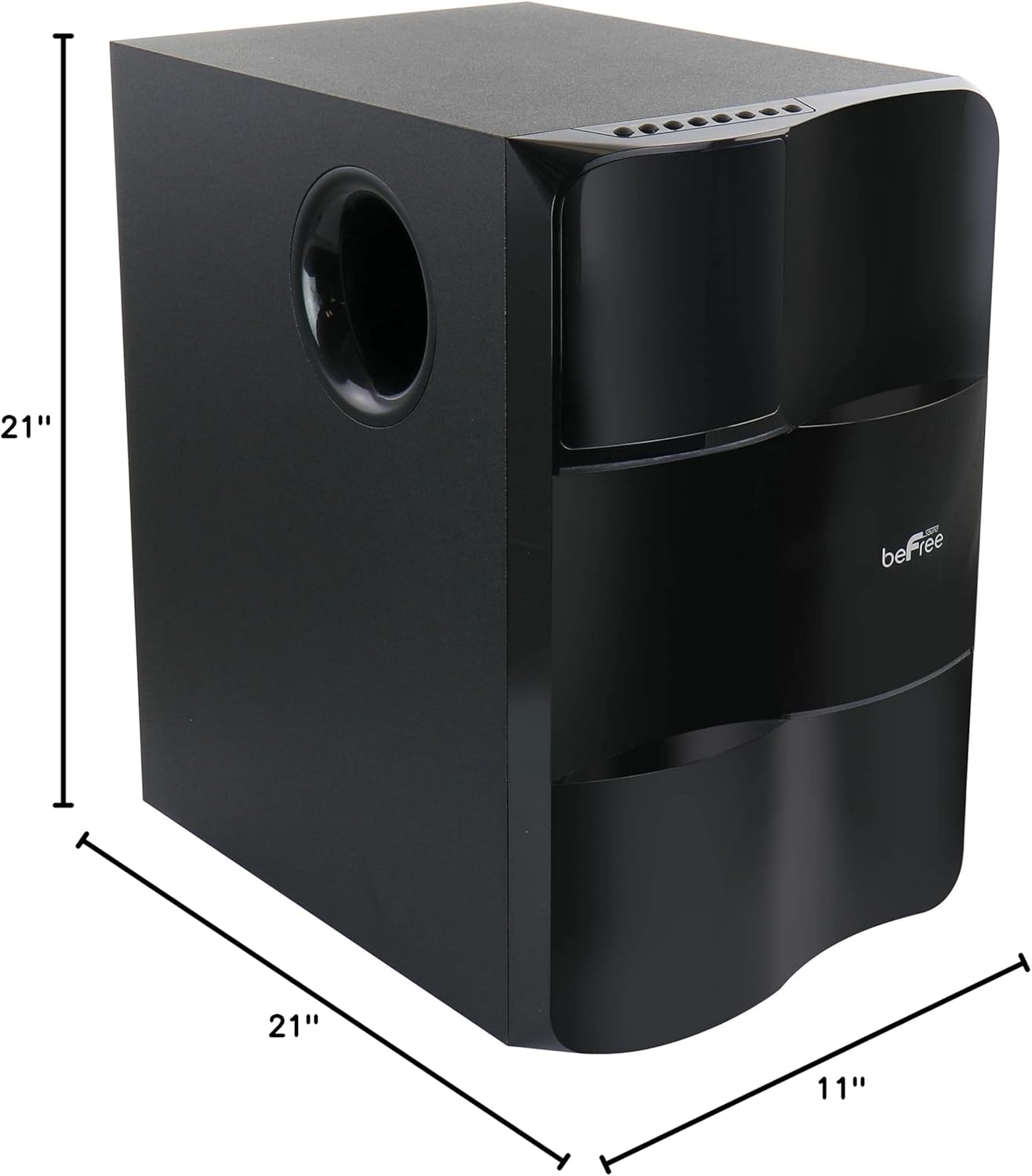
Image: Diagram illustrating the dimensions of the subwoofer unit (21"D x 11"W x 21"H).
10. Garanzia e supporto
This product comes with a limited warranty. For specific details regarding warranty coverage and duration, please refer to the warranty card included in your package or contact your retailer. For technical support or service inquiries, please reach out to the point of purchase or the manufacturer's customer service channels.


