1. Introduzione
This manual provides instructions for the proper use and maintenance of your Sena Parani A20 Bluetooth Intercom Headset. Please read this manual thoroughly before operating the device to ensure optimal performance and safety.
The Parani A20 is designed for motorcycle communication, offering features such as 4-way Bluetooth intercom, HD 2-way intercom, and smartphone connectivity for music and calls.
2. Contenuto della confezione
The Sena Parani A20 package typically includes the following components:
- Parani A20 Headset Unit
- Set di altoparlanti
- Microfono boom
- Microfono cablato
- Montaggio Clamp Kit
- Cavo di ricarica USB
- Manuale dell'utente (questo documento)

Immagine: Oltreview of the Sena Parani A20 headset and its included components, such as the main unit, speakers, boom microphone, and wired microphone.
3. Configurazione e installazione
3.1 Ricarica del dispositivo
Before first use, fully charge the Parani A20 headset. Connect the USB charging cable to the headset and a power source. The charging time is approximately 2.5 hours.
3.2 Montaggio dell'auricolare
The Parani A20 can be mounted to most motorcycle helmets using the included clamp kit. Ensure the mounting location allows for clear access to the controls and does not obstruct helmet functionality.
- Choose a suitable location on the left side of your helmet.
- Fissare saldamente la staffa di montaggioamp to the helmet shell.
- Slide the Parani A20 main unit onto the mounted clamp finché non scatta in posizione.

Image: The Sena Parani A20 headset unit attached to the side of a motorcycle helmet, showing its position relative to the helmet's structure.
3.3 Installing Speakers and Microphones
Install the speakers inside the helmet's ear pockets and route the microphone cable to the front of the helmet. Two microphone options are provided:
- Microfono a braccio: Recommended for open-face or modular helmets. Position the microphone close to your mouth.
- Microfono cablato: Suitable for full-face helmets. Secure it inside the chin bar.
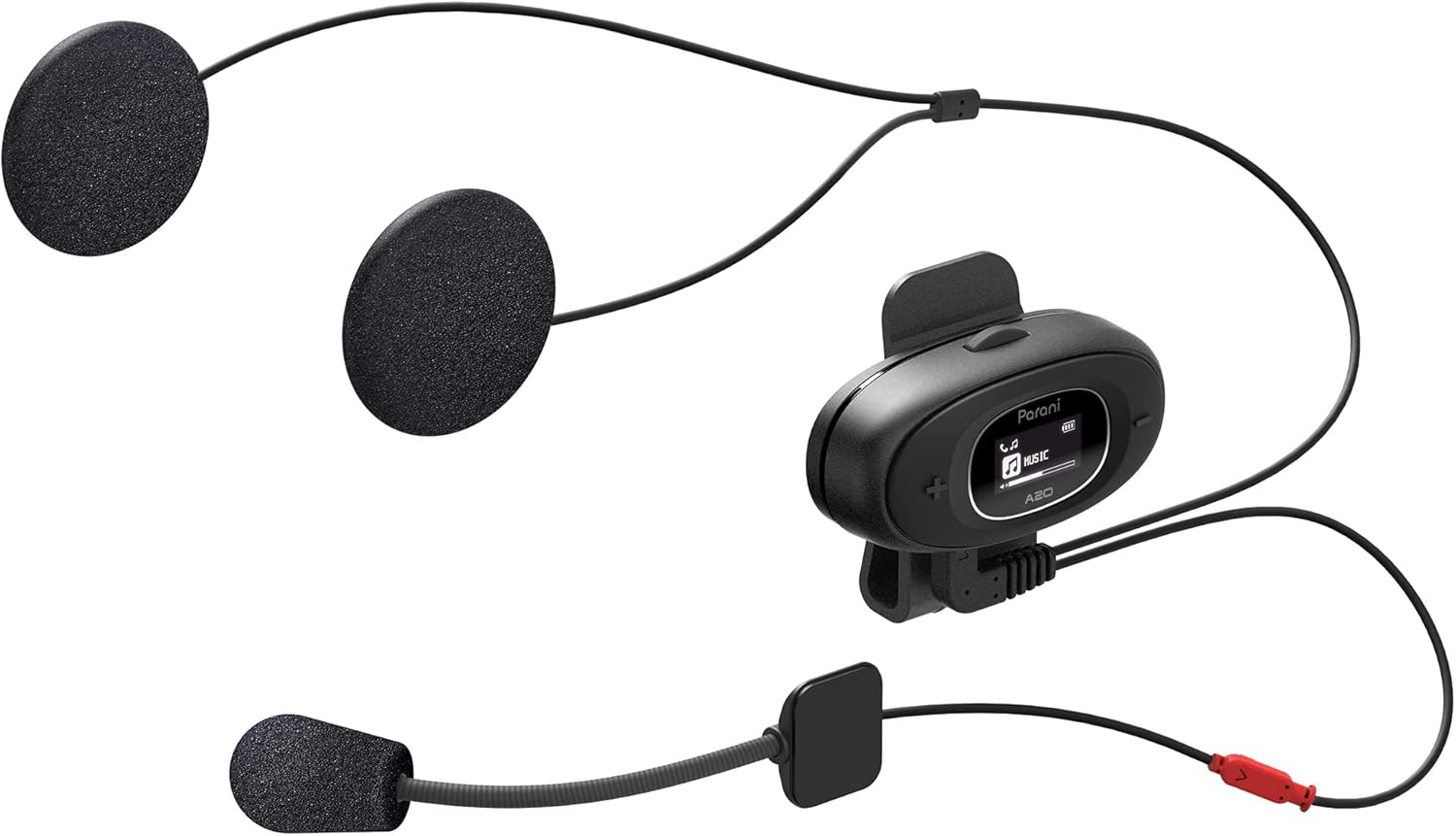
Image: The Sena Parani A20's speakers and both microphone types (boom and wired) are displayed, ready for installation inside a helmet.
4. Istruzioni per l'uso
4.1 Accensione/spegnimento
- Accensione: Premere e tenere premuto il tasto Pulsante centrale per 1 secondo.
- Spegni: Premere e tenere premuto il tasto Pulsante centrale per 5 secondi.
4.2 Accoppiamento Bluetooth con lo smartphone
To connect your Parani A20 to a smartphone for music, GPS, or phone calls:
- With the headset off, press and hold the Pulsante centrale for 5 seconds until the LED flashes red and blue, indicating pairing mode.
- On your smartphone, go to Bluetooth settings and select "Parani A20" from the list of available devices.
- Una volta effettuato l'accoppiamento, il LED lampeggerà in blu.
4.3 Comunicazione interfonica
The Parani A20 supports 4-way Bluetooth intercom and HD 2-way intercom with a range of up to 1 km (0.6 miles).
- Avvio dell'interfono: Premere brevemente il tasto Pulsante centrale to initiate intercom with a paired Parani A20 unit.
- Interfono finale: Premere brevemente il tasto Pulsante centrale Ancora.
- Multi-way Intercom: Follow the specific pairing instructions in the full manual for connecting multiple units.

Immagine: Un dettaglio view of the Parani A20 unit, highlighting its LCD screen which displays intercom status and battery level, along with the control buttons.
4.4 Riproduzione musicale e controllo del volume
- Riproduci/Pausa: Premere il tasto Pulsante centrale during music playback.
- Aumenta volume: Premere il tasto Pulsante (+).
- Volume basso: Premere il tasto Pulsante (-).
- The Parani A20 offers exceptional sound quality with enhanced bass and clarity.
4.5 Chiamate telefoniche
- Rispondi alla chiamata: Premere brevemente il tasto Pulsante centrale.
- Termina chiamata: Premere brevemente il tasto Pulsante centrale.
- Rifiuta chiamata: Premere e tenere premuto il tasto Pulsante centrale per 2 secondi.

Image: A motorcycle rider on the road, wearing a helmet equipped with the Sena Parani A20 intercom, demonstrating its use in a riding context.
5. Manutenzione e cura
- Keep the device dry. The Parani A20 is not water-resistant.
- Pulire l'unità con un panno morbido, damp stoffa. Non utilizzare prodotti chimici o solventi aggressivi.
- Conservare il dispositivo in un luogo fresco e asciutto quando non viene utilizzato.
- Assicurarsi che la porta di ricarica sia libera da polvere e detriti.
6. Risoluzione Dei Problemi
6.1 Il dispositivo non si accende
- Check battery level. Charge the device for at least 30 minutes.
- Ensure the power button is pressed correctly (hold for 1 second).
6.2 No Audio from Speakers
- Verify that the speakers are correctly plugged into the headset unit.
- Check the volume level on both the headset and your connected smartphone.
- Ensure the headset is properly paired with your audio source.
6.3 Interfono non connesso
- Ensure both units are within the specified intercom range (up to 1 km).
- Re-pair the intercom units if connection issues persist.
- Verificare la presenza di eventuali ostruzioni o interferenze.
6.4 Ripristino delle impostazioni di fabbrica
If the device is not functioning correctly, a factory reset may resolve the issue. Refer to the full manual for specific instructions on performing a factory reset.
7. Specifiche
| Nome del modello | Parani A20 |
| Versione Bluetooth | 5.1 |
| Interfono | Fino a 1 km (0.6 miglia) |
| Tipo di citofono | 4-way Bluetooth, HD 2-way |
| Tempo di ricarica | Circa 2.5 ore |
| Spettro di frequenza | 20 Hz - 10,000 Hz |
| Peso | 240 grammi |
| Dimensioni | Dimensioni: 18.7 x 11.8 x 6.4 cm |
| Materiale | Plastica |
| Resistenza all'acqua | Non resistente all'acqua |
| Dispositivi compatibili | Mobile phones, Motorcycles |
8. Garanzia e supporto
For warranty information and technical support, please refer to the official Sena webo contattare il rivenditore locale. Conservare la prova d'acquisto per eventuali reclami in garanzia.
Risorse online: Visitare il Sena websito for the latest firmware updates, FAQs, and detailed product manuals.
9. Informazioni importanti sulla sicurezza
- Dare sempre priorità alla sicurezza stradale. Non utilizzare il dispositivo in modo da distrarti dalla guida.
- Ensure the device is securely mounted to your helmet.
- Non esporre il dispositivo a temperature estreme o alla luce solare diretta per periodi prolungati.
- Tenere fuori dalla portata dei bambini.


