1. Introduzione
This manual provides detailed instructions for the VTech AM18447 4-Line Corded Base Phone System, including the AM18447 main console and up to three AM18247 corded desksets. This system is designed to manage calls across 1 to 4 telephone lines simultaneously, offering advanced features for efficient communication. Please read this manual thoroughly to ensure proper installation, operation, and maintenance of your phone system.

Image 1: The VTech AM18447 4-Line Corded Base Phone System, showing the main console and three additional corded desksets.
2. Impostazione
2.1 Disimballaggio del sistema
Disimballare con cura tutti gli articoli dalla scatola. Assicurarsi che siano presenti i seguenti componenti:
- VTech AM18447 Main Console (Base Unit)
- Up to three VTech AM18247 Corded Desksets
- Adattatori di alimentazione per ogni unità
- Cavi della linea telefonica
- Corded Handsets and Coiled Cords
2.2 Connecting the Main Console (AM18447)
- Connect one end of the coiled handset cord to the handset jack on the main console and the other end to the handset.
- Plug one end of the telephone line cord into the LINE 1 jack on the back of the main console and the other end into a telephone wall jack. Repeat for LINE 2, LINE 3, and LINE 4 if you have multiple lines.
- Connect the power adapter to the POWER jack on the main console and plug the other end into an electrical outlet.
- If using DSL service, ensure you use a DSL filter (not included) for each telephone line to prevent interference.
2.3 Connecting Additional Corded Desksets (AM18247)
Each AM18247 deskset connects to the main console wirelessly. Follow these steps for each deskset:
- Connect one end of the coiled handset cord to the handset jack on the deskset and the other end to the handset.
- Connect the power adapter to the POWER jack on the deskset and plug the other end into an electrical outlet.
- The deskset will automatically register with the main console upon power-up. If registration fails, refer to the troubleshooting section.
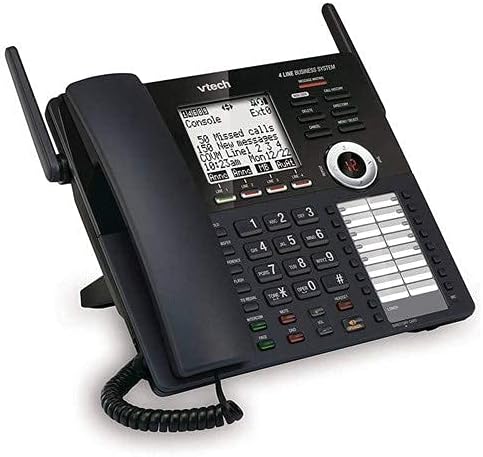
Immagine 2: Un dettaglio view of the VTech AM18447 main console, highlighting the display, keypad, and line indicators.
2.4 Battery Installation for Power Failure Operation
The main console requires 4 AAA batteries (not included) for power failure operation, allowing basic functionality during a power outage. Locate the battery compartment on the underside of the main console, insert the batteries according to the polarity markings, and replace the cover.
3. Istruzioni per l'uso
3.1 Funzioni di chiamata di base
- Effettuare una chiamata: Sollevare il ricevitore o premere il tasto ORATORE button. Select an available line (LINE 1-4) if not automatically selected. Dial the number.
- Risposta a una chiamata: Sollevare il ricevitore o premere il tasto ORATORE pulsante quando squilla il telefono.
- Terminare una chiamata: Riposizionare il ricevitore nella base o premere il tasto ORATORE di nuovo il pulsante.
- Presa: Durante una chiamata, premere il tasto PRESA per mettere in attesa la chiamata. Premere il pulsante di linea lampeggiante per riprendere la chiamata.
- Ricomposizione: Premere il tasto RICOMPOSIZIONE button to redial the last 10 numbers called.
3.2 Vivavoce
The system features a full-duplex speakerphone, allowing both parties to speak and be heard simultaneously. To use, press the ORATORE button during a call or to initiate a call without lifting the handset.
3.3 Sistema di risposta digitale
The integrated digital answering system records up to 180 minutes of messages, announcements, and memos.
- Recording an Outgoing Announcement: Access the answering system menu and follow voice prompts to record your personalized message.
- Riproduzione del messaggio: Premere il tasto RIPRODUCI/ARRESTA pulsante. Uso SALTARE to advance, RIPETERE to replay, and ELIMINARE to remove messages. Variable speed playback is available through menu options.
- Registrazione promemoria: Record personal memos for later playback.
- Accesso remoto: Access your messages from an outside line by dialing your phone number and entering your remote access code.
- Private Mailbox: Configure private mailboxes for individual users.
3.4 ID chiamante / Chiamata in attesa
The system stores up to 50 names and numbers in the Caller ID history.
- Viewing Caller ID: Use the navigation buttons to scroll through the Caller ID log.
- Chiamata in attesa: When on a call, a tone indicates an incoming call. Press the FLASH pulsante per passare da una chiamata all'altra.
3.5 Elenco telefonico
Memorizza fino a 100 nomi e numeri nella rubrica.
- Aggiunta di una voce: Access the phonebook menu, select 'Add New Entry', and enter the name and number.
- Chiamata rapida: Assign frequently called numbers to speed dial locations (up to 32).
3.6 Intercom, Call Transfer, and Conferencing
- Citofono: Premere il tasto CITOFONO button and select the desired station to initiate an internal call.
- Trasferimento di chiamata: Durante una chiamata esterna, premere TRASFERIRE, select the internal station, and then hang up to complete the transfer.
- Conferenza a 4 vie: Connect up to four parties (internal and external) on a single call. Refer to the menu for specific steps.
3.7 Impostazioni di sistema
Access the setup menu to customize various settings.
- Lingua: Select English, Spanish, or French for the display menu.
- Ringers: Choose from 10 polyphonic ringers, assignable per line.
- Operatore automatico: Enable or disable the auto attendant feature for each line.
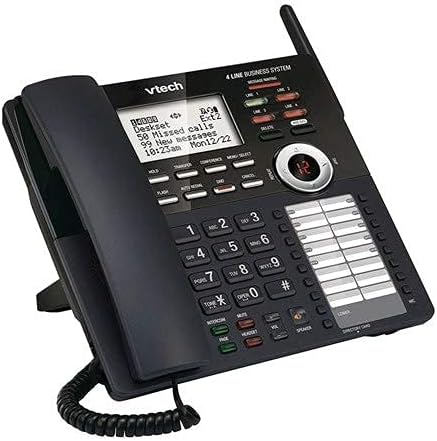
Immagine 3: Un angolo view of the VTech AM18447 main console, providing a clear perspective of its ergonomic design and button layout.
4. Manutenzione
Per garantire la longevità e le prestazioni ottimali del tuo sistema telefonico VTech, segui queste linee guida per la manutenzione:
- Pulizia: Wipe the phone surfaces with a soft, slightly damp stoffa. Non utilizzare prodotti chimici aggressivi o detergenti abrasivi.
- Posizione: Place the phone system in a dry area, away from direct sunlight, heat sources, and excessive moisture.
- Energia: Ensure all power adapters are securely plugged into working electrical outlets.
5. Risoluzione Dei Problemi
If you encounter issues with your VTech phone system, try the following solutions:
- Nessun segnale di linea:
- Check all telephone line cord connections.
- Assicurati che l'alimentatore sia collegato saldamente.
- Test the telephone line with another phone.
- Nessuna alimentazione all'unità:
- Verify the power adapter is correctly connected to the unit and a working electrical outlet.
- Check the electrical outlet with another device.
- Il sistema di risposta non registra:
- Assicurarsi che la segreteria telefonica sia ATTIVA.
- Controllare se la memoria è piena; eliminare i vecchi messaggi.
- ID chiamante non visualizzato:
- Ensure you have subscribed to Caller ID service from your telephone provider.
- Verify the phone line connection.
- Deskset Not Registering:
- Ensure the deskset is powered on.
- Refer to the main console's menu for manual registration options if automatic registration fails.
6. Specifiche
| Caratteristica | Dettaglio |
|---|---|
| Dimensioni del prodotto | 9 x 5.7 x 8.8 pollici |
| Peso dell'articolo | 2 libbre |
| Batterie richieste | 4 AAA batteries (for power failure operation) |
| Produttore | Tecnologia virtuale |
| Marca | VTech |
| Colore | Nero |
| Tipo di telefono | filo |
| Materiale | Plastica |
| Fonte di alimentazione | Elettrico con cavo |
| Tipo di combinatore | Tastiera singola |
| Tipo di sistema di risposta | Digitale |
7. Garanzia e supporto
VTech products are manufactured with high-quality components and are designed for reliable performance. For specific warranty information, please refer to the warranty card included with your product packaging or visit the official VTech websito.
For technical support, troubleshooting assistance, or to inquire about replacement parts, please contact VTech Customer Service. Contact details can typically be found on the VTech websito o nella confezione del tuo prodotto.


