1. Introduzione
This manual provides detailed instructions for the proper use and maintenance of your Cellularline Task Dual-Mode Headset. Please read this manual thoroughly before using the product to ensure optimal performance and longevity.
The Cellularline Task headset is designed for versatility, offering both wired and wireless (Bluetooth) connectivity. It features a detachable microphone, making it suitable for smart working, remote learning, and music listening.
2. Prodotto finitoview
The Cellularline Task headset combines comfort with functionality, featuring over-ear cushions and intuitive controls. Its dual-mode capability allows seamless switching between wired and Bluetooth connections.

Figura 2.1: Cellularline Task Dual-Mode Headset with detachable microphone connected.
Caratteristiche principali:
- Dual-mode stereo headset (wired and Bluetooth).
- Wireless communication technology compatible with various devices (iPhone, Samsung, Huawei, Xiaomi, etc.).
- Modern design with comfortable over-ear cushions.
- Adaptable and removable microphone, ideal for video calls and audio recording.
- Volume limitation feature for hearing protection.
- Up to 18 hours of continuous music playback or talk time.
3. Impostazione
3.1 Contenuto della confezione
Before proceeding, ensure your package contains the following items:
- Cellularline Task Headset
- Microfono staccabile
- Cavo di ricarica (USB)
- Cavo audio (jack da 3.5 mm)
- Manuale dell'utente (questo documento)
3.2 Ricarica dell'auricolare
Before first use, fully charge the headset. Connect the provided USB charging cable to the charging port on the headset and to a compatible USB power source. The LED indicator will show charging status and turn off or change color when fully charged.
3.3 Collegamento del microfono staccabile
The microphone can be easily attached or detached based on your usage needs.
- Individuare la porta di ingresso del microfono sul padiglione auricolare sinistro delle cuffie.
- Align the 3.5mm jack of the detachable microphone with the port.
- Gently push the microphone jack into the port until it is securely seated.
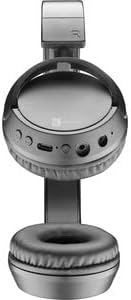
Figura 3.1: Headset with the detachable microphone removed, showing the input port.
3.4 Connessione cablata
Per utilizzare le cuffie in modalità cablata:
- Assicurati che le cuffie siano spente.
- Connect one end of the 3.5mm audio cable to the audio input port on the headset.
- Connect the other end of the 3.5mm audio cable to the audio output jack of your device (e.g., computer, smartphone, tablet).
- The headset will function as a wired headset, drawing power from the connected device if needed, or using its own battery for active features.

Figura 3.2: Headset connected via 3.5mm audio cable, demonstrating wired mode.
3.5 Associazione Bluetooth
Per connettere le cuffie in modalità wireless tramite Bluetooth:
- Accensione: Press and hold the Power button on the headset until the LED indicator flashes, indicating pairing mode.
- Attiva Bluetooth: Sul tuo dispositivo (smartphone, tablet, computer), vai alle impostazioni Bluetooth e assicurati che il Bluetooth sia abilitato.
- Cercare Dispositivi: Il dispositivo eseguirà la scansione dei dispositivi Bluetooth disponibili.
- Seleziona auricolare: From the list of found devices, select "Cellularline Task" (or similar name).
- Conferma connessione: Once connected, the LED indicator on the headset will change to a steady light or flash slowly, and your device will confirm the connection.
The headset is compatible with iPhone, Samsung, Huawei, Xiaomi, and other Bluetooth-enabled devices.
4. Istruzioni per l'uso
4.1 Accensione/spegnimento
- Accensione: Tenere premuto il pulsante di accensione per circa 3 secondi finché l'indicatore LED non si accende.
- Spegni: Tenere premuto il pulsante di accensione per circa 5 secondi finché l'indicatore LED non si spegne.
4.2 Controllo del volume
The headset features tactile controls for volume adjustment.
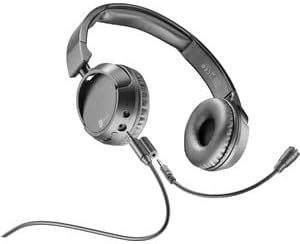
Figura 4.1: Avvicinamento view of the earcup showing control buttons for volume and playback.
- Aumenta volume: Premere il pulsante '+'.
- Diminuisci volume: Premere il pulsante '-'.
The headset includes a volume limitation feature to protect your hearing.
4.3 Gestione delle chiamate
When connected via Bluetooth, you can manage calls directly from the headset:
- Rispondi alla chiamata: Press the Multi-function button (usually the Power button or a dedicated call button) once.
- Termina chiamata: Premere una volta il pulsante Multifunzione durante una chiamata.
- Rifiuta chiamata: Press and hold the Multi-function button for 2 seconds when an incoming call rings.
4.4 Riproduzione di musica
When connected via Bluetooth, control your music playback:
- Riproduci/Pausa: Premi una volta il pulsante Multifunzione.
- Traccia successiva: Premere e tenere premuto il pulsante '+'.
- Traccia precedente: Premere e tenere premuto il pulsante '-'.
4.5 Utilizzo del microfono
The detachable microphone is designed for clear voice capture during calls or recordings.
- Ensure the microphone is securely attached (refer to Section 3.3).
- Position the microphone appropriately for optimal voice pickup.
- When using the headset in wired mode, the microphone functionality will depend on the connected device's compatibility with 4-pole 3.5mm jacks.
5. Manutenzione
5.1 Pulizia
- Per pulire le cuffie, utilizzare un panno morbido e asciutto.
- Non utilizzare detergenti abrasivi, solventi o prodotti chimici aggressivi.
- Evitare che l'umidità penetri nelle aperture.
5.2 Conservazione
- Conservare le cuffie in un luogo fresco e asciutto, lontano dalla luce solare diretta e da temperature estreme.
- Se si conserva la batteria per un periodo prolungato, assicurarsi che sia parzialmente carica (circa il 50%) per mantenerla in buone condizioni.
5.3 Cura della batteria
- Evitare di scaricare completamente la batteria frequentemente.
- Non esporre la batteria a temperature elevate.
- If the headset will not be used for a long time, charge it every few months to prevent deep discharge.
6. Risoluzione Dei Problemi
6.1 L'auricolare non si accende
- Assicurati che le cuffie siano completamente cariche. Collegale a una fonte di alimentazione e attendi qualche minuto prima di riprovare ad accenderle.
- Prova un cavo di ricarica o un adattatore di alimentazione diverso.
6.2 Nessun suono o volume basso
- Controllare i livelli del volume sia sull'auricolare che sul dispositivo collegato.
- If using Bluetooth, ensure the headset is properly paired and connected.
- If using wired mode, ensure the 3.5mm audio cable is fully inserted into both the headset and the device.
- Eseguire una prova con una sorgente audio o un dispositivo diverso.
6.3 Problemi di associazione Bluetooth
- Assicurarsi che l'auricolare sia in modalità di associazione (LED lampeggiante).
- Disattiva e attiva il Bluetooth sul tuo dispositivo.
- Forget the headset from your device's Bluetooth list and attempt to pair again.
- Ensure the headset is within the effective range of your device (typically 10 meters).
6.4 Il microfono non funziona
- Assicurarsi che il microfono staccabile sia saldamente fissato all'auricolare.
- Check microphone settings on your connected device to ensure the headset's microphone is selected as the input device.
- Prova il microfono con un'applicazione o un dispositivo diverso.
- Ensure the microphone is not muted on your device or via any headset controls (if applicable).
7. Specifiche
| Marca | Cellularline |
| Nome del modello | BTHEADBTASKK |
| Tecnologia di connettività | Wireless (Bluetooth), cablato (jack da 3.5 mm) |
| Tecnologia di comunicazione wireless | Bluetooth |
| Fattore di forma | Sopra l'orecchio |
| Caratteristiche speciali | Fast Charging, Volume Control, Included Microphone |
| Tempo di gioco | Fino a 18 ore |
| Tempo di conversazione | 18 ore |
| Dispositivi compatibili | Laptop, Tablet, Mobile Phone, Universal |
| Tipo di controllo | Controllo touch, telecomando |
| Materiale | Plastica, gomma |
| Colore | Nero |
8. Garanzia e supporto
Cellularline products are designed and manufactured to the highest quality standards. For information regarding warranty coverage, please refer to the warranty card included with your product or visit the official Cellularline websito.
If you encounter any issues not covered in this manual or require further assistance, please contact Cellularline customer support through their official websito o le informazioni di contatto fornite nella confezione del prodotto.
Websito: www.cellularline.com


