Introduzione
This manual provides detailed instructions for the setup, operation, and maintenance of your Blue Tiger Storm Gray Premium Trucker Bluetooth Headset. Please read this manual thoroughly to ensure optimal performance and longevity of your device.
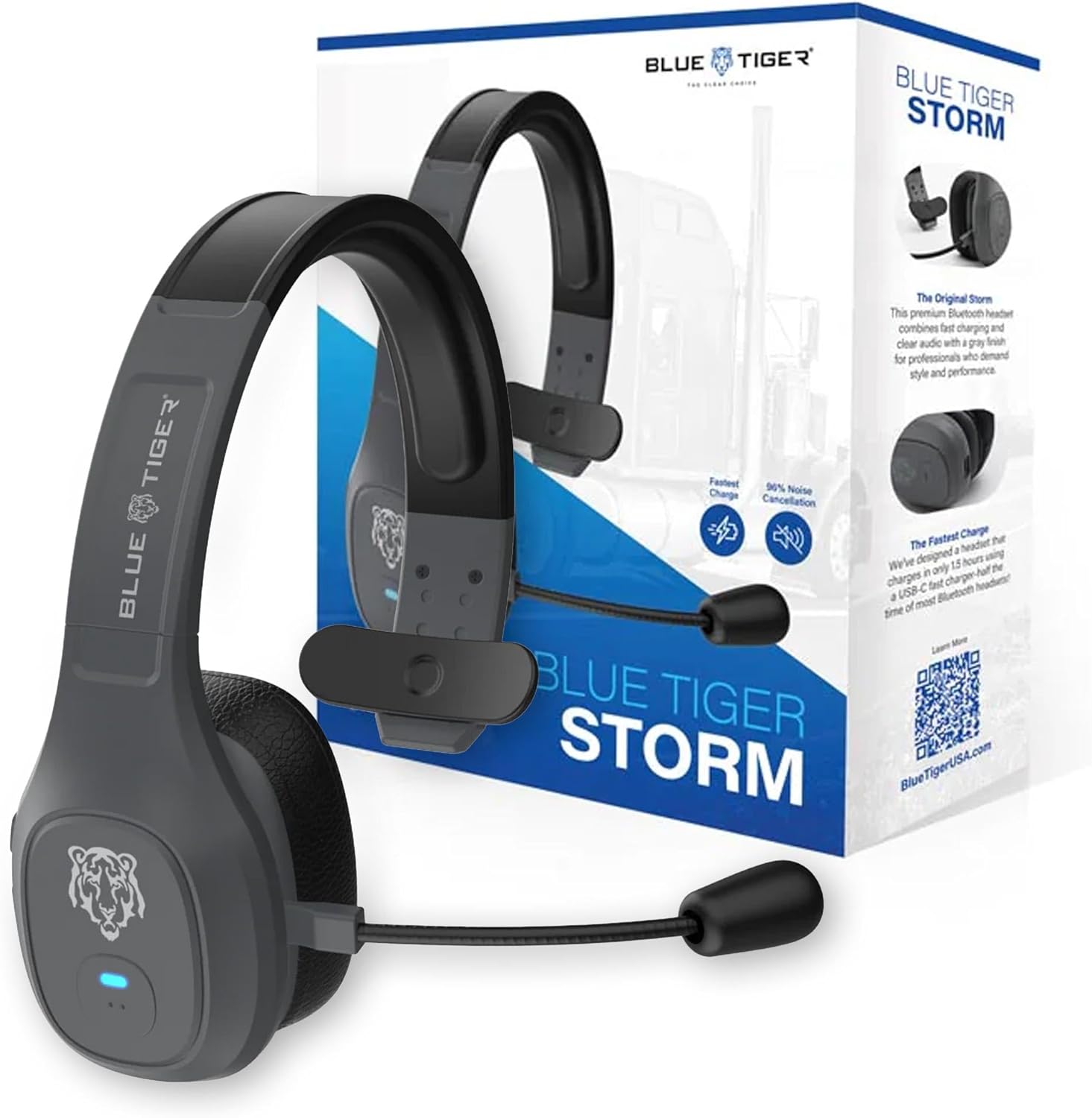
Image: Blue Tiger Storm Gray Premium Trucker Bluetooth Headset with its packaging.
Contenuto della confezione
Verifica che tutti gli articoli siano presenti nel tuo pacco:
- Premium Storm Headset
- Attached Protein Leather Ear Cushion
- Cavo di ricarica USB-C
- D/C Vehicle Adapter
- Bonus Mic Cover
- Guida rapida
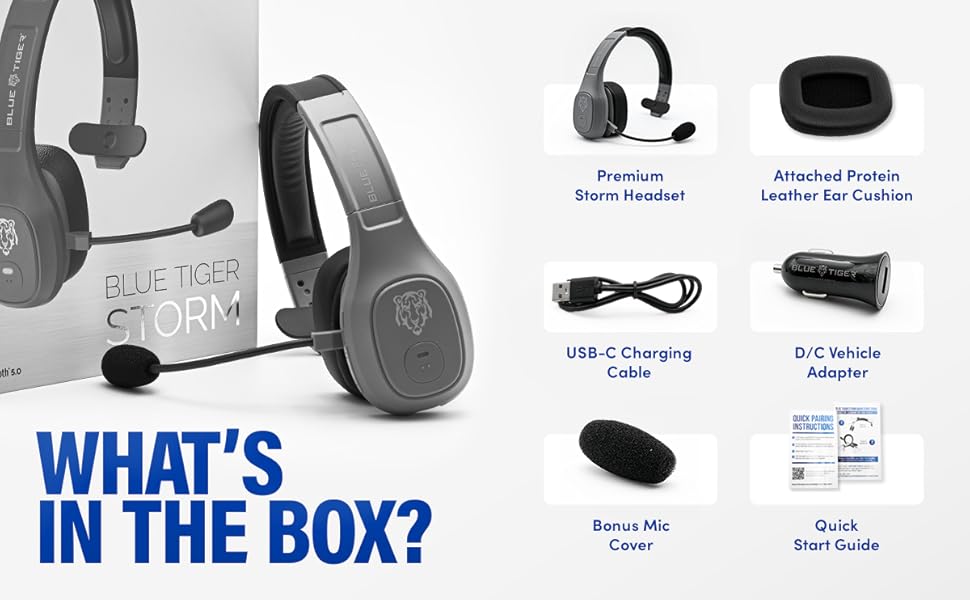
Image: Contents of the Blue Tiger Storm headset package.
Prodotto finitoview
Componenti e controlli
Familiarizza con le varie parti e i comandi del tuo visore:
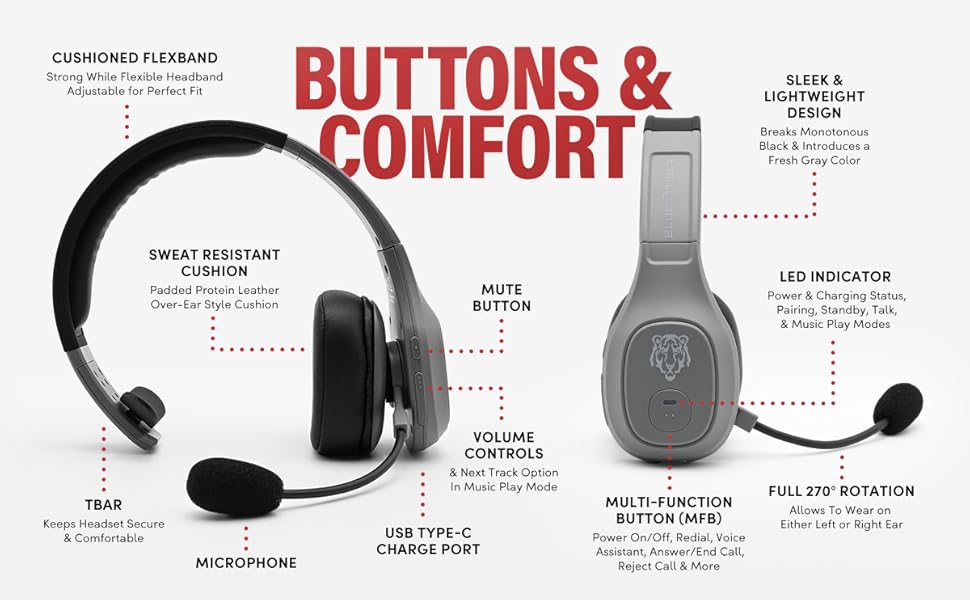
Image: Diagram of headset components and controls.
- Cushioned Flexband: Strong yet flexible headband for a comfortable fit.
- Sweat Resistant Cushion: Padded protein leather over-ear style cushion.
- Microfono: Passive noise-canceling microphone for clear communication.
- Porta di ricarica USB di tipo C: Per caricare l'auricolare.
- Tasto muto: Controls microphone mute function.
- Controlli del volume: Adjusts audio volume and navigates tracks in music mode.
- Pulsante multifunzione (MFB): Controls power, pairing, calls, and voice assistant.
- Indicatore LED: Displays power, charging, pairing, talk, and music play modes.
- Rotazione completa di 270°: Allows the headset to be worn on either the left or right ear.
- TBAR: Helps keep the headset secure and comfortable.
Caratteristiche principali
- Comfort: Lightweight (under 5 oz), adjustable headband, and soft over-ear protein leather ear cushions designed for extended wear.
- Cancellazione del rumore: Passive noise-canceling microphone blocks out 96% of background noise for clear calls in noisy environments.
- Durata prolungata della batteria: 400 mAh battery provides 30 hours of talk time and 800 hours on standby.
- Ricarica rapida: USB-C port allows for a full charge in 1.5 hours.
- Connettività affidabile: Bluetooth 5.0 offers a 100 ft operating range and compatibility with two devices simultaneously.
- Intelligenti Caratteristiche: Supports Siri and Google Assistant for hands-free voice commands.
- Vehicle-Ready: Includes a D/C vehicle adapter for convenient charging on the go.

Image: Comfort features of the headset.

Image: Noise cancellation features.
Impostare
1. Caricare l'auricolare
- Connect the provided USB-C charging cable to the headset's USB-C port.
- Plug the other end of the USB-C cable into a compatible USB power source (e.g., computer, wall adapter, or the included D/C vehicle adapter).
- The LED indicator will show charging status. A full charge typically takes 1.5 hours.
2. Accoppiamento Bluetooth
Ensure your device supports Bluetooth functionality.
- Accensione: Press and hold the Multi-Function Button (MFB) until the LED indicator flashes blue and red, indicating pairing mode.
- Attiva Bluetooth: On your mobile device, navigate to the Bluetooth settings and turn Bluetooth on.
- Seleziona auricolare: Look for "Blue Tiger Storm" in the list of available devices and select it to connect.
- Conferma: The LED indicator on the headset will turn solid blue or flash blue slowly once successfully paired. A voice prompt will also confirm the connection.
- Associazione di un secondo dispositivo: To pair a second device, ensure the first device is connected. Then, put the headset back into pairing mode (LED flashing blue/red) and connect the second device. The headset can maintain connection with two devices simultaneously.
Video: A 360 gradi view of the Blue Tiger Storm headset, demonstrating its design and features.
Istruzioni per l'uso
Accensione/spegnimento
- Accensione: Press and hold the MFB for approximately 3 seconds until the LED flashes blue.
- Spegni: Press and hold the MFB for approximately 5 seconds until the LED flashes red and then turns off.
Gestione delle chiamate
- Rispondi/Termina chiamata: Premere una volta il tasto MFB.
- Rifiuta chiamata: Tenere premuto il tasto MFB per 2 secondi.
- Ricomponi l'ultimo numero: Premere due volte l'MFB.
Volume e Muto
- Aumenta volume: Premere il pulsante Volume su.
- Volume basso: Premere il pulsante Volume giù.
- Disattiva/Riattiva microfono: Double-tap the Mute button. The microphone boom can be adjusted 270 degrees for optimal positioning.
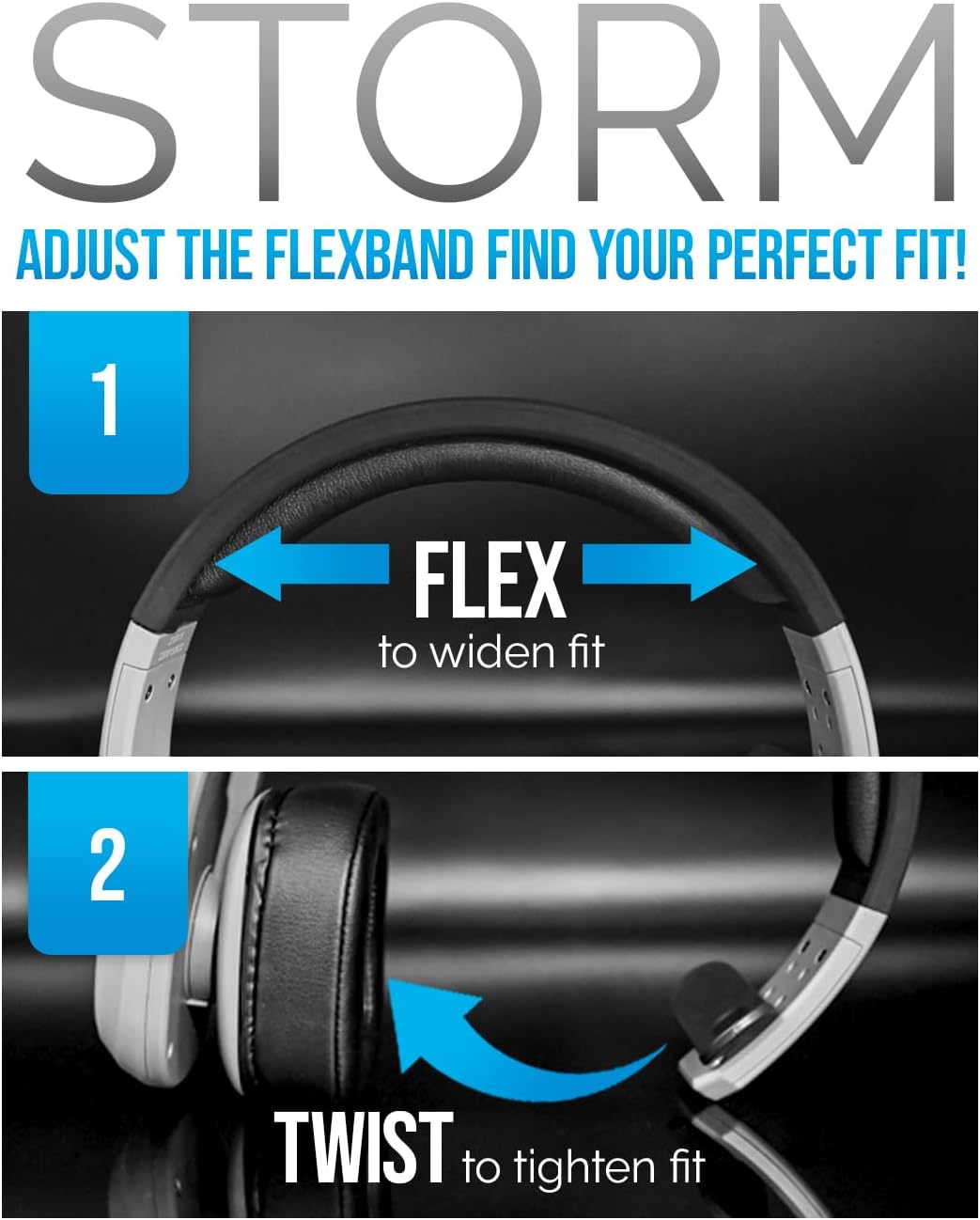
Image: Adjusting the headset for a perfect fit.
Assistente vocale
- Attiva Siri/Assistente Google: Tap the MFB once to activate your device's voice assistant.
Riproduzione musicale
- Riproduci/Pausa: Premere una volta il tasto MFB.
- Traccia successiva: Premere il pulsante Volume su per 2 secondi.
- Traccia precedente: Premi il pulsante Volume giù per 2 secondi.
Video: A promotional video highlighting the features and benefits of the Blue Tiger Storm headset, including noise cancellation, battery life, and smart assistant integration.
Manutenzione
Pulizia
- Pulisci l'auricolare con un panno morbido eamp stoffa. Evitare l'uso di prodotti chimici aggressivi o detergenti abrasivi.
- For the protein leather ear cushions, use a mild soap solution if necessary, and ensure they are completely dry before use.
- The microphone cover can be gently removed and cleaned or replaced with the bonus mic cover provided.
Magazzinaggio
- Conservare le cuffie in un luogo fresco e asciutto, lontano dalla luce solare diretta e da temperature estreme.
- Evitare di posizionare oggetti pesanti sulle cuffie per evitare danni.
Risoluzione dei problemi
| Problema | Possibile causa | Soluzione |
|---|---|---|
| L'auricolare non si accende | Batteria scarica | Charge the headset using the USB-C cable. |
| Impossibile associare il dispositivo | Headset not in pairing mode; Bluetooth off on device; Device out of range | Ensure headset is in pairing mode (flashing blue/red LED). Turn on Bluetooth on your device. Move device closer to headset (within 100 ft). |
| Poor audio quality / Background noise | Microphone not positioned correctly; Excessive environmental noise; Weak Bluetooth connection | Adjust microphone closer to your mouth. Ensure the passive noise cancellation is effective. Move closer to the paired device. |
| Nessun suono dalle cuffie | Volume too low; Headset not connected; Device audio output not set to headset | Increase headset and device volume. Re-pair the headset. Check device audio settings to ensure output is directed to the headset. |
| L'auricolare si disconnette frequentemente | Out of range; Interference; Low battery | Stay within 100 ft of the paired device. Avoid strong electromagnetic interference. Charge the headset. |
Specifiche
| Caratteristica | Specificazione |
|---|---|
| Nome del modello | Tempesta |
| Tecnologia di connettività | Senza fili (Bluetooth 5.0) |
| Portata Bluetooth | 100 piedi |
| Tempo di conversazione | 30 ore |
| Tempo di standby | 800 ore |
| Tempo di ricarica | 1.5 ore (USB-C) |
| Controllo del rumore | Passive Noise Cancellation (96%) |
| Peso | 4.98 Ounces (approx. 5 ounces) |
| Posizionamento dell'orecchio | Sopra l'orecchio |
| Microfono | 270-degree adjustable boom mic |
| Dispositivi compatibili | Bluetooth-enabled devices, Car Audio Systems |
| Componenti inclusi | D/C vehicle adapter, Extra Mic Cover, USB-C Charging Cable |
Garanzia e supporto
Blue Tiger products are designed for durability and performance. For specific warranty information, please refer to the warranty card included with your product or visit the official Blue Tiger website. For technical support or further assistance, please contact Blue Tiger customer service.
Supporto online: www.bluetigerusa.com