Introduzione
This manual provides comprehensive instructions for the setup, operation, and maintenance of your Technical Pro 2000 Watts Professional Mixer and Amplifier, model TP2000BT. This unit is designed for versatile audio applications, including DJ, karaoke, and home theater systems, offering powerful amplification and multiple input options.
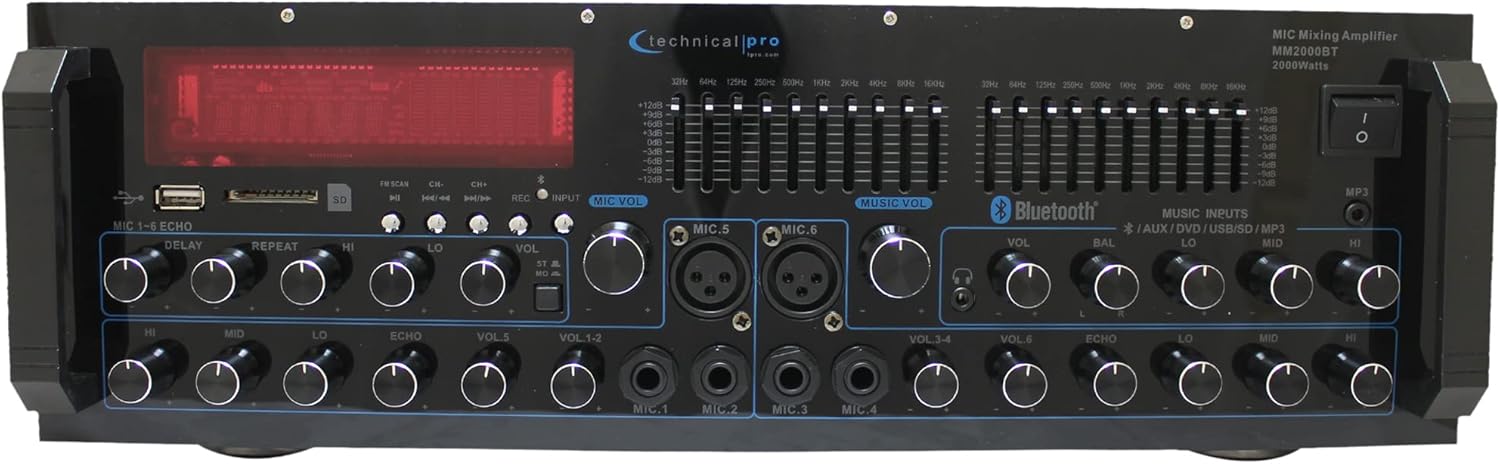
Immagine: Frontale view del mixer professionale Technical Pro 2000 Watt e Amplificatore, showcasing its various controls and display.
Caratteristiche principali
- Potenza di picco di 2000 Watt: Delivers high power output suitable for multi-speaker setups with 2-8 ohms impedance.
- Ingressi multipli: Supports FM/AM radio, MP3 audio playback, USB Flash Drive Reader, AUX 3.5mm input, 2 ¼” mic inputs, headphone jack, and RCA (L/R) output jacks for subwoofers.
- Connettività Bluetooth: Seamless wireless music streaming from smartphones, tablets, laptops, and computers.
- Controlli dell'equalizzazione: Features dual 10-band graphic equalizers for precise audio adjustments.
- Controlli del pannello frontale: Intuitive controls for independent audio source selection, microphone volume, echo control, bass, treble, and master volume. Includes LED backlight illumination with dimmer.
- 6 ingressi microfono: Dedicated inputs for multiple microphones, ideal for karaoke and live performances.
- Dual Speaker Output: Connects to two sets of speakers (Channel A and Channel B) with 4-16 ohms impedance.

Image: A visual representation highlighting the amplifier's features such as 2000 watts peak power, various inputs (RCA, USB, SD Card, Bluetooth, MP3), outputs (Banana binding post, RCA Line Out, Headphones), Bluetooth compatibility range, and adjustment range.
Impostare
Disimballaggio e ispezione iniziale
Rimuovere con attenzione il file amplifier from its packaging. Ensure all components are present:
- Technical Pro 2000 Watts Professional Mixer and Amplifier (Model TP2000BT)
- Cavo di alimentazione
- Manuale dell'utente (questo documento)
- Telecomando (se incluso)
Ispezionare l'unità per verificare eventuali segni di danni durante il trasporto. In caso di danni, contattare immediatamente il rivenditore.
Posizionamento
Posizionare il amplifier on a stable, flat surface. Ensure adequate ventilation around the unit to prevent overheating. Do not obstruct the cooling fan located on the rear panel.

Immagine: dettagliata view of the front and back panels, illustrating the layout of controls and connection ports.
Collegamento degli altoparlanti
Connect your speakers to the "SPEAKER OUTPUT" terminals on the rear panel. The unit is designed to work with multi-speakers with 2-8 ohms impedance, and the speaker output terminals are specifically labeled for 4-16 ohms. Ensure correct polarity (+ to + and – to –) for optimal sound quality. The amplifier features dual speaker outputs (Channel A and Channel B).

Image: Close-up of the rear panel, highlighting the speaker output terminals and RCA input/output connections.
Collegamento di sorgenti audio
IL amplifier offre varie opzioni di input:
- RCA Inputs (DVD, AUX): Use RCA cables to connect external audio devices like DVD players, CD players, or other audio sources to the "INPUT" section on the rear panel.
- USB/scheda SD: Insert a USB flash drive or SD card into the respective slots on the front panel for MP3/WAV/WMA playback.
- Bluetooth: For wireless audio streaming, refer to the "Bluetooth Operation" section.
- Ingressi microfono: Connect up to six microphones using the ¼” (Mic 1-4) and XLR/¼” combo (Mic 5-6) inputs on the front panel.
- Uscita cuffie: Connect headphones to the dedicated jack on the front panel.
Istruzioni per l'uso
Accensione/spegnimento
Press the "POWER" button on the front panel to turn the unit on or off. The LED display will illuminate when the unit is powered on.
Selezione della fonte
Use the input selection buttons on the front panel (e.g., USB/SD, Bluetooth, AUX, DVD) to choose your desired audio source.
Controlli di volume e tono
- Volume principale: Regola il volume di uscita complessivo del amppiù vivace.
- Volume del microfono: Individual volume controls for each microphone input (VOL 1-6).
- Bassi/Alti: Adjusts the low and high frequency response of the audio.
- Bilancia: Regola il bilanciamento del canale sinistro/destro.
- Echo Controls (Delay, Repeat, Hi, Lo): Regola l'effetto eco per gli ingressi del microfono.

Immagine: dettagliata view of the front panel, highlighting the AUX inputs, bass and treble controls, and the digital display.
Funzionamento Bluetooth
- Select "Bluetooth" as the input source using the front panel controls.
- Sul tuo dispositivo abilitato Bluetooth (smartphone, tablet, ecc.), cerca i dispositivi Bluetooth disponibili.
- Select "Technical Pro" or "TP2000BT" from the list to pair.
- Una volta associato, è possibile trasmettere l'audio in modalità wireless al amppiù vivace.
Riproduzione USB/scheda SD
Insert a USB flash drive or SD card (max 32GB) containing MP3, WAV, or WMA audio files into the corresponding slot on the front panel. The unit will automatically switch to USB/SD mode and begin playback. Use the navigation buttons (Play/Pause, Next, Previous) to control playback.

Immagine: Il amplifier's front panel with USB and SD card slots highlighted, indicating support for MP3, WAV, WMA files and a maximum size of 32GB.
Regolazione dell'equalizzatore
The dual 10-band graphic equalizers allow for precise frequency adjustments. Move the sliders up or down to boost or cut specific frequency ranges to tailor the sound to your preference and acoustic environment.
Video: An official product video demonstrating the features of the Technical Pro 2000 Watts Professional Mixer and Amplifier, including its dual 10-band EQs, various inputs, and dual speaker outputs.
Manutenzione
- Pulizia: Utilizzare un panno morbido e asciutto per pulire l'esterno dell'unità. Non utilizzare detergenti liquidi o spray.
- Ventilazione: Assicurarsi che le aperture di ventilazione siano libere da polvere e detriti per garantire un flusso d'aria adeguato ed evitare il surriscaldamento.
- Magazzinaggio: Se si conserva l'unità per un periodo prolungato, scollegarla dall'alimentazione e conservarla in un luogo fresco e asciutto, lontano dalla luce solare diretta e da temperature estreme.
Risoluzione dei problemi
| Problema | Possibile causa | Soluzione |
|---|---|---|
| Nessun potere | Power cable not connected; Power outlet faulty; Unit fuse blown. | Controllare il collegamento del cavo di alimentazione; provare una presa diversa; consultare un tecnico qualificato per la sostituzione del fusibile. |
| Nessuna uscita audio | Altoparlanti non collegati correttamente; Volume troppo basso; Sorgente di ingresso selezionata non corretta; Funzione di disattivazione audio attiva. | Verify speaker connections and polarity; Increase master volume; Select the correct input source; Deactivate mute. |
| Errore di associazione Bluetooth | Device too far; Bluetooth not enabled on device; Amplifier non in modalità di associazione. | Avvicinare il dispositivo a amplifier; Enable Bluetooth on your device; Ensure amplifier è impostato sull'ingresso Bluetooth. |
| Suono distorto | Input signal too high; Speaker impedance mismatch; EQ settings incorrect. | Reduce input source volume; Ensure speakers are 4-16 ohms; Adjust EQ settings. |
For issues not listed here, please contact Technical Pro customer support.
Specifiche
| Caratteristica | Dettaglio |
|---|---|
| Numero di modello | TP2000BT |
| Potenza in uscita | 2000 Watt di potenza di picco |
| Numero di canali | 2 |
| Impedenza dell'altoparlante | Supports 2-8 ohms speakers; Speaker output terminals designed for 4-16 ohms. |
| Tecnologia di connettività | Bluetooth, USB, SD Card, RCA, 3.5mm AUX |
| Ingressi microfono | 6 (4 x 1/4", 2 x XLR/1/4" Combo) |
| Dimensioni del prodotto | 48.26 cm P x 25.4 cm L x 12.7 cm A (19" P x 10" L x 5" A) |
| Peso dell'articolo | 14.1 libbre (6.4 kg) |
| Data di rilascio | 11 marzo 2025 |
| Produttore | Professionista tecnico |

Image: Dimensions of the amplifier, indicating its width, depth, and height.
Garanzia e supporto
This Technical Pro product is covered by a manufacturer's warranty. For specific warranty terms and conditions, please refer to the warranty card included with your product or visit the official Technical Pro websito. Potrebbero essere disponibili anche piani di protezione estesa da acquistare.
For technical support, troubleshooting assistance, or service inquiries, please contact Technical Pro customer service. Contact information can typically be found on the manufacturer's websito o sulla confezione del prodotto.
Puoi anche visitare il Technical Pro Store on Amazon per maggiori informazioni e risorse sui prodotti.