1. Introduzione
The MARKLIFE P11 Label Maker is a mini thermal wireless inkless sticker printer designed for efficient organization in various environments. It connects via Bluetooth to your smartphone, allowing for easy label creation and printing without the need for ink or toner. Its compact and portable design makes it suitable for home, kitchen, office, and classroom use.
Caratteristiche principali:
- Fashion & Portable Design: Print labels directly from your smartphone via Bluetooth, eliminating the need for a traditional keyboard and screen. Smaller, lighter, and more convenient.
- Utilizzo multiuso: Ideal for organizing home, office, and classroom. Print labels for kitchen jars, cables, storage rooms, and even commodity prices.
- Design Your Own Labels: Customize labels using the mobile app with options for text, small pictures, dates, borders, stickers, lines, icons, QR codes, barcodes, graffiti, and serial numbers. Supports 9 languages and 15 font options.
- Multiple Styles of Label Tapes: Compatible with various tape styles including white, color, fruit, cherry blossoms, cable labels, and transparent labels. Tapes are long-lasting, waterproof, wipeable, tear-resistant, and self-adhesive.
- Risparmia tempo e denaro: Thermal printing requires no ink or toner. Features 1-second instant printing, 3 times faster than traditional label printers. Rechargeable with automatic off for power saving.

The MARKLIFE P11 Label Maker Machine, showcasing its compact design and various label tape options.
2. Cosa c'è nella scatola
Upon unboxing your MARKLIFE P11 Label Maker, you should find the following components:
- Etichettatrice MARKLIFE P11
- Labels (pre-installed or included as separate rolls)
- Cavo di ricarica USB-C
- Manuale d'uso

The compact MARKLIFE P11 compared to a traditional label maker, highlighting its modern design.
3. Guida all'installazione
3.1 Accensione
To power on the device, long press the power button located on the front of the label maker until the indicator light turns green.
3.2 Caricamento della carta per etichette
- Open the label compartment by gently pushing the top cover.
- Insert the label roll with the printing side facing up, ensuring it feeds smoothly into the printer mechanism.
- Chiudere il coperchio superiore finché non scatta saldamente in posizione.
- Quickly press the power button twice to automatically adjust the paper to the correct printing position.

The thermal printing technology of the P11, which requires no ink.
3.3 Download dell'app e connessione Bluetooth
The MARKLIFE P11 operates via a dedicated mobile application. Follow these steps to connect:
- Download the "Marklife" app from your smartphone's app store (available on App Store and Google Play).
- Assicurati che il Bluetooth del tuo telefono sia attivato.
- Open the Marklife app. Click on the "Unlink" or "Connect" option within the app to search for nearby devices.
- Select your P11 device (e.g., "P11_XXXX_BLE") from the list to establish a Bluetooth connection. The app will indicate when the connection is successful.
Video: Step-by-step guide on how to use the P11 label machine, including app connection and basic operation.
4. Istruzioni per l'uso
4.1 Creazione e stampa di etichette
- Once connected, select "Create Label" in the app.
- Choose a template or start with a blank label.
- Double-click the text area to input your desired text. You can adjust font, size, alignment, and add various elements like pictures, borders, stickers, dates, QR codes, and barcodes.
- Review your label design in the preview modalità.
- Seleziona il numero di copie che desideri stampare.
- Tap the "Print" button. The label maker will quickly print your labels.
- Tear off the printed label from the dispenser.
Video: Demonstration of the Marklife P11 label maker in use, showing the app interface and printing process.
Video: Una rapida panoramicaview of the P11 label maker's printing capabilities and speed.
4.2 Label Properties and Applications
The MARKLIFE P11 uses durable labels with excellent properties:
- Impermeabile: Labels resist water damage, making them suitable for kitchen or bathroom items.
- Antiolio: Labels maintain integrity even when exposed to oils.
- Resistente ai graffi: Designed to withstand minor abrasions.
- No Residue: Labels can be removed without leaving sticky residue.

Demonstration of label durability: waterproof, oil-proof, scratch-resistant, and residue-free removal.
Scenari applicativi:
- Cucina: Etichettare i barattoli delle spezie, i contenitori per alimenti e gli articoli della dispensa.
- Ufficio: Organizzare files, documents, cables, and stationery.
- Casa: Label storage bins, personal items, and children's belongings.
- Regali: Create personalized tags for presents.
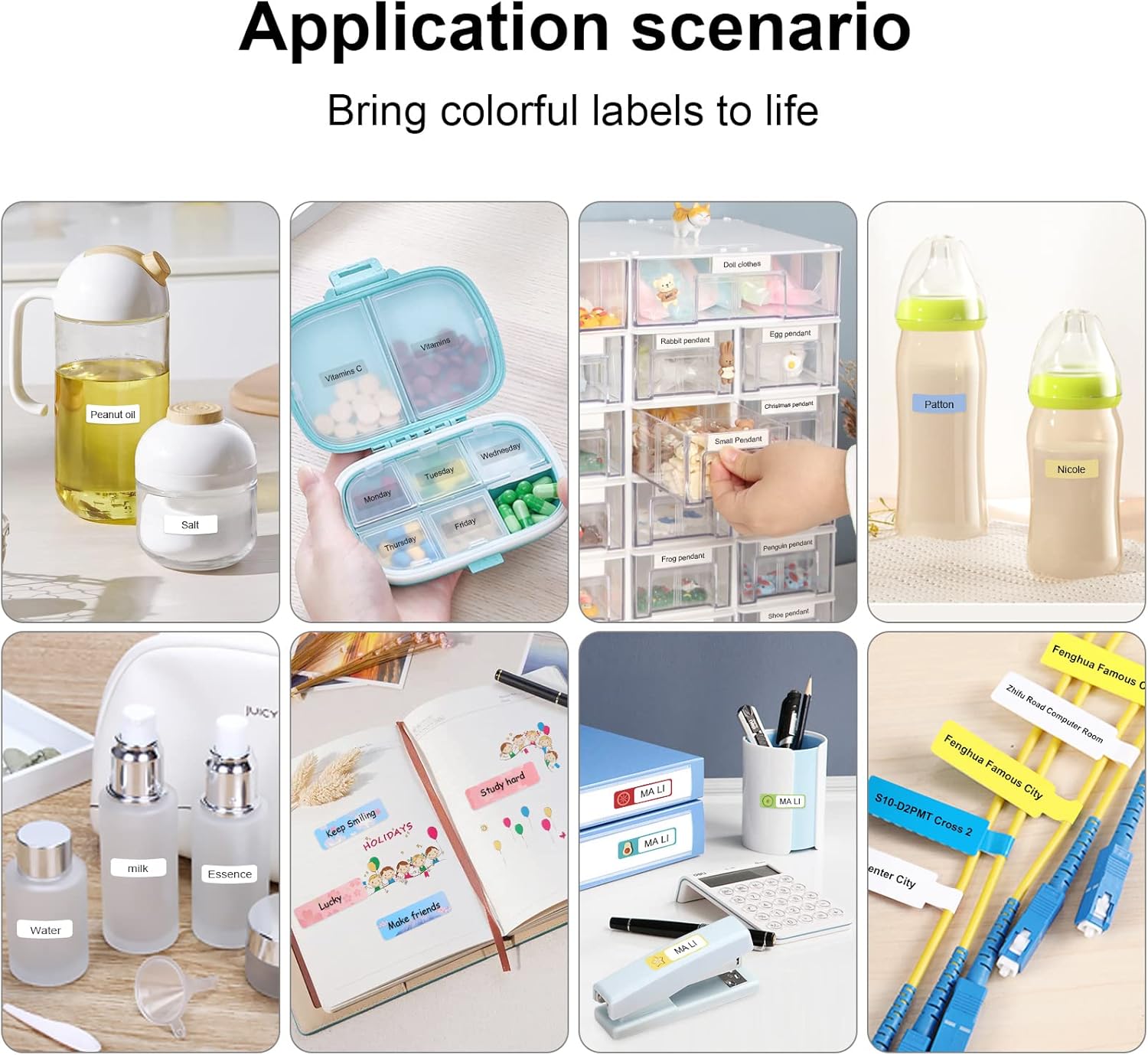
Examples of label maker use in different settings, from kitchen organization to baby item labeling.

Office organization made easy with the P11 label maker. Example of a label with a barcode: 6953124066961

Personalized gift labeling for various occasions.

Home organization with labels for pantry items and personal storage.
5. Manutenzione
To ensure the longevity and optimal performance of your MARKLIFE P11 Label Maker, follow these maintenance tips:
- Pulizia della testina di stampa: Regularly clean the thermal print head with a cotton swab lightly dampcon alcol isopropilico. Assicurarsi che il dispositivo sia spento e freddo prima di pulirlo.
- Storing Labels: Store label rolls in a cool, dry place away from direct sunlight and extreme temperatures to prevent degradation.
- Cura della batteria: Charge the device regularly, even if not in frequent use, to maintain battery health. Avoid fully discharging the battery for extended periods.
- Pulizia generale: Pulire l'esterno dell'etichettatrice con un panno morbido e asciutto. Evitare l'uso di prodotti chimici aggressivi o materiali abrasivi.
6. Risoluzione Dei Problemi
Se riscontri problemi con la tua etichettatrice MARKLIFE P11, prova le seguenti soluzioni:
- Dispositivo non connesso tramite Bluetooth:
- Assicurarsi che l'etichettatrice sia accesa e completamente carica.
- Turn your phone's Bluetooth off and on again.
- Restart the Marklife app.
- If previously paired with another device, ensure it's disconnected.
- Poor Print Quality (Faint or Incomplete Prints):
- Check if the label roll is inserted correctly and is not jammed.
- Pulire la testina di stampa termica come descritto nella sezione Manutenzione.
- Ensure the label tape is suitable for thermal printing and is not expired or damaged.
- Adjust the print density setting in the Marklife app.
- Inceppamento carta:
- Spegnere il dispositivo.
- Open the label compartment and carefully remove any jammed paper or debris.
- Reinsert the label roll and close the cover. Power on and press the feed button twice to re-position.
- Arresto anomalo o blocco dell'app:
- Chiudere e riaprire l'app.
- Assicurati che la tua app sia aggiornata all'ultima versione.
- Se i problemi persistono, svuota la cache dell'app o reinstallala.
7. Specifiche
| Caratteristica | Dettaglio |
|---|---|
| Marca | MARKLIFE |
| Nome del modello | P11 |
| Tecnologia di connettività | Bluetooth |
| Tecnologia di stampa | Termico |
| Caratteristica speciale | Portatile |
| Colore | Rosa |
| Uscita della stampante | Monocromo |
| Velocità di stampa massima in bianco e nero | 30 ppm |
| Peso dell'articolo | 270 grammi (9.5 once) |
| Dimensioni del prodotto | 2"P x 2"L x 2"A |
| Dispositivi compatibili | Smartphone |
| Metodo di controllo | App, tocco |
| Risoluzione | 600x600 |
| Dimensione massima del supporto | 12x40cm |
8. Garanzia e supporto
8.1 Informazioni sulla garanzia
The MARKLIFE P11 Label Maker Machine comes with a Limited Warranty. Please refer to the warranty card included in your product packaging for specific terms and conditions, including coverage duration and claim procedures.
8.2 Assistenza clienti
For any technical assistance, troubleshooting not covered in this manual, or warranty inquiries, please contact MARKLIFE customer support. Contact details can typically be found on the official MARKLIFE websito o sulla confezione del prodotto.


