1. Introduzione
This manual provides detailed instructions for the proper use and maintenance of your Casio G-Shock G-5600UE-1 digital watch. Designed for durability and functionality, this timepiece features shock resistance, 200-meter water resistance, and Tough Solar power. Please read this manual thoroughly to ensure optimal performance and longevity of your watch.
2. Prodotto finitoview
2.1 Caratteristiche principali
- Shock Resistant (G-SHOCK construction)
- Resistenza all'acqua fino a 200 metri
- Tough Solar Power (solar charging system)
- LED Backlight with Afterglow
- World Time (supports multiple time zones)
- Cronometro da 1/100 di secondo
- Timer per il conto alla rovescia
- Multi-function Alarms and Hourly Segnale orario
- Calendario completamente automatico (preprogrammato fino al 2099)
- Formato 12/24 ore
- Flash Alert (flashes with buzzer for alarms, hourly time signal, countdown timer time-up alarm)
2.2 Componenti dell'orologio
The Casio G-Shock G-5600UE-1 features a standard four-button configuration for navigation and function control.
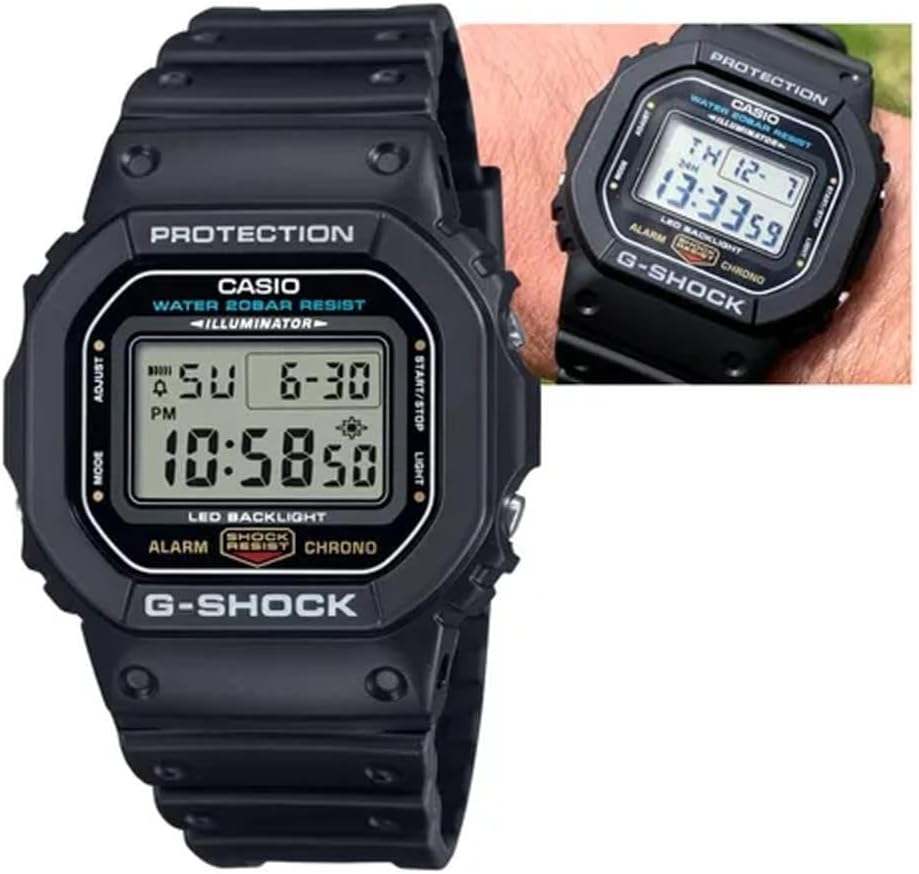
Figura 1: Davanti view of the Casio G-Shock G-5600UE-1 digital watch. The display shows time, date, and day. Buttons are located on the left (MODE, ADJUST) and right (START/STOP, LIGHT) sides of the case.
- Pulsante REGOLA (in alto a sinistra): Utilizzato per entrare e uscire dalle modalità di impostazione e per confermare le impostazioni.
- Pulsante MODE (in basso a sinistra): Used to cycle through the watch's various modes (Timekeeping, World Time, Alarm, Stopwatch, Countdown Timer).
- Pulsante LUCE (in alto a destra): Activates the LED backlight. Also used to increase values during setting.
- START/STOP Button (Bottom Right): Used to start/stop stopwatch and countdown timer operations. Also used to decrease values during setting.
3. Impostazione
3.1 Ricarica iniziale (Tough Solar)
Your watch is equipped with Tough Solar technology, which converts light into power. Before initial use, or if the watch display is blank, expose the watch face to bright light (e.g., sunlight or a bright window) for several hours to ensure it is sufficiently charged. Avoid prolonged exposure to extreme heat.
3.2 Impostazione della città e dell'ora di residenza
- Nella modalità di indicazione dell'ora, tenere premuto REGOLARE finché il codice della città non inizia a lampeggiare. Questo indica la modalità di impostazione.
- Utilizzare il LEGGERO E AVVIO/ARRESTO pulsanti per selezionare il codice della città di residenza desiderato.
- Premere il tasto MODALITÀ button to cycle through other settings: DST (Daylight Saving Time), 12/24-hour format, Seconds, Hour, Minute, Year, Month, Day.
- For each setting, use the LEGGERO E AVVIO/ARRESTO pulsanti per regolare il valore.
- Una volta configurate tutte le impostazioni, premere il tasto REGOLARE pulsante per uscire dalla modalità di impostazione.
4. Istruzioni per l'uso
Modalità di navigazione 4.1
Premere il tasto MODALITÀ button to cycle through the watch's modes in the following order:Timekeeping Mode → World Time Mode → Alarm Mode → Stopwatch Mode → Countdown Timer Mode → Timekeeping Mode.
4.2 Modalità Ora Mondiale
Nella modalità Ora mondiale, puoi view l'ora corrente in 48 città (29 fusi orari) in tutto il mondo.
- Premere il tasto AVVIO/ARRESTO button to scroll through city codes.
- To toggle Daylight Saving Time (DST) for the currently displayed city, hold down the REGOLARE button for approximately two seconds.
4.3 Modalità allarme
The watch has multiple alarms and an hourlsegnale orario.
- In modalità Allarme, utilizzare il AVVIO/ARRESTO button to select the desired alarm (AL1, AL2, AL3, AL4, AL5, SNZ for Snooze Alarm, or SIG for Hourly Segnale orario).
- Tieni premuto il tasto REGOLARE finché l'ora della sveglia non inizia a lampeggiare.
- Utilizzare il LEGGERO E AVVIO/ARRESTO pulsanti per impostare l'ora e i minuti.
- Premere il tasto REGOLARE pulsante per uscire dalla modalità di impostazione.
- Premere il tasto AVVIO/ARRESTO button to toggle the alarm or hourlsegnale orario ON/OFF.
4.4 Modalità cronometro
Il cronometro misura il tempo trascorso, i tempi parziali e due arrivi.
- In modalità cronometro, premere il tasto AVVIO/ARRESTO button to start and stop the measurement.
- Premere il tasto REGOLARE pulsante per azzerare il cronometro.
4.5 Modalità timer conto alla rovescia
The countdown timer can be set for a period of 1 minute to 24 hours.
- In Countdown Timer Mode, hold down the REGOLARE finché l'ora di inizio del conto alla rovescia corrente non lampeggia.
- Utilizzare il LEGGERO E AVVIO/ARRESTO buttons to set the desired countdown start time.
- Premere il tasto REGOLARE pulsante per uscire dalla modalità di impostazione.
- Premere il tasto AVVIO/ARRESTO pulsante per avviare e interrompere il conto alla rovescia.
- Quando il conto alla rovescia raggiunge lo zero, suonerà un allarme. Premere un pulsante qualsiasi per interrompere l'allarme.
4.6 retroilluminazione a LED
Premere il tasto LEGGERO pulsante per illuminare il display per una facile viewing in low-light conditions. The backlight duration can typically be adjusted in the Timekeeping Mode settings.
5. Manutenzione
5.1 Power Management (Tough Solar)
To ensure stable operation, expose the watch to light regularly. The watch has a power saving function that turns off the display when left in the dark for a certain period. The power indicator on the display shows the current charge level.
- Esposizione alla luce: Place the watch where it can receive direct sunlight or strong artificial light.
- Evitare l'ostruzione: Ensure the watch face is not covered by clothing or other objects.
- Livello di carica: Monitor the charge indicator. If it drops to a low level, expose the watch to light immediately.
5.2 Resistenza all'acqua
Your G-Shock G-5600UE-1 is water resistant to 200 meters (20 BAR). This means it is suitable for showering, swimming, and diving (excluding saturation diving).
- Non azionare i pulsanti mentre l'orologio è immerso in acqua o bagnato.
- Dopo l'esposizione all'acqua salata, sciacquare l'orologio con acqua dolce e asciugarlo con un panno morbido.
- Avoid exposing the watch to hot water or steam, as this can damage the seals.
5.3 Pulizia
Wipe the watch and band with a soft, dry cloth to remove dirt and moisture. For stubborn dirt, use a soft brush with mild soap and water, then rinse thoroughly and dry. Avoid using chemical cleaners or solvents.
6. Risoluzione Dei Problemi
- Il display è vuoto o poco luminoso: The watch may be low on charge. Expose it to bright light for several hours. Ensure the power saving function is not active (if in a dark environment).
- L'ora non è corretta: Re-check your Home City setting and DST setting. Perform a manual time adjustment as described in Section 3.2.
- I pulsanti non rispondono: Ensure the watch is not in a mode that locks button operations. If submerged or wet, dry the watch thoroughly before attempting to operate buttons.
- Acqua all'interno dell'orologio: If you notice condensation or water droplets inside the watch, stop using it immediately and contact Casio service for inspection.
7. Specifiche
| Numero di modello | G-5600UE-1 |
| Case Dimensions (L×W×H) | Dimensioni: 48.9 × 42.8 × 13.4 mm |
| Peso | 52g |
| Case and Band Material | Resina |
| Cristallo | Vetro minerale |
| Resistenza all'acqua | 200 metri (20 BAR) |
| Fonte di alimentazione | Tough Solar (alimentato a energia solare) |
| Tipo di batteria | 1 batteria al litio metallico (inclusa) |
| Approx. Battery Life (without solar charge) | 2 years on CR2016 (Note: Tough Solar power system significantly extends operational life with regular light exposure.) |
| Precisione | ± 15 secondi al mese |
| Retroilluminazione | Retroilluminazione elettroluminescente con Afterglow |
| Caratteristiche speciali | Shock Resistant, World Time, 1/100-second Stopwatch, Countdown Timer, Multi-function Alarms, Hourly Time Signal, Full Auto Calendar, 12/24-hour format, Flash Alert |
8. Garanzia e supporto
Your Casio G-Shock G-5600UE-1 watch is covered by a manufacturer's warranty. For specific warranty terms, service, or technical support, please refer to the warranty card included with your purchase or visit the official Casio websito.
Supporto ufficiale Casio: https://www.casio.com/us/support/


