1. Introduzione
Thank you for choosing the Dalton 10 kVA Uninterruptible Power Supply (UPS) unit. This manual provides essential information for the safe and efficient operation of your UPS. Please read this manual thoroughly before installation and operation, and keep it for future reference.
This UPS is designed to provide reliable power protection for critical equipment, safeguarding against power outages, surges, and fluctuations. Its advanced technology ensures stable and clean power delivery, extending the lifespan of your connected devices.
2. Informazioni sulla sicurezza
Per evitare lesioni o danni all'UPS e alle apparecchiature collegate, osservare sempre le seguenti precauzioni di sicurezza:
- Non aprire l'UPS casing. All'interno non sono presenti parti riparabili dall'utente. Per qualsiasi intervento di assistenza, rivolgersi a personale qualificato.
- Assicurarsi che l'UPS sia collegato a una presa di corrente con messa a terra.
- Do not block ventilation openings. Adequate airflow is crucial for proper cooling.
- Evitare di installare l'UPS in aree con polvere eccessiva, umidità o temperature estreme.
- Disconnect the UPS from the AC power source before performing any maintenance or moving the unit.
- Le batterie possono presentare un rischio di scosse elettriche e di elevata corrente di cortocircuito. Osservare le dovute precauzioni quando si maneggiano le batterie.
3. Contenuto della confezione
Carefully unpack the UPS and check if all items are present and undamaged. If any items are missing or damaged, contact your dealer immediately.
- Dalton 10 kVA UPS Unit
- Manuale dell'utente (questo documento)
- Cavo di alimentazione in ingresso
- Cavi di alimentazione in uscita (la quantità può variare)
- USB Communication Cable (for monitoring software)
- CD del software (se applicabile)
4. Prodotto finitoview
The Dalton 10 kVA UPS is a robust power protection solution. Below is an overview of its typical components and features.
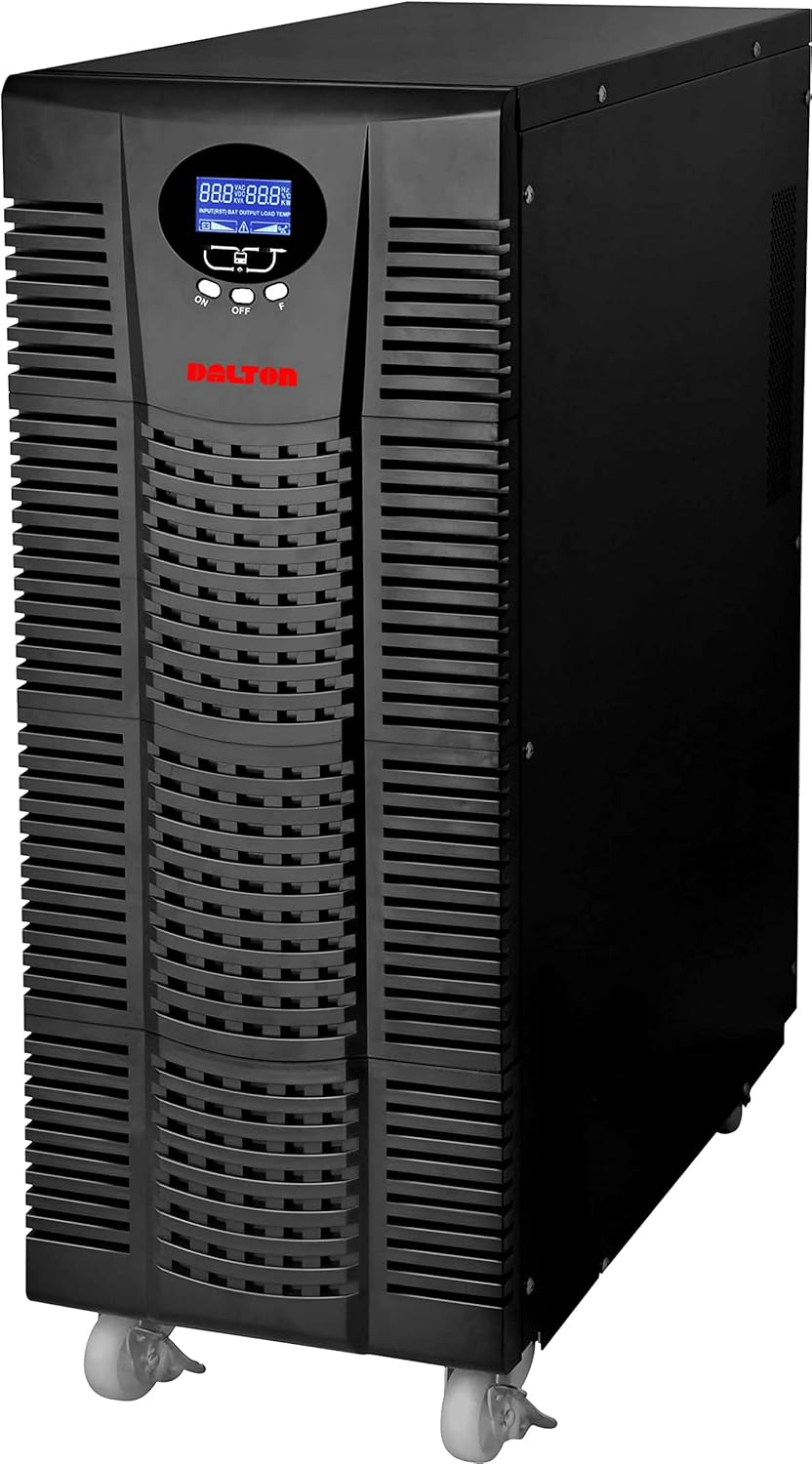
Figura 4.1: Fronte view of the Dalton 10 kVA UPS unit. This image displays the tall, black tower design of the UPS, featuring a prominent vented front panel for airflow and integrated wheels at the base for easy mobility. The control panel and display are visible towards the top of the unit.
4.1 Pannello frontale
- Schermo LCD: Mostra lo stato in tempo reale, il volume di input/outputtage, livello della batteria, percentuale di caricotage codici di errore.
- Pulsanti di controllo: Used to navigate menus, acknowledge alarms, and perform system tests.
- Pulsante di accensione: Accende o spegne l'UPS.
4.2 Pannello posteriore
- Connettore di alimentazione in ingresso: For connecting the UPS to the main AC power source.
- Prese di uscita: For connecting protected equipment.
- Communication Ports (USB/RS232): For connecting to a computer for monitoring and management.
- External Battery Connector (if applicable): For connecting optional external battery packs.
- Interruttore: Fornisce protezione da sovraccarico.
5. Configurazione e installazione
Follow these steps for proper installation of your UPS unit:
- Posizionamento:
- Posizionare l'UPS in un luogo pulito, asciutto e ben ventilato.
- Ensure sufficient clearance around the unit for proper airflow.
- Evitare la luce solare diretta, le fonti di calore e l'eccessiva umidità.
- Carica iniziale della batteria:
- Collegare l'UPS a una presa di alimentazione CA con messa a terra.
- Allow the UPS to charge for at least 8 hours before connecting any equipment to ensure full battery capacity. The display will indicate charging status.
- Collegamento dell'attrezzatura:
- With the UPS turned off and fully charged, connect your critical equipment (computers, servers, networking devices) to the UPS output receptacles.
- Do not connect laser printers or other high-surge current devices to the battery-backed outlets, as this may overload the UPS.
- Accensione:
- Press and hold the power button on the front panel until you hear a beep and the display illuminates.
- The UPS will perform a self-test and then enter normal operating mode.
6. Istruzioni per l'uso
6.1 Funzionamento normale
Once powered on, the UPS continuously monitors the incoming AC power. In normal mode, it provides clean and stable power to connected devices.
6.2 Modalità batteria
If the utility power fails or fluctuates outside acceptable limits, the UPS will automatically switch to battery mode, providing power from its internal batteries. An audible alarm will sound, and the LCD display will indicate "Battery Mode".
- During battery mode, save your work and shut down connected equipment gracefully to prevent data loss.
- The duration of battery backup depends on the load connected and the battery charge level.
6.3 Spegnimento dell'UPS
To turn off the UPS and disconnect power to connected devices:
- Shut down all connected equipment.
- Press and hold the power button on the UPS until it powers off.
- Disconnect the UPS from the AC power outlet.
7. Manutenzione
7.1 Cura della batteria
- Regularly charge the batteries by keeping the UPS connected to AC power.
- Perform a battery self-test periodically (refer to your UPS display menu for this option) to check battery health.
- Batteries have a limited lifespan (typically 3-5 years). Contact service for battery replacement when performance degrades.
7.2 Pulizia
- Clean the exterior of the UPS with a soft, dry cloth.
- Non utilizzare detergenti liquidi o aerosol.
- Assicurarsi che le aperture di ventilazione siano libere da polvere e detriti.
8. Risoluzione Dei Problemi
Questa sezione fornisce soluzioni ai problemi più comuni che potresti riscontrare con il tuo UPS.
| Problema | Possibile causa | Soluzione |
|---|---|---|
| L'UPS non si accende. | Nessuna alimentazione CA in ingresso; batteria scarica; guasto UPS. | Check power cord connection and wall outlet. Allow UPS to charge for several hours. Contact service if problem persists. |
| L'UPS emette segnali acustici continui in modalità normale. | Overload; Battery fault. | Reduce connected load. Perform battery self-test. |
| Tempo di backup breve. | Overload; Old battery; Insufficient charging. | Reduce load. Replace battery. Ensure UPS is fully charged. |
For issues not listed here, or if solutions do not resolve the problem, please contact Dalton customer support.
9. Specifiche
| Caratteristica | Dettaglio |
|---|---|
| Marca | Dalton |
| Modello | Gruppo di continuità da 10kVA |
| Potenza massima | 10,000 Watt |
| Potenza di uscita | 10,000 Watt |
| Gamma di frequenza | 50/60 Hz (± 3 Hz) |
| Tipo di connettore | IEC 320, Battery |
| Colore | Nero |
| Materiale | Metallo |
| ASIN | B09NC2FXNC |
| Prima data disponibile | 9 dicembre 2021 |
10. Garanzia e supporto
Dalton provides comprehensive support for its products. As authorized distributors in the Arab Republic of Egypt, we maintain an authorized service center for all Dalton UPS units.
- For technical assistance, troubleshooting, or warranty claims, please contact our authorized service center.
- Ensure you have your product model and ASIN (B09NC2FXNC) ready when contacting support.
- Riparazioni o modifiche non autorizzate invalideranno la garanzia del prodotto.
For more information, please visit the official Dalton websito o contattare il distributore locale.


