Prodotto finitoview
The One For All URC 3661 is a universal remote control designed to consolidate multiple remote controls into a single, easy-to-use device. It is compatible with a wide range of electronic devices, including televisions, set-top boxes, audio systems, DVD players, and Blu-ray players. This remote features backlit keys for improved visibility in low-light conditions and includes a learning function to copy commands from original remotes.

Figura 1: Angolato view of the URC 3661 Universal Remote Control.
Impostare
1. Installazione della batteria
The URC 3661 remote control requires two (2) AA batteries for operation. Follow these steps to install them:
- Individuare il vano batterie sul retro del telecomando.
- Far scorrere il coperchio della batteria verso il basso e sollevarlo.
- Inserire due batterie AA, assicurandosi che i terminali positivo (+) e negativo (-) siano allineati con le marcature all'interno del vano.
- Riposizionare il coperchio della batteria facendolo scorrere nuovamente in posizione finché non scatta in posizione.
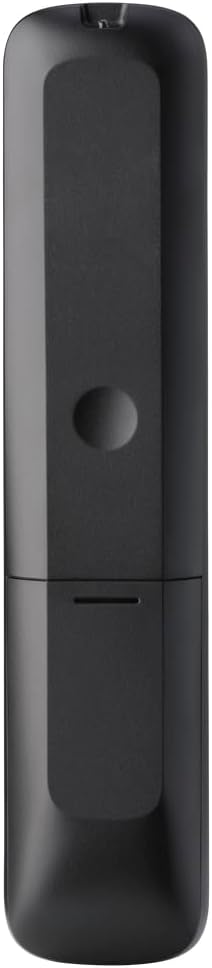
Figura 2: Indietro view of the remote, highlighting the battery compartment.
2. Programmazione del telecomando
The URC 3661 can be programmed using direct code entry, auto code search, or the learning function. It is recommended to try direct code entry first.
Immissione diretta del codice:
- Accendi il dispositivo che desideri controllare (ad esempio, TV, lettore DVD).
- Premere e tenere premuto il tasto IMPOSTARE button until the LED light under the device key (e.g., TV, DVD) blinks twice and stays lit.
- Press the device key you want to program (e.g., TV). The LED will remain lit.
- Enter the 4-digit or 5-digit setup code for your brand and device. Refer to the code list provided with your remote or visit the One For All website for the most up-to-date codes.
- After entering the code, the LED will blink twice and turn off if the code is valid. If it blinks once and stays lit, the code is invalid; re-enter the code.
- Prova il telecomando premendo il tasto ENERGIA button. If the device turns off, try other functions like volume or channel. If it works, programming is complete. If not, try the next code for your brand or use the Auto Code Search.
Ricerca codice automatico:
- Accendi il dispositivo che desideri controllare.
- Premere e tenere premuto il tasto IMPOSTARE pulsante finché il LED non lampeggia due volte e rimane acceso.
- Press the device key you want to program.
- Puntare il telecomando verso il dispositivo e premere il tasto ENERGIA ripetutamente il pulsante (circa ogni 3 secondi) fino allo spegnimento del dispositivo.
- Una volta spento il dispositivo, premere immediatamente il tasto IMPOSTARE button to save the code. The LED will blink twice and turn off.
- Test the remote. If it doesn't work correctly, repeat the process.
Funzione di apprendimento:
The learning function allows the URC 3661 to copy functions directly from your original remote control, which is useful for commands not available via direct code entry or auto search.
- Place the URC 3661 and your original remote on a flat surface, facing each other, about 1-2 inches apart.
- Premere e tenere premuto il tasto IMPOSTARE pulsante finché il LED non lampeggia due volte e rimane acceso.
- Press the button on the URC 3661 that you want to teach a function to (e.g., a specific input button). The LED will blink rapidly.
- Press and hold the corresponding button on your original remote control until the LED on the URC 3661 blinks twice, indicating successful learning.
- Ripetere l'operazione per tutti i pulsanti desiderati.
- Per uscire dalla modalità di apprendimento, premere il tasto IMPOSTARE button. The LED will blink twice and turn off.
Utilizzo del telecomando
The URC 3661 is designed for intuitive operation. Familiarize yourself with the button layout and their primary functions.

Figura 3: Fronte view of the URC 3661 with button layout.
Funzioni chiave:
- Device Keys (TV, STB, AUDIO, BLURAY, DVD, STREAM): Select the device you wish to control. The LED under the selected device key will illuminate.
- ENERGIA: Accende o spegne il dispositivo selezionato.
- VOL +/-: Regola il volume.
- CH +/-: Cambia canale.
- Navigation Pad (UP, DOWN, LEFT, RIGHT, OK): Utilizzato per la navigazione e la selezione del menu.
- MENU: Apre il menu principale del dispositivo.
- GUIDA: Displays the electronic program guide (if supported by the device).
- INFORMAZIONI: Visualizza informazioni sul programma o sull'input corrente.
- CASA: Returns to the device's home screen.
- USCITA: Exits menus or applications.
- Controlli di riproduzione (RIPRODUCI, PAUSA, STOP, RIAVVOLGI, AVANZAMENTO VELOCE, SALTA): Controlla la riproduzione multimediale.
- Tasti numerici (0-9): Per l'inserimento diretto del canale o l'immissione numerica.
- App Shortcut Keys (Netflix, Prime Video, YouTube): Accesso diretto ai servizi di streaming più diffusi.
- Retroilluminazione: The keys are backlit for easy use in dark environments. The backlight activates automatically when a button is pressed.
Manutenzione
Pulizia del telecomando:
Per preservare l'aspetto e la funzionalità del telecomando, pulirlo regolarmente:
- Utilizzare un panno morbido e asciutto per pulire la superficie del telecomando.
- Per sporco ostinato, leggermente dampPulire il panno con acqua o con un detergente delicato e non abrasivo. Evitare l'eccessiva umidità.
- Non utilizzare prodotti chimici aggressivi, solventi o detergenti abrasivi, poiché potrebbero danneggiare la finitura del telecomando o i componenti interni.
Sostituzione della batteria:
Replace batteries when the remote's performance degrades or the LED indicator blinks unusually. Refer to the "Battery Installation" section under Setup for detailed instructions.
Risoluzione dei problemi
If you encounter issues with your URC 3661 remote control, try the following troubleshooting steps:
| Problema | Possibile causa | Soluzione |
|---|---|---|
| Il telecomando non aziona il dispositivo. | Dispositivo selezionato non corretto. Le batterie sono scariche o inserite in modo errato. Codice programmato errato. | Ensure the correct device key (TV, DVD, etc.) is pressed. Controllare l'orientamento della batteria e sostituirla se necessario. Re-program the remote using a different code or the Auto Code Search/Learning function. |
| Alcuni pulsanti non funzionano. | Incomplete programming. Device does not support the function. | Use the Learning function to copy specific commands from your original remote. Verify if the original remote has that function. |
| LED blinks once and stays lit during code entry. | Invalid code entered. | Ensure you are entering the correct 4 or 5-digit code. Try another code from the list or use Auto Code Search. |
| Il LED remoto non si accende. | Batterie scariche. | Sostituire le batterie con nuove batterie AA. |
For further assistance, visit the official One For All support websito o consultare il manuale completo online.
Specifiche
| Caratteristica | Dettaglio |
|---|---|
| Numero di modello | UR 3661 |
| Marca | Uno per tutti |
| Dimensioni del prodotto | 0.39 x 0.39 x 0.39 pollici |
| Peso dell'articolo | 6.7 once |
| Batterie richieste | 2 batterie AA |
| Numero massimo di dispositivi supportati | Fino a 6 dispositivi |
| Dispositivi compatibili | Television, Set-top Box, Audio, Blu-ray, DVD, Streaming devices |
| Caratteristica speciale | Universal, Learning Function, Backlit Keys |

Figure 4: Product packaging indicating compatibility with up to 6 devices.
Garanzia e supporto
Warranty information for the One For All URC 3661 Universal Remote Control is typically provided with your purchase documentation. Please refer to the warranty card or leaflet included in the product packaging for details regarding coverage, terms, and conditions.
For technical support, frequently asked questions, or to find the latest programming codes, please visit the official One For All website. Contact information for customer service may also be found on the manufacturer's websito o nella documentazione del prodotto.
One For All Official Websito: www.oneforall.com


