1. Introduzione
Thank you for choosing the JZAQ BT40 Motorcycle Helmet Bluetooth Headset. This manual provides detailed instructions for the proper installation, operation, and maintenance of your device. Please read this manual thoroughly before use to ensure optimal performance and safety. Keep this manual for future reference.
2. Prodotto finitoview
2.1 Caratteristiche principali
- Design ultrasottile: Only 0.35 inches thick, designed to fit comfortably in all helmet types without squeezing the ears.
- Connettività Bluetooth 5.0: Ensures a strong, stable signal connection and automatic pairing. Can connect wirelessly to two mobile devices simultaneously.
- Tempo di riproduzione esteso: Built-in 600mAh rechargeable Li-ion battery provides up to 80 hours of continuous talking/playing time and 500 hours of standby time. Full charge in approximately 2 hours.
- IPX7 impermeabile e antipolvere: Nano coating technology protects the headset from rain, snow, and dust, making it suitable for various outdoor conditions.
- Qualità del suono chiara: Features DSP noise-canceling technology and windproof foam pads for crystal-clear stereo music and calls.
- Funzionamento semplice: Easy-to-use controls for music, calls, and voice assistant. Automatic answering for safer riding.
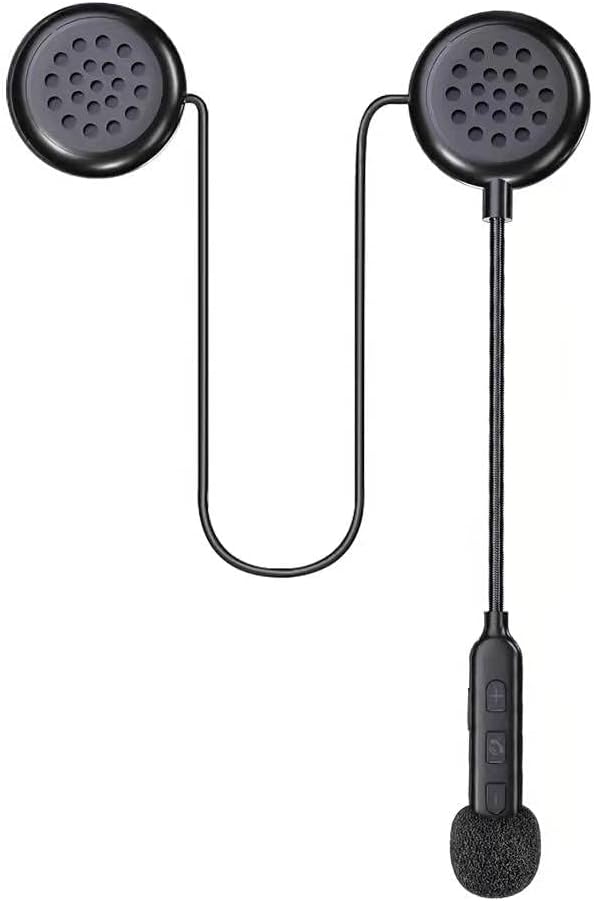
Figure 1: The JZAQ BT40 Motorcycle Helmet Bluetooth Headset, showcasing its compact design with two earpieces, a flexible microphone boom, and integrated control buttons.

Figure 2: Image highlighting the ultra-thin profile of the headset speakers, measuring 0.35 inches (8.7mm), ensuring they do not press against the ears inside a helmet.
2.2 Cosa è incluso
- Cuffie con casco
- Cavo USB
- Manuale dell'utente (questo documento)
- Adesivo riflettente
3. Impostazione
3.1 Installation into Helmet
- Identify suitable locations within your helmet for the speakers. Most helmets have designated pockets or areas near the ears.
- Attach the speakers to the helmet's interior using the provided detachable Velcro pads. Ensure the speakers are positioned directly over your ears for optimal sound and comfort.
- Route the microphone boom and control unit to a convenient location near your mouth, ensuring it does not obstruct your vision or helmet closure. Secure any loose wires.

Figure 3: An illustration demonstrating the simple installation process of the headset into a helmet, emphasizing the ease of attaching the components.
3.2 Ricarica dell'auricolare
Before first use, fully charge the headset. Connect the provided USB cable to the charging interface on the control unit and plug the other end into a USB power source (e.g., computer, wall adapter). The charging time is approximately 2 hours. The headset supports displaying battery status on your connected phone.

Figure 4: A smartphone screen displaying the battery level indicator for the connected JZAQ BT40 headset, allowing users to monitor charge status.
3.3 Associazione Bluetooth
- Assicurarsi che l'auricolare sia carico e spento.
- Press and hold the Power ON/Play/Pause button on the control unit until the indicator light flashes, indicating pairing mode.
- On your mobile device, enable Bluetooth and search for available devices. Select "JZAQ BT40" (or similar name) from the list.
- Once connected, the indicator light will change, and you will hear an audible confirmation. The headset can connect to two mobile phones simultaneously.

Figure 5: The JZAQ BT40 headset shown connected simultaneously to two different mobile phones, illustrating its smart connection capability.
4. Istruzioni per l'uso

Figure 6: A detailed diagram illustrating the components of the JZAQ BT40 headset, including earpiece dimensions, speaker, microphone hole, charging interface, and the functions of each control button (Power ON/Play/Pause, Volume +/Previous Song, Volume -/Next Song).
4.1 Accensione/spegnimento
- Accensione: Press and hold the central button (Power ON/Play/Pause) until the indicator light illuminates and you hear a power-on prompt.
- Spegni: Press and hold the central button (Power ON/Play/Pause) until the indicator light turns off and you hear a power-off prompt.
4.2 Controllo della musica
- Riproduci/Pausa: Short press the central button (Power ON/Play/Pause).
- Aumenta volume: Premere brevemente il pulsante "+".
- Volume basso: Premere brevemente il pulsante "-".
- Prossima canzone: Premere a lungo il pulsante "-".
- Canzone precedente: Premere a lungo il pulsante "+".
4.3 Gestione delle chiamate
- Rispondi alla chiamata: Short press the central button (Power ON/Play/Pause) when an incoming call is received. The headset supports automatic answering.
- Termina chiamata: Short press the central button (Power ON/Play/Pause) during a call.
- Rifiuta chiamata: Long press the central button (Power ON/Play/Pause) when an incoming call is received.
4.4 Assistente vocale
- Attiva l'assistente vocale: Double-click the central button (Power ON/Play/Pause) to activate your phone's voice assistant (e.g., Siri, Google Assistant).
5. Manutenzione
5.1 Pulizia
Wipe the headset and control unit with a soft, damp panno. Non utilizzare prodotti chimici aggressivi o detergenti abrasivi. Assicurarsi che la porta di ricarica sia asciutta prima di caricare.
5.2 Impermeabilizzazione
The JZAQ BT40 headset features IPX7 waterproofing, protecting it from immersion in water up to 1 meter for 30 minutes. While it is designed to withstand rain and snow, avoid prolonged submersion. Always ensure the charging port cover is securely closed when not charging to maintain water resistance.

Figure 7: The JZAQ BT40 headset shown with water droplets, emphasizing its IPX7 waterproof capability, suitable for use in wet conditions.
5.3 Conservazione
Store the headset in a cool, dry place away from direct sunlight and extreme temperatures. When storing for extended periods, ensure the battery is partially charged (around 50%) to prolong its lifespan.
6. Risoluzione Dei Problemi
- Nessun potere: Ensure the headset is fully charged. Connect to a power source and check the charging indicator.
- Impossibile associare: Make sure the headset is in pairing mode (indicator light flashing). Turn off and on your phone's Bluetooth. If issues persist, try resetting the headset (refer to manufacturer's websito per istruzioni specifiche sul reset se non presenti nel manuale).
- Volume basso/scarsa qualità del suono: Adjust the volume on both the headset and your connected device. Ensure speakers are correctly positioned over your ears inside the helmet. Check for obstructions or damage to the speakers.
- Connessione intermittente: Ensure your device is within the Bluetooth range (up to 20 meters). Avoid environments with strong electromagnetic interference.
- Microfono non funzionante: Ensure the microphone is positioned correctly and not obstructed. Check your phone's privacy settings for microphone access.
7. Specifiche tecniche
| Caratteristica | Specificazione |
|---|---|
| Nome del modello | Modello BT40 |
| Versione Bluetooth | 5.0 |
| Portata Bluetooth | 20 metri |
| Capacità della batteria | 600 mAh agli ioni di litio |
| Durata della batteria (tempo di riproduzione) | Fino a 80 ore |
| Tempo di standby | 500 ore |
| Tempo di ricarica | 2 ore |
| Livello di resistenza all'acqua | Grado di protezione IPX7 |
| Controllo del rumore | Cancellazione attiva del rumore (DSP) |
| Earphone Thickness | 0.35 pollici (9 mm) |
| Tecnologia di connettività | Senza fili |
| Dispositivi compatibili | Cellulari |
| Materiale | Plastica, elastomero termoplastico (TPE) |
| Peso dell'articolo | 3.84 once |
8. Garanzia e supporto
This JZAQ product is covered by a standard manufacturer's warranty. For specific warranty details, duration, and terms, please refer to the product packaging or contact JZAQ customer support directly. If you encounter any issues or require assistance, please reach out to the retailer where you purchased the product or visit the official JZAQ websito per risorse di supporto e informazioni di contatto.


