Introduzione
This manual provides essential instructions for the safe and effective use of your Technics EAH-A800 Wireless Noise Cancelling Over-Ear Headphones. Please read this manual thoroughly before using the product and retain it for future reference.

Image: Technics EAH-A800 Wireless Noise Cancelling Over-Ear Headphones in black, showcasinil loro design elegante.
The Technics EAH-A800 headphones are designed to deliver high-fidelity audio with advanced noise-cancelling technology and superior call clarity. They feature multi-point connectivity for seamless switching between devices and comfortable over-ear earpads for extended wear.
Cosa c'è nella scatola
Verificare che tutti gli articoli siano presenti nel pacco:
- Technics EAH-A800 Over-Ear Headphones
- Cavo di ricarica USB
- Cavo audio (jack da 3.5 mm)
- Custodia protettiva per il trasporto

Image: The complete package contents, including the headphones, charging cable, audio cable, and protective case.
Impostare
1. Carica delle cuffie
Before first use, fully charge the headphones. Connect the USB charging cable to the headphone's charging port and a USB power source. The charging indicator will show the charging status.
2. Accoppiamento Bluetooth
- Assicurati che le cuffie siano spente.
- Tenere premuto il pulsante di accensione finché l'indicatore LED non lampeggia in blu e rosso, indicando la modalità di associazione.
- Sul tuo dispositivo (smartphone, tablet, computer), attiva il Bluetooth e cerca i dispositivi disponibili.
- Select "Technics EAH-A800" from the list of found devices.
- Una volta connesso, l'indicatore LED lampeggerà lentamente in blu.
3. Applicazione Technics Audio Connect
For enhanced control and customization, download the Technics Audio Connect app from your device's app store. The app allows you to adjust sound settings, noise cancellation levels, and other features.

Image: Screenshots of the Technics Audio Connect app, illustrating its interface for sound and ambient control settings.
Istruzioni per l'uso
1. Accensione/spegnimento
- Per accendere: tenere premuto il pulsante di accensione finché l'indicatore LED non si accende.
- Per spegnere: tenere premuto il pulsante di accensione finché l'indicatore LED non si spegne.
2. Noise Cancelling and Ambient Sound Modes
The EAH-A800 features active noise cancellation to reduce external distractions and an ambient sound mode to allow you to hear your surroundings.
- Cancellazione del rumore: Reduces environmental noise for an immersive listening experience.
- Modalità ambiente: Allows external sounds to be heard, useful for awareness in public spaces.
Switch between modes using the dedicated button on the headphones or through the Technics Audio Connect app.

Image: A visual representation of the noise cancelling technology in action, showing how external sounds are minimized.
3. Connettività multi-punto
The headphones can connect to more than two Bluetooth devices simultaneously, allowing for seamless audio switching. For example, you can listen to music from your laptop and instantly answer a call from your smartphone without re-pairing.

Image: A user seamlessly switching audio between a smartphone and a laptop, highlighting the multi-point connectivity feature.
4. Funzioni di chiamata
The EAH-A800 headphones are equipped with 8 microphones and advanced wind noise reduction for clear voice transmission during calls. Use the integrated controls to answer, end, or reject calls.
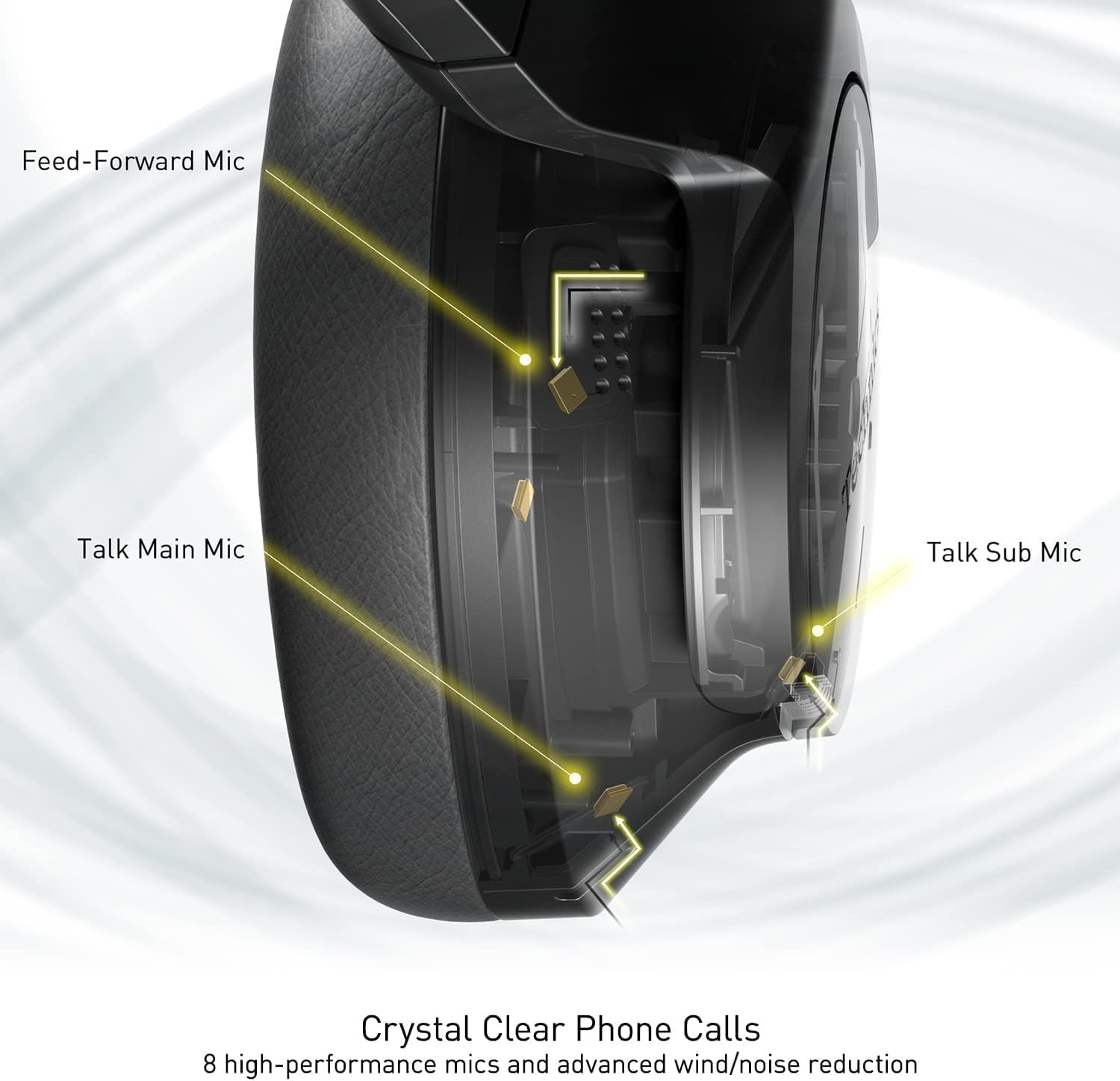
Image: An internal diagram illustrating the strategic placement of 8 microphones within the headphone for optimal call clarity.
5. Controlli
The headphones feature physical buttons for power, volume, and mode switching, as well as a touch-sensitive panel on one earcup for additional functions. Refer to the quick start guide for a detailed layout of controls.
6. Durata della batteria e ricarica
The EAH-A800 offers up to 50 hours of playback with Active Noise Cancellation (ANC) enabled on a single charge. A quick 15-minute charge provides approximately 10 hours of playback.

Image: A graphic detailing the impressive battery life and quick charge capabilities of the headphones.
Manutenzione
1. Pulizia
- Pulisci le cuffie con un panno morbido e asciutto.
- Per i cuscinetti auricolari, strofinare delicatamente con un panno leggermente damp panno e lasciare asciugare completamente all'aria prima dell'uso.
- Non utilizzare prodotti chimici aggressivi, solventi o detergenti abrasivi.
2. Conservazione
When not in use, store the headphones in their protective carrying case to prevent damage from dust, scratches, and impacts. Avoid exposing the headphones to extreme temperatures or humidity.
Risoluzione dei problemi
| Problema | Possibile causa | Soluzione |
|---|---|---|
| Le cuffie non si accendono | Batteria scarica | Caricare completamente le cuffie. |
| Impossibile effettuare l'associazione tramite Bluetooth | Headphones not in pairing mode; Device Bluetooth off; Out of range | Assicurati che le cuffie siano in modalità di associazione (blu/rosso lampeggiante). Attiva il Bluetooth sul tuo dispositivo. Avvicina il dispositivo alle cuffie. |
| Nessun suono o volume basso | Volume too low; Incorrect audio output selected; Device not connected | Increase headphone and device volume. Check device's audio output settings. Re-establish Bluetooth connection. |
| Scarsa qualità delle chiamate | Microphone obstructed; Weak signal; Environmental noise | Ensure microphones are clear. Move to an area with better signal. Adjust noise cancelling settings via the app. |
| Multi-point connectivity issues | Connection conflict; Device not properly paired | Disconnect from one device and reconnect. Ensure both devices are paired correctly. |
If problems persist, consult the Technics Audio Connect app for further diagnostics or visit the official Technics support websito.
Specifiche
| Nome del modello | Technics EAH-A800 |
| Tecnologia di connettività | Bluetooth 5.2 |
| Risposta in frequenza | 4 Hz - 40 kHz |
| Controllo del rumore | Cancellazione attiva del rumore |
| Durata della batteria | Up to 50 Hours (with ANC ON) |
| Tempo di ricarica | Approximately 3 Hours (15 min quick charge for 10 hrs playback) |
| Peso dell'articolo | 10.5 once (298 grammi) |
| Materiale | Poliuretano (PU) |
| Presa per cuffie | 3.5 mm Jack |
| Dispositivi compatibili | Cellphones, Desktops, Laptops, Tablets, Telephones |
| Caratteristiche speciali | Fast Charging, Foldable, Microphone Included |
| Codice UPC | 885170381162 |
Garanzia e supporto
Your Technics EAH-A800 headphones are covered by a manufacturer's warranty. For specific warranty terms, registration, and support inquiries, please refer to the official Technics websito o contattare il loro servizio clienti.
For additional information, FAQs, and software updates, please visit the official Technics brand store or support pages:


