1. Introduzione e oltreview
The Wemo Smart Video Doorbell is designed for seamless integration with Apple HomeKit Secure Video, providing a convenient and secure method to monitor your home and communicate with visitors. This device offers a wide field of view and high-definition video quality, ensuring comprehensive coverage of your doorstep. It leverages your existing iCloud subscription for secure storage of motion-based recordings within the Apple Home App.
Key features include face recognition, dual-band Wi-Fi connectivity for reliable performance, and infrared technology for clear night vision. This doorbell is compatible exclusively with wired 16-24V AC doorbell systems.
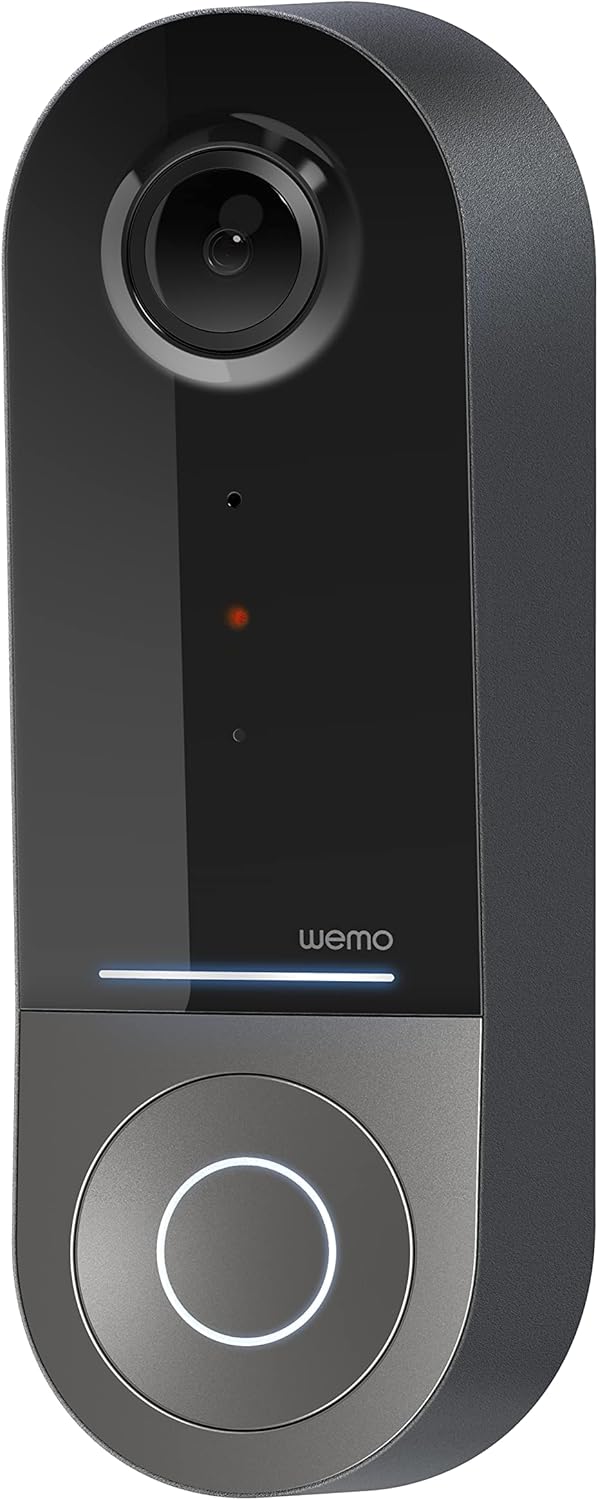
Figure 1: Wemo Smart Video Doorbell
2. Configurazione e installazione
2.1 Lista di controllo pre-installazione
- Ensure you have a wired doorbell system with 16-24V AC power.
- Download the Apple Home App on your iOS device.
- Confirm strong 2.4GHz and 5GHz Wi-Fi signal at your doorbell location.
2.2 Installazione fisica
- Spegnere l'alimentazione: Before beginning installation, turn off power to your existing doorbell system at the circuit breaker.
- Rimuovere il vecchio campanello: Carefully remove your existing doorbell button.
- Installare la staffa di montaggio: Use the provided screws and screwdriver to securely attach the mounting bracket to your wall. If needed, use the left/right wedges to adjust the viewangolo di ing.
- Connect power kit: Follow the instructions in the included Setup Guide to properly install the Power Kit with Connectors into your existing chime box. This is crucial for correct operation.
- Wire the Wemo Doorbell: Connect the existing doorbell wires to the terminals on the back of the Wemo Smart Video Doorbell.
- Montare il campanello: Secure the Wemo Smart Video Doorbell onto the mounting bracket.
- Ripristinare l'alimentazione: Riattivare la corrente tramite l'interruttore automatico.
2.3 Configurazione dell'app
- Open the Apple Home App on your iOS device.
- Tap the '+' icon to add a new accessory.
- Scan the HomeKit setup code provided with your Wemo Smart Video Doorbell.
- Follow the on-screen prompts to name your doorbell, assign it to a room, and configure HomeKit Secure Video settings, including motion detection and face recognition preferences.
3. Istruzioni per l'uso
3.1 Vivere View e Notifiche
- Access live video feed directly from the Apple Home App on your iPhone, iPad, or HomePod.
- Receive instant notifications on your iOS device when motion is detected or the doorbell is pressed.
- Utilize face recognition to receive specific alerts for known individuals.

Figure 2: Face Recognition with HomeKit Secure Video
3.2 Registrazione e archiviazione video
- HomeKit Secure Video stores 10 days of motion-based recording history in your iCloud account.
- Review recorded events directly within the Apple Home App.

Figure 3: iCloud Recording via Apple Home App
3.3 Audio bidirezionale
- Engage in real-time two-way conversations with visitors through the Apple Home App.
3.4 Advanced Video Features
- Ampio campo di View: The camera offers a 178° vertical, 140° horizontal, and 223° diagonal field of view per una copertura estesa.
- HD Resolution with HDR: Enjoy crystal clear 1200x1600 resolution video with HDR for optimal image quality in varying light conditions.
- Visione notturna migliorata: Infrared technology provides clear video even in low-light conditions.

Figura 4: Visione notturna migliorata
3.5 Connettività Wi-Fi dual-band
- The doorbell utilizes both 2.4GHz and 5GHz Wi-Fi bands.
- The 2.4GHz band offers a longer range and better penetration through walls.
- The 5GHz band provides higher speeds for closer proximity connections.

Figura 5: Connettività Wi-Fi dual-band
4. Manutenzione e risoluzione dei problemi
4.1 Cura generale
- Pulire regolarmente l'obiettivo della fotocamera con un panno morbido eamp cloth to ensure clear video quality.
- Ensure the doorbell is free from obstructions that might block its field of view or microphone.
Risoluzione dei problemi di 4.2
- Problemi di connettività: If the doorbell frequently disconnects, ensure your Wi-Fi signal is strong at the installation location. Consider adjusting your router's band (2.4GHz for range, 5GHz for speed) or adding a Wi-Fi extender.
- Problemi di alimentazione: Verify that your wired doorbell system provides the required 16-24V AC. Insufficient voltage can lead to intermittent operation or device resets. Consult a qualified electrician if you suspect voltage problemi.
- Reattività dell'app: If the Apple Home App is slow to connect or display the live feed, ensure your iOS device and HomeKit hub (e.g., Apple TV, HomePod) are updated and have a stable internet connection. Restarting the doorbell or your HomeKit hub may resolve temporary glitches.
5. Specifiche
| Uso interno/esterno | All'aperto |
| Dispositivi compatibili | HomePod, iPad, iPhone |
| Fonte di alimentazione | Elettrico con cavo (16-24 V CA) |
| Protocollo di connettività | Wi-Fi (2.4 GHz e 5 GHz) |
| Tipo di controllore | Apple HomeKit |
| Tipo di montaggio | Montaggio a parete |
| Risoluzione di acquisizione video | 1200x1600 (HD, HDR-enabled) |
| Colore | Nero |
| Dimensioni dell'articolo L x P x A | 2.1 x 1.8 x 5 pollici |
| Peso dell'articolo | 13.7 once |
| Caratteristiche speciali | HD Resolution, Image Sensor, Night Vision, HDR |
6. Cosa c'è nella scatola
- Videocitofono intelligente
- Guida all'installazione
- Staffa di fissaggio
- Left/Right Wedge
- Viti e cacciavite
- Power Kit with Connectors
7. Video ufficiale del prodotto
Video 1: Official Wemo Video Doorbell overview, mostraasincaratteristiche e design g.
8. Garanzia e supporto
For warranty information and technical support, please refer to the official WeMo websito o contattare direttamente il servizio clienti. Conservare la ricevuta d'acquisto per eventuali reclami in garanzia.


