1. Introduzione
Thank you for choosing the Darkglass Exponent 500 Bass Amplifier Head. This manual provides essential information for the safe and efficient operation of your amplifier. The Exponent 500 is a versatile 500-watt bass amplifier head featuring advanced digital signal processing, audio interface functionality, full MIDI control, an effects loop, and Bluetooth connectivity. Please read this manual thoroughly before using the device to ensure proper setup and optimal performance.
2. Importanti istruzioni di sicurezza
- Fonte di energia: Collegare l'unità solo all'alimentazione specificatatage indicated on the rear panel. Ensure the voltage selector switch is set correctly for your region (100-120 VAC or 200-240 VAC).
- Ventilazione: Do not block any ventilation openings. Ensure adequate airflow around the unit to prevent overheating.
- Acqua e umidità: Non esporre l'apparecchio a pioggia o umidità. Non posizionare oggetti contenenti liquidi, come vasi, sull'apparecchio.
- Calore: Non collocare vicino a fonti di calore come radiatori, termosifoni, stufe o altri apparecchi (compresi amplificatori) che producono calore.
- Messa a terra: This apparatus must be grounded. Use only a power cord with a grounding-type plug.
- Manutenzione: Non tentare di riparare questo prodotto da soli. Affidare qualsiasi intervento di assistenza a personale qualificato. L'apertura dell'unità potrebbe esporre a tensioni pericolose.tago altri pericoli.
- cavi: Proteggere il cavo di alimentazione per evitare che venga calpestato o schiacciato, in particolare in corrispondenza delle spine, delle prese di corrente e del punto in cui esce dall'apparecchio.
- Pulizia: Scollegare l'apparecchio durante i temporali o quando non viene utilizzato per lunghi periodi di tempo. Pulire solo con un panno asciutto.
3. Prodotto finitoview
3.1 Controlli del pannello frontale

Figura 1: Davanti view of the Darkglass Exponent 500 Bass Amplifier Head, showing the input jack, various control knobs (labeled 'a' through 'e'), and master volume, along with five preset buttons and other indicators.
- Ingresso: 1/4" instrument input jack.
- Manopola del guadagno in ingresso: Regola la sensibilità dell'ingresso.
- Knobs 'a' through 'e': These controls are context-sensitive and adjust parameters of the selected preamp or effect module. Their specific functions are displayed on the unit's screen or controlled via software.
- Manopola del volume principale: Controlla il volume di uscita complessivo del amppiù vivace.
- Pulsanti preimpostati (1-5): Selects different user-defined presets or effect configurations.
- Infinity Icon Button: Likely related to loop or continuous play functions.
- Pulsante icona altoparlante: Toggles speaker output or related settings.
- Headphone Icon Button: Activates or controls headphone output.
3.2 Collegamenti del pannello posteriore
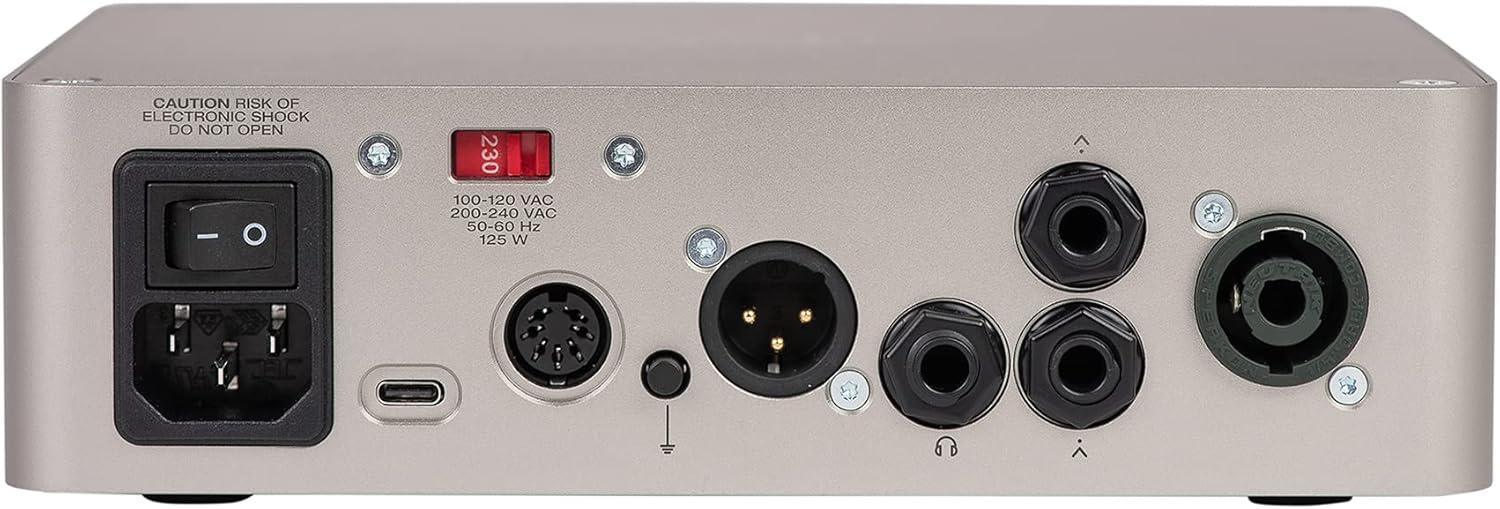
Figura 2: Posteriore view of the Darkglass Exponent 500 Bass Amplifier Head, showing the power input, power switch, voltage selector, USB-C port, MIDI input/output, XLR DI output, ground lift switch, headphone output, and two speaker outputs.
- Potenza in ingresso: Standard IEC power connector for the included power cable.
- Interruttore di alimentazione: Accende o spegne l'unità.
- Voltage Selector (100-120 VAC / 200-240 VAC): Selects the appropriate operating voltage per la tua regione. Ensure this is set correctly before powering on.
- Porta USB-C: Connects to a computer for audio interface functionality, firmware updates, and software control.
- Ingresso/uscita MIDI: 5-pin DIN connectors for MIDI control and integration with other MIDI devices.
- Uscita XLR DI: Balanced direct output for connecting to mixing consoles or recording interfaces.
- Interruttore di sollevamento a terra: Helps eliminate hum or ground loop noise when using the XLR DI output.
- Uscita cuffie: Jack da 3.5 mm per il collegamento delle cuffie.
- Uscite altoparlanti: Two 1/4" speaker jacks for connecting to bass cabinets.
4. Guida all'installazione
4.1 Collegamento iniziale all'alimentazione
- Verifica voltage: Before connecting the power cable, ensure the voltagl'interruttore di selezione sul pannello posteriore è impostato sul volume correttotage for your region (100-120 VAC or 200-240 VAC). Incorrect voltagLa selezione può danneggiare l'unità.
- Connetti alimentazione: Plug the supplied IEC power cable into the power input on the rear panel and then into a grounded AC outlet.
- Spegni: Ensure the power switch on the rear panel is in the OFF position before making any other connections.
4.2 Connecting Your Instrument and Speakers
- Input dello strumento: Connect your bass guitar to the 1/4" INPUT jack on the front panel using a high-quality instrument cable.
- Collegamento dell'altoparlante: Connect your bass cabinet(s) to the 1/4" SPEAKER OUTPUTS on the rear panel. Ensure your cabinet's impedance matches the amplifier's requirements (typically 4 or 8 ohms). Do not connect to speaker outputs while the amplifier è acceso.
4.3 Computer and MIDI Connections
- USB-C: For audio interface functionality, firmware updates, and software control, connect a USB-C cable from the Exponent 500's USB-C port to your computer.
- Italiano: Use standard 5-pin MIDI cables to connect the MIDI IN/OUT ports to external MIDI controllers or interfaces for advanced control.
4.4 Associazione Bluetooth
The Exponent 500 supports Bluetooth for audio streaming or control. Refer to the Darkglass Suite software or the unit's display for specific pairing instructions. Typically, you will activate Bluetooth on the amplifier, then search for "Darkglass Exponent 500" on your Bluetooth-enabled device and pair.
5. Istruzioni per l'uso
5.1 Accensione e spegnimento
- Accensione: After all connections are made, ensure the Master Volume knob is set to minimum. Flip the power switch on the rear panel to the ON position.
- Spegni: Turn the Master Volume knob to minimum, then flip the power switch on the rear panel to the OFF position.
5.2 Basic Sound Adjustment
- Guadagno in ingresso: Adjust the Input Gain knob to achieve a strong signal without clipping. The unit may have an indicator for optimal input level.
- Volume principale: Slowly increase the Master Volume knob to reach your desired listening level.
- Tone Shaping (Knobs 'a' through 'e'): These knobs control various parameters depending on the selected preset or module. Use the Darkglass Suite software for detailed configuration and understanding of their current function.
5.3 Utilizzo dei preset
The five preset buttons (1-5) on the front panel allow for quick recall of different sound configurations. Press a button to activate the corresponding preset. Presets can be customized and saved using the Darkglass Suite software.
5.4 Funzionalità dell'interfaccia audio
When connected to a computer via USB-C, the Exponent 500 functions as an audio interface. This allows you to record your bass directly to a Digital Audio Workstation (DAW) or use the amplifier for playback from your computer. Ensure the necessary drivers (if any) are installed and select the Exponent 500 as your audio input/output device in your computer's sound settings or DAW.
5.5 Effects Loop
The effects loop allows you to integrate external effects pedals or processors into your signal chain. Connect the SEND of the Exponent 500 to the input of your effects unit, and the output of your effects unit to the RETURN of the Exponent 500. This places the external effects after the preamp section but before the power amp.
6. Manutenzione
- Pulizia: Pulisci l'esterno del amplifier with a soft, dry cloth. Do not use abrasive cleaners, solvents, or waxes.
- Magazzinaggio: Quando non viene utilizzato per lunghi periodi, conservare il amplifier in a dry, cool environment, away from direct sunlight and extreme temperatures.
- Ventilazione: Controllare regolarmente che le aperture di ventilazione siano libere da polvere e detriti per garantire un raffreddamento adeguato.
7. Risoluzione Dei Problemi
| Problema | Possibile causa | Soluzione |
|---|---|---|
| Nessun potere | Power cable disconnected, power switch off, incorrect voltage selection, blown fuse. | Check power cable connections. Ensure power switch is ON. Verify voltage selector setting. If fuse is suspected, consult qualified service personnel. |
| Nessuna uscita audio | Master volume low, instrument cable faulty, speaker cable faulty, speaker cabinet disconnected, incorrect preset selected, effects loop issue. | Increase Master Volume. Check all cable connections. Test with different cables/speakers. Ensure a valid preset is active. Bypass effects loop to check if it's the source of the problem. |
| Ronzio o rumore | Loop di terra, cavi difettosi, interferenze da altri dispositivi elettronici. | Engage the Ground Lift switch on the rear panel. Try different cables. Move amplifier lontano da altri dispositivi elettronici. |
| I controlli non rispondono | Software glitch, unit frozen. | Power cycle the unit. If issues persist, connect to computer via USB-C and check for firmware updates using Darkglass Suite software. |
If you encounter problems not listed here or if the suggested solutions do not resolve the issue, please contact Darkglass Electronics customer support.
8. Specifiche
| Nome del modello | Esponente 500 |
| Numero modello articolo | E500 |
| Marca | Elettronica Darkglass |
| Uscita Wattage | 500 Watt |
| Peso dell'articolo | 5.07 libbre (circa 2.3 kg) |
| Dimensioni del pacco | 10.51 x 9.88 x 3.03 pollici (circa 26.7 x 25.1 x 7.7 cm) |
| Colore | Argento |
| Fonte di alimentazione | Elettrico con cavo |
| Tipi di connettori | XLR, 3.5mm Jack, 6.35mm Jack (1/4") |
| Numero di bande | 3 (referring to EQ bands, though the product description implies more complex tone shaping) |
| Caratteristiche | Bassi da 500 watt Amplifier Head, Effects, Audio Interface Functionality, Full MIDI control, Effects Loop, Bluetooth |
9. Garanzia e supporto
For information regarding warranty coverage, technical support, or service, please visit the official Darkglass Electronics webo contattare direttamente l'assistenza clienti. Conservare la prova d'acquisto per eventuali reclami in garanzia.
Ufficiale di Darkglass Electronics Websito: www.darkglass.com


