1. Introduzione
The KAIWEETS ST100 is a versatile and intelligent voltage tester designed for a wide range of electrical measurements. It combines multiple functions into a compact and user-friendly device, making it suitable for vehicle, industrial, and household electrical problem-solving. This manual provides detailed instructions to ensure safe and effective use of your ST100.
2. Informazioni sulla sicurezza
Always adhere to local and national safety codes. Use personal protective equipment (PPE) such as safety glasses and insulated gloves. Before any electrical work, ensure power is disconnected and verified with the tester. Do not use the device if it appears damaged or is operating abnormally. Refer to the CAT III 600V rating for safe operating voltage limiti.
- Non superare the maximum input values for any function.
- Prestare estrema cautela when working with live circuits.
- Keep hands and fingers away from the probe tips when testing.
- Sostituire immediatamente le batterie quando appare l'indicatore di batteria scarica per garantire letture accurate.
3. Prodotto finitoview
3.1 Cosa c'è nella scatola
Your KAIWEETS ST100 package includes:
- KAIWEETS ST100 VoltageTester
- Cavi di prova (rosso e nero)
- Manuale dell'utente (questo documento)

Figure 1: KAIWEETS ST100 Voltage Tester and included test leads.
3.2 Componenti e caratteristiche chiave
The ST100 is designed for comprehensive electrical measurements, featuring:
- Schermo LCD retroilluminato: Fornisce letture chiare in diverse condizioni di illuminazione.
- Volume senza contattotage (NCV) Sensore: Rileva AC voltage senza contatto fisico, aumentando la sicurezza.
- Indicator Bar: Visual indication of voltage levels (High/Low) with corresponding beeper frequency.
- Prese per cavi di prova: For connecting the included test leads for precise measurements.
- Pulsanti funzione: For mode selection and backlight control.
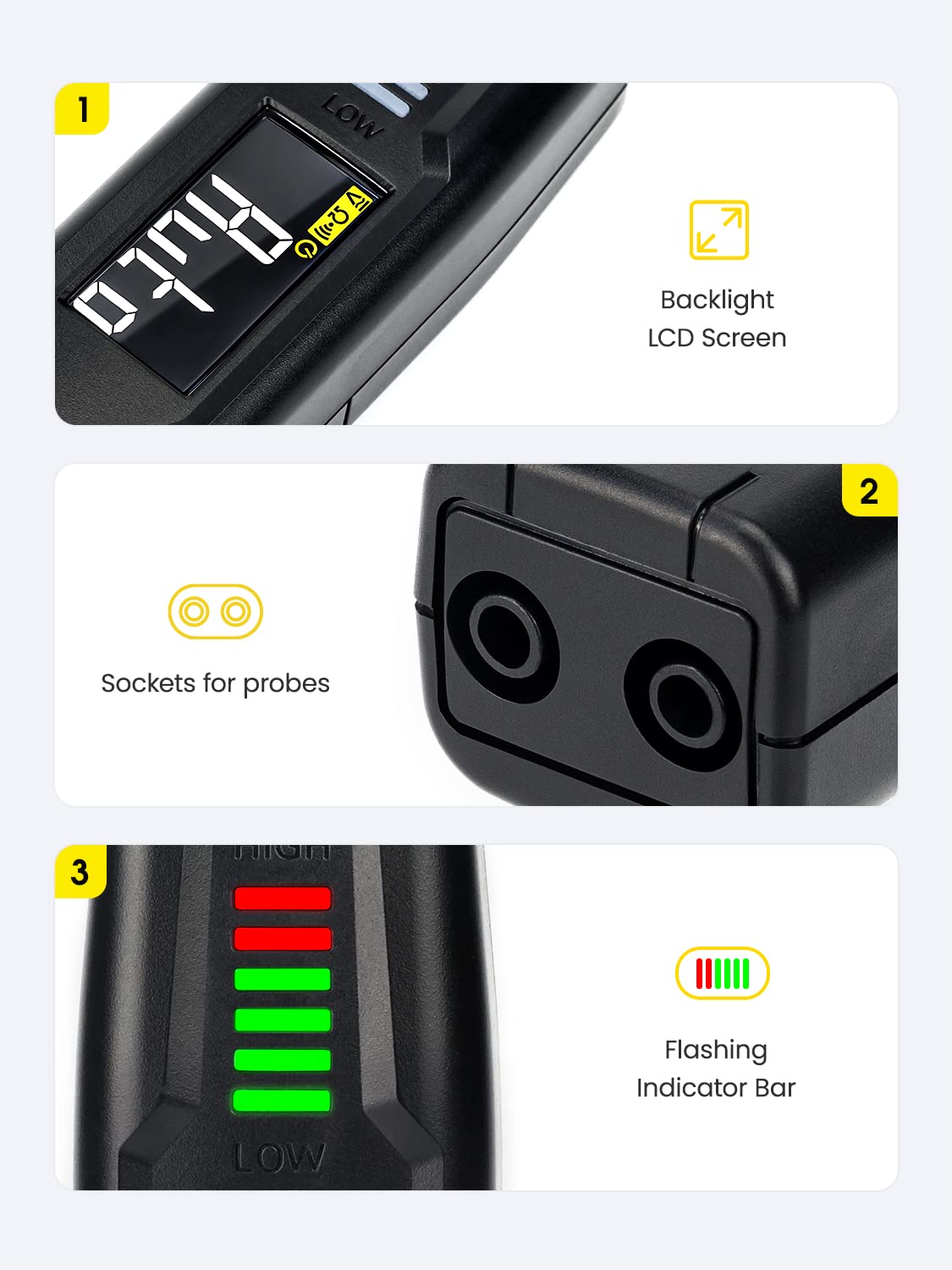
Figura 2: dettagliata view of the ST100's display, probe inputs, and indicator lights.

Figure 3: The ST100's comprehensive measurement capabilities.
4. Impostazione
4.1 Installazione della batteria
The KAIWEETS ST100 requires 2 AAA batteries for operation. To install or replace batteries:
- Individuare il coperchio del vano batteria sul retro del dispositivo.
- Slide or unscrew the cover to open the compartment.
- Inserire le 2 batterie AAA, assicurandosi della corretta polarità (+/-).
- Chiudere saldamente il coperchio del vano batterie.
5. Istruzioni per l'uso
5.1 Accensione/spegnimento
Press the red power button to turn the device on or off. The device will automatically enter NCV mode upon startup.
5.2 Modalità automatica
In Auto Mode, the ST100 automatically identifies the measurement type (Voltage, Resistance, or Continuity) and displays the reading. This simplifies operation by eliminating the need for manual range selection.

Figure 4: The ST100's intelligent Auto Measurement feature.
5.3 Senza contatto voltage (NCV) Test
The NCV function allows for voltage detection without direct contact, ideal for quickly checking for live wires or identifying breaks in cables.
- Ensure the tester is in NCV mode (default upon power on).
- Place the NCV sensor tip near the wire or outlet to be tested.
- The indicator bar will light up and the beeper will sound, with frequency and light intensity increasing con volume più altotage.

Figura 5: Utilizzo della funzione NCV per rilevare il volume in tempo realetage.

Figure 6: The display indicating Live/NCV detection.
5.4 Probe Measurements
Connect the red test lead to the 'INPUT' terminal and the black test lead to the 'COM' terminal. Press the 'FUNC' button to cycle through different measurement modes.
- Volume AC/DCtage: Misura volumetage by placing the probes across the circuit.
- Resistenza: Measure resistance of components by placing probes across them.
- Continuità: Test for continuity in circuits. A beeper will sound if continuity is detected.
- Capacità: Measure the capacitance of capacitors.
- Test diodi: Testare il volume in avantitage goccia di diodi.

Figura 7: Esamples of Capacitance, Resistance, and Diode Testing.
5.5 Rilevamento della sequenza di fase
The ST100 can assist in determining phase sequence in three-phase systems. Follow specific instructions in the full user guide for this advanced function.

Figure 8: Testing phase sequence with the ST100.
5.6 Suggerimenti generali per l'uso
- Retroilluminazione: Press the light bulb button to toggle the display backlight.
- Spegnimento automatico: The device features an auto power-off function after approximately 15 minutes of inactivity to conserve battery life.
5.7 Video dimostrativo del prodotto
Video 1: An introductory video demonstrating the features and basic operation of the KAIWEETS ST100 Voltage Tester, including non-contact voltage detection and probe measurements.
6. Manutenzione
- Pulizia: Utilizzare un morbido, damp panno per pulire l'esterno del dispositivo. Non utilizzare detergenti abrasivi o solventi.
- Magazzinaggio: Store the tester in a cool, dry place away from direct sunlight and extreme temperatures. Remove batteries if storing for extended periods to prevent leakage.
- Cura della sonda: Inspect test leads for any damage before each use. Replace if insulation is cracked or wires are exposed.
7. Risoluzione Dei Problemi
- Nessun display/alimentazione: Controllare l'installazione delle batterie e assicurarsi che non siano scariche. Sostituirle se necessario.
- Letture imprecise: Ensure probes are making good contact. Verify the correct mode is selected (if not using Auto mode). Low battery can also affect accuracy.
- NCV non rilevato: Ensure the NCV sensor tip is close enough to the live source. Environmental interference can sometimes affect NCV sensitivity.
- Nessun segnale acustico di continuità: Check if the circuit is truly continuous. Ensure probes are firmly connected. The internal speaker may be quiet in noisy environments.
8. Specifiche
| Specificazione | Valore |
|---|---|
| Dimensioni del prodotto | 6.89 x 1.1 x 1.22 pollici |
| Numero modello articolo | US-ST100 |
| Batterie | Sono necessarie 2 batterie AAA |
| Peso dell'articolo | 2.86 once (81 grammi) |
| Marca | KAIWEET - dolciumi |
| Fonte di alimentazione | Elettrico |
| Colore | Nero |
9. Garanzia e supporto
KAIWEETS provides 36-month technical support for the ST100 Smart Voltage Tester. If you have any questions or require assistance, please do not hesitate to contact KAIWEETS customer service. For the most up-to-date support information, please visit the official KAIWEETS websito o fare riferimento ai recapiti forniti sulla confezione del prodotto.


