1. Introduzione
This manual provides comprehensive instructions for the setup, operation, and maintenance of your Sharkoon V1000 RGB PC Case. Please read this manual carefully before beginning installation to ensure proper assembly and optimal performance.

Figura 1.1: The Sharkoon V1000 RGB PC Case, showcasing its front mesh panel and pre-installed RGB fans.
2. Caratteristiche principali
- Design compatto: Mini-tower form factor suitable for Micro ATX motherboards.
- Illuminazione RGB: Pre-installed RGB fans for vibrant lighting effects.
- Pannello laterale in vetro temperato: Showcases internal components.
- Flusso d'aria ottimizzato: Mesh front panel and support for multiple cooling fans.
- Compatibilità versatile: Supports graphics cards up to 40 cm, air cooling systems, and standard power supplies.
- Connettività conveniente: Front I/O panel with USB 3.0 ports.
3. Configurazione e installazione
3.1. Disimballaggio e ispezione
Carefully remove the PC case from its packaging. Inspect for any signs of damage during transit. Retain the packaging for future transport or storage.
3.2. Component Installation Overview
The Sharkoon V1000 RGB is designed for easy installation of your PC components. Follow the steps below for a typical build process.
- Preparare il caso: Remove the tempered glass side panel and the rear metal side panel to access the interior.
- Installa la scheda madre: Secure your Micro ATX motherboard onto the pre-installed standoffs. Ensure all screws are tightened appropriately.
- Installare l'alimentatore (PSU): The PSU mounts at the rear bottom of the case. Slide the PSU into the dedicated shroud area and secure it with screws from the rear.
- Installa unità di archiviazione: Utilize the drive bays for 2.5-inch SSDs or 3.5-inch HDDs. Refer to the case's internal structure for specific mounting points.
- Installa la scheda grafica: Insert your graphics card into the appropriate PCIe slot on the motherboard and secure it with the retention clip and screw. The case supports cards up to 40 cm in length.
- Collegare i cavi del pannello frontale: Connect the front panel I/O cables (USB, audio, power, reset, LED) to their respective headers on the motherboard.
- Gestione dei cavi: Utilizzate i fori per il passaggio dei cavi e i punti di fissaggio dietro il vassoio della scheda madre per gestire i cavi in modo ordinato. Questo migliora il flusso d'aria e l'estetica.
- Riattaccare i pannelli: Una volta installati tutti i componenti e sistemati i cavi, riattaccare i pannelli laterali.

Figura 3.1: Internal layout of the V1000 RGB, highlighting the motherboard tray and PSU shroud.
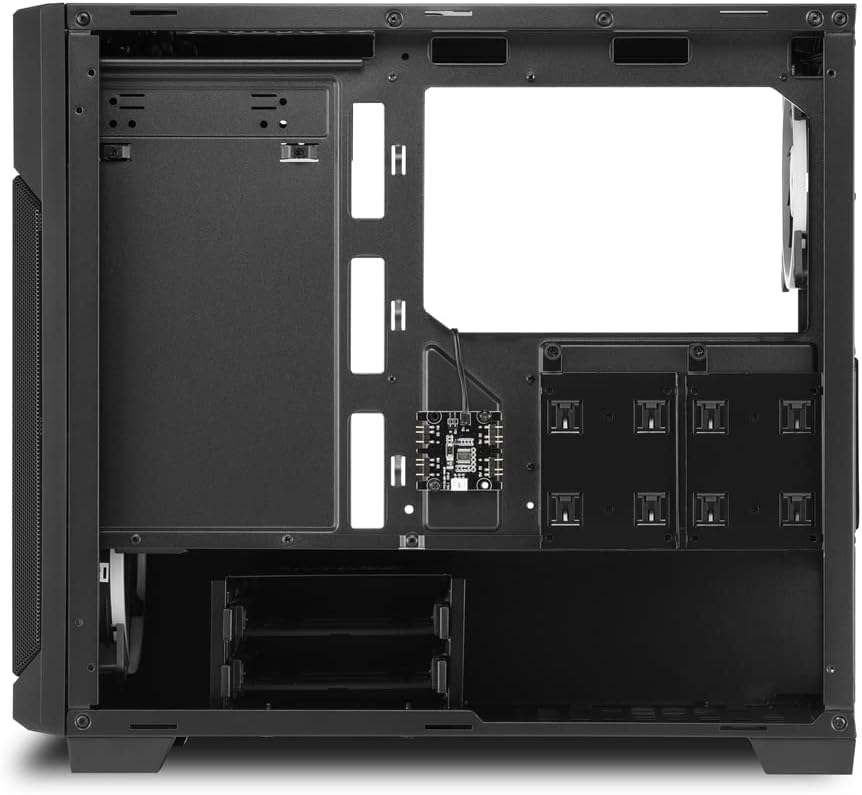
Figura 3.2: Interno posteriore view, illustrating cable routing options and drive bay locations.
4. Funzionamento del case del PC
4.1. Accensione
After connecting all external peripherals and the power cable to your PSU, press the power button located on the top front panel of the case to turn on your system.
4.2. Controllo dell'illuminazione RGB
The pre-installed RGB fans are typically controlled via your motherboard's RGB software (if compatible) or a dedicated RGB controller if included with your specific model. Refer to your motherboard or controller manual for detailed instructions on changing lighting modes and colors.
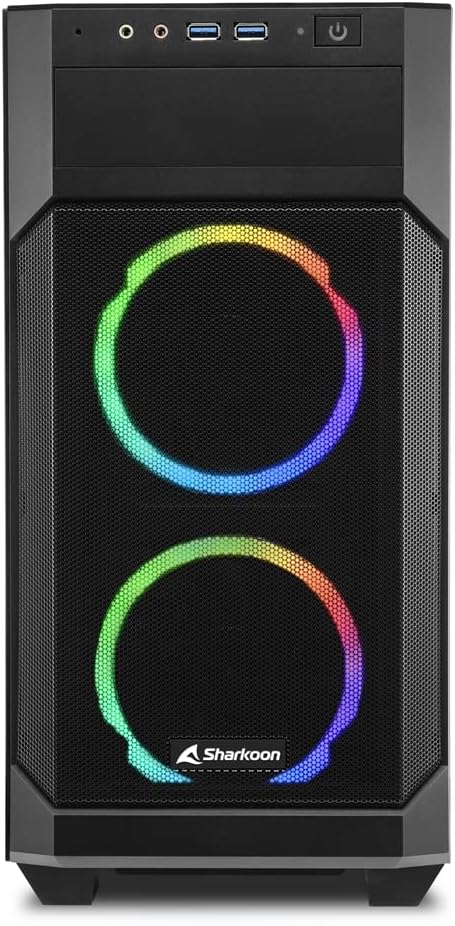
Figura 4.1: Davanti view of the V1000 RGB, showcasing the vibrant RGB fan illumination.
5. Manutenzione
5.1. Pulizia del filtro antipolvere
The Sharkoon V1000 RGB features magnetic dust filters on the top and front panels to prevent dust accumulation inside the case. Regularly clean these filters to maintain optimal airflow and cooling performance.
- Filtro superiore: Gently lift the magnetic filter from the top panel.
- Filtro anteriore: The front mesh panel can be partially opened or removed for access to the front fans and filter.
- Use a soft brush or compressed air to remove dust from the filters. Rinse with water if necessary, and ensure they are completely dry before reattaching.

Figura 5.1: Magnetic dust filter on the top panel, easily removable for cleaning.

Figura 5.2: The front panel can be opened for easy access to the front fans and dust filter.
5.2. Pulizia generale
Pulisci l'esterno della custodia con un panno morbido eamp panno. Evitare detergenti abrasivi o solventi che potrebbero danneggiare la finitura o il vetro temperato.
6. Risoluzione Dei Problemi
| Problema | Possibile causa | Soluzione |
|---|---|---|
| Il PC non si accende. | Loose power connections (PSU, motherboard, front panel). | Check all power cables are securely connected. Ensure front panel power switch cable is correctly attached to the motherboard. |
| RGB fans not lighting up. | RGB cables not connected or incorrect software settings. | Verify RGB cables are properly connected to the motherboard or controller. Check motherboard's RGB software settings. |
| Poor airflow/overheating. | Dusty filters or obstructed fan vents. | Clean dust filters. Ensure no cables or components are blocking fan airflow. |
| Le porte USB anteriori non funzionano. | Cavo USB del pannello frontale non collegato alla scheda madre. | Ensure the USB 3.0 header cable from the front panel is securely connected to the motherboard's USB 3.0 header. |
7. Specifiche tecniche
- Nome modello: Sharkoon V1000 RGB
- Numero modello: 4044951035052
- Tipo di caso: Mini-torre
- Compatibilità della scheda madre: Micro-ATX
- Materiale: Acciaio, Vetro Temperato, Plastica
- Colore: Multicolored (Black with RGB elements)
- Metodo di raffreddamento: Aria
- Ventole preinstallate: RGB fans (quantity not specified, but images show 3)
- Massimo. Lunghezza della scheda grafica: 40 centimetri
- PSU Mounting: Fondo posteriore
- I / O anteriore: 2 x USB 3.0, Audio In/Out, Power Button, Reset Button
- Caratteristiche speciali: RGB Lighting, Tempered Glass Side Panel, Removable Dust Filters
8. Garanzia e supporto
Sharkoon products are manufactured with high-quality standards. In the unlikely event of a defect, please contact your local retailer or Sharkoon customer support.
- Disponibilità dei pezzi: I pezzi di ricambio sono generalmente disponibili per 2 anni dalla data di acquisto.
- For technical assistance or warranty claims, please visit the official Sharkoon websito o contattare i loro canali di supporto.


