1. Introduzione
This manual provides essential instructions for the proper use and maintenance of your LOTUS Smartwatch Model 50003/A. Please read this guide thoroughly before using your smartwatch to ensure optimal performance and longevity.
The LOTUS Smartwatch 50003/A features an intuitive interface and elegant design, offering a variety of smart functions. It is equipped with Bluetooth connectivity, allowing seamless synchronization with your mobile devices. This synchronization enables features such as call and message notifications, music control, and other practical functions for daily life.
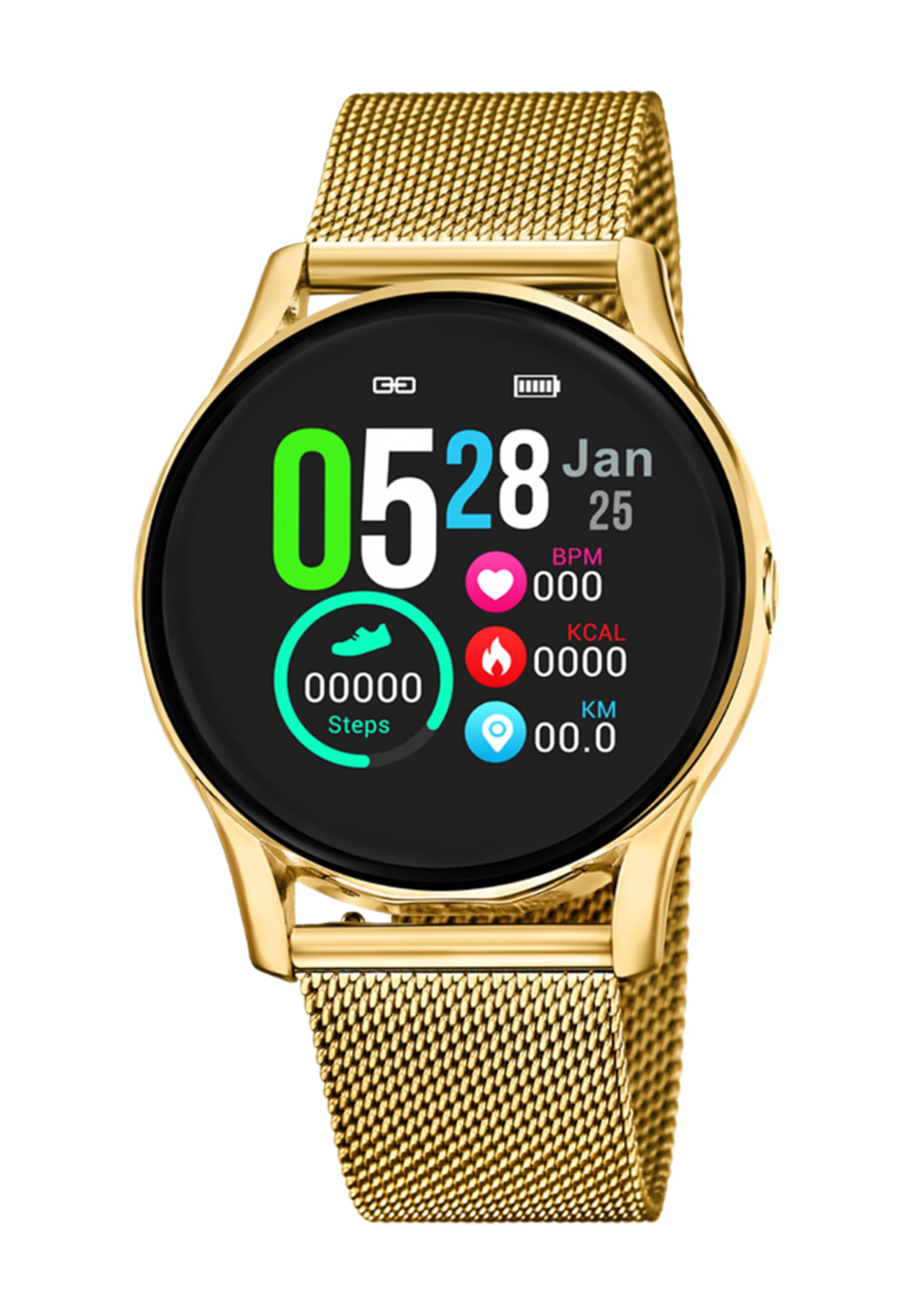
Immagine 1.1: anteriore view of the LOTUS Smartwatch 50003/A.
2. Contenuto della confezione
Please check the package contents upon unboxing. The standard package for the LOTUS Smartwatch 50003/A should include:
- LOTUS Smartwatch 50003/A
- Cavo di ricarica
- Manuale dell'utente (questo documento)
3. Guida all'installazione
3.1. Ricarica dello smartwatch
Prima del primo utilizzo, caricare completamente lo smartwatch.
- Collegare il cavo di ricarica alla porta di ricarica sul retro dello smartwatch.
- Collegare l'altra estremità del cavo di ricarica a un adattatore di alimentazione USB (non incluso) o alla porta USB di un computer.
- Il display dell'orologio indicherà lo stato di carica. Per una carica completa sono necessarie circa 2-3 ore.
3.2. Installazione dell'app complementare
To unlock all features and synchronize your smartwatch with your smartphone, you need to install the official LOTUS Connected app.
- Scan the QR code provided in the watch packaging or search for "LOTUS Connected" in your smartphone's app store (Google Play Store for Android, Apple App Store for iOS).
- Scarica e installa l'app.
- Segui le istruzioni visualizzate sullo schermo per creare un account o accedere.

Image 3.2: Synchronizing the smartwatch with the companion app on a smartphone.
3.3. Associazione con lo smartphone
Ensure Bluetooth is enabled on your smartphone and the smartwatch is charged.
- Open the LOTUS Connected app on your smartphone.
- Segui le istruzioni dell'app per aggiungere un nuovo dispositivo.
- The app will search for available smartwatches. Select "LOTUS 50003/A" from the list.
- Se richiesto, conferma la richiesta di associazione sia sullo smartphone che sullo smartwatch.
- Una volta associato, l'orologio sincronizzerà l'ora e i dati con il tuo telefono.
4. Istruzioni per l'uso
4.1. Navigazione di base
- Schermo tattile: Scorri verso sinistra/destra, su/giù per navigare tra i menu e le funzioni. Tocca per selezionare.
- Pulsanti laterali: The smartwatch may have one or more physical buttons. Typically, one button serves as a power on/off, back, or home button. Refer to the on-screen prompts for specific button functions.

Immagine 4.1: Es.ample of a smartwatch display showing activity data.
4.2. Caratteristiche principali
- Notifiche: Receive alerts for incoming calls, messages, and app notifications directly on your wrist. Manage notification settings via the LOTUS Connected app.
- Controllo della musica: Control music playback on your connected smartphone (play, pause, skip tracks, adjust volume).
- Monitoraggio delle attività: Monitor steps, distance, calories burned, and sleep patterns. View detailed statistics in the companion app.
- Resistenza all'acqua: The smartwatch is water resistant. Avoid prolonged submersion or use in hot water/steam. Refer to specifications for exact water resistance rating.
5. Manutenzione
5.1. Pulizia dello smartwatch
- Pulisci lo schermo e il corpo dell'orologio con un panno morbido e privo di lanugine.
- Per sporco ostinato, leggermente dampLavare il panno con acqua. Evitare prodotti chimici aggressivi o materiali abrasivi.
- Prima di procedere alla ricarica, assicurarsi che i contatti di ricarica siano puliti e asciutti.
5.2. Cura della batteria
- Charge the smartwatch regularly. Avoid letting the battery completely drain for extended periods.
- Do not expose the smartwatch to extreme temperatures, as this can affect battery life and performance.
- Se l'orologio non verrà utilizzato per un lungo periodo, caricarlo fino a circa il 50% prima di riporlo.
6. Risoluzione Dei Problemi
6.1. Problemi comuni e soluzioni
- L'orologio non si accende: Assicurati che l'orologio sia completamente carico. Collegalo al caricabatterie e attendi qualche minuto prima di provare ad accenderlo.
- Impossibile associare lo smartphone:
- Assicurati che il Bluetooth sia abilitato sul tuo smartphone.
- Assicurati che lo smartwatch sia nel raggio d'azione del tuo telefono.
- Riavvia sia lo smartphone che lo smartwatch.
- Prova a disaccoppiare e riassociare il dispositivo tramite l'app.
- Notifiche non ricevute:
- Check notification settings in the LOTUS Connected app.
- Assicurati che l'app disponga delle autorizzazioni necessarie sul tuo smartphone.
- Verify that the smartwatch is properly connected via Bluetooth.
- Breve durata della batteria:
- Ridurre la luminosità dello schermo.
- Disattiva le notifiche o le funzionalità non necessarie.
- Assicurarsi che l'orologio sia completamente carico prima dell'uso.
6.2. Ripristino delle impostazioni di fabbrica
If issues persist, a factory reset may resolve them. This will erase all data on the smartwatch and restore it to its original settings.
- Navigate to the "Settings" menu on your smartwatch.
- Look for an option like "System," "Reset," or "Factory Reset."
- Confermare il ripristino quando richiesto.
- After resetting, you will need to re-pair the smartwatch with your phone and set it up again.
7. Specifiche
| Caratteristica | Dettaglio |
|---|---|
| Marca | LOTO |
| Numero di modello | 50003/A |
| Colore | Nero |
| Compatibilità del sistema operativo | Androide, iOS |
| Dimensioni dello schermo | 39.65 millimetri |
| Caratteristiche speciali | Resistente all'acqua |
| Dispositivi compatibili | Smartphone |
| Composizione della batteria | Litio metallico |
| Disponibilità dei pezzi di ricambio | 5 anni |
8. Garanzia e supporto
Your LOTUS Smartwatch 50003/A comes with a manufacturer's warranty. Please refer to the warranty card included in your product packaging for specific terms and conditions.
I pezzi di ricambio per questo modello sono disponibili fino a 5 anni dalla data di acquisto.
For technical support, service, or warranty claims, please contact LOTUS customer service through their official websito o le informazioni di contatto fornite nella documentazione di garanzia.


