1. Introduzione
The My Arcade Gamer V Classic is a portable gaming system designed for on-the-go entertainment. This device comes preloaded with 220 classic video games, offering a wide variety of genres including entertainment, sports, and adventure. Its compact size and 2.5-inch color display make it suitable for use at home, during travel, or at social gatherings. This manual provides essential information for setting up, operating, maintaining, and troubleshooting your Gamer V Classic.
2. Cosa c'è nella scatola
- Gamer V Classic Portable Gaming System
- Guida per l'utente (questo documento)
3. Caratteristiche del prodotto
- Design adatto ai bambini: No console or controllers required.
- Excellent Gaming Experience: Perfect for travel, birthday parties, gifts, and more.
- Rich Collection of Classic Games: Includes 220 preloaded video games including various types such as entertainment, sports, and adventure.
- Conveniente: 2.5" color display, suitable for playing portable games outdoors.
- Controllo del volume: Integrated volume control for adjustable audio.
- Piccolo e leggero: Progettato per una facile trasportabilità.
- Fonte di energia: Alimentato da 3 batterie AAA (non incluse).
4. Impostazione
4.1 Installazione della batteria
- Locate the battery compartment on the back of the Gamer V Classic unit.
- Aprire il coperchio del vano batterie.
- Inserire 3 batterie AAA nuove, assicurandosi che la polarità (+/-) sia corretta, come indicato all'interno del vano.
- Chiudere saldamente il coperchio del vano batterie.
Nota: Batteries are not included. Alternatively, the unit can be powered via a USB-C cable (not included) connected to a 5V power source.
4.2 Accensione
Press and hold the power button (usually located on the top left of the device) for a few seconds until the screen illuminates and the My Arcade logo appears.

Image: The Gamer V Classic in use, showing its compact design and screen.
5. Istruzioni per l'uso
5.1 controlli oltreview
- D-Pad (tastiera direzionale): Located on the left, used for movement and menu navigation.
- Pulsanti A/B: Action buttons located on the right, used for jumping, firing, selecting, etc.
- Pulsante di avvio: Avvia i giochi e mette in pausa il gioco.
- Pulsante di reset: Returns to the main menu or restarts the current game.
- Pulsante Home: Returns to the game selection screen.
- Controllo del volume: Adjusts the audio level of the device.
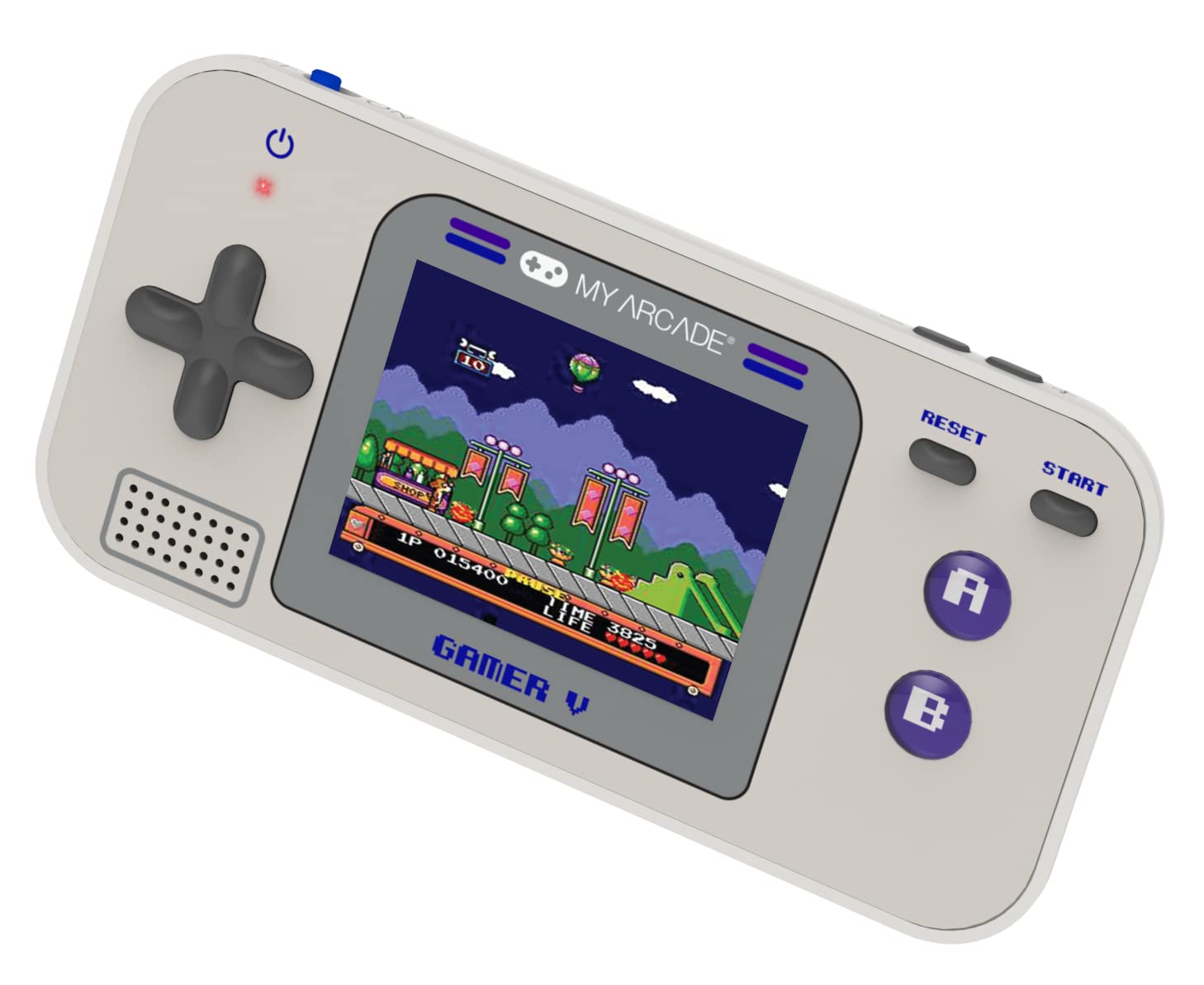
Immagine: dettagliata view of the Gamer V Classic controls.
5.2 Selezione e gioco del gioco
- After powering on, the device will display the main game selection menu.
- Use the D-Pad to scroll through the list of available games.
- Press the 'A' button or 'Start' button to select and launch a game.
- Follow on-screen instructions for specific game controls.
- To return to the game selection menu, press the 'Home' button.
5.3 Regolazione del volume
Use the dedicated volume control buttons or switch (location may vary slightly by unit) to increase or decrease the sound output.
6. Manutenzione
- Pulizia: Per pulire il dispositivo, utilizzare un panno morbido e asciutto. Non utilizzare detergenti liquidi o spray.
- Magazzinaggio: Store the device in a cool, dry place away from direct sunlight and extreme temperatures. If storing for an extended period, remove the batteries.
- Cura della batteria: Replace all batteries at the same time. Do not mix old and new batteries or different types of batteries. Dispose of used batteries responsibly.
- Evitare l'impatto: Non far cadere il dispositivo né sottoporlo a forti urti, poiché ciò potrebbe danneggiare i componenti interni o lo schermo.
7. Risoluzione Dei Problemi
| Problema | Possibile causa | Soluzione |
|---|---|---|
| Il dispositivo non si accende. | Batterie scariche o esaurite. Installazione errata della batteria. | Replace batteries with new ones, ensuring correct polarity. Try powering via USB-C cable. |
| Lo schermo è vuoto o distorto. | Low battery power. Device malfunction. | Replace batteries or connect to USB-C power. If problem persists, contact customer support. |
| Nessun suono o volume basso. | Volume set too low. Mute function activated. | Adjust volume using the volume controls. Ensure no external headphones are connected if not intended. |
| I pulsanti non rispondono. | Device frozen. Low battery power. | Try pressing the 'Reset' button. Replace batteries. Power cycle the device (turn off and on). |
8. Specifiche
- Dimensioni del prodotto: 5 cm L x 2.5 cm P x 0.75 cm A
- Tipo di controller: Controllo dei pulsanti
- Peso dell'articolo: 0.15 chilogrammi (5.3 once)
- Dimensioni dello schermo: 2.5 pollici
- Fonte di energia: Alimentato a batteria (sono necessarie 3 batterie AAA, non incluse)
- Interfaccia hardware: Interno con supporto rimovibile
- Fascia d'età (descrizione): Kid, Teen
- Tipo di visualizzazione: LCD o LED
- Materiale: Plastica
- Fattore di forma: Portatile
- Numero modello articolo: DGUN-3920
- Produttore: La mia sala giochi
9. Garanzia e supporto
For warranty information and customer support, please refer to the official My Arcade websito o contattare il servizio clienti. Conservare la ricevuta d'acquisto come prova d'acquisto.


