1. Informazioni importanti sulla sicurezza
Si prega di leggere attentamente tutte le istruzioni prima del montaggio e dell'uso. Il mancato rispetto di queste istruzioni può causare lesioni o danni al prodotto.
- Non superare il limite di peso massimo di 145 libbre (65.7 kg).
- Exercise caution when adjusting the desk height to prevent pinching or crushing injuries. Ensure no objects or body parts are in the path of the moving desk.
- Ensure all screws and fasteners are securely tightened before using the desk. Regularly check for loose connections.
- Tenere bambini e animali domestici lontani dalla scrivania durante il funzionamento.
- Non stare né seduto né in piedi sulla scrivania.
- If any parts are missing or damaged, do not attempt to assemble or use the desk. Contact customer support immediately.
2. Contenuto della confezione
Prima di iniziare il montaggio, verificare che tutti i componenti siano presenti e integri.
- Pannelli da scrivania (2 pezzi)
- Desk Legs (2) with T-shaped feet
- Motor and Control Panel
- Biella
- Adattatore di alimentazione e cavo
- Gancio per cuffie
- Cable Hole Covers
- Assembly Hardware (screws, brackets, tools)
- Manuale di istruzioni
3. Installazione e assemblaggio
Assembly is straightforward and typically requires one person, though two people are recommended for lifting the desktop. All necessary tools are included.
- Assemblare il telaio: Attach the T-shaped feet to the desk legs. Connect the two desk legs using the crossbar and connecting rod. Ensure the connecting rod is properly aligned between both legs.
- Collega i pannelli del desktop: Place the two desktop panels upside down on a soft, clean surface. Securely attach the metal brackets to join the two desktop pieces. Then, attach the assembled frame to the underside of the desktop using the provided screws.
- Installare il pannello di controllo e gli accessori: Mount the digital control panel to the underside of the desktop in the desired location. Connect the motor and control panel cables. Install the headphone hook and cable hole covers.
- Connetti alimentazione: Collegare l'adattatore di alimentazione all'unità di controllo e poi a una presa a muro.
- Configurazione iniziale: Before first use, ensure both legs are at the same height. If not, adjust manually using the control panel.
Video: Full installation and usage guide for the Furmax Electric Height Adjustable Standing Desk. This video demonstrates the step-by-step assembly process and initial setup procedures.

Immagine: A view of the underside of the desk, highlighting the motor, connecting rod, and how the two desktop panels are joined. This illustrates the robust construction and internal mechanisms.
4. Istruzioni per l'uso
The Furmax Electric Height Adjustable Standing Desk features an intuitive digital control panel for easy height adjustments and memory presets.
Funzioni del pannello di controllo:
- Display a LED: Mostra l'altezza attuale della scrivania in pollici.
- Tasto Su (▲): Tieni premuto per sollevare la scrivania.
- Tasto Giù (▼): Tieni premuto per abbassare la scrivania.
- Preimpostazioni di memoria (1, 2): Press and hold the 'S' (Set) button, then press '1' or '2' to save the current height. To recall a saved height, simply press '1' or '2'.
The desk can be adjusted between a minimum height of 28.7 inches and a maximum height of 46.4 inches. The motor operates smoothly at 1 inch per second with low noise levels (under 50 dB).
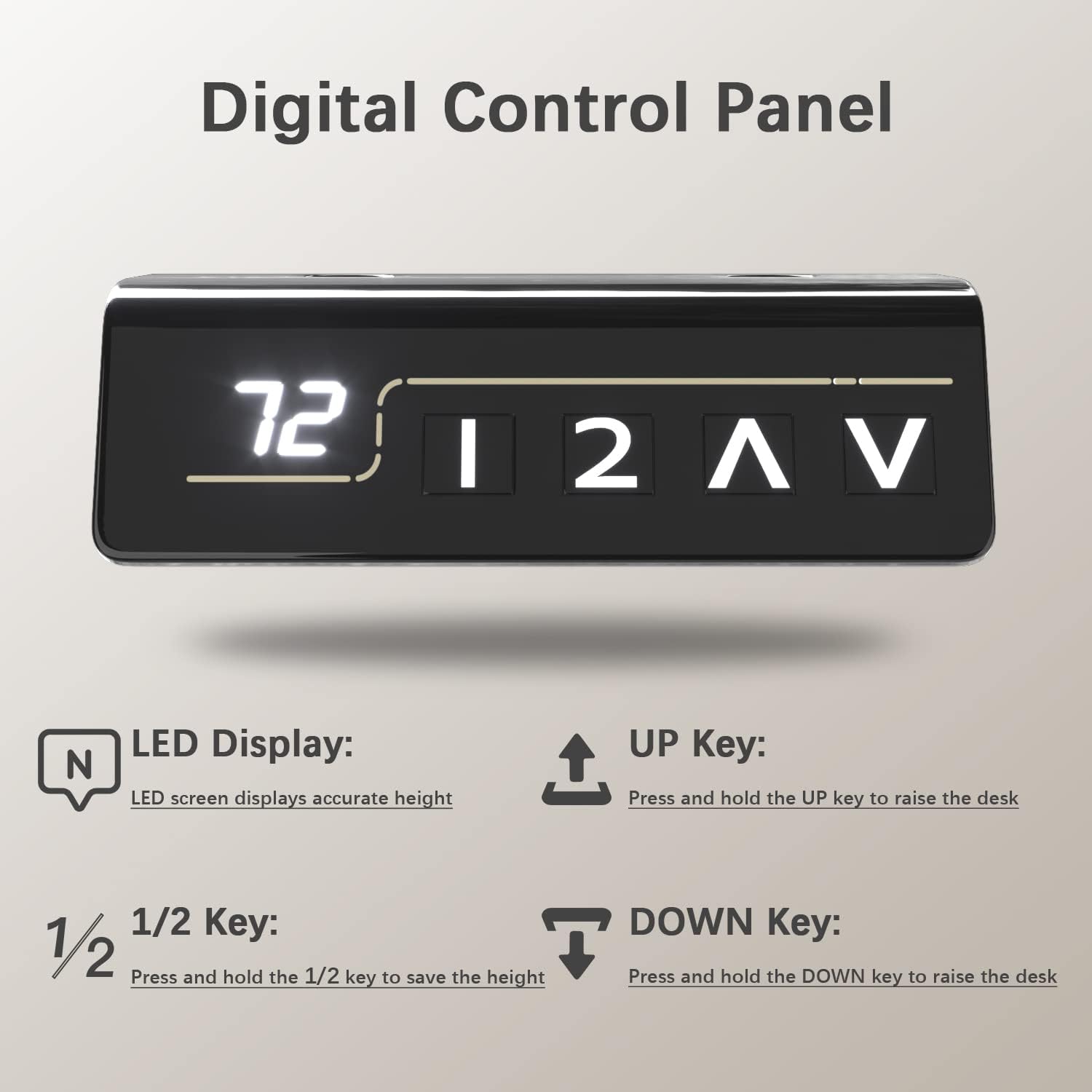
Immagine: Un dettagliato view of the digital control panel, illustrating the LED height display and the intuitive buttons for height adjustment and memory settings.
Video: Demonstration of the Furmax Electric Height Adjustable Desk in operation, showcasing the smooth and quiet height adjustment feature.
5. Caratteristiche principali
- Regolazione elettrica dell'altezza: Seamlessly switch between sitting and standing positions with the touch of a button, promoting a healthier work environment.
- Preimpostazioni di memoria: Two programmable memory settings allow you to quickly recall your preferred sitting and standing heights.
- Desktop spazioso: The 55 x 24 inch desktop (composed of two high-class wood panels) provides ample space for multiple monitors, laptops, and office accessories. Features round desk corners and wire holes for organization.
- Motore durevole e silenzioso: Operates at 1 inch per second with noise levels below 50 dB, ensuring minimal disruption. Designed for over 10,000 uses.
- Costruzione robusta: Box-frame structured steel legs with wide T-shaped feet provide excellent stability, even at maximum height.
- Caratteristiche di sicurezza: Includes safety lock, anti-collision function, and overheat protection for reliable operation.
- Accessori integrati: Comes with a convenient headphone hook and cable management holes to keep your workspace tidy.

Immagine: A visual representation of the desk's height range, from its lowest point of 28.7 inches to its highest point of 46.4 inches, demonstrating its versatility.
Immagine: Dettagliato views of the practical desk hook for headphones, the stable wide T-shaped foot design, and the ergonomically designed cambered table corners.
6. Manutenzione
- Pulizia: Pulisci il desktop e la cornice con un panno morbido eamp panno. Evitare prodotti chimici aggressivi o detergenti abrasivi.
- Controlli regolari: Controllare periodicamente tutte le viti e i collegamenti per assicurarsi che siano sempre ben serrati.
- Gestione dei cavi: Ensure cables are neatly organized and do not interfere with the desk's movement.
7. Risoluzione Dei Problemi
| Problema | Possibile causa | Soluzione |
|---|---|---|
| La scrivania non si muove. | Power cable disconnected, motor issue, control panel malfunction. | Check power connections. Ensure the power adapter is securely plugged into the wall and the control unit. If the issue persists, contact customer support. |
| Regolazione dell'altezza non uniforme. | Connecting rod not properly installed or damaged. | Verify the connecting rod is correctly seated and secured between both legs. Perform an initial setup/reset if necessary (refer to full manual for specific reset procedures). |
| La scrivania si ferma durante la regolazione. | Overload (exceeding 145 lbs), anti-collision activated, overheat protection. | Reduce weight on the desk. Check for obstructions. Allow the motor to cool down if it has been used continuously. |
8. Specifiche
- Marca: Furmax
- Numero modello: ST241
- Dimensioni del desktop: 55" W x 24" D (139.7 cm x 60.96 cm)
- Intervallo di altezza: 28.7" - 46.4" (72.9 cm - 117.9 cm)
- Capacità di peso: 145 libbre (65.7 kg)
- Velocità del motore: 1 pollici/secondo
- Livello di rumore: Sotto i 50 dB
- Materiale del tavolo: Legno (finitura laminata)
- Materiale del telaio: Acciaio legato
- Colore: Brown (Desktop), Black (Frame)
- Caratteristiche: Electric Lift, Memory Presets, Anti-Collision, Overheat Protection, Cable Hole, Headphone Hook

Immagine: A comprehensive diagram detailing the dimensions of the desk (55 inches wide, 24 inches deep, and a height range of 28.7 to 48.1 inches) and its maximum weight capacity of 145 lbs.
9. Informazioni sulla garanzia
This Furmax Electric Height Adjustable Standing Desk comes with a Garanzia limitata. Please refer to the warranty card included in your package or contact Furmax customer support for detailed terms and conditions.
10. Assistenza clienti
For any questions, assistance with assembly, troubleshooting, or warranty claims, please contact Furmax customer support through the retailer's platform or the official Furmax websito.
Puoi anche visitare il Negozio Furmax su Amazon per ulteriori informazioni e risorse di supporto.


