1. Istruzioni di sicurezza
Si prega di leggere attentamente tutte le istruzioni prima del montaggio e dell'uso. Il mancato rispetto di queste istruzioni può causare lesioni o danni al prodotto.
- Capacità di peso massima: Non superare il peso massimo raccomandato di 145 libbre (65.7 kg).
- Motor System Safety: Ensure the motor system's safety lock, anti-collision, and overheat protection functions are working correctly.
- Montaggio: Follow the assembly instructions precisely. Two people are recommended for assembly to prevent injury and ensure proper setup.
- Utensili elettrici: Avoid using power tools for tightening screws, especially for the desktop, as this may strip threads or damage components. Use hand tools provided or appropriate manual tools.
- Stabilità: The desk features a wide T-shaped foot design for stability. Ensure all feet are level on the ground before use.
- Liquidazione: Ensure there are no obstructions above or below the desk when adjusting height to prevent damage or injury.
- Bambini e animali domestici: Tenere bambini e animali domestici lontani dalla scrivania durante il funzionamento.
2. Prodotto finitoview e Caratteristiche
The Furmax Electric Height Adjustable Standing Desk is designed to promote a healthier work environment by allowing seamless transitions between sitting and standing positions. Its robust construction and intelligent features enhance productivity and comfort.
- Regolazione elettrica dell'altezza: Easily control desk height with intuitive buttons, accommodating various user heights and preferences.
- Preimpostazioni di memoria: Features 1/2 memory keys for quick and accurate adjustment to your preferred sitting and standing heights.
- Caratteristiche di sicurezza: Equipped with safety lock, anti-collision, and overheat protection functions for secure operation.
- Desktop spazioso: A large 55 x 24 inch (139.7 x 60.96 cm) wood desktop provides ample space for computers, notebooks, files, and other office supplies. Note: The desktop is divided into two pieces.
- Motore durevole e silenzioso: High-quality motor allows height adjustment between 28.7 to 46.4 inches (72.9 to 117.9 cm) at 1 inch/second with low noise (under 50 dB). Designed for over 10,000 uses.
- Costruzione robusta: Box-frame structured steel legs with a wide T-shaped foot design ensure stability even at maximum height.
- Funzionalità integrate: Includes cable holes for organization and a headphone hook for convenience.

Image: Adjustable height range of the Furmax Electric Standing Desk.
3. Contenuto della confezione
Before beginning assembly, ensure all parts are present and undamaged. Refer to the included parts list in your package for exact quantities.
- Scrivania (2 pezzi)
- Gambe (2 pezzi)
- Feet (2 pieces, T-shaped)
- Crossbar/Connecting Rod
- Motore e scatola di controllo
- Pannello di controllo digitale
- Adattatore di alimentazione e cavo
- Gancio per cuffie
- Ferramenta di montaggio (viti, chiave a brugola, ecc.)
4. Installazione e assemblaggio
Per un corretto montaggio, seguire questi passaggi. Si consiglia di essere in due per questa operazione.
- Preparare l'area di lavoro: Preparare un'area spaziosa per l'assemblaggio. Disporre tutti i componenti e la ferramenta.
- Assemble Legs and Feet: Attach the T-shaped feet to the bottom of each leg using the provided screws.
- Connect Legs with Crossbar: Secure the crossbar between the two legs. Ensure the connecting rod is properly inserted and aligned to transmit motor torque. Maintain equal height for both legs before securing the shaft.
- Attach Desktop Halves: Use the wooden dowels and metal plates to join the two desktop pieces securely. Tighten screws carefully by hand to avoid damage.
- Montare la cornice sul desktop: Carefully place the assembled frame onto the underside of the desktop. Align screw holes and secure the frame to the desktop.
- Installare la scatola di controllo e il pannello: Mount the control box and digital control panel to the designated areas under the desktop.
- Collegare il cablaggio: Connect the motor, control panel, and power adapter to the control box. Use cable management clips to keep wires tidy.
- Fissare il gancio per le cuffie: Install the headphone hook to your preferred side of the desk.
- Controllo finale: Ensure all screws are tightened, and the desk is stable. Plug in the power adapter.

Immagine: Esploso view of Furmax Electric Standing Desk components.
Video: Official installation guide for the Furmax Electric Height Adjustable Standing Desk.
5. Istruzioni per l'uso
The digital control panel allows for easy and precise height adjustments.
- Display a LED: The LED screen displays the current desk height in inches.
- Tasto SU (▲): Press and hold the UP key to raise the desk. Release to stop at the desired height.
- Tasto GIÙ (▼): Press and hold the DOWN key to lower the desk. Release to stop at the desired height.
- Preimpostazioni di memoria (1, 2): To save a height, adjust the desk to your desired position, then press and hold the '1' or '2' key until you hear a beep or the display flashes. To recall a saved height, simply press the corresponding '1' or '2' key.
- Funzione anticollisione: The desk is equipped with an anti-collision system. If the desk encounters an obstacle during adjustment, it will stop and reverse slightly to prevent damage.
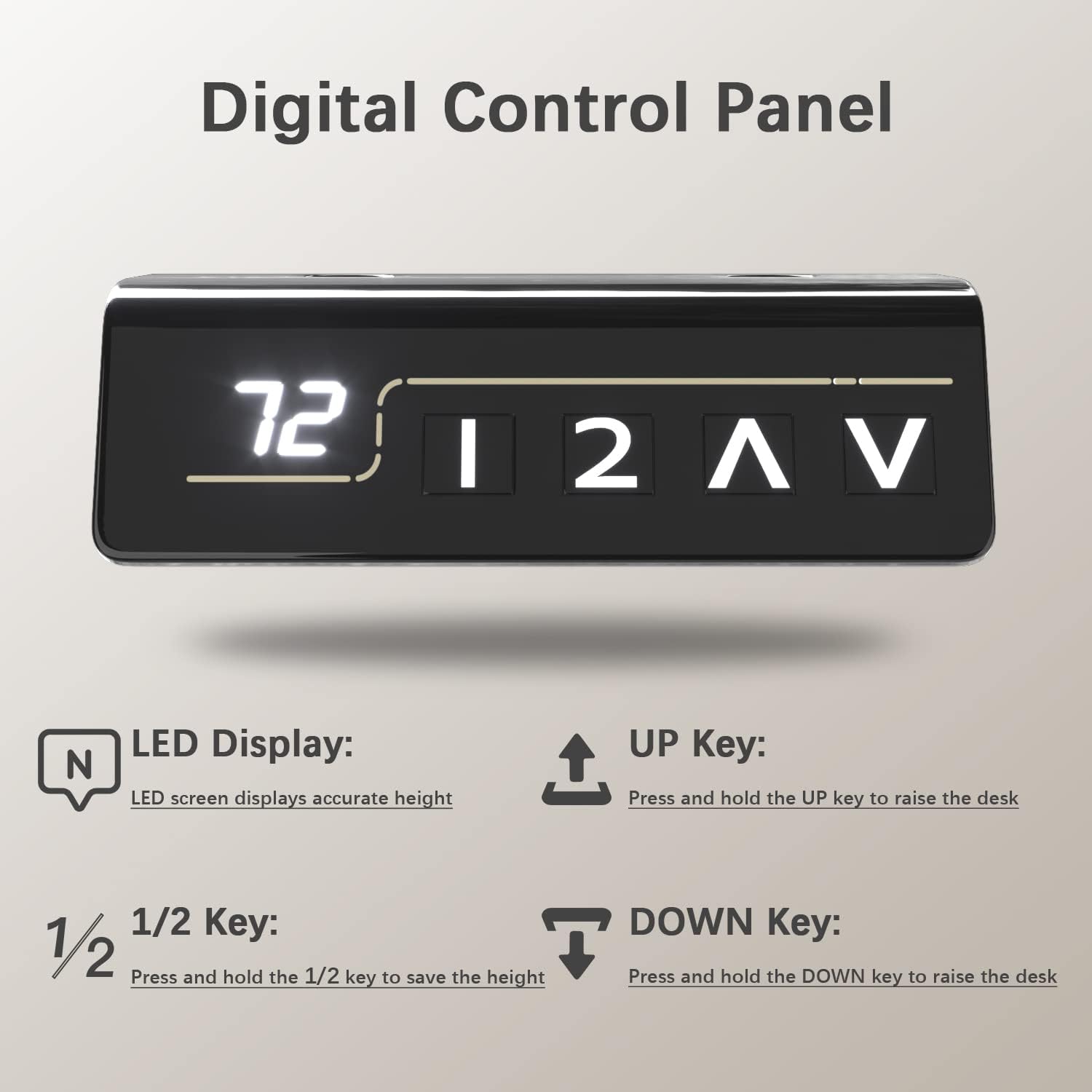
Image: Digital Control Panel.
6. Manutenzione
Una manutenzione regolare garantisce la longevità e le prestazioni ottimali della tua scrivania.
- Pulizia: Pulisci il desktop e la cornice con un panno morbido eamp panno. Evitare prodotti chimici aggressivi o detergenti abrasivi.
- Controllare le connessioni: Controllare periodicamente tutte le viti e i collegamenti per assicurarsi che siano ben serrati. Serrare nuovamente se necessario.
- Gestione dei cavi: Keep cables organized to prevent tangling or interference with the desk's movement.
- Cura del motore: The motor is designed for durability. Avoid overloading the desk beyond its weight capacity to prevent strain on the motor.
7. Risoluzione Dei Problemi
In caso di problemi, fare riferimento ai seguenti suggerimenti comuni per la risoluzione dei problemi:
- La scrivania non si muove: Check if the power cable is securely plugged into both the desk and the wall outlet. Ensure no cables are caught or obstructing movement.
- Altezza irregolare: If the desk appears uneven, check that the connecting rod between the legs is properly installed and secured. Refer to the assembly instructions.
- Codici di errore: If the LED display shows an error code, consult the full user manual (if provided separately) or contact customer support for specific instructions.
- Anti-Collision Activation: If the desk stops unexpectedly, it might be due to the anti-collision feature. Remove any obstructions and try adjusting again.
8. Specifiche
| Caratteristica | Dettaglio |
|---|---|
| Marca | Furmax |
| Numero di modello | ST241 |
| Dimensioni del desktop (L x P) | 55" x 24" (139.7 cm x 60.96 cm) |
| Gamma di regolazione dell'altezza | 28.7" - 46.4" (72.9 cm - 117.9 cm) |
| Capacità massima di peso | 145 libbre (65.7 kg) |
| Velocità | 1"/secondo |
| Livello di rumore | Sotto i 50 dB |
| Materiale del desktop | Legno (laminato) |
| Materiale del telaio | Metallo (acciaio legato) |
| Caratteristiche speciali | Adjustable Height, Memory Presets, Anti-Collision, Cable Hole, Headphone Hook |

Image: Furmax Electric Standing Desk dimensions and weight capacity.
9. Garanzia e supporto
This Furmax Electric Height Adjustable Standing Desk comes with a Garanzia limitataPer i termini e le condizioni specifici, fare riferimento alla scheda di garanzia inclusa nella confezione.
For technical support, troubleshooting assistance, or warranty claims, please contact Furmax customer service through the retailer where the product was purchased or visit the official Furmax websito per le informazioni di contatto.


