1. Introduzione
Thank you for choosing the USX MOUNT TV Wall Mount. This manual provides essential information for the safe and correct installation, operation, and maintenance of your new TV wall mount. Please read these instructions thoroughly before installation and retain them for future reference.
2. Informazioni sulla sicurezza
AVVERTIMENTO: Failure to read and follow these instructions may result in serious personal injury, property damage, or voiding of your warranty. If you have any questions, please contact customer service.
- Assicurarsi che la superficie di montaggio possa sostenere in modo sicuro il peso combinato del supporto e del televisore.
- Non superare la capacità di carico massima di 35 kg (77 libbre).
- This product is designed for installation on wood studs or solid concrete walls only. Do not install on drywall alone.
- Utilizzare sempre un cerca-travetti per individuare con precisione i montanti in legno.
- Durante l'installazione, utilizzare dispositivi di sicurezza adeguati, tra cui protezioni per gli occhi.
- Per garantire la sicurezza, si consiglia di effettuare l'installazione in due persone.
3. Contenuto della confezione
Verify that all components are present and undamaged before beginning installation. If any parts are missing or defective, contact customer service.
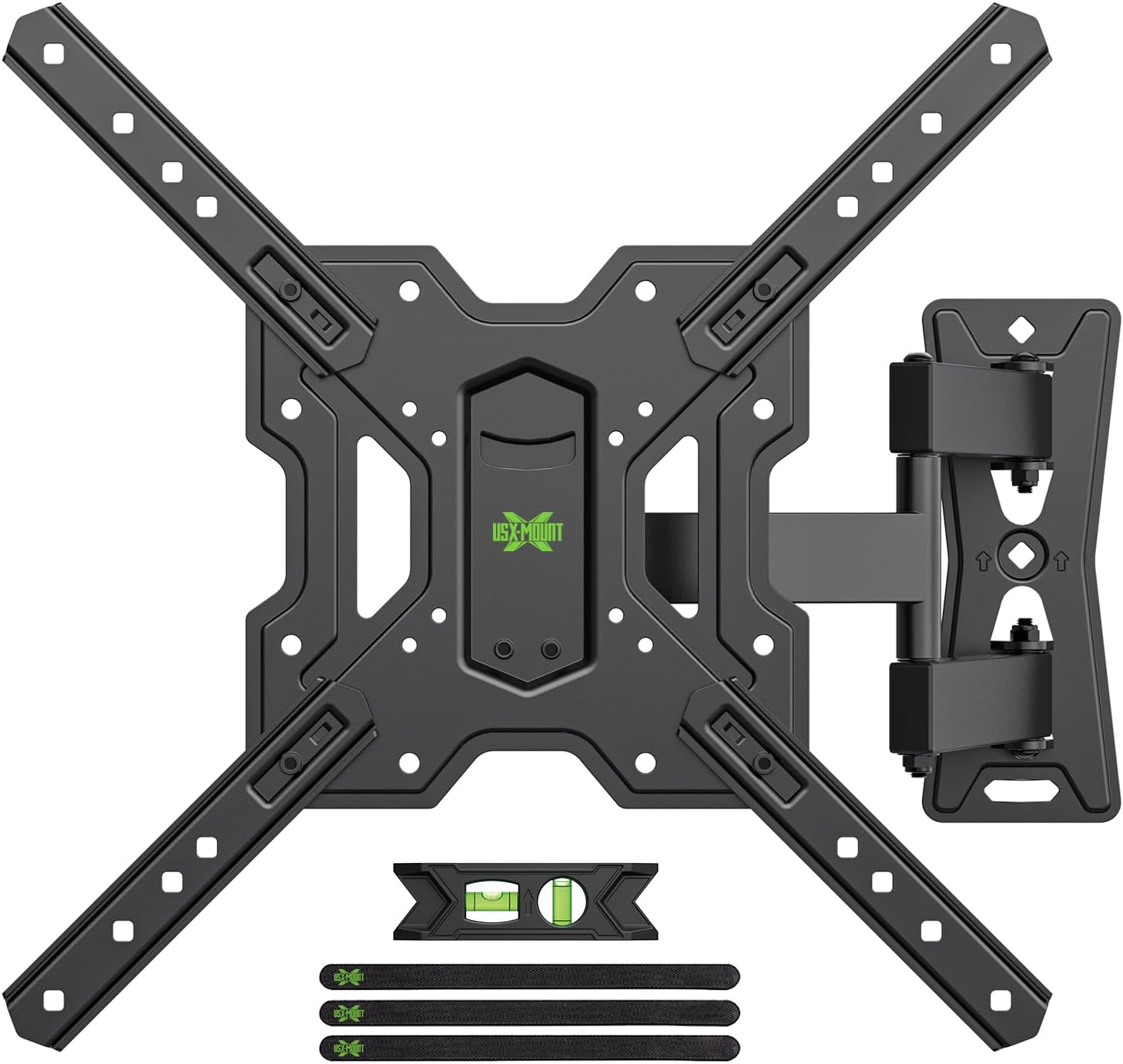
Figura 3.1: Sopraview of the USX MOUNT TV Wall Mount and all included accessories, such as the main mount assembly, VESA extension arms, bubble level, and cable ties.
Hardware incluso:
- Montaggio piastra a parete
- TV Plate (VESA Adapter)
- Varie viti, rondelle e distanziali per il fissaggio della TV
- Lag bolts and concrete anchors for wall attachment
- Livella a bolla
- Fascette per cavi
- Chiave esagonale
4. Specifiche
| Caratteristica | Specificazione |
|---|---|
| Dimensioni TV compatibili | 26-55 pollici |
| Capacità di carico massima | 35 kg (77 libbre) |
| Compatibilità VESA | 75x75mm, 100x100mm, 100x200mm, 200x100mm, 200x200mm, 150x150mm, 200x300mm, 200x400mm, 300x200mm, 300x300mm, 400x200mm, 400x300mm, 400x400mm |
| Angolo di inclinazione | da +5° a -15° |
| Angolo di rotazione | ±90° (a seconda delle dimensioni del televisore) |
| Regolazione del livello | ±4° |
| Distanza dal muro | Da 70 mm (min) a 480 mm (max) |
| Materiale | Acciaio |
| Colore | Nero |

Figura 4.1: VESA compatibility chart and maximum load capacity for the mount. Always check your TV's VESA pattern before installation.

Figura 4.2: Visual representation of various VESA mounting patterns supported by the mount, indicating horizontal and vertical screw hole distances.
5. Istruzioni per l'installazione
Step 1: Attach TV Plate to TV
- Posizionare con cautela il televisore a faccia in giù su una superficie morbida e pulita per evitare di danneggiare lo schermo.
- Identifica i fori di montaggio VESA sul retro del televisore.
- Selezionare le viti, le rondelle e i distanziali adatti ai fori di montaggio del televisore dal kit hardware fornito.
- Attach the TV plate (VESA adapter) to the back of your TV using the selected hardware. Ensure it is securely fastened but do not overtighten.
Passaggio 2: attaccare la piastra a parete alla parete
IMPORTANTE: Determine your wall type before proceeding. This mount is suitable for wood stud walls and solid concrete walls.

Figura 5.1: Illustration of compatible wall types for installation: wood stud and solid concrete. Ensure your wall matches one of these types.
Per pareti con montanti in legno:
- Use a stud finder to locate the edges and center of the wood stud. Mark the center of the stud.
- Position the wall plate at your desired height and use the integrated bubble level to ensure it is perfectly horizontal. Mark the pilot hole locations.
- Drill pilot holes into the center of the stud at the marked locations. The drill bit size should be 5/32" (4 mm) and the depth approximately 2.36" (60 mm).
- Attach the wall plate to the wall using the provided lag bolts. Tighten securely with a wrench.
Per pareti in calcestruzzo pieno:
- Position the wall plate at your desired height and use the integrated bubble level to ensure it is perfectly horizontal. Mark the pilot hole locations.
- Drill pilot holes into the concrete at the marked locations. The drill bit size should be 3/8" (10 mm) and the depth approximately 2.36" (60 mm).
- Insert the concrete anchors into the drilled holes. Tap them gently with a hammer until they are flush with the wall surface.
- Attach the wall plate to the wall using the provided lag bolts. Tighten securely with a wrench.
Step 3: Hang and Secure TV to Wall Plate
- With assistance, carefully lift the TV (with the TV plate attached) and hook it onto the wall plate.
- Ensure the TV is properly seated and centered on the wall plate.
- Secure the TV to the wall plate using the safety screws or locking mechanisms provided. This prevents accidental dislodgement.
5.1 video: A short demonstration of the installation process, including attaching the TV plate, mounting the wall plate, and hanging the TV. This video also briefly shows the leveling and tilting adjustments.
6. Istruzioni per l'uso (Regolazioni)
Your USX MOUNT TV Wall Mount offers various adjustments for optimal viewing.
Regolazione dell'inclinazione:
The mount allows for a tilt range of +5° to -15°. To adjust the tilt:
- Locate the tilt adjustment knobs on the TV plate.
- Loosen the knobs to allow the TV to tilt freely.
- Adjust the TV to your desired vertical angle.
- Tighten the knobs to secure the TV in place.
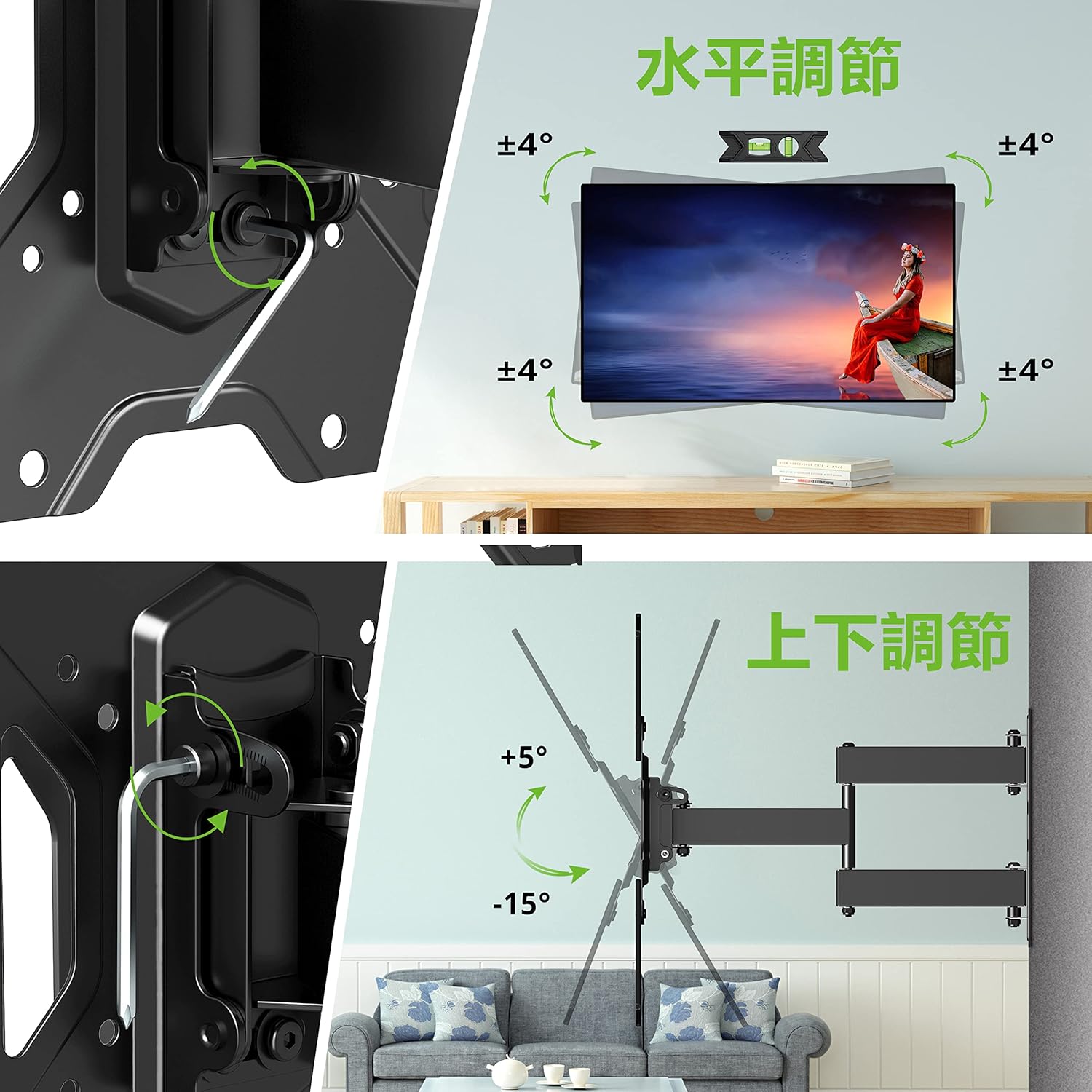
Figura 6.1: Visual guide for adjusting the horizontal level and vertical tilt of the TV. The top panel shows ±4° leveling, and the bottom panel shows +5° to -15° tilt.

Figura 6.2: This image illustrates the adjustable distance from the wall (70mm to 426mm) and the tilt angles (+5° backward, -15° forward) of the TV mount.
Regolazione della rotazione:
The mount allows for a swivel of up to ±90° (left/right), depending on the size of your TV. To adjust the swivel:
- Gently push or pull the TV to the desired left or right angle.
- The friction joints will hold the TV in position.

Figura 6.3: This diagram demonstrates the ±90° swivel capability of the TV mount, allowing for flexible viewangoli di ripresa da varie posizioni in una stanza.
Regolazione del livello:
The mount allows for a level adjustment of ±4° after installation. To adjust the level:
- Use the provided hex key to loosen the leveling screws on the TV plate.
- Adjust the TV until it is perfectly level using the bubble level.
- Tighten the leveling screws to secure the TV in the desired horizontal position.
7. Manutenzione
- Controllare periodicamente tutte le viti e i bulloni per assicurarsi che siano ben serrati. Serrarli nuovamente se necessario.
- Pulire il supporto con un panno morbido e asciutto. Evitare detergenti abrasivi o solventi.
- Ensure cables are managed neatly using the provided cable ties to prevent strain or damage.
8. Risoluzione Dei Problemi
If you encounter any issues during or after installation, please refer to the following common solutions:
- TV non in piano: Use the level adjustment feature as described in Section 6.
- Il supporto sembra allentato: Recheck all wall and TV attachment points and tighten any loose fasteners. Ensure the wall type is appropriate for installation.
- Difficoltà nella regolazione dell'inclinazione/rotazione: Ensure all adjustment knobs/screws are sufficiently loosened before attempting to move the TV.
If the problem persists, contact USX MOUNT customer support.
9. Garanzia e supporto
USX MOUNT provides a 10-year quality guarantee from the date of purchase. This warranty covers manufacturing defects and ensures the product's structural integrity under normal use.
For any questions, missing parts, or support needs, please contact USX MOUNT customer service. Our team is dedicated to providing assistance and ensuring your satisfaction.
Informazioni sui contatti: Please refer to the contact details provided with your purchase or visit the official USX MOUNT websito.