1. Introduzione
This manual provides detailed instructions for the setup, operation, and maintenance of your KECAG 10.1 Inch Digital Picture Frame. Please read this manual thoroughly before using the device to ensure proper functionality and to maximize your user experience. Keep this manual for future reference.
2. Prodotto finitoview
2.1 Caratteristiche principali
- 10.1 Inch 1080P HD IPS Screen: Features a 1920x1080 resolution with a 180° wide-angle IPS display for clear viewda diverse angolazioni.
- Riproduzione multimediale: Supports photo slideshows, video playback, and music playback.
- Sensore di movimento: Automatically turns the frame on/off based on detected movement to conserve energy.
- Timing On/Off Function: Allows scheduled power on and off times.
- Supporto multimediale versatile: Compatible with SD cards and USB flash drives.
- Interfaccia intuitiva: Simple main menu for easy navigation.
- Telecomando: Consente un comodo utilizzo a distanza.
- Funzioni aggiuntive: Includes calendar and alarm features.
2.2 Contenuto della confezione
- KECAG 10.1 Inch Digital Picture Frame
- Unità flash USB 32GB
- Telecomando
- Adattatore di alimentazione
- Manuale d'uso

Figura 2.2.1: The KECAG 10.1 Inch Digital Picture Frame displaying a family photo, accompanied by its remote control.
3. Impostazione
3.1 Collegamento di alimentazione
- Locate the power adapter included in the package.
- Connect the small end of the power adapter cable to the DC IN port on the back of the digital picture frame.
- Collegare l'altra estremità dell'adattatore di alimentazione a una presa elettrica standard.
- The frame will automatically power on or enter standby mode.
3.2 Inserting Media (USB Drive or SD Card)
The digital picture frame supports both USB flash drives and SD cards for media playback.
- Identify the USB port and SD card slot on the side or back of the frame.
- For a USB drive: Carefully insert the USB flash drive into the USB port.
- For an SD card: Insert the SD card into the SD card slot with the metal contacts facing down, until it clicks into place.
- Ensure the media is inserted correctly to avoid damage.

Figura 3.2.1: Illustrated steps for connecting media (USB/SD card) and power to the digital picture frame.
3.3 Accensione iniziale e impostazioni della lingua
- Once powered on, the frame may display a language selection screen.
- Use the remote control's navigation buttons (Up/Down/Left/Right) to select your preferred language.
- Premere il tasto ENTRARE pulsante per confermare la selezione.
4. Istruzioni per l'uso
4.1 Funzioni del telecomando
The remote control allows for convenient navigation and setting adjustments. Ensure the remote is aligned with the infrared sensor on the frame during use.
- MENU: Access the main menu or return to the previous menu.
- FOTO: Directly enter photo playback mode.
- MUSICA: Directly enter music playback mode.
- FILM: Directly enter video playback mode.
- USCITA: Exit current function or menu.
- ACCEDERE: Confirm selection or play/pause media.
- IMPOSTARE: Accedi alle impostazioni di sistema.
- Pulsanti di navigazione (su/giù/sinistra/destra): Navigare attraverso i menu e le opzioni.
- VOL+/VOL-: Adjust volume during video or music playback.
4.2 Navigazione nel menu principale
From the main menu, you can select different functions:
- Immagine: View photos in a slideshow.
- Musica: Riproduci audio files.
- Calendario: Display calendar and set alarms.
- Impostazioni: Configurare le preferenze del dispositivo.

Figura 4.2.1: The digital picture frame's interface showing options for Calendar, Photo/Video, and Music playback.
4.3 Photo Playback
- Dal menu principale, seleziona Immagine oppure premere il tasto FOTO pulsante sul telecomando.
- The frame will automatically start a slideshow of photos found on the inserted media.
- Ordine di riproduzione: In settings, you can choose between Shuffle, Sequential, or Repeat All.
- Effetti di transizione: Select from various effects like Up/Down, Mosaic, Left/Right, or Random.
- Anteprima immagineview: Access a thumbnail view of your photos.
- Rotazione dell'immagine: Adjust the orientation of images (vertical/horizontal).
- Luminosità dello schermo: Adjust the display brightness in the settings menu.
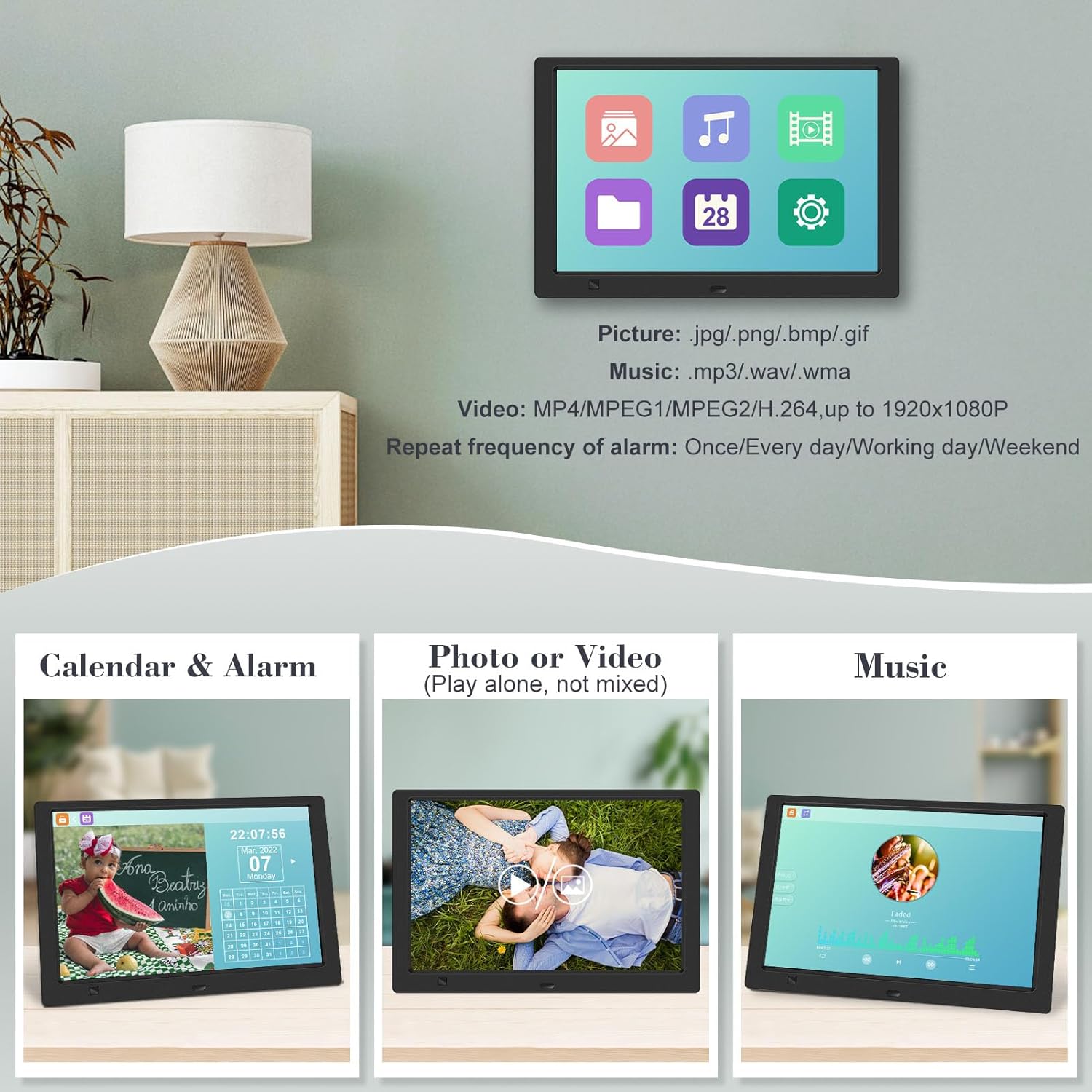
Figura 4.3.1: The digital picture frame displaying a photo slideshow with background music and various image transition options.

Figura 4.3.2: Visual representation of slideshow and image preview options, including settings for playback order, display scale, picture rotation, time window, and screen brightness adjustment.
4.4 Video and Music Playback
- Dal menu principale, seleziona Film or Musica, or use the corresponding buttons on the remote.
- Naviga verso il desiderato file using the remote control and press ENTRARE giocare.
- Supported video formats: MP4/MPEG1/MPEG2/H.264 up to 1920x1080.
- Supported music formats: MP3/WAV/WMA.
4.5 Funzione del sensore di movimento
The motion sensor helps save energy by automatically turning the frame on or off.
- To enable/disable the motion sensor, go to the Impostazioni menu.
- Select the motion sensor option and toggle it On or Off.
- When enabled, the frame will power on when movement is detected and turn off after a period of inactivity.
4.6 Timing On/Off Function
Set specific times for the frame to automatically power on and off.
- Accedi al Impostazioni menu.
- Locate the Timing On/Off function.
- Set your desired power-on time and power-off time. You can also configure this for specific days (e.g., weekdays, weekends, every day).

Figura 4.6.1: Demonstrates the smart motion sensor turning on the frame when movement is detected and the timing on/off function for scheduled operation.
5. Manutenzione
5.1 Pulizia dello schermo
Per pulire lo schermo, strofinarlo delicatamente con un panno morbido, asciutto e privo di lanugine. Per macchie ostinate, strofinare leggermenteampPulisci il panno con acqua o una soluzione detergente adatta allo schermo. Evita di utilizzare prodotti chimici aggressivi o materiali abrasivi.
5.2 Cura generale
- Keep the frame away from direct sunlight, heat sources, and excessive moisture.
- Evitare di far cadere il dispositivo o di sottoporlo a forti impatti.
- Non tentare di smontare il telaio; ciò invaliderebbe la garanzia.
- Garantire un'adeguata ventilazione intorno al dispositivo.
6. Risoluzione Dei Problemi
If you encounter issues with your digital picture frame, please refer to the following common problems and solutions:
| Problema | Possibile causa | Soluzione |
|---|---|---|
| Il telaio non si accende. | Adattatore di alimentazione non collegato o presa difettosa. | Assicurati che l'adattatore di alimentazione sia collegato saldamente al telaio e a una presa elettrica funzionante. Prova una presa diversa. |
| No photos/videos/music displayed. | No media inserted, media not recognized, or unsupported file formato. | Ensure a USB drive or SD card is properly inserted. Check if files are in supported formats (JPG/PNG/BMP/GIF for photos; MP4/MPEG1/MPEG2/H.264 for video; MP3/WAV/WMA for music). Try reformatting the media (backup data first). |
| Telecomando non funzionante. | Battery depleted, remote not aimed correctly, or sensor obstructed. | Replace the remote control battery. Ensure the remote is pointed directly at the frame's infrared sensor. Remove any obstructions between the remote and the frame. |
| Lo schermo è vuoto o bloccato. | Problema temporaneo del software. | Scollegare l'adattatore di alimentazione, attendere 10 secondi, quindi ricollegarlo per riavviare il telaio. |
7. Specifiche
| Caratteristica | Specificazione |
|---|---|
| Dimensioni dello schermo | 10.1 pollici |
| Risoluzione | 1920 x 1080 (1080p HD IPS) |
| Proporzioni | 16:9 |
| Viewangolo di ing | 180° |
| Dispositivi compatibili | Scheda SD, unità USB |
| Formati foto supportati | Formato: JPG, PNG, BMP, GIF |
| Formati video supportati | MP4, MPEG1, MPEG2, H.264 (up to 1920x1080) |
| Formati musicali supportati | MP3, WAV, WMA |
| Sensore di movimento | SÌ |
| Numero modello articolo | KECAG-CA-001 |
| Dimensioni del prodotto | 6.4 x 9.7 x 0.99 pollici |
| Peso dell'articolo | 1.59 libbre |
| Batterie (telecomando) | 1 batteria al litio metallico (inclusa) |
| Produttore | KECAG |
8. Garanzia e supporto
For warranty information, please refer to the documentation included with your product packaging. KECAG provides 24-hour customer service to assist with any issues or questions you may have regarding your digital picture frame. Please contact customer support for assistance.


