Introduzione
This manual provides detailed instructions for the operation and maintenance of your Casio A100WE-7B Digital Watch. Please read this manual carefully to ensure proper use and to fully utilize all features of your timepiece.
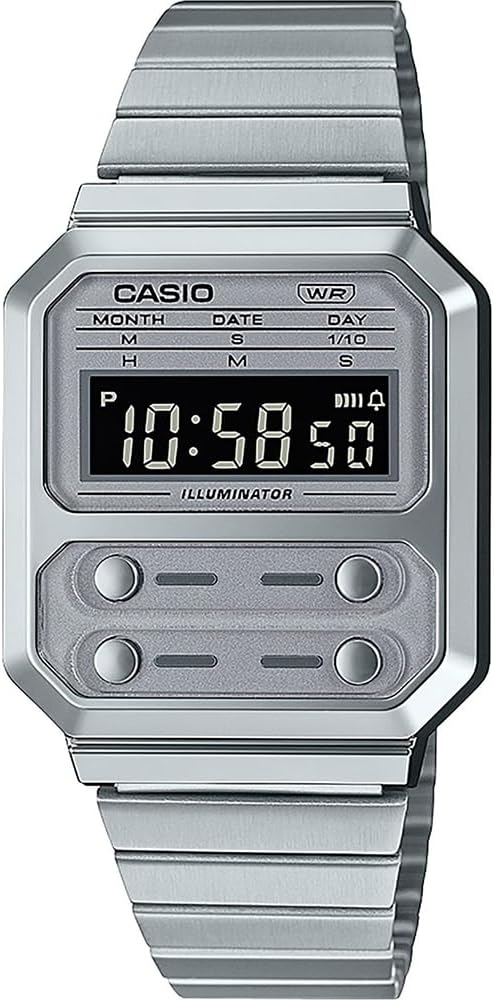
Figura 1: Davanti view of the Casio A100WE-7B Digital Watch. The watch features a silver-tone case and band, a clear digital display, and four distinct buttons for various functions located below the main display area.
Impostare
Adjusting the Band Length
The watch band features a side clasp for easy adjustment. To adjust the length:
- Open the clasp by lifting the small lever.
- Slide the clasp along the band to the desired position.
- Press the lever down firmly to secure the clasp. Ensure it clicks into place to prevent accidental opening.
Impostazione iniziale di data e ora
Refer to the "Operating Instructions" section for detailed instructions on setting the time and date using the watch's buttons.
Istruzioni per l'uso
Your Casio A100WE-7B watch features four buttons for operation. While the exact button functions may vary by mode, generally:
- Pulsante A (in alto a sinistra): Mode selection, adjustment.
- Button B (Top Right): Start/Stop, increment.
- Button C (Bottom Left): Light, decrement.
- Pulsante D (in basso a destra): Reset, confirmation.
Modalità di indicazione dell'ora
This is the default mode, displaying the current time (hours, minutes, seconds), day of the week, month, and date.
- To enter time setting mode, press and hold Pulsante A until the seconds begin to flash.
- Premere Pulsante A repeatedly to cycle through the setting options: seconds, hour, minute, year, month, day.
- Utilizzo Pulsante B to increase the flashing value or Pulsante C per diminuirlo.
- Premere Pulsante A di nuovo per uscire dalla modalità di impostazione.
Funzione di allarme
The watch features a daily alarm.
- Dalla modalità di cronometraggio, premere Pulsante A to cycle through modes until "AL" (Alarm) appears.
- Premere e tenere premuto Pulsante A finché l'ora della sveglia non lampeggia.
- Utilizzo Pulsante B per regolare l'ora e Pulsante A per passare ai minuti.
- Utilizzo Pulsante B per regolare i minuti.
- Premere Pulsante A per uscire dalle impostazioni dell'allarme.
- Per accendere/spegnere la sveglia, premere Pulsante B while in Alarm Mode. An alarm indicator will appear/disappear.
Funzione cronometro
The 1/100 second digital stopwatch measures elapsed time, split time, and two finishes.
- Dalla modalità di cronometraggio, premere Pulsante A to cycle through modes until "ST" (Stopwatch) appears.
- Premere Pulsante B per avviare il cronometro.
- Premere Pulsante B di nuovo per fermarlo.
- Premere Pulsante D per azzerare il cronometro.
- For split times, press Pulsante D while the stopwatch is running to display the split. Press Pulsante D di nuovo per tornare alla misurazione del tempo trascorso.
Backlight Operation (EL Backlight)
Premere Pulsante C (bottom left) to illuminate the display for easy reading in low light conditions. The backlight will remain on for a few seconds.
Hourly Segnale orario
Per attivare o disattivare l'hourly time signal (which beeps every hour on the hour), navigate to the Alarm Mode. While in Alarm Mode, press Pulsante D per alternare l'hourly time signal ON/OFF. An indicator will show if it's active.
Calendario automatico
The watch includes an auto calendar feature, which automatically adjusts for different month lengths and leap years once the date is correctly set.
Manutenzione
Resistenza all'acqua
Your watch is water resistant for daily use. This means it can withstand splashes or brief immersion in water, such as during hand washing or rain. It is non adatto per nuotare, fare immersioni o fare la doccia con acqua calda, poiché il vapore può penetrare nelle guarnizioni.
- Do not operate buttons while the watch is wet.
- Evitare di esporre l'orologio a temperature estreme o a sbalzi di temperatura improvvisi.
Durata della batteria
The approximate battery life is 7 years with a CR2016 battery. When the display becomes dim or functions become erratic, it is time to replace the battery. Battery replacement should be performed by a qualified technician to ensure water resistance is maintained.
Pulizia
Pulisci la cassa e il cinturino dell'orologio con un panno morbido e asciutto. Per lo sporco ostinato, usa un panno leggermenteamp È possibile utilizzare un panno, seguito da un panno asciutto. Evitare l'uso di detergenti chimici, poiché potrebbero danneggiare la finitura dell'orologio.
Risoluzione dei problemi
- Il display è vuoto o poco luminoso: La batteria potrebbe essere scarica o esaurita. Sostituiscila.
- L'ora non è corretta: Re-set the time according to the "Timekeeping Mode" instructions. Ensure the correct AM/PM setting is selected if using 12-hour format.
- I pulsanti non rispondono: Ensure the watch is not wet. If the issue persists, a reset may be required (consult a service center) or the battery may be extremely low.
- Acqua all'interno dell'orologio: Portare immediatamente l'orologio presso un centro di assistenza qualificato. Non tentare di asciugarlo da soli, poiché ciò potrebbe causare ulteriori danni.
Specifiche
| Numero di modello | A100WE-7BDF |
| Dimensioni della cassa | Dimensioni: 37.5 x 33.5 x 9.5 mm |
| Peso totale | 58 grammi |
| Resistenza all'acqua | Daily Use (Splashes, Rain) |
| Retroilluminazione | Retroilluminazione EL |
| Allarme | Sveglia giornaliera |
| Cronometro | 1/100 second digital stopwatch |
| Segnale orario | Hourly Segnale orario |
| Calendario | Calendario automatico |
| Precisione | +/-30 secondi al mese |
| Tipo di batteria | CR2016 (1 batteria al litio inclusa) |
| Durata approssimativa della batteria | 7 anni |
| Modulo | 1275 |
| Tipo di chiusura | Double Locking Foldover Clasp |
Garanzia e supporto
Il tuo orologio Casio è coperto da una garanzia del produttore contro difetti di materiali e fabbricazione. Per i termini e le condizioni di garanzia specifici, consulta la scheda di garanzia inclusa con l'acquisto o visita il sito ufficiale Casio. websito.
For technical support, service, or replacement parts, please contact your local authorized Casio service center. Contact information can typically be found on the official Casio websito o nella documentazione fornita con l'orologio.
Nota: riparazioni o modifiche non autorizzate potrebbero invalidare la garanzia.


