Introduzione
This manual provides detailed instructions for the safe and efficient use of your mophie Snap+ Powerstation Wireless Stand. Please read this manual thoroughly before using the device and retain it for future reference.
The mophie Snap+ Powerstation Wireless Stand is a versatile portable charger designed to provide wireless power to MagSafe-compatible iPhones and other Qi-enabled smartphones. It features an integrated adjustable stand and a standard tripod socket for enhanced usability during video calls or media consumption.
Contenuto della confezione
- mophie Snap+ Powerstation Wireless Stand
- Snap Adapter (metallic ring)
- Cavo da USB-C a USB-C
- Guida rapida (non inclusa in questo manuale)
Prodotto finitoview

Figura 1: Davanti view of the mophie Snap+ Powerstation Wireless Stand with its integrated stand deployed.

Figura 2: The mophie Snap+ Powerstation Wireless Stand actively charging a smartphone, displaying a 100% charge indicator.
The Snap+ Powerstation features a magnetic charging surface, an adjustable kickstand, and a USB-C port for charging the powerstation itself or for wired output. It also includes a standard 1/4-inch tripod socket for versatile mounting options.
Impostare
Initial Charging of the Powerstation
- Connect the supplied USB-C to USB-C cable to the USB-C port on the mophie Snap+ Powerstation.
- Collegare l'altra estremità del cavo a un adattatore di alimentazione USB-C compatibile (non incluso).
- The LED indicator lights on the powerstation will illuminate to show the charging status. Allow the powerstation to fully charge before first use.
Attaching the Snap Adapter (for non-MagSafe devices)

Figura 3: A hand carefully applying the metallic Snap Adapter ring to the back of a smartphone, enabling magnetic compatibility.
If your smartphone is not MagSafe compatible, use the included Snap Adapter to enable magnetic alignment and wireless charging:
- Clean the back surface of your phone or phone case where the adapter will be placed.
- Peel off the adhesive backing from the Snap Adapter.
- Carefully align the adapter over the wireless charging coil area of your phone. For optimal alignment, you may need to consult your phone's manual for the exact location of its wireless charging coil.
- Press firmly to secure the adapter in place.
Istruzioni per l'uso
Wireless Charging Your Device
- Ensure the mophie Snap+ Powerstation is sufficiently charged.
- Align your MagSafe-compatible iPhone or Qi-enabled smartphone (with Snap Adapter if necessary) onto the magnetic charging surface of the powerstation. The magnets will help snap your device into the correct position.
- Charging will begin automatically upon proper alignment. The LED indicators on the powerstation may briefly illuminate to confirm charging.

Figura 4: Lato profile of the mophie Snap+ Powerstation with a smartphone magnetically attached and the stand deployed for viewing.

Figura 5: Posteriore view of the mophie Snap+ Powerstation, illustrating the phone attached and the stand supporting the device.
Utilizzo del supporto regolabile
Il supporto integrato consente di lavorare a mani libere viewing or video calls:
- Gently pull out the kickstand from the back of the powerstation until it locks into position.
- Place the powerstation with your device on a flat surface.
- To fold the stand back, push it gently until it retracts flush with the powerstation body.
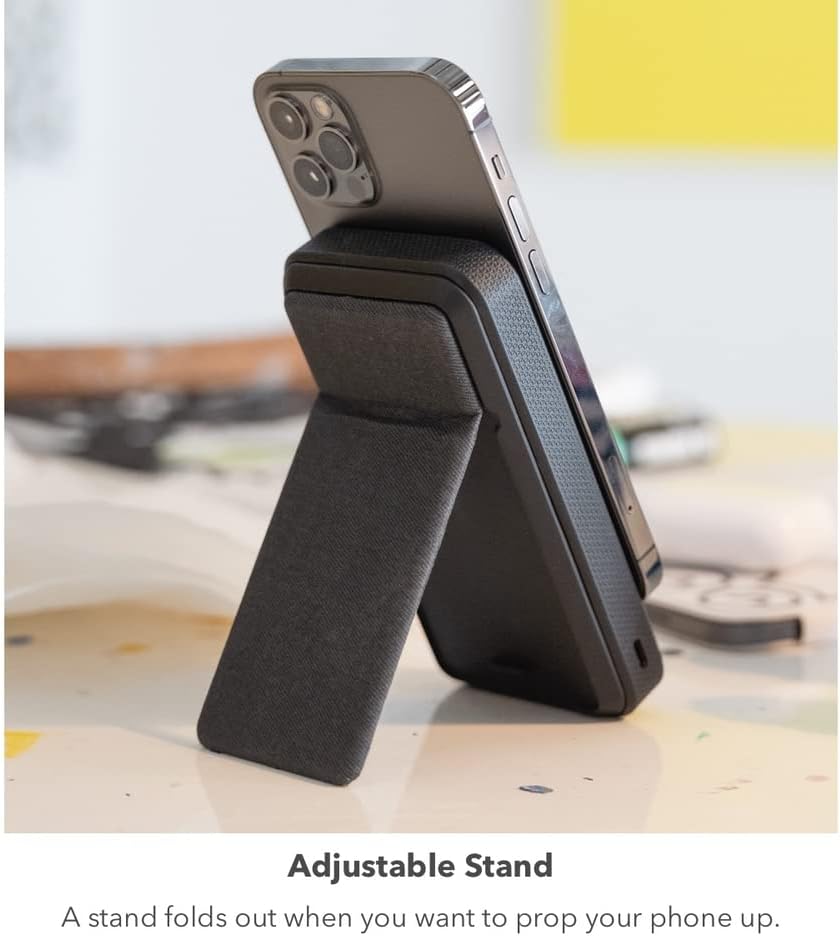
Figura 6: The mophie Snap+ Powerstation with a phone attached, positioned on a desk with its adjustable stand deployed for convenient viewing.
Utilizzo dell'attacco per treppiede
The 1/4-inch tripod socket at the bottom of the powerstation allows for mounting on standard tripods or stands:
- Locate the 1/4-inch screw thread at the bottom of the powerstation.
- Screw the powerstation onto a compatible tripod or mounting accessory.
- Ensure the connection is secure before attaching your device.

Figura 7: The mophie Snap+ Powerstation mounted on a mini tripod, demonstrating the use of its integrated tripod socket for stable positioning during video calls or streaming.
Recharging the Powerstation Wirelessly
The Snap+ Powerstation can also be recharged wirelessly using a Qi-enabled charging pad or stand:
- Place the mophie Snap+ Powerstation onto a Qi-enabled wireless charging pad.
- Assicurarsi che l'allineamento sia corretto per avviare la carica.
- Gli indicatori LED mostreranno lo stato di carica.
Manutenzione
- Pulizia: Use a soft, lint-free cloth to clean the surface of the powerstation. Avoid using harsh chemicals or abrasive materials.
- Magazzinaggio: Store the powerstation in a cool, dry place away from direct sunlight and extreme temperatures.
- Cura della batteria: To prolong battery life, avoid fully discharging the powerstation frequently. Recharge it regularly, even if not in active use.
Risoluzione dei problemi
| Problema | Possibile causa | Soluzione |
|---|---|---|
| Il dispositivo non si carica in modalità wireless. | Improper alignment; Powerstation battery low; Phone case too thick; Foreign object between phone and powerstation. | Realign device on charging surface; Recharge powerstation; Remove phone case or use thinner one; Remove any objects. |
| Powerstation not recharging. | Charging cable or adapter faulty; Improper wireless charging alignment. | Try a different cable/adapter; Ensure proper placement on wireless charging pad. |
| La connessione magnetica è debole. | Phone case interfering; Snap Adapter not properly installed or missing. | Remove phone case or use a MagSafe-compatible case; Ensure Snap Adapter is correctly applied for non-MagSafe devices. |
Specifiche
- Numero modello: SNP-PS-STND-10K
- Capacità della batteria: 10,000 mAh
- Tipo di connettore: Wireless (Qi), USB-C
- Caratteristiche speciali: Magnetic alignment, Adjustable Stand, 1/4-inch Tripod Socket
- Dimensioni: 7.8 x 4.33 x 1.26 inches (Package Dimensions, actual product dimensions not explicitly stated but inferred from images)
- Peso: 12 once
- Batterie: 2 batterie ai polimeri di litio (incluse)
Informazioni sulla sicurezza
- Non esporre il dispositivo a temperature estreme, alla luce solare diretta o all'umidità.
- Non smontare o tentare di riparare il dispositivo. Rivolgersi a personale qualificato.
- Tenere fuori dalla portata dei bambini.
- Smaltire il dispositivo in modo responsabile secondo le normative locali.
Garanzia e supporto
For warranty information and customer support, please visit the official mophie webo contattare il servizio clienti. Conservare la prova d'acquisto per eventuali reclami in garanzia.
mophie Official Websito: www.mophie.com


