Manuale utente del lettore multimediale in streaming Formuler Z10 Android 10 4K
Modello: Z10
1. Introduzione
Thank you for choosing the Formuler Z10 Android 10 4K Streaming Media Player. This device is designed to provide a high-quality streaming experience with its powerful hardware and user-friendly Android 10 operating system. The Z10 supports 4K resolution, HDR10, and features dual-band 5G Wi-Fi for stable and fast connectivity. This manual will guide you through the setup, operation, and maintenance of your new device.
2. Cosa c'è nella scatola
Please check the contents of your Formuler Z10 package. If any items are missing or damaged, please contact your retailer.
- Formuler Z10 Streaming Media Player
- IR1 Remote Control
- Adattatore di alimentazione
- Cavo HDMI
- 2 batterie AAA (per il telecomando)
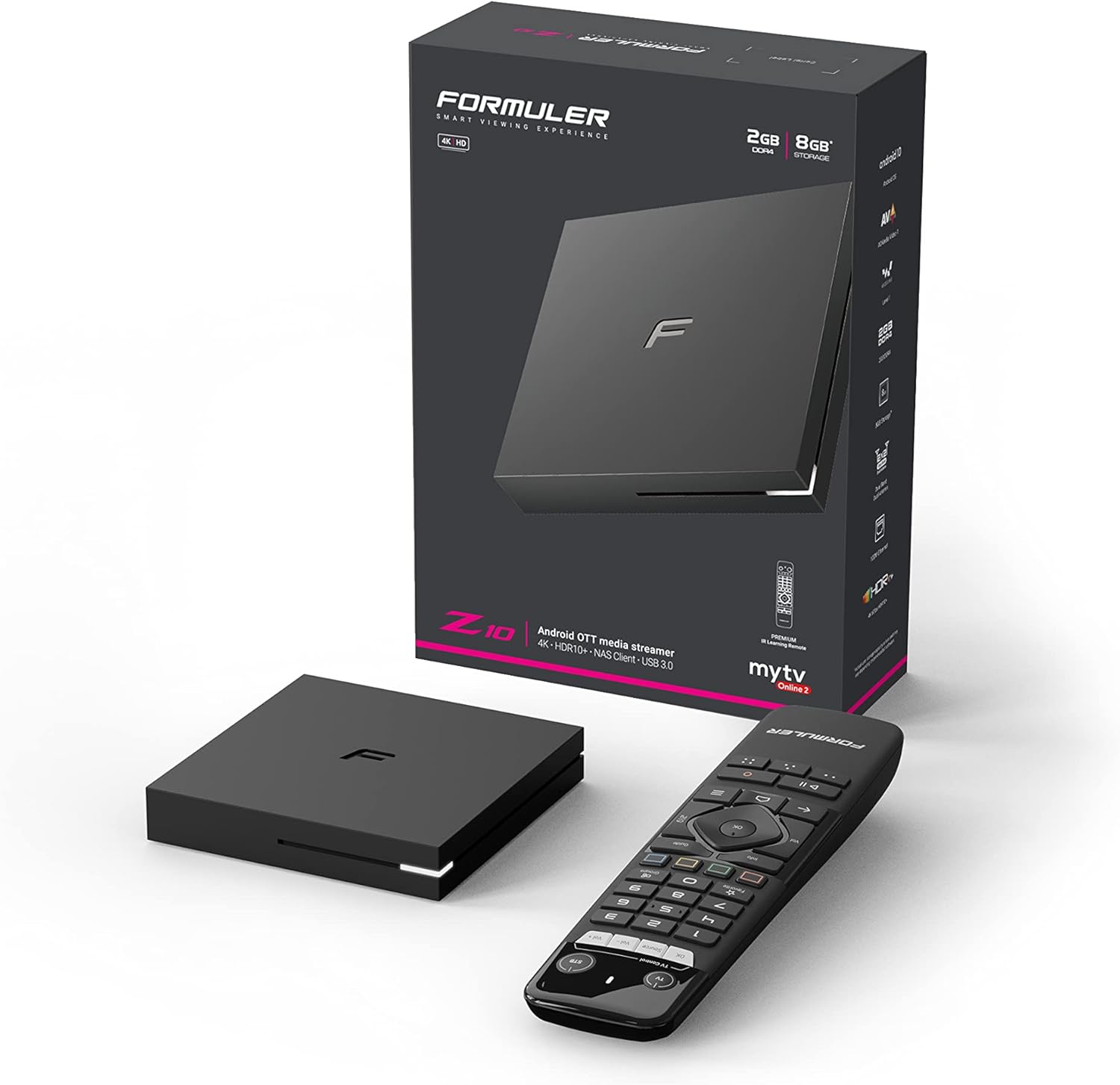
Image: Formuler Z10 retail box, the streaming device, and its remote control.

Image: The Formuler Z10 device and its remote control, showcasing il loro design.

Immagine: dall'alto verso il basso view of the Formuler Z10 streaming device, highlighting its compact form factor.
3. Guida all'installazione
3.1 Collegamento del dispositivo
- Connettiti all'alimentazione: Insert the power adapter into the DC 12V/1A port on the back of the Formuler Z10 and plug the adapter into a wall outlet.
- Collegamento alla TV: Use the provided HDMI cable to connect the HDMI port on the Formuler Z10 to an available HDMI input on your television.
- Connettiti alla rete (facoltativo): For a wired internet connection, connect an Ethernet cable from your router to the LAN port on the Formuler Z10. For wireless connection, you will set this up during initial software configuration.

Immagine: Posteriore view of the Formuler Z10 showing the power input, USB 3.0 port, LAN port, HDMI port, and reset button.
3.2 Configurazione iniziale del software
- Accensione: Turn on your TV and select the correct HDMI input. The Formuler Z10 will power on automatically when connected to power.
- Selezione della lingua: Segui le istruzioni sullo schermo per selezionare la lingua preferita.
- Connessione di rete: If you are using Wi-Fi, select your network from the list and enter the password. If using Ethernet, the connection should be established automatically.
- Account Google: Sign in with your Google account to access the Google Play Store and other Google services. If you don't have one, you can create one.
- Aggiornamenti di sistema: The device may prompt you to download and install the latest firmware updates. It is recommended to perform these updates for optimal performance and security.
4. Istruzioni per l'uso
4.1 Controllo remoto finitoview (IR1)
The IR1 remote control provides full functionality for navigating your Formuler Z10. Insert the two AAA batteries into the remote control before use.

Image: Detailed diagram of the Formuler IR1 remote control, indicating the function of each button.
- Pulsante di accensione (TV/STB): Press once to put TV/STB into standby mode. Press and hold for Learning mode (TV Control).
- Controllo TV (OK, Sorgente, Vol-, Vol+): Buttons for controlling your television (requires learning mode setup).
- Tastierino numerico (0-9): Inserimento diretto del numero del canale.
- Pulsante preferito: Mostra/imposta i canali preferiti.
- Pulsante Gruppi: Mostra categorie di canali o VOD.
- Colored Hotkeys (Red, Green, Yellow, Blue): Configurable hotkeys, follow on-screen instructions.
- Pulsante informazioni: Premere due volte per visualizzare informazioni dettagliate.
- Pulsante Guida: Mostra la griglia EPG (Guida elettronica ai programmi).
- Tastierino di navigazione (su, giù, sinistra, destra, OK): Move cursor, channel list navigation, select items.
- Volume +/-: Regola il volume del decoder.
- Canale +/-: Cambia canale, Pagina su/giù.
- Pulsante Indietro: Torna al menu precedente.
- Pulsante Home: Vai alla schermata Home del sistema.
- Pulsante Menu: Mostra menu principale.
- Pulsante Play/Pausa: Timeshift/Riprendi, Metti in pausa la riproduzione.
- Pulsante di registrazione: Inizia la registrazione.
4.2 Navigazione nell'interfaccia
The Formuler Z10 runs on Android 10, providing a familiar and intuitive interface. Use the navigation pad and OK button on your remote to move through menus and select options.
- Schermata iniziale: Provides quick access to your favorite apps, recommended content, and system settings.
- Applicazioni: Access installed applications like Netflix, Hulu, Amazon Prime Video, and others downloaded from the Google Play Store.
- Impostazioni: Located on the home screen or accessible via the Menu button, this section allows you to configure network settings, display options, sound, storage, and more.
4.3 Riproduzione multimediale
The Formuler Z10 is capable of playing 4K content at 60 frames per second with HDR10 support, offering a vibrant viewesperienza di acquisizione.
- Servizi di streaming: Launch your preferred streaming applications from the home screen or app drawer. Ensure you have an active subscription for paid services.
- Media locali: Puoi riprodurre contenuti multimediali files from connected USB drives using a compatible media player app.
5. Manutenzione
- Pulizia: Utilizzare un panno morbido e asciutto per pulire l'esterno del dispositivo. Non utilizzare detergenti liquidi o materiali abrasivi.
- Aggiornamenti software: Controlla regolarmente e installa gli aggiornamenti di sistema per assicurarti che il tuo dispositivo abbia le ultime funzionalità, patch di sicurezza e miglioramenti delle prestazioni. Vai a Settings > About > System update.
- Ripristino di fabbrica: If you encounter persistent issues, a factory reset can resolve them. Be aware that this will erase all data and settings on the device. Navigate to Impostazioni > Preferenze dispositivo > Ripristina.
6. Risoluzione Dei Problemi
This section addresses common issues you might encounter with your Formuler Z10.
- Nessun potere:
- Assicurarsi che l'adattatore di alimentazione sia collegato saldamente al dispositivo e a una presa di corrente funzionante.
- Verificare che la presa di corrente funzioni collegandovi un altro dispositivo.
- Nessuna uscita video/audio:
- Verify the HDMI cable is securely connected to both the Formuler Z10 and your TV.
- Assicurati che il televisore sia impostato sulla sorgente di ingresso HDMI corretta.
- Prova un cavo HDMI o una porta HDMI diversi sul tuo televisore.
- Problemi di connessione di rete:
- For Wi-Fi, ensure the correct password is entered and the device is within range of your router.
- For Ethernet, check the cable connection and ensure your router is functioning correctly.
- Riavvia il router e il Formuler Z10.
- Il telecomando non risponde:
- Sostituire le batterie AAA nel telecomando.
- Assicurarsi che non vi siano ostacoli tra il telecomando e il ricevitore IR del dispositivo.
- Applicazioni che si bloccano o si bloccano:
- Chiudere e riavviare l'applicazione.
- Cancella la cache dell'app (Impostazioni > App > [Nome app] > Cancella cache).
- Assicurarsi che il firmware del dispositivo sia aggiornato.
- If issues persist, consider a factory reset (see Maintenance section).
7. Specifiche
Specifiche tecniche dettagliate del Formuler Z10:
| Caratteristica | Specificazione |
|---|---|
| Risoluzione di uscita | Risoluzione 4K (3840 x 2160) |
| processore | RealTek |
| Scheda grafica | ARM G31 MP2 |
| Memoria RAM | 2 GB DDR a 2400 MHz |
| Magazzinaggio | 8 GB eMMC |
| Sistema operativo | Androide 10 |
| Connettività wireless | Wireless AC dual-band 2x2 |
| Bluetooth | 5.0 |
| Etereo | 100 milioni |
| Dimensioni (L x P x A) | 94 mm x 94 mm x 16.5 mm (3.7 x 3.7 x 0.65 pollici) |
| Peso dell'articolo | 1.21 libbre |
| Porti | 1 x Power Input, 1 x USB 3.0, 1 x HDMI, 1 x LAN |
| Batterie remote | 2 x AAA (incluse) |
8. Garanzia e supporto
Formuler products are manufactured to the highest quality standards. For information regarding warranty coverage, technical support, and service, please refer to the warranty card included with your product or visit the official Formuler websito. Conservare la prova d'acquisto per eventuali reclami in garanzia.
For further assistance, you may also contact your retailer or the Formuler customer support team directly.


