1. Prodotto finitoview
The Croma 55-inch 4K Ultra HD Smart LED TV (Model CREL055USA024601) offers a high-resolution viewing experience with smart TV functionalities. This manual provides instructions for setup, operation, maintenance, and troubleshooting.

Immagine 1.1: anteriore view of the Croma 55-inch 4K Ultra HD Smart LED TV.
This television features a 55-inch LED display with 4K (3840x2160 pixels) resolution and a 60 Hz refresh rate. It operates on a Linux-based WebOS system, providing access to various streaming services and applications. The TV includes multiple connectivity options such as HDMI, USB, and Bluetooth.
2. Configurazione e installazione
2.1 Disimballaggio
Rimuovere con cautela tutti i componenti dall'imballaggio. Assicurarsi che siano presenti i seguenti elementi:
- Televisore LED da 1 pollici
- 2 supporti da tavolo
- 1 Manuale utente (questo documento)
- 1 telecomando (con 2 batterie AAA incluse)
- 1 Wall Mount kit
2.2 Stand Installation (Table Top)
If placing the TV on a surface, attach the two provided table-top stands to the bottom of the television. Refer to the markings on the TV and stands for correct orientation. Secure them using the screws provided in the packaging.
2.3 Montaggio a parete
If wall-mounting the TV, use the included wall mount kit. It is recommended to seek professional assistance for wall mounting to ensure proper and secure installation. Follow the instructions provided with the wall mount kit for safe installation.
2.4 Collegamento delle periferiche
Il televisore è dotato di diverse porte per il collegamento di dispositivi esterni:
- Porte HDMI: Collega lettori Blu-ray, console di gioco, decoder o altri dispositivi abilitati HDMI.
- Porte USB: Collegare dispositivi di archiviazione USB per la riproduzione di contenuti multimediali.
- Jack per cuffie: Collega le cuffie per l'ascolto privato.

Immagine 2.1: posteriore view of the television displaying various connectivity ports.
2.5 Accensione iniziale e connessione di rete
After connecting the power cord, press the power button on the remote control or the TV. Follow the on-screen instructions to complete the initial setup, including language selection, time zone, and network configuration. The TV supports dual-band Wi-Fi for internet connectivity.
3. Utilizzo del televisore
3.1 telecomando
The television comes with an Intelligent Motion Remote. This remote allows for intuitive navigation using a pointer function, similar to a mouse. Key features include:
- Pulsante assistente vocale: Activates the built-in voice recognition system.
- Pulsanti di accesso rapido: Pulsanti dedicati per i servizi di streaming più diffusi, come Netflix e Prime Video.

Image 3.1: The Intelligent Motion Remote control with highlighted Voice Assistant and Quick Access buttons.
3.2 Caratteristiche della Smart TV (WebSistema operativo)
The TV runs on WebOS, providing a user-friendly interface for accessing various applications and content. The Home Dashboard allows you to manage connected devices and access streaming platforms. Supported internet services include Amazon Instant Video, Netflix, YouTube, and a web browser.
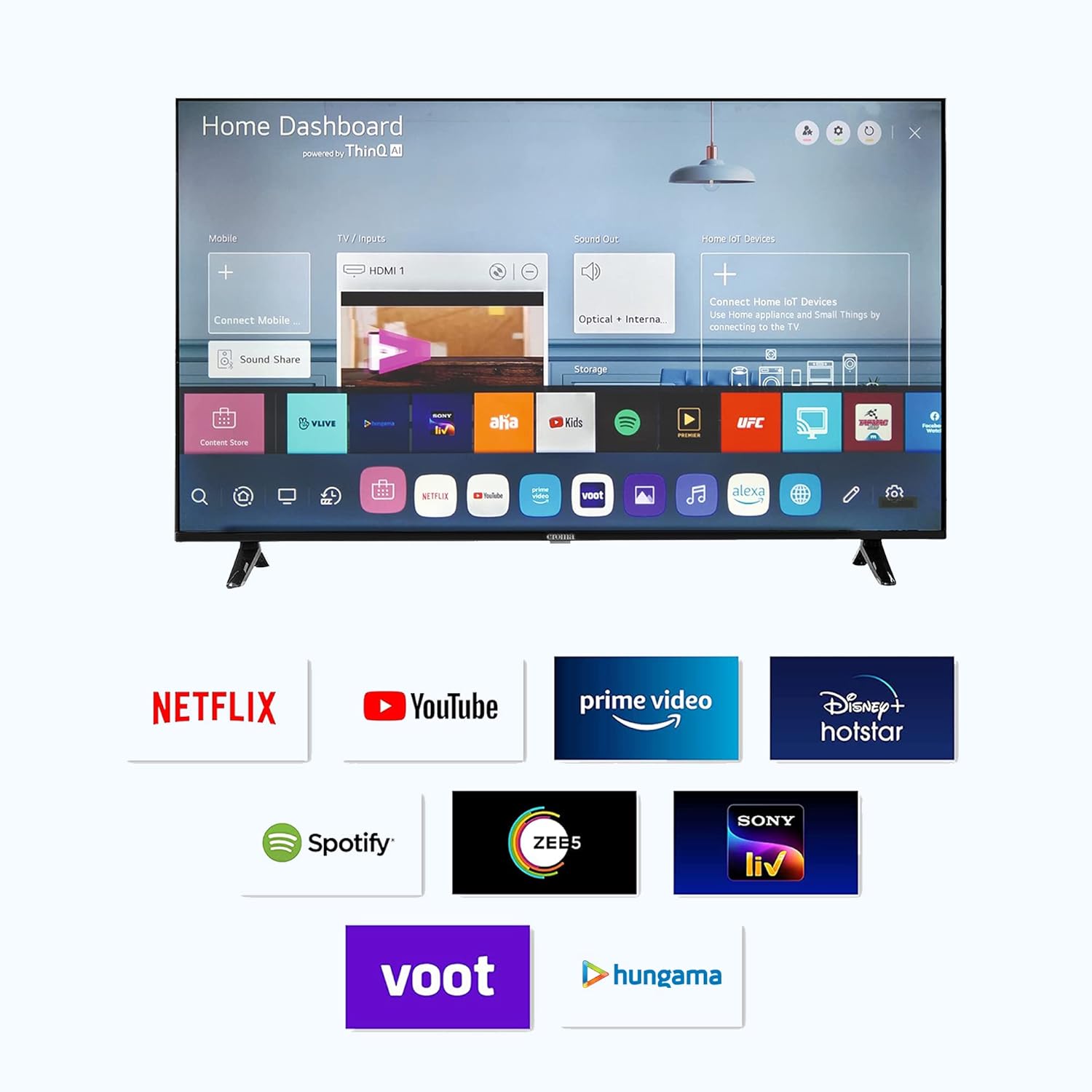
Image 3.2: The Smart TV Home Dashboard displaying available applications and services.
3.3 Impostazioni immagine e audio
Personalizza il tuo viewesperienza di ascolto e riproduzione tramite il menu delle impostazioni del televisore:
- Impostazioni immagine: Adjust brightness, contrast, color, and sharpness. The TV features a 4K LED display with a 178-degree viewing angle and a 5000:1 contrast ratio.
- Impostazioni audio: Modify sound modes, equalizer settings, and output options. The TV has 20 Watts audio output with 2.0 speaker surround sound channel configuration and supports MP3 audio format.

Image 3.3: Illustration of Dolby Audio feature for enhanced sound experience.
3.4 Voice Control and Alexa Integration
The TV includes a built-in voice recognition assistant accessible via the remote control. It also supports Amazon Alexa integration. While the TV can function as a standalone Alexa device (using the remote's microphone), its control over other Alexa smart devices may be limited. You can turn the TV off using Alexa, but turning it on via Alexa is not supported.
3.5 Connettività Bluetooth
The television supports Bluetooth 5.0 for connecting wireless audio devices such as soundbars or headphones. To pair a device, navigate to the Bluetooth settings in the TV menu and follow the on-screen instructions.
4. Manutenzione
4.1 Pulizia dello schermo
Per pulire lo schermo, strofinarlo delicatamente con un panno morbido, asciutto e privo di lanugine. Per macchie ostinate, strofinare leggermenteampen the cloth with water or a specialized screen cleaner. Avoid using harsh chemicals, abrasive materials, or excessive pressure, as these can damage the screen.
4.2 Cura generale
Keep the television in a well-ventilated area, away from direct sunlight, heat sources, and moisture. Do not block the ventilation openings on the back of the TV. Unplug the TV from the power outlet during lightning storms or when it will be unused for extended periods.
5. Risoluzione Dei Problemi
Questa sezione affronta i problemi più comuni che potresti riscontrare. Se il problema persiste, contatta l'assistenza clienti.
- Nessun potere:
- Assicurarsi che il cavo di alimentazione sia collegato saldamente sia al televisore sia a una presa elettrica funzionante.
- Verificare che la presa di corrente funzioni collegandovi un altro dispositivo.
- Premere il pulsante di accensione sul televisore stesso, non solo sul telecomando.
- Nessuna immagine/suono:
- Verificare che sia selezionata la sorgente di ingresso corretta (HDMI 1, HDMI 2, ecc.).
- Check all cable connections (HDMI, antenna, etc.) to ensure they are secure.
- Adjust the volume and ensure the TV is not muted.
- Il telecomando non funziona:
- Sostituire le batterie AAA nel telecomando.
- Assicurarsi che non vi siano ostacoli tra il telecomando e il sensore del televisore.
- Problemi di connettività Wi-Fi:
- Riavvia il router Wi-Fi e la TV.
- Assicurati che la TV si trovi nel raggio di azione della tua rete Wi-Fi.
- Check network settings on the TV to ensure correct password and connection type.
- Bluetooth Audio Lag:
- Ensure the Bluetooth device is fully charged and within close proximity to the TV.
- Prova a scollegare e riassociare il dispositivo Bluetooth.
- Test with a different Bluetooth audio device to determine if the issue is with the TV or the external device.
6. Specifiche
| Caratteristica | Specificazione |
|---|---|
| Marca | CROMA |
| Nome del modello | CREL055USA024601 |
| Anno del modello | 2022 |
| Dimensioni dello schermo | 55 pollici (140 cm) |
| Tecnologia di visualizzazione | GUIDATO |
| Risoluzione | 4K Ultra HD (3840 x 2160 pixel) |
| Frequenza di aggiornamento | Frequenza 60 Hz |
| Viewangolo di ing | 178 gradi |
| Rapporto di contrasto dell'immagine | 5000:01 |
| Sistema operativo | Linux (WebSistema operativo) |
| Dimensione della memoria RAM installata | 1.5 GB |
| Capacità di archiviazione della memoria | 8 GB |
| Modalità di uscita audio | Circondare |
| Audio Wattage | 20 Watt |
| Configurazione del canale audio surround degli altoparlanti | 2.0 |
| Formati audio supportati | MP3 |
| Interfaccia Hardware | HDMI, Headphone, USB |
| Porte USB totali | 2 |
| Tecnologia di connettività | HDMI, Bluetooth, Wi-Fi |
| Servizi Internet supportati | Amazon Instant Video, Browser, Netflix, YouTube |
| Dimensioni del prodotto (LxWxH) | Dimensioni: 123 x 27 x 77 cm |
| Peso dell'articolo | 7.3 kg |
| Fonte di alimentazione | Elettrico con cavo |
| Consumo energetico in modalità accesa | 140.00 watt |

Image 6.1: Diagram illustrating the dimensions of the Croma 55-inch TV.
7. Garanzia e supporto
The Croma 55-inch 4K Ultra HD Smart LED TV comes with a Garanzia di 1 anno from the date of purchase. For warranty claims or technical assistance, please contact Croma customer support.
Croma offers Assured Lifetime Service and has over 160+ stores that can serve as service centers. For detailed support information, visit the official Croma websito o fare riferimento alla scheda di garanzia inclusa con il prodotto.

Immagine 7.1: Passoview of Croma's customer support advantages.


