1. Introduzione
This manual provides essential instructions for the setup, operation, maintenance, and troubleshooting of your Noise ColorFit Icon 2 Smartwatch. Please read this manual thoroughly before using your device to ensure proper function and longevity.
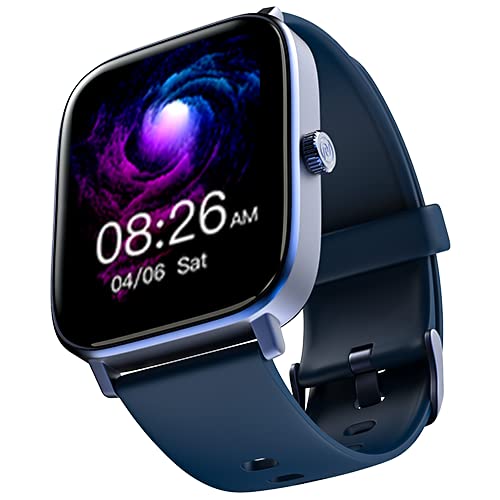
Immagine: Frontale view of the Noise ColorFit Icon 2 Smartwatch, displaying its rectangular screen and strap.
2. Cosa c'è nella scatola
Verify that all the following items are present in your product packaging:
- Noise ColorFit Icon 2 Smartwatch
- Caricatore magnetico
- Manuale dell'utente (questo documento)
- Scheda di garanzia
3. Impostazione
3.1 Ricarica dello smartwatch
Before initial use, fully charge your smartwatch. Connect the magnetic charger to the charging points on the back of the smartwatch and plug the USB end into a compatible power adapter (not included) or a computer's USB port. The watch display will indicate charging status.
3.2 Accensione/Spegnimento
- Per accendere: Tieni premuto il pulsante laterale finché non appare il logo Noise.
- Per spegnere: Navigate to the settings menu on the smartwatch, select "Power Off," and confirm. Alternatively, press and hold the side button and select "Power Off" from the options.
3.3 Associazione con lo smartphone
- Download the official NoiseFit application from your smartphone's app store.
- Assicurati che il Bluetooth sia abilitato sul tuo smartphone.
- Apri l'app NoiseFit e segui le istruzioni sullo schermo per creare un account o effettuare l'accesso.
- Select "Add Device" or a similar option within the app and choose "ColorFit Icon 2" from the list of available devices.
- Conferma la richiesta di associazione sia sullo smartphone che sullo smartwatch.
- Your smartwatch is compatible with devices running iOS 8 & + or Android 4.4 & +.
4. Istruzioni per l'uso
4.1 Navigazione di base
- Scorri verso l'alto/il basso: Scorri i menu e le notifiche.
- Scorri verso sinistra/destra: Accedi rapidamente ai widget o a schermate diverse.
- Rubinetto: Seleziona un elemento o conferma un'azione.
- Pulsante laterale: Premere per tornare alla schermata iniziale o riattivare il dispositivo.
4.2 Caratteristiche principali
The Noise ColorFit Icon 2 Smartwatch offers various features accessible through its interface and the connected NoiseFit app. These include:
- Activity Tracking (steps, distance, calories)
- Monitoraggio della frequenza cardiaca
- Monitoraggio del sonno
- Notification Alerts (calls, messages, app notifications)
- Controllo della musica
- Informazioni meteo
For detailed instructions on specific features, refer to the NoiseFit application's help section.
5. Manutenzione
5.1 Pulizia
Pulisci regolarmente lo smartwatch e il cinturino per prevenire irritazioni cutanee e mantenere le prestazioni del dispositivo. Utilizza un panno morbido e privo di lanugine. Se necessario, asciugalo leggermente.ampLavare il panno con acqua. Evitare l'uso di prodotti chimici aggressivi, materiali abrasivi o detergenti forti.
5.2 Migliori pratiche di addebito
- Utilizzare solo il caricabatterie magnetico fornito.
- Avoid exposing the charging contacts to water or sweat. Ensure they are dry before charging.
- Do not leave the smartwatch charging for extended periods after it is fully charged.
5.3 Conservazione
When not in use for an extended period, store the smartwatch in a cool, dry place away from direct sunlight and extreme temperatures. Ensure it has a partial charge to prevent battery degradation.
6. Risoluzione Dei Problemi
| Problema | Possibile soluzione |
|---|---|
| Lo smartwatch non si accende. | Ensure the device is fully charged. Connect to the magnetic charger and wait a few minutes before attempting to power on again. |
| Impossibile effettuare l'associazione con lo smartphone. |
|
| Monitoraggio impreciso delle attività. | Ensure the smartwatch is worn snugly on your wrist, about one finger's width above your wrist bone. Calibrate the device through the NoiseFit app if available. |
| Notifiche non ricevute. |
|
If you encounter issues not listed here, please refer to the support section of the NoiseFit application or contact customer support.
7. Specifiche
| Caratteristica | Dettaglio |
|---|---|
| Marca | Rumore |
| Serie di modelli | Icona ColorFit 2 |
| Numero modello articolo | wrb-sw-colorfiticon2-std-blu_blu |
| Dimensioni del prodotto | Dimensioni: 4.7 x 3.9 x 1.2 cm |
| Peso dell'articolo | 45 grammi |
| Tipo di connettività | Bluetooth |
| Tipo senza fili | Bluetooth |
| Compatibilità del sistema operativo | iOS 8 & + or Android 4.4 & + |
| Componenti inclusi | Smartwatch, caricabatterie magnetico, manuale utente, scheda di garanzia |
| GPS | Nessun GPS |
| Forma | Rettangolare |
8. Garanzia e supporto
Your Noise ColorFit Icon 2 Smartwatch comes with a 1-year assured warranty from Noise, covering manufacturing defects from the date of purchase. Please retain your purchase receipt and warranty card for any warranty claims.
For technical support, warranty claims, or further assistance, please contact Noise customer service. Manufacturer and Importer details:
Nexxbase Marketing Pvt. Ltd.Khasra No-146/25/2/1, Jail Road Badshahpur,
Gurugram Haryana-122101, India
Telefono: 8882-132-132
You can also visit the official Noise websito per ulteriori informazioni e risorse di supporto.