Introduzione
The OWC Thunderbolt Dock is designed to expand the connectivity of your computer, providing a comprehensive solution for connecting multiple peripherals through a single Thunderbolt cable. This dock adds three Thunderbolt 4 ports, four USB ports, Gigabit Ethernet, audio, and an SD card reader, enhancing your workflow and device management.
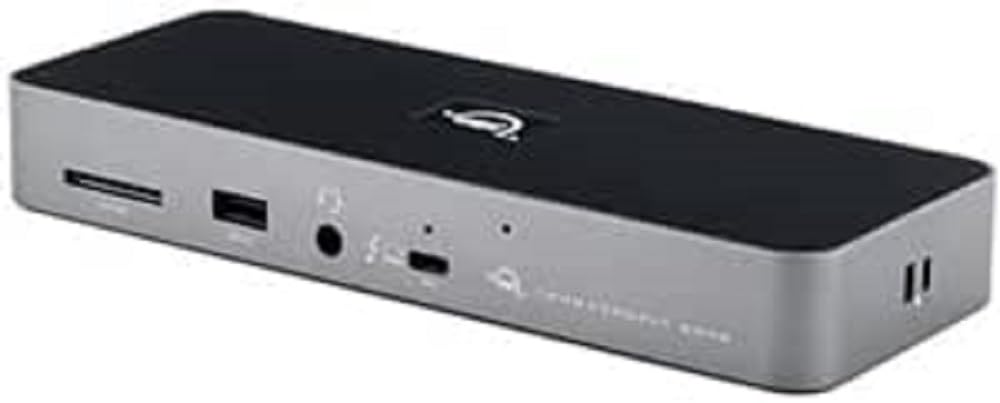
Figure 1: OWC Thunderbolt Dock, showing its compact design and front-facing ports.
Cosa c'è nella scatola
Verificare che tutti gli articoli siano presenti nel pacco:
- Dock Thunderbolt OWC
- Cavo Thunderbolt
- Alimentazione e cavo
- Guida rapida
Caratteristiche principali
The OWC Thunderbolt Dock offers the following capabilities:
- Adds three full-speed and functional Thunderbolt 4 ports to your computer.
- Enables creation of multiple independent "tree branches" for device connectivity.
- Provides up to 96W of power delivery for laptop charging.
- Includes four USB ports for connecting and charging USB devices.
- Supports connection of various storage devices, up to two 4K displays, or one 5K/6K/8K display.
- Ensures device compatibility as if directly connected to your computer.
- Features Gigabit Ethernet for reliable network streaming and sharing.
- Integrated SD card reader for data transfer speeds up to 312MB/s.
- Audio combo jack for headphones and microphones.
- Adjustable LED for customizable illumination.
Impostare
Follow these steps to set up your OWC Thunderbolt Dock:
- Connetti alimentazione: Connect the included power supply to the DC In port on the rear of the OWC Thunderbolt Dock and then plug the power cable into a wall outlet.

Figure 2: Rear ports of the OWC Thunderbolt Dock, including the DC In port on the left.
- Connessione al computer: Use the provided Thunderbolt cable to connect one of the Thunderbolt 4 ports on the dock (labeled with a computer icon) to a Thunderbolt 3 or Thunderbolt 4 port on your computer.
- Connetti le periferiche: Connect your external devices such as monitors, external drives, USB devices, Ethernet cable, and audio devices to the corresponding ports on the OWC Thunderbolt Dock.

Figure 3: Front ports of the OWC Thunderbolt Dock, including the SD card slot, USB 2.0 port, and audio combo jack.
- Accensione: The dock will power on automatically once connected to power and your computer. The LED indicator will illuminate.
Utilizzo del Dock
Once set up, the OWC Thunderbolt Dock operates as an extension of your computer's ports. Devices connected to the dock will function as if they were directly connected to your computer.
- Connettività dello schermo: Connect up to two 4K displays at 60Hz, or a single 5K, 6K, or 8K display at 60Hz (or 4K at 120Hz) to the Thunderbolt 4 downstream ports using appropriate cables and adapters.
- Dispositivi USB: Utilize the USB-A ports for connecting keyboards, mice, external hard drives, and other USB peripherals. The USB 2.0 port is suitable for low-bandwidth devices like keyboards or mice.
- Connessione di rete: Plug an Ethernet cable into the Gigabit Ethernet port for a stable wired network connection.
- Audio: Use the 3.5mm audio combo jack for headphones, speakers, or microphones.
- Lettore di schede SD: Insert an SD card into the front-facing slot to access photos, videos, and other data.
- Potenza erogata: The dock provides up to 96W of power to charge your connected laptop via the Thunderbolt cable.
Manutenzione
To ensure optimal performance and longevity of your OWC Thunderbolt Dock:
- Keep the dock in a well-ventilated area to prevent overheating.
- Clean the exterior with a soft, dry, lint-free cloth. Avoid using liquid cleaners or aerosols.
- Assicurarsi che tutti i cavi siano collegati saldamente.
- Avoid placing heavy objects on top of the dock.
Risoluzione dei problemi
If you encounter issues with your OWC Thunderbolt Dock, try the following solutions:
- No Power/Dock Not Responding:
- Verify that the power supply is securely connected to the dock and a working power outlet.
- Ensure the Thunderbolt cable is firmly connected to both the dock and your computer.
- Prova una presa di corrente diversa.
- Dispositivi connessi non riconosciuti:
- Disconnect and reconnect the problematic device from the dock.
- Try connecting the device to a different port on the dock, if available.
- Ensure your computer's operating system and Thunderbolt drivers are up to date.
- Riavvia il computer.
- Problemi di visualizzazione (nessun segnale, sfarfallio):
- Check the display cable connection between the monitor and the dock.
- Assicurarsi che il display sia impostato sulla sorgente di input corretta.
- Try a different display cable or adapter.
- Ridurre la risoluzione dello schermo o la frequenza di aggiornamento per verificare se il problema persiste.
- Problemi di connettività di rete:
- Verify the Ethernet cable is securely connected to the dock and your router/modem.
- Controlla le impostazioni di rete del tuo computer.
- Riavvia il router/modem.
Specifiche
| Caratteristica | Dettaglio |
|---|---|
| Dimensioni del prodotto | 8.66 x 3.15 x 1.18 pollici |
| Peso | 14.11 once |
| Numero modello articolo | OWCTB4DOCK |
| Produttore | OWC |
| Tipo di connettore | Ethernet, RJ45, USB Type A, USB Type C |
| Tipo di cavo | Fulmine |
| Dispositivi compatibili | Computer, Docking Station, External Display |
| Caratteristica speciale | Ad alta velocità |
| Erogazione di potenza | Up to 96W to host computer |
| Supporto di visualizzazione | Up to two 4K displays @ 60Hz, or one 5K/6K/8K display @ 60Hz (or 4K @ 120Hz) |
| SD Card Reader Speed | Fino a 312 MB/s |
Garanzia e supporto
OWC products are designed for reliability and performance. For information regarding warranty coverage, technical support, or service, please refer to the official OWC website or contact OWC customer support directly. Keep your proof of purchase for warranty claims.
Per le risorse di supporto più aggiornate, visita: www.owcdigital.com/support


