1. Introduzione
The XPLORA XGO 3 is a watch phone designed for children, offering a secure way to stay connected. It features 4G connectivity for calls and messages, a Kids School Mode, an SOS function for emergencies, GPS location tracking, a camera, and a pedometer. This manual provides essential information for setting up and operating your XGO 3 device.

Image: The XPLORA XGO 3 watch phone in various colors.
2. Cosa c'è nella scatola
Upon opening your XPLORA XGO 3 package, you should find the following items:
- XPLORA XGO 3 Watch Phone
- Cavo di ricarica USB
- Guida rapida
- Pre-installed Xplora Connect SIM card

Image: Contents of the XPLORA XGO 3 packaging.
3. Guida all'installazione
Follow these steps to set up your XPLORA XGO 3 watch phone:
- Activate your SIM: The XPLORA XGO 3 comes with a pre-installed Xplora Connect SIM card. Activate this SIM card through the Xplora website or app as instructed in the Quick Start Guide. A minimum 12-month subscription is required for optimum performance.
- Install the Xplora App: Download the official Xplora app on your smartphone from your device's app store.
- Connect your watch to the Xplora app: Follow the in-app instructions to pair your XGO 3 watch phone with your smartphone. This typically involves scanning a QR code displayed on the watch screen.

Immagine: Guida visiva per la procedura di configurazione in tre fasi.
Video: Official Xplora XGO 3 product overview, che ne dimostra le caratteristiche e l'utilizzo.
4. Caratteristiche principali
4.1 Chiamate vocali
The XGO 3 allows children to make and receive calls from pre-saved numbers. Parents manage the contact list through the Xplora app, ensuring communication only with trusted contacts.
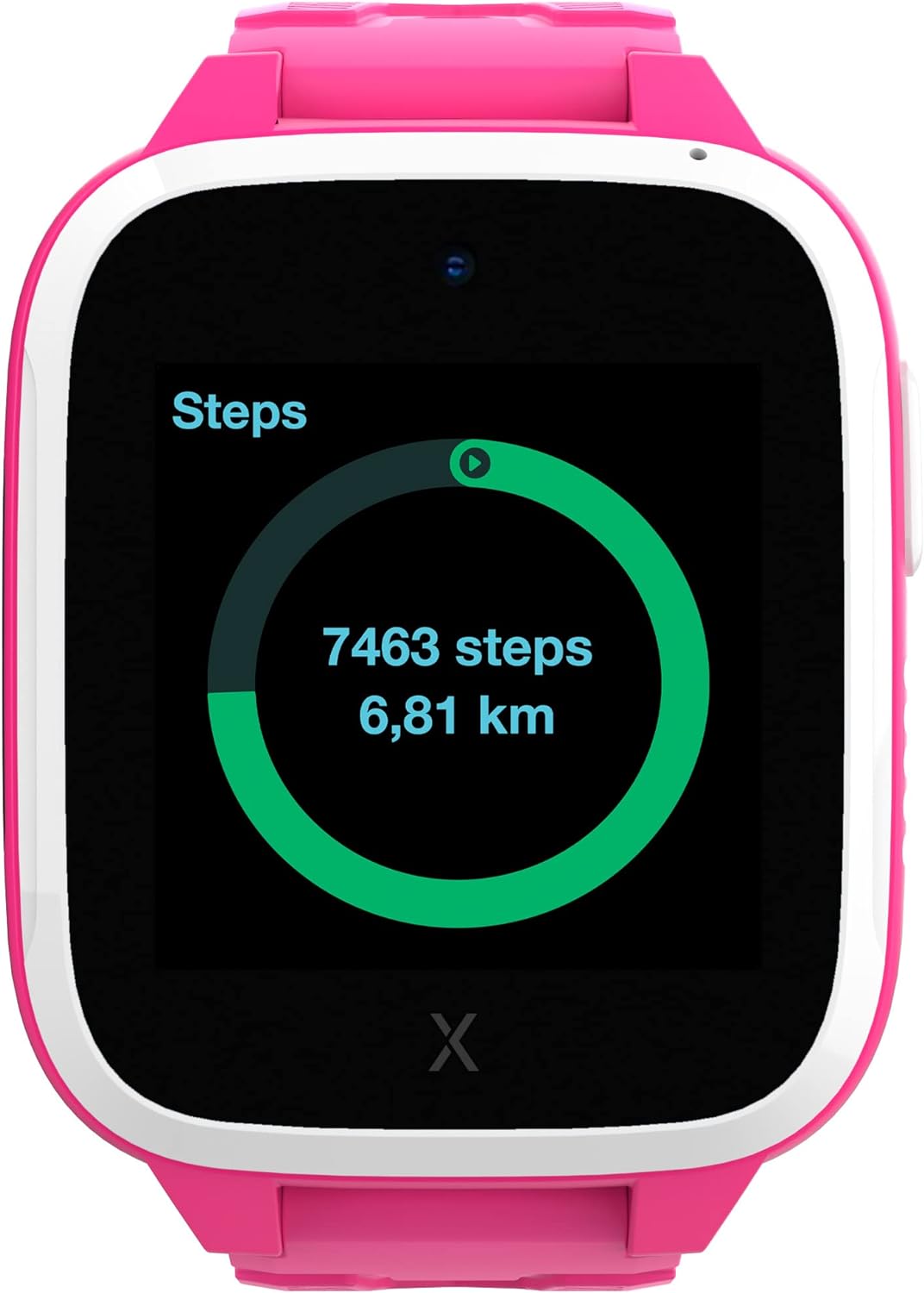
Image: The watch displaying an incoming call.
4.2 Messaggi
The device can receive text messages, emojis, images, and voice messages. Children can reply using images, emojis, and voice messages, providing a safe and controlled communication environment.
4.3 Funzione SOS
In an emergency, the child can press the SOS button to notify pre-selected emergency contacts of their location, providing immediate assistance and peace of mind.
4.4 GPS Location & Safety Zones
The XGO 3 utilizes multiple services for accurate device location tracking. Parents can set up customizable Safety Zones around key locations like home and school. Notifications are sent when the child enters or leaves these designated areas.

Image: The Xplora app displaying GPS tracking and safety zone setup.
4.5 Kids School Mode
School Mode allows parents to disable all watch functions except the clock and SOS feature during school hours, minimizing distractions and promoting focus.
4.6 Pedometer & Activity Platform
The built-in pedometer tracks your child's steps, encouraging physical activity. Steps can be converted into Xplora Coins, redeemable for content on the Xplora Goplay Activity Platform.

Image: The watch displaying the step counter.
Fotocamera a 4.7°
The XGO 3 includes a camera for capturing photos, which can be shared via messages with approved contacts.
5. Istruzioni per l'uso
This section covers basic operation of your XPLORA XGO 3 watch phone.
5.1 Accensione/spegnimento
- Per accendere: Tieni premuto il pulsante laterale finché lo schermo non si illumina.
- Per spegnere: Navigate to the settings menu on the watch, then select 'Shut Down'. Alternatively, press and hold the side button and confirm power off.
5.2 Navigazione
- Scorri: Swipe left or right on the screen to navigate between different app screens and features.
- Rubinetto: Tap on an icon to open an application or select an option.
- Pulsante laterale: The side button typically acts as a 'back' button or to return to the home screen.
5.3 Effettuare e ricevere chiamate
- Effettuare una chiamata: From the home screen, swipe to the 'Phone' app, select a contact from the approved list, and tap to initiate a call.
- Ricevere una chiamata: When a call comes in, the watch will ring and display the caller's name (if in contacts). Tap the green icon to answer or the red icon to decline.
5.4 Invio di messaggi
- From the home screen, swipe to the 'Chat' app. Select a contact. You can send pre-defined messages, emojis, voice messages, or photos taken with the watch camera.
5.5 Activating School Mode
- School Mode is managed by parents through the Xplora app. Set specific timeframes during which the watch will only display the time and allow SOS calls.
6. Informazioni sulla sicurezza
Please read the following safety guidelines carefully to ensure safe and proper use of the XPLORA XGO 3 watch phone:
- Supervisione degli adulti: While designed for children, adult supervision is recommended, especially during initial setup and for monitoring usage.
- Sicurezza della batteria: The device contains a Lithium Ion battery. Do not attempt to replace the battery yourself. Use only the provided USB charging cable. Avoid exposing the device to extreme temperatures or direct sunlight for prolonged periods.
- Resistenza all'acqua: The XGO 3 is designed to be splash-proof and resistant to light rain. It is not suitable for swimming or submersion in water. Avoid exposing the device to high-pressure water or steam.
- Rischio di soffocamento: Keep small parts, such as the SIM card, out of reach of very young children to prevent choking hazards.
- Copertura di rete: GPS accuracy and call quality depend on network coverage. Ensure your child is in an area with adequate 4G signal for optimal performance.
7. Specifiche
| Caratteristica | Dettaglio |
|---|---|
| Numero di modello | XGOTED 3 |
| Dimensioni del prodotto | 10.24 x 2.76 x 1.18 pollici |
| Peso dell'articolo | 7.1 once (200 grammi) |
| Batterie | 1 batteria agli ioni di litio (inclusa) |
| Dimensioni di visualizzazione dello schermo in piedi | 1.3 pollici |
| Sistema operativo | Android |
| Caratteristica speciale | GPS |
| Capacità della batteria | 850 milioneamp Ore |
| Tecnologia di connettività | Wifi |
| Standard di comunicazione wireless | Bluetooth |
| GPS | VERO |
| Forma | Piazza |
8. Risoluzione Dei Problemi
If you encounter issues with your XPLORA XGO 3, refer to the common problems and solutions below:
- "No SIM" Error: Ensure the Xplora Connect SIM card is properly inserted and activated. If the issue persists, contact Xplora customer support.
- Posizione GPS imprecisa: GPS accuracy can be affected by environmental factors (e.g., dense buildings, heavy tree cover) and network signal strength. Ensure the watch has a clear view of the sky and good network coverage. If the problem continues, check for software updates.
- Watch Freezing or Unresponsive: Try restarting the watch. If a restart doesn't resolve the issue, perform a factory reset via the settings menu (note: this will erase data).
- Problemi di qualità della chiamata: Ensure the watch has strong 4G network signal. Poor signal can lead to dropped calls or unclear audio.
- Impossibile effettuare/ricevere chiamate: Verify that the SIM card is active and that the contact numbers are correctly saved in the Xplora app. Ensure no dashes or parentheses are in the contact phone numbers within the app.
9. Garanzia e supporto
For warranty claims, technical support, or further assistance, please refer to the following:
- Politica di ritorno: The product is eligible for a 30-day refund/replacement policy.
- Piani di protezione: Optional 2-Year or 3-Year Protection Plans are available for purchase. Monthly
Documenti correlati - XGOTED 3

Guida rapida di Xplora XGO3: configurazione e funzionalità
Inizia a utilizzare il tuo smartwatch per bambini Xplora XGO3. Questa guida contiene informazioni sulla configurazione, informazioni importanti e risorse di supporto di Xplora Technologies AS.
Guida per l'utente di Xplora X5 Play Smartwatch Phone for Kids
Manuale utente completo per lo smartwatch Xplora X5 Play, che illustra dettagliatamente la configurazione, le funzionalità, la sicurezza e le informazioni sullo smaltimento dei dispositivi tecnologici indossabili per bambini.
Manuale utente dell'orologio XPLORA: caratteristiche, configurazione e funzionamento
Manuale utente completo per l'orologio XPLORA, che copre il contenuto della confezione, la disposizione del dispositivo, la ricarica, la sostituzione del cinturino, le funzioni di alimentazione, l'interfaccia touch, le chiamate, la messaggistica, le funzioni SOS, l'installazione dell'app, la creazione dell'account e le impostazioni avanzate come il monitoraggio della posizione, le pianificazioni e le zone di sicurezza.
Guida rapida per l'utente di XPLORA GO: configurazione e funzionalità
Scopri come configurare e utilizzare il tuo dispositivo XPLORA GO con questa guida utente concisa. ...
Guida rapida all'avvio di Xplora X6Play: fai funzionare lo smartwatch dei tuoi bambini
Inizia a utilizzare il tuo smartwatch per bambini Xplora X6Play. Questa guida rapida illustra i passaggi essenziali per la configurazione, il download dell'app, la configurazione del piano SIM e importanti informazioni sulla sicurezza per genitori e bambini.
Guida rapida di Xplora X6Play
Una guida concisa per configurare e utilizzare lo smartwatch Xplora X6Play, che comprende i passaggi di configurazione iniziale, importanti informazioni sulla sicurezza e sulla garanzia, dichiarazioni di conformità FCC e IC e linee guida per uno smaltimento corretto.