1. Introduzione
Thank you for choosing the ErGear Height Adjustable Electric Standing Desk. This desk is designed to enhance your workspace with dependable, scientifically-designed ergonomic features, promoting a healthier and more productive work environment. It allows for seamless transitions between sitting and standing positions, offering optimal comfort and productivity throughout your day.
This manual provides essential information for the safe and efficient use of your new electric standing desk, including setup, operation, maintenance, and troubleshooting.
2. Informazioni sulla sicurezza
AVVERTIMENTO: Si prega di leggere attentamente tutte le istruzioni di sicurezza prima del montaggio e dell'uso. Il mancato rispetto di queste istruzioni può causare lesioni o danni al prodotto.
- La scrivania ha un limite massimo di peso di 176 libbre (80 kg). Do not exceed this weight capacity.
- Proper assembly is required for stability and safety. Ensure all screws and fasteners are securely tightened.
- If the desk is used in an environment with children, consider anchoring the desk to the wall to prevent tipping.
- Keep hands and objects clear of the lifting mechanism during operation to prevent pinching or damage.
- Ensure all cables connected to devices on the desk have sufficient slack to accommodate height adjustments.
- Non stare né seduto né in piedi sulla scrivania.
- Do not disassemble or modify the motor or control box. Contact customer support for any repairs.
3. Contenuto della confezione
Please verify that all components are present and undamaged. A detailed list of all parts and hardware is provided in the separate installation manual included with your purchase. Key components include:
- Desktop (Two-Piece)
- Colonne di sollevamento (gambe)
- Scatola di controllo
- Controllore portatile
- Adattatore di alimentazione e cavo
- Dual Cable Access Holes
- Ganci di stoccaggio
- Ferramenta e utensili per l'assemblaggio
4. Installazione e assemblaggio
The ErGear Electric Standing Desk is designed for straightforward assembly. Most users report an average assembly time of 30 minutes. For detailed, step-by-step instructions, please refer to the dedicated Installation Manual (PDF) provided with your product or available online via the link in the Support section.
Suggerimenti per l'assemblaggio delle chiavi:
- Prima di iniziare, disporre tutti i componenti e l'hardware.
- Follow the numbered steps in the installation manual precisely.
- Ensure all connections are secure before plugging in the desk.
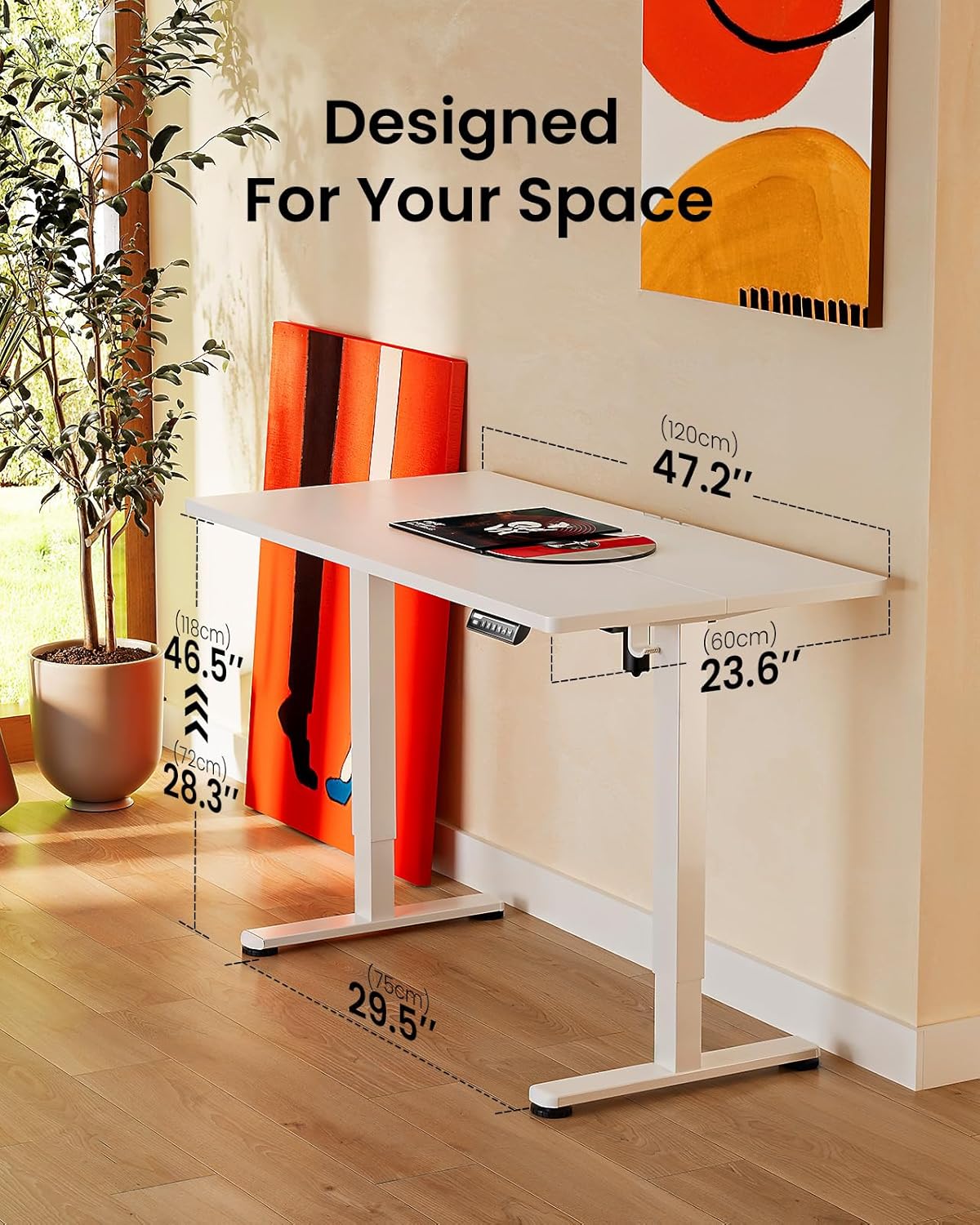
Image: ErGear standing desk with dimensions showing 47.2 inches width, 23.6 inches depth, and height adjustable from 28.3 to 46.5 inches. This illustrates how the desk is designed to fit various spaces.

Image: Diagram illustrating the simplified assembly process of the ErGear standing desk, highlighting an average assembly time of 30 minutes.
5. Istruzioni per l'uso
Your ErGear Electric Standing Desk features an intuitive control panel for easy height adjustment and memory settings.
Regolazione dell'altezza
The desk's height can be freely adjusted from Da 28.35 pollici (72 cm) a 46.79 pollici (118.8 cm). Use the up and down arrows on the control panel to manually adjust the desk to your desired height. The motor provides powerful and smooth lifting performance.
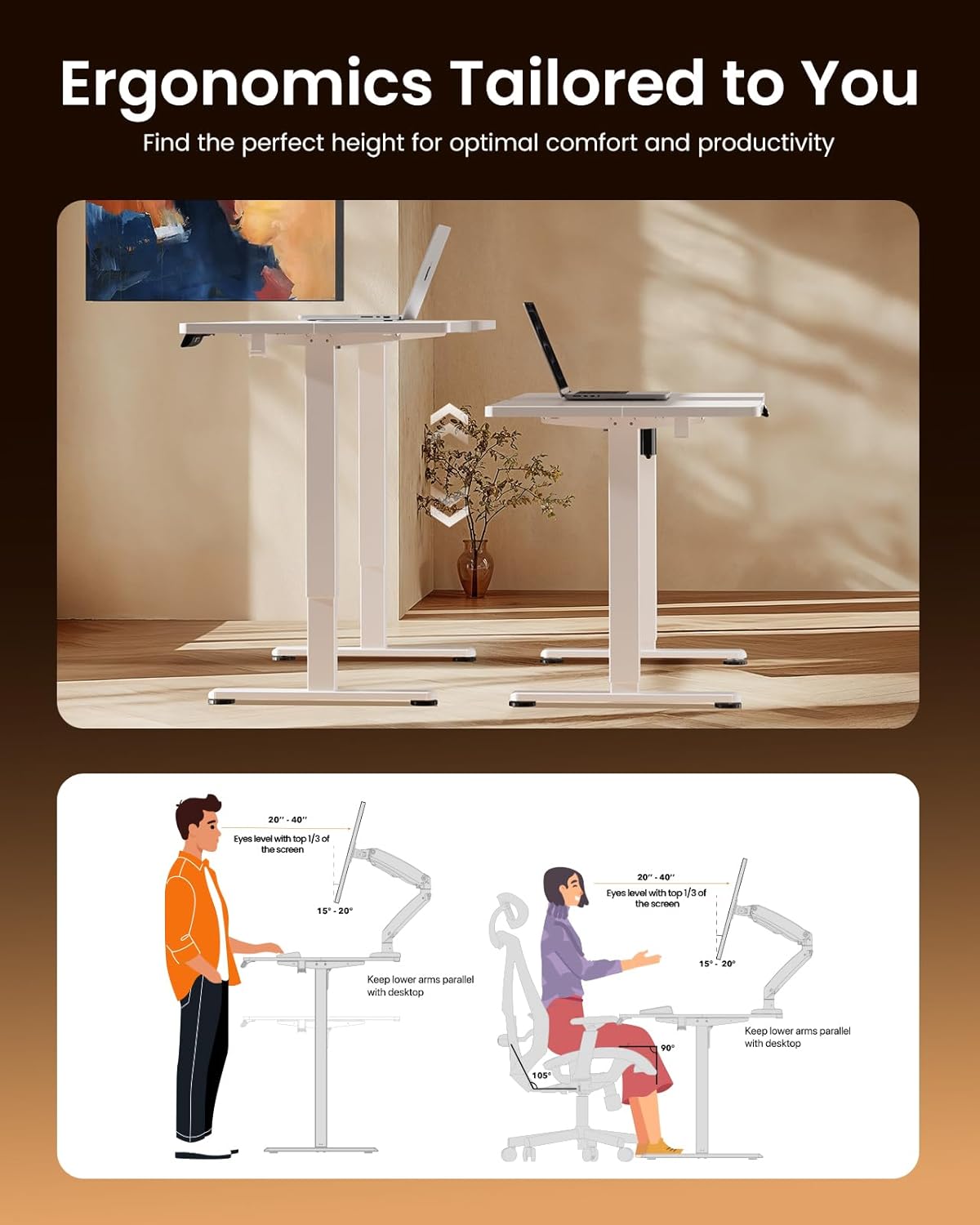
Image: Illustrations demonstrating proper ergonomic postures for both sitting and standing positions when using the ErGear desk, emphasizing ideal screen height and arm placement for comfort and productivity.
Preset di memoria
The control panel includes three memory preset buttons (1, 2, and 3). These allow you to save your favorite sitting and standing heights for quick and convenient adjustment.
- Per salvare un'altezza: Adjust the desk to your desired height using the up/down arrows. Press the 'M' button (or 'Set' button, if present) followed by the desired number button (1, 2, or 3). The display will confirm the setting is saved.
- Per richiamare un'altezza: Basta premere il pulsante numerico corrispondente (1, 2 o 3). La scrivania si sposterà automaticamente all'altezza salvata.

Image: A person sitting on the edge of the ErGear standing desk, illustrating its robust construction and ability to smoothly lift loads up to 176 lbs with ease and reliability.
6. Manutenzione
Per garantire la longevità e le prestazioni ottimali della tua scrivania elettrica ErGear, segui queste semplici linee guida per la manutenzione:
- Pulizia: The desk surface is easy to clean. Use a soft, damp cloth with a mild cleaner to wipe down the desktop and frame. Avoid abrasive cleaners or harsh chemicals that could damage the finish.
- Controlli regolari: Controllare periodicamente tutte le viti e gli elementi di fissaggio per assicurarsi che siano ben serrati. Serrarli nuovamente se necessario.
- Gestione dei cavi: Utilize the integrated cable access holes and storage hooks to keep cables organized and prevent tangling, especially during height adjustments.
- Cura del motore: The uprated motor is designed for long-term operation (tested 50,033 times). No special maintenance is required for the motor itself, but avoid overloading the desk beyond its 176 lbs capacity.
7. Risoluzione Dei Problemi
Se riscontri problemi con la tua scrivania elettrica ErGear, consulta i seguenti suggerimenti comuni per la risoluzione dei problemi:
- La scrivania non si muove: Check if the power cable is securely plugged into both the desk and the wall outlet. Ensure there are no obstructions preventing the desk from moving freely.
- Movimento irregolare/oscillazione: Verify that the desk is assembled correctly and all fasteners are tightened. Ensure the desk is placed on a flat, stable surface.
- Il pannello di controllo non risponde: Unplug the desk from the power outlet for 30 seconds, then plug it back in. This can reset the control system.
- Rumori insoliti: A slight humming sound during operation is normal. If you hear loud grinding or unusual noises, discontinue use and contact customer support. One user reported a loud coil whining noise from the power adapter; if this occurs, contact support for a replacement.
For more complex issues or if the problem persists, please contact ErGear Customer Support.
8. Specifiche
| Caratteristica | Specificazione |
|---|---|
| Marca | Ingranaggio Er |
| Dimensioni del prodotto (P x L x A) | 24"P x 48"L x 28.35"A |
| Colore | Bianco |
| Stile | Moderno |
| Materiale di base | Acciaio legato |
| Tipo di finitura | Dipinto |
| Caratteristica speciale | Height adjustable electric standing desk |
| Tipologia di camera | Ufficio |
| Usi consigliati | Lavorando |
| Tipo di montaggio | Montaggio a pavimento |
| Descrizione della fascia d'età | Adulto |
| Grado del prodotto | Nuovo |
| Produttore | Ingranaggio Er |
| Altezza dell'articolo | 46.46 pollici |
| Tipo di materiale superiore | Legno ingegnerizzato |
| Materiale delle gambe dei mobili | Acciaio legato |
| Meccanismo di sollevamento | Elettrico |
| Numero di posizioni in altezza | 3 (Preimpostazioni di memoria) |
| Forma | Rettangolare |
| Progettazione della scrivania | Scrivania in piedi |
| Stile gamba | Telaio in acciaio solido |
| Colore superiore | Bianco |
| Colore base | Bianco |
| Spessore del piano del tavolo | 0.67 pollici |
| Altezza massima | 46.46 pollici |
| Altezza minima | 28.35 pollici |
| Peso massimo raccomandato | 176 libbre |
| Assemblaggio richiesto | SÌ |
9. Garanzia e supporto
ErGear stands behind the quality of its products. Your electric standing desk comes with the following warranty coverage:
- Protezione di 5 anni: On desktop and desk frame.
- Protezione di 2 anni: On motors and electrical components.
For any questions, technical assistance, or warranty claims, please contact ErGear Customer Support. You can also find additional resources, including the full installation manual, on the official ErGear brand store or by visiting the user guide link below:
Guida utente ufficiale (PDF): Scarica qui
Visit the ErGear Store: Negozio ufficiale ErGear


