1. Importanti istruzioni di sicurezza
Please read and save these important safety instructions before using this humidifier. Failure to follow these instructions may result in electric shock, fire, or serious injury.
- Posizionare sempre l'umidificatore su una superficie solida, piana e livellata.
- Non posizionare l'umidificatore vicino a fonti di calore come stufe, termosifoni o luce solare diretta.
- Do not block air vents. Ensure proper air circulation around the unit.
- Utilizzare solo acqua di rubinetto pulita e fresca. Si consiglia di usare acqua distillata o demineralizzata per prevenire l'accumulo di minerali.
- Never add essential oils or other additives directly into the water tank, as this may damage the unit and void the warranty.
- Scollegare l'umidificatore dalla presa di corrente prima di riempirlo, pulirlo o spostarlo.
- Non immergere la base dell'umidificatore in acqua o altri liquidi.
- Tenere fuori dalla portata dei bambini e degli animali domestici. Questo apparecchio non è destinato all'uso da parte di persone con ridotte capacità fisiche, sensoriali o mentali, o prive di esperienza e conoscenza, a meno che non siano supervisionate o istruite sull'uso dell'apparecchio da una persona responsabile della loro sicurezza.
- Se il cavo di alimentazione è danneggiato, deve essere sostituito dal produttore, da un suo agente di assistenza o da personale qualificato per evitare rischi.
2. Prodotto finitoview
The BLACK+DECKER Digital Humidifier HM4250-B5 is designed to provide optimal humidity levels for large rooms up to 40m2, enhancing comfort and air quality. It features both cool and warm mist options, an intuitive touch control panel, and a convenient top-fill design.
Caratteristiche principali:
- Optimal Room Coverage: Engineered to cover rooms up to 40 sq m, this humidifier offers a mist output of 180-350ml/h. The 4L tank ensures continuous operation for 8-14 hours.
- Versatile Mist Options: Features both cool and warm mist settings to suit your comfort needs, with warm mist ideal for steam sterilization and enhanced home comfort during cooler seasons.
- Sistema di filtraggio avanzato: Equipped with an air filter that removes impurities, providing clean and pure mist for healthier indoor air quality.
- Controlli touch intuitivi: User-friendly touch interface allows easy mode selection and mist level adjustment, complemented by an LED display for clear visibility of settings.
- Comodo design con riempimento dall'alto: The square water tank's top-fill design allows for easy refills and cleaning, with a maximum water level window to prevent overflows.
- Spegnimento automatico di sicurezza: Includes an automatic shutoff function with an indicator light that activates when water is low, ensuring safe and worry-free operation.
- Stylish Modern Aesthetics: Features a modern design with a matte texture and decorative wooden finish, making it a stylish addition to any living room or bedroom decor.
- Dual Mist Levels: Offers two mist levels to cater to different preferences and needs, coupled with a high-performance ultrasonic system for efficient mist dispersion.
- Portatile e pratico: Designed with a detachable power cord for convenient storage and handling.
Componenti:

Figura 2.1: Davanti view of the humidifier, showing the LED display and touch controls.

Figura 2.2: Angolato view of the humidifier, highlighting its modern design and wooden finish accent.

Figura 2.3: The humidifier with its top lid removed, showing the wide opening for easy water refilling.

Figura 2.4: Interno view of the water tank, showing the mist outlet and maximum water level indicator.

Figura 2.5: Visual icons representing key features: Touch Panel, Cool Mist, Warm Mist, Room Area (Up to 40m2), Integrated Tank Design, PTC Pasteurization, 12hr Timer, Silent Sleep Mode.
3. Impostazione
- Disimballaggio: Estrarre con cautela l'umidificatore dalla confezione. Conservare l'imballaggio per un eventuale stoccaggio o trasporto futuro.
- Posizionamento: Place the humidifier on a flat, stable, water-resistant surface at least 15 cm (6 inches) away from walls and furniture. Ensure the mist outlet is not directed at walls or furniture.
- Riempimento del serbatoio dell'acqua:
- Rimuovere il coperchio superiore dell'umidificatore.
- Pour clean, cool tap water directly into the water tank opening. Distilled or demineralized water is recommended to minimize mineral residue.
- Fill the tank up to the "MAX" water level indicator. Do not overfill.
- Richiudere bene il coperchio superiore.
Figura 3.1: Demonstrating the easy top-fill method for the water tank.
- Collegamento elettrico: Plug the detachable power cord into the humidifier's power inlet, then plug the other end into a standard electrical outlet.
4. Istruzioni per l'uso
The humidifier features an intuitive touch control panel and LED display for easy operation.

Figura 4.1: A hand interacting with the touch control panel and LED display.
Funzioni del pannello di controllo:
| Icona/Pulsante | Funzione | Descrizione |
|---|---|---|
| Pulsante di accensione (acceso/spento) | Accensione/spegnimento | Premere per accendere o spegnere l'umidificatore. |
| Icona del livello di nebbia | Regolazione del livello di nebbia | Press to cycle through available mist levels (e.g., Low, High). The LED display will show the current setting. |
| Warm Mist Icon (SSS) | Modalità nebbia calda | Press to activate or deactivate the warm mist function. An indicator light will illuminate when warm mist is active. |
| Timer Icon (Clock) | Impostazione del timer | Press to set the operating timer (e.g., 1-12 hours). The unit will automatically shut off when the set time expires. |
| Humidity Icon (%RH) | Impostazione dell'umidità | Press to set your desired humidity level (e.g., 50%-80%). The humidifier will automatically adjust mist output to maintain this level. |
Spegnimento automatico:
The humidifier is equipped with an automatic shutoff feature for safety. When the water level in the tank is too low, the unit will automatically turn off, and an indicator light will illuminate to signal that the tank needs refilling.
5. Manutenzione e pulizia
Regular cleaning is essential to maintain the efficiency and longevity of your humidifier and to prevent the growth of mold and bacteria.
- Manutenzione giornaliera:
- Before refilling, empty any remaining water from the tank and base.
- Risciacquare accuratamente il serbatoio dell'acqua e la base con acqua pulita.
- Pulizia settimanale:
- Scollegare l'umidificatore e rimuovere il serbatoio dell'acqua.
- Pulire il serbatoio dell'acqua: Fill the tank halfway with water and add 2 tablespoons of white vinegar. Shake vigorously and let it stand for 30 minutes. Rinse thoroughly with clean water until the vinegar smell is gone.
- Pulire l'unità base: Gently wipe the surface of the base unit, especially around the ultrasonic transducer (the small disc), with a soft cloth dampened with white vinegar. Do not immerse the base in water. Use a small brush (not metal) to remove any mineral deposits from the transducer.
- Pulire il filtro dell'aria: The humidifier is equipped with an air filter. Gently remove the filter and clean it according to the instructions provided in the filter compartment. If heavily soiled, replace it.
- Rinse all parts with clean water and allow them to air dry completely before reassembling.
- Magazzinaggio: If the humidifier will not be used for an extended period, clean all parts as described above, ensure they are completely dry, and store the unit in a cool, dry place.
6. Risoluzione Dei Problemi
Prima di contattare l'assistenza clienti, consultare la seguente guida alla risoluzione dei problemi più comuni.
| Problema | Possibile causa | Soluzione |
|---|---|---|
| Nessuna nebbia o pochissima nebbia |
|
|
| Odore insolito dalla nebbia |
|
|
| Perdita d'acqua |
|
|
| L'unità non si accende |
|
|
7. Specifiche
| Specificazione | Valore |
|---|---|
| Marca | NERO+DECKER |
| Numero di modello | Modello HM4250-B5 |
| Colore | Bianco |
| Dimensioni del prodotto (L x P x A) | Dimensioni: 28 x 25 x 25 cm |
| Peso dell'articolo | 1.6 chilogrammi |
| Capacità | 4 litri (4000 millilitri) |
| Potenza / Wattage | 110W |
| Durata | Fino a 14 ore |
| Caratteristiche speciali | Ultrasonic, Warm Mist, Cool Mist, Digital Display, Auto Shutoff |
| Area della stanza consigliata | Fino a 40 metri2 |
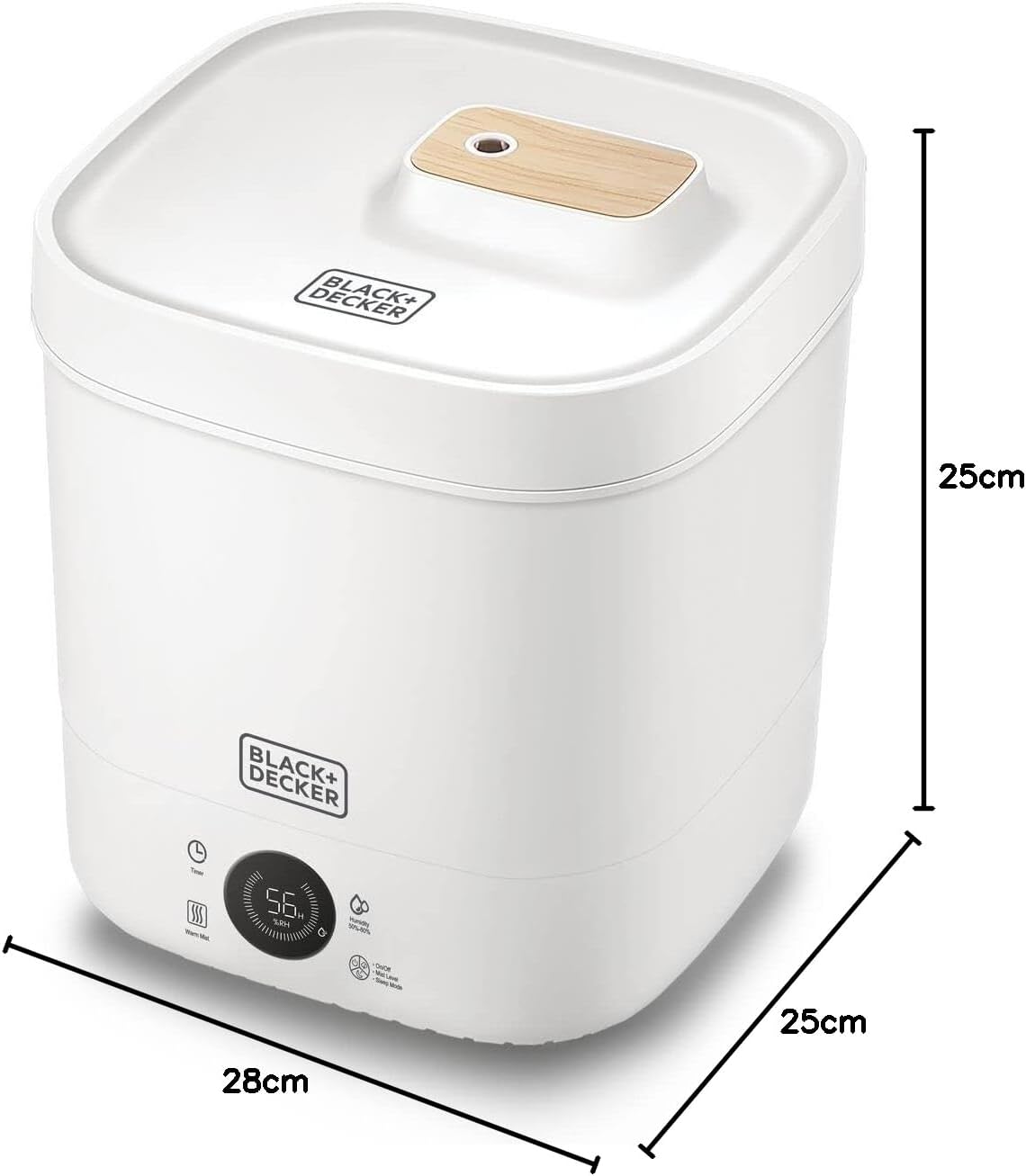
Figura 7.1: Diagram showing the dimensions of the humidifier: 28cm (length), 25cm (width), 25cm (height).
8. Garanzia e supporto
This BLACK+DECKER Digital Humidifier HM4250-B5 comes with a 2-Year Brand and Manufacturer Warranty, garantendo prestazioni affidabili e tranquillità.
For warranty claims, technical support, or any inquiries regarding your product, please contact BLACK+DECKER customer service through their official website or the retailer from whom you purchased the product. Please have your model number (HM4250-B5) and proof of purchase ready when contacting support.
You can find more information and support resources on the official BLACK+DECKER websito: www.blackanddecker.com


