1. Introduzione
Thank you for choosing the COMAOGO T002-W Mini Projector. This manual provides essential information for setting up, operating, and maintaining your projector to ensure optimal performance and longevity. The T002-W is a versatile projector featuring 9500 Lumens brightness, 1080P support, 5G WiFi, and Bluetooth 5.1 connectivity, designed for an immersive viewing esperienza fino a 220 pollici.
2. Contenuto della confezione
Si prega di controllare la confezione per verificare la presenza dei seguenti elementi:
- 1 x COMAOGO T002-W Mini Projector
- 1 x telecomando
- 1 x cavo di alimentazione
- 1 cavo HDMI
- 1 x cavo AV
- 1 x Manuale utente
3. Prodotto finitoview
Familiarizzare con i componenti e le interfacce del proiettore.

Image: COMAOGO T002-W Projector with 5G and 2.4G WiFi capabilities, showing wireless screen synchronization with a tablet and smartphone.
The projector features various ports for connectivity, including HDMI, USB, VGA, AV, and a TF card slot, along with a 3.5mm audio output. It also supports dual-band 5G and 2.4G WiFi for stable wireless connections and Bluetooth 5.1 for audio devices.

Image: COMAOGO T002-W Projector connected to various devices including a laptop, game console, and streaming stick, highlighting its multiple input ports (AV, HDMI, USB, TF, VGA).
4. Impostazione
4.1 Posizionamento
Position the projector on a stable, flat surface or mount it on a tripod. Ensure there are no obstructions to the ventilation vents. For optimal viewing, the projection distance should be between 1.5 meters and 5.5 meters, yielding a screen size from 45 inches to 220 inches.
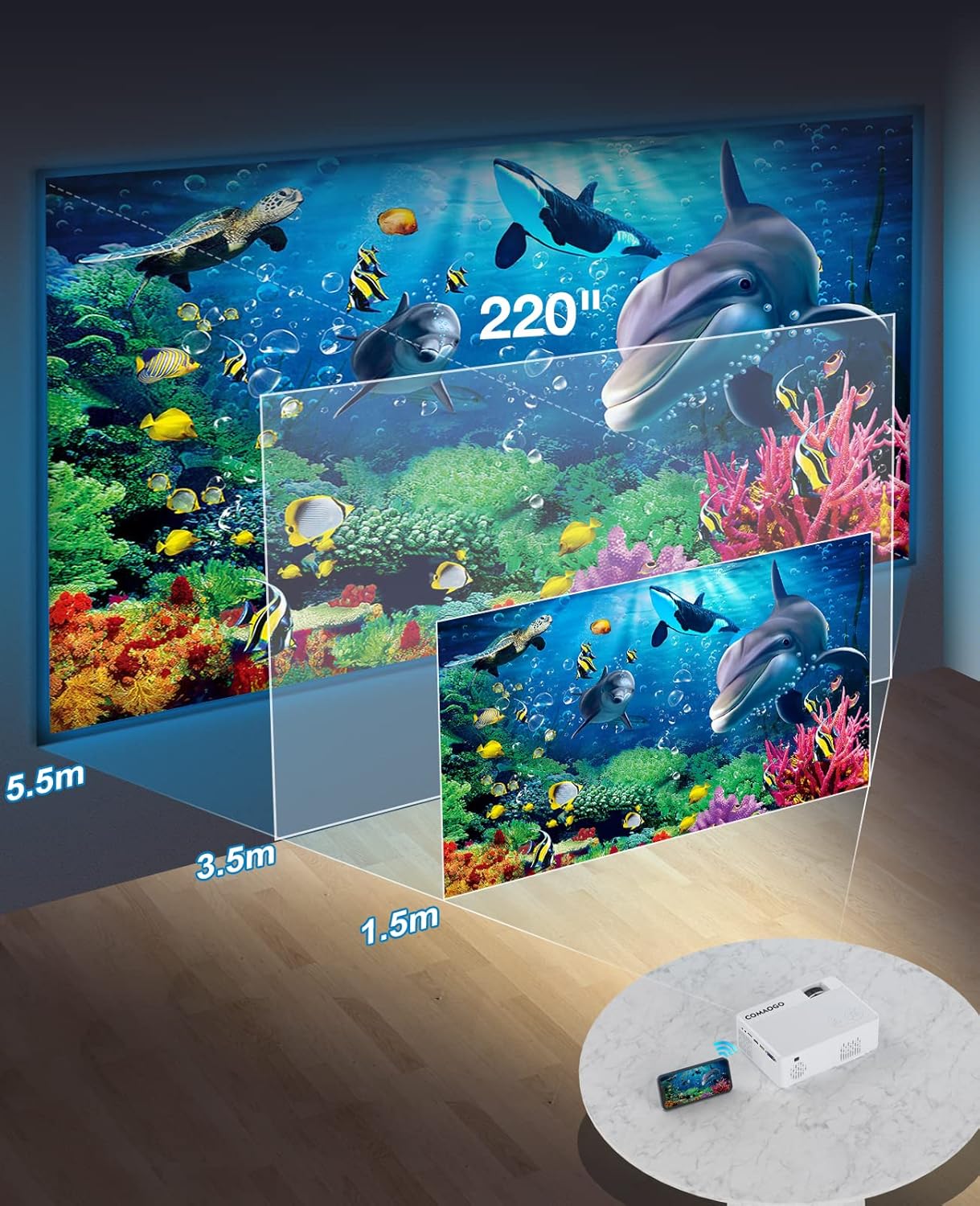
Image: Diagram illustrating the projection distances (1.5m to 5.5m) and corresponding screen sizes (45 to 220 inches) for the COMAOGO T002-W Projector.
4.2 Collegamento di alimentazione
Connect the power cable to the projector's power input and then plug it into a power outlet (AC 220V).
4.3 Correzione della messa a fuoco e della distorsione trapezoidale
Per ottenere un'immagine nitida e rettangolare:
- Regolazione della messa a fuoco: Ruotare l'anello di messa a fuoco sull'obiettivo del proiettore finché l'immagine non appare nitida.
- Correzione trapezoidale: Adjust the keystone correction dial (if available, or via menu settings) to correct trapezoidal distortion, ensuring the image is rectangular. The projector supports ±15° keystone correction.

Image: Illustration of keystone correction and focus adjustment for the COMAOGO T002-W Projector, showing how to achieve a clear, rectangular image.
5. Istruzioni per l'uso
5.1 Accensione/spegnimento
- Accensione: Premere il pulsante di alimentazione sul proiettore o sul telecomando.
- Spegni: Premere nuovamente il pulsante di accensione per spegnere il proiettore.
5.2 Selezione della sorgente di input
Use the "Source" button on the remote control or the projector's control panel to select the desired input source (e.g., HDMI, USB, VGA, AV).
5.3 Connettività wireless (WiFi)
The projector supports dual-band 5G and 2.4G WiFi for stable screen mirroring.
- Navigate to the WiFi settings on the projector's menu.
- Select your desired WiFi network (5G for faster, more stable connection; 2.4G for longer range and better penetration).
- Inserisci la password per connetterti.
- For screen mirroring, select the appropriate option (e.g., "iOS Cast" or "Android Cast") on the projector and follow the on-screen instructions to connect your smartphone or tablet.
5.4 Connettività Bluetooth
Connect external Bluetooth audio devices like speakers or headphones.

Image: COMAOGO T002-W Projector demonstrating Bluetooth 5.1 connection with a speaker and headphones.
- Accedere alle impostazioni Bluetooth nel menu del proiettore.
- Assicurati che il tuo dispositivo Bluetooth sia in modalità di associazione.
- Seleziona il dispositivo dall'elenco per associarlo.
- Note: The projector's Bluetooth function is for connecting output devices (speakers, headphones) only.
5.5 Connessioni cablate
Collegare vari dispositivi utilizzando le porte disponibili:
- HDMI: Connect laptops, PCs, game consoles (Xbox), TV sticks (Roku, Chromecast), DVD players.
- USB: Riproduci contenuti multimediali filedirettamente dalle unità USB.
- VGA: Collegare computer o laptop più vecchi.
- AV: Collegare dispositivi video legacy.
- Carta TF: Insert a TF card to play media files.
- Important: Copyright-protected content from services like Netflix or Disney+ is not directly supported via screen mirroring. For these services, use an HDMI connection with a compatible adapter (e.g., Lightning Digital AV Adapter for iOS devices) or a streaming stick.
6. Manutenzione
6.1 Pulizia della lente
Use a soft, lint-free cloth or lens cleaning paper to gently wipe the projector lens. Avoid using abrasive materials or harsh chemicals that could damage the lens coating.
6.2 Sistema di raffreddamento
The projector features an updated cooling system designed to reduce noise and maintain optimal operating temperature. Ensure the ventilation vents are clear of dust and obstructions to prevent overheating. Regular cleaning of the vents with a soft brush or compressed air is recommended.
7. Risoluzione Dei Problemi
Se riscontri problemi con il proiettore, fai riferimento alle seguenti soluzioni comuni:
- Nessuna immagine:
- Controllare il collegamento elettrico e assicurarsi che il proiettore sia acceso.
- Verify the input source selection matches your connected device.
- Ensure all cables (HDMI, VGA, etc.) are securely connected.
- Regola la messa a fuoco e la correzione trapezoidale.
- Nessun suono:
- Regola il volume del proiettore.
- Se si utilizzano altoparlanti esterni, assicurarsi che siano correttamente collegati e accesi.
- Check Bluetooth connection for external audio devices.
- Ensure the audio output from your source device is enabled.
- WiFi/Screen Mirroring Issues:
- Ensure both the projector and your device are connected to the same WiFi network.
- Check for strong WiFi signal.
- Restart both the projector and your source device.
- For Android devices, ensure "Wireless Projection" or "Screen Mirroring" is enabled. For iOS, use "Screen Mirroring" from Control Center.
- L'immagine è sfocata:
- Regolare la ghiera di messa a fuoco sull'obiettivo.
- Assicurarsi che la distanza di proiezione rientri nell'intervallo consigliato.
- L'immagine è trapezoidale:
- Adjust the keystone correction dial or setting.
For further assistance or software updates, please contact COMAOGO customer support.
8. Specifiche
| Caratteristica | Specificazione |
|---|---|
| Marca | COMAOGO |
| Modello | T002-W |
| Luminosità | 9500 lumen (220 ANSI) |
| Rapporto di contrasto | 6000:1 |
| Risoluzione nativa | 1280x720 |
| Risoluzione supportata | 1080P |
| Dimensioni della proiezione | 45" - 220" |
| Distanza di proiezione | 1.5 m - 5.5 m |
| Correzione Keystone | ±15° |
| Connettività WiFi | Dual-band (5G + 2.4G) |
| Bluetooth | Bluetooth 5.1 |
| Interfaccia Hardware | 3.5mm Audio, TF Card, USB 2.0, VGA, HDMI |
| Altoparlante incorporato | SÌ |
| Livello di rumore | 45 decibel |
| Consumo energetico | 48 watt |
| Dimensioni | Dimensioni: 20.32 x 15.24 x 7.62 cm |
| Peso | 1 chilogrammo |
9. Video ufficiale del prodotto
Watch this video for a visual guide on the COMAOGO T002-W Mini Projector's features and operation.
Video: An official product video demonstrating the features and usage of the COMAOGO T002-W Mini Projector, including connectivity and display capabilities.
10. Garanzia e supporto
The COMAOGO T002-W Mini Projector comes with a standard manufacturer's warranty. For warranty claims, technical support, or inquiries regarding software updates, please contact COMAOGO customer service through the retailer where you purchased the product or visit the official COMAOGO websito.
SOFTWARE UPDATES can be provided; please contact us if needed.


