Prodotto finitoview
The Karlsson Silver Mirror LED Oval Alarm Clock (Model: PTG-KA5876BK) is a modern digital alarm clock designed for clear time display and reliable alarm functionality. Its sleek design features an oval mirror LED screen, making it a functional and aesthetic addition to any space.

Immagine: Frontale view of the Karlsson Silver Mirror LED Oval Alarm Clock, showing the digital display set to 20:00. The clock has a black frame and a reflective screen.
Guida all'installazione
Alimentazione della sveglia
The alarm clock can be powered using either AAA batteries or a DC 5V USB power source.
- Installazione della batteria:
Locate the battery compartment on the back of the alarm clock. Open the cover and insert 3x AAA batteries, ensuring correct polarity (+/-). Close the battery compartment cover securely.

Immagine: Posteriore view of the alarm clock, highlighting the battery compartment with an "OPEN" label and the DC 5V power input port.
- Collegamento di alimentazione USB:
Connect the provided USB cable to the DC 5V input port on the back of the alarm clock. Plug the other end of the USB cable into a compatible USB power adapter (not included) or a USB port on a computer or power bank.

Image: A coiled black USB power cable, used for connecting the alarm clock to a power source.
Upon successful power connection, the digital display will illuminate.
Istruzioni per l'uso
The alarm clock features several buttons on its top surface for various functions:
- ALLARME: Used to set and activate/deactivate the alarm.
- DIREZIONI: Used to switch between time display, alarm setting, and other modes.
- LUCE/SNOOZE: Used to adjust display brightness or activate the snooze function when the alarm sounds.
- SU: Used to increase values during setting or navigate menus.
- GIÙ: Used to decrease values during setting or navigate menus.
Impostazione dell'ora
- Premere il tasto MODALITÀ una volta il pulsante per accedere alla modalità di impostazione dell'ora. Le cifre delle ore lampeggeranno.
- Utilizzare il UP or GIÙ pulsanti per regolare l'ora.
- Premere il tasto MODALITÀ nuovamente il pulsante. Le cifre dei minuti lampeggeranno.
- Utilizzare il UP or GIÙ pulsanti per regolare i minuti.
- Premere il tasto MODALITÀ una terza volta per confermare e uscire dalla modalità di impostazione dell'ora.
Impostazione della sveglia
- Premere il tasto ALLARME una volta il pulsante per accedere alla modalità di impostazione della sveglia. Le cifre dell'ora della sveglia lampeggeranno.
- Utilizzare il UP or GIÙ pulsanti per regolare l'ora della sveglia.
- Premere il tasto ALLARME nuovamente il pulsante. Le cifre dei minuti della sveglia lampeggeranno.
- Utilizzare il UP or GIÙ pulsanti per regolare i minuti della sveglia.
- Premere il tasto ALLARME una terza volta per confermare e uscire dalla modalità di impostazione della sveglia.
- Per attivare o disattivare l'allarme, premere il tasto ALLARME button briefly when not in setting mode. An alarm icon will appear on the display when activated.
Snooze Function and Display Brightness
- Posticipa: Quando suona la sveglia, premere il tasto LUCE/SNOOZE button to temporarily silence the alarm. The alarm will sound again after a set snooze interval (e.g., 5-10 minutes).
- Luminosità dello schermo: Premere il tasto LUCE/SNOOZE button when the alarm is not sounding to cycle through different brightness levels of the LED display.

Image: The Karlsson alarm clock showing the time 14:52, placed on a dark surface, possibly a bedside table, with a wristwatch in the foreground.
Manutenzione e cura
- Pulizia: To clean the clock, gently wipe the surface with a soft, dry cloth. For stubborn marks, a slightly damp cloth can be used, followed by immediate drying. Do not use abrasive cleaners, solvents, or strong chemicals, as these may damage the finish or display.
- Sostituzione della batteria: If using batteries, replace them when the display dims or functions become erratic. Always replace all batteries at the same time with new ones of the same type.
- Posizionamento: Avoid placing the clock in direct sunlight, near heat sources, or in areas with high humidity, as these conditions can affect performance and lifespan.
Risoluzione dei problemi
| Problema | Possibile causa | Soluzione |
|---|---|---|
| Il display è vuoto o poco luminoso. | Nessuna alimentazione, batterie scariche o collegamento elettrico errato. | Ensure batteries are correctly installed and not depleted. Check USB cable connection and power adapter. |
| L'allarme non suona. | Allarme non attivato, volume dell'allarme troppo basso (se regolabile) oppure impostazione dell'ora errata. | Verify alarm is activated (check for alarm icon on display). Re-set the alarm time. |
| L'ora non è corretta. | L'ora non è stata impostata correttamente o si è verificata un'interruzione di corrente. | Re-set the current time following the "Setting the Time" instructions. |
Specifiche
| Caratteristica | Dettaglio |
|---|---|
| Numero di modello | PTG-KA5876BK |
| Marca | Karlsson |
| Materiale | Acrilonitrile Butadiene Stirene (ABS) |
| Colore | Nero |
| Tipo di visualizzazione | LED digitale |
| Fonte di alimentazione | 3x AAA Batteries (not included) or DC 5V USB |
| Dimensioni del prodotto (L x A x P) | 12.2 cm x 6 cm x 4 cm (approx. 12W x 6H cm) |
| Peso | 200 grammi |
| Caratteristiche speciali | Alarm, Snooze, Adjustable Display Brightness |
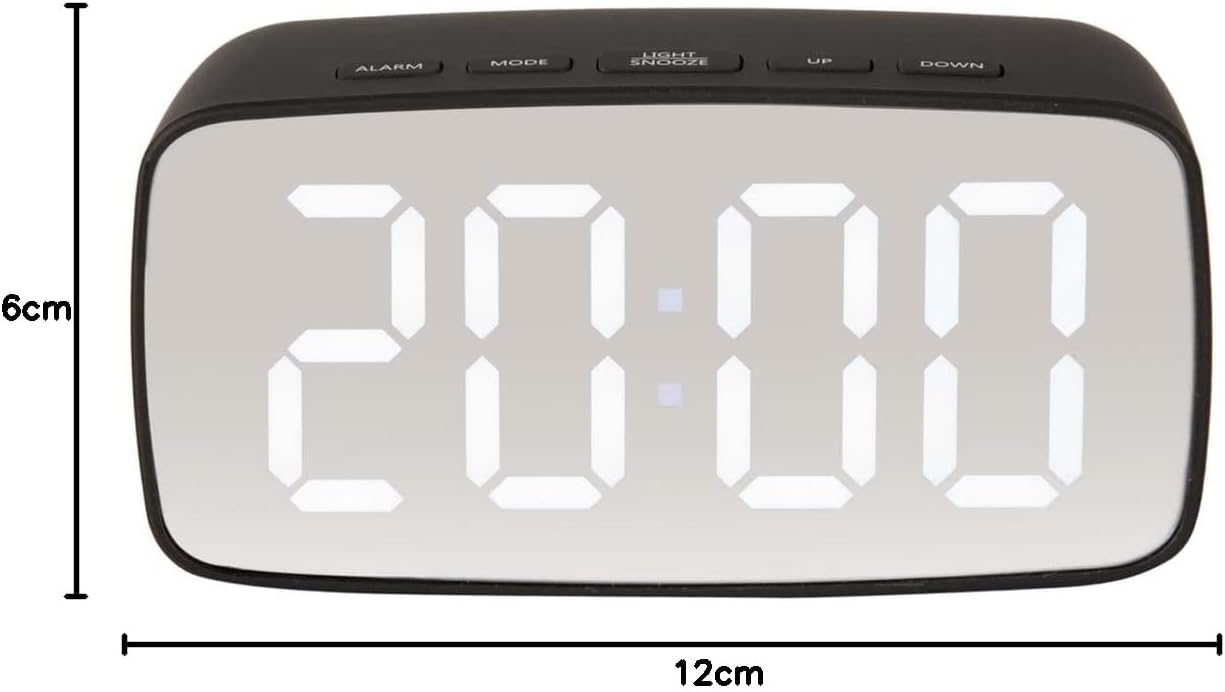
Immagine: Frontale view of the alarm clock with overlaid measurements indicating a width of 12cm and a height of 6cm.