Introduzione
Thank you for choosing the FANTECH MAXFIT61 Frost Wireless Mechanical Keyboard. This compact 61-key keyboard offers versatile connectivity options, customizable RGB lighting, and hot-swappable switches for a personalized typing and gaming experience. This manual provides detailed instructions for setup, operation, maintenance, and troubleshooting to ensure optimal performance.

Image: The FANTECH MAXFIT61 Frost Wireless Mechanical Keyboard, showcasing its 5-pin hot-swappable design, 3 connection modes (Bluetooth, 2.4GHz, USB-C), RGB lighting, and switch options (Red and Blue).
Impostare
Cosa c'è nella scatola
- FANTECH MAXFIT61 Frost Wireless Mechanical Keyboard
- Estrattore per tasti
- Estrattore per interruttori
- Cavo di ricarica USB di tipo C.
- Ricevitore USB (per connessione wireless a 2.4 GHz)
- Manuale di istruzioni

Image: A visual representation of the items included in the product packaging, such as the keyboard, cables, and tools.
Modalità di connettività
The MAXFIT61 Frost Wireless keyboard supports three connection modes:
- Bluetooth 5.0 (BT5.0): For wireless connection to up to three devices.
- Wireless a 2.4 GHz: Utilizes the included USB receiver for a stable, low-latency wireless connection.
- USB Type-C cablato: Connect directly via the USB-C cable for a wired connection and charging.
To switch between modes, use the dedicated switch on the keyboard or specific key combinations as detailed in the operating instructions.
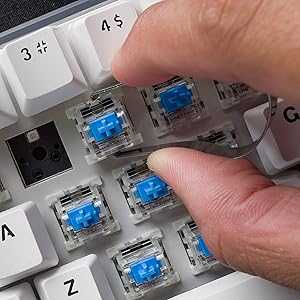
Image: A visual comparison showing the keyboard operating in wireless (Bluetooth/2.4GHz) mode and wired mode, highlighting the flexibility of connection options.

Immagine: un primo piano view of the detachable USB Type-C cable connected to the keyboard, emphasizing its portability and ease of management.
Istruzioni per l'uso
Funzioni di base
- Accensione/spegnimento: Use the switch located on the keyboard's side or bottom.
- Commutazione della modalità: Refer to the specific key combinations or physical switch for changing between Bluetooth, 2.4GHz, and wired modes.
- Pairing (Bluetooth): Activate Bluetooth mode, then search for 'MAXFIT61' on your device and pair.
- Connessione a 2.4 GHz: Insert the USB receiver into your computer. The keyboard should connect automatically.
Tasto magico FN
The 'Fn' key provides access to various multimedia functions, lighting controls, and custom macros. Pressing Fn + MAIUSCOLA allows quick access to multimedia keys, home key, and custom functions.

Image: A close-up of the 'Caps' and 'Shift' keys, indicating the functionality of the 'Magic FN Key' for accessing additional commands.
Personalizzazione dell'illuminazione RGB
The keyboard features 15 built-in brilliant backlight effects. You can cycle through these effects using specific Fn key combinations. For advanced customization, including per-key RGB lighting, macros, and function key remapping, download and install the FANTECH MAXFIT61 software from the official FANTECH websito.

Image: A screenshot of the FANTECH MAXFIT61 software, demonstrating the interface for adjusting RGB lighting modes and creating custom key assignments.
Manutenzione
Pulizia
To clean your keyboard, disconnect it from your computer. Use a soft, dry cloth to wipe the surface. For deeper cleaning, you may carefully remove keycaps using the provided keycap puller and use compressed air to clear debris from underneath.
Interruttori sostituibili a caldo
The MAXFIT61 features hot-swappable sockets, allowing you to change switches without soldering. It supports most 5-pin/3-pin mechanical switches from brands like Gateron, Cherry, and Kailh.
- Rimozione dei tasti: Use the keycap puller to gently lift keycaps straight up.
- Rimozione degli interruttori: Utilizzare l'estrattore per afferrare le clip superiore e inferiore dell'interruttore ed estrarlo in linea retta.
- Installazione degli interruttori: Align the pins of the new switch with the holes on the PCB. Press firmly until the switch clicks into place. Ensure pins are not bent.
- Installazione dei tasti: Allineare il tasto con lo stelo dell'interruttore e premere delicatamente.
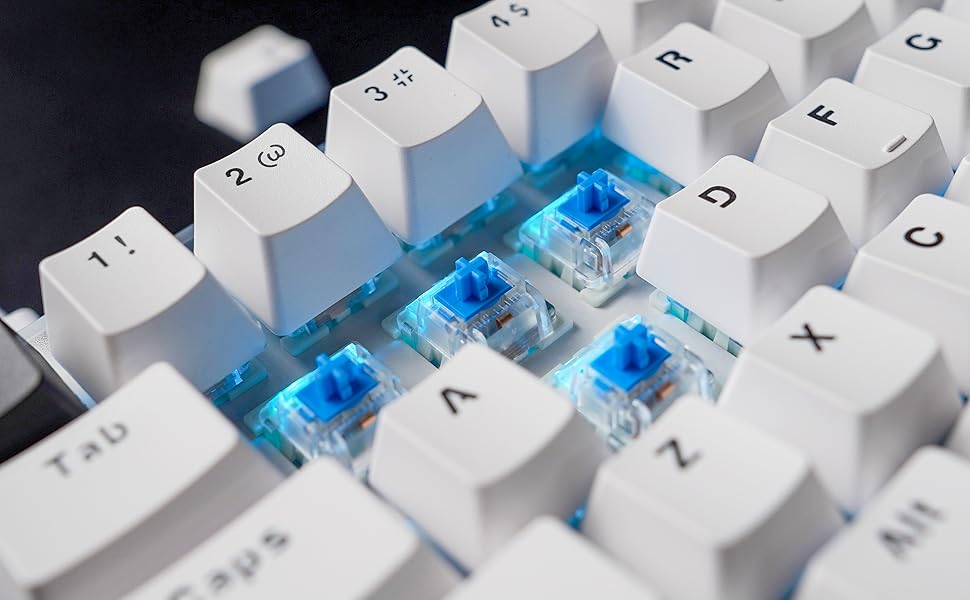
Image: A close-up showing mechanical switches being removed from the keyboard's PCB using a switch puller, demonstrating the hot-swappable feature.

Image: An exploded diagram illustrating the internal components of the keyboard, including keycaps, plate, switches, sound-proofing foam, PCB, and bottom case.
Risoluzione dei problemi
- La tastiera non risponde:
- Assicurarsi che la tastiera sia carica o collegata tramite USB-C.
- Check the connection mode (Bluetooth, 2.4GHz, Wired) and ensure it matches your device.
- Per 2.4 GHz, assicurarsi che il ricevitore USB sia inserito correttamente.
- For Bluetooth, ensure it's paired correctly and your device's Bluetooth is enabled.
- Illuminazione RGB non funzionante/errata:
- Assicurati che la tastiera sia accesa.
- Cycle through built-in effects using Fn key combinations.
- If using custom settings, verify them in the FANTECH software.
- Chiavi non registrate:
- If a specific key is not working, carefully remove the keycap and switch to check for debris or bent pins. Reinstall or replace the switch if necessary.
- Ensure the keyboard firmware is up to date (check FANTECH webposto).
- Problemi di connettività (ritardi/disconnessioni):
- Ridurre la distanza tra la tastiera e il ricevitore/dispositivo.
- Evitare interferenze da altri dispositivi wireless.
- Assicurarsi che la tastiera sia completamente carica.
- Prova una connessione cablata per escludere problemi wireless.
Specifiche
| Caratteristica | Dettaglio |
|---|---|
| Nome del prodotto | MAXFIT61 FROST WIRELESS MK857 |
| Numero di chiavi | 61 chiavi |
| Tipo di interruttore | Meccanico (sostituibile a caldo) |
| Tecnologia di connettività | BT5.0, 2.4GHz Wireless, USB Type-C Wired |
| Anti-ghosting | Tutte le chiavi |
| Retroilluminazione della tastiera | Colore RGB |
| Dimensioni (L x P x A) | 294 mm x 103 mm x 42 mm (13.5 x 5.63 x 1.85 pollici) |
| Peso | 566g (1.37 libbre) |
| Batteria | 1 batteria ai polimeri di litio (inclusa) |
| Dispositivi compatibili | PC (finestre) |

Image: A table outlining the characteristics of Outemu Red and Blue switches, including actuation force, pre-travel, travel distance, behavior, and sound level.
Garanzia e supporto
FANTECH products come with a limited warranty. For detailed warranty information, technical support, or service inquiries, please visit the official FANTECH webo contattare direttamente l'assistenza clienti. Conservare la prova d'acquisto per eventuali reclami in garanzia.


