1. Introduzione
The AeroCool Blade is an ATX semi-tower PC case designed for optimal airflow and aesthetic appeal. It features an RGB front panel with preset lighting modes, a full tempered glass side window, and ample space for component installation. This manual provides essential information for the proper setup, operation, and maintenance of your PC case.
Informazioni sulla sicurezza: Always disconnect power from your system before performing any installation or maintenance. Handle components with care to avoid damage. Refer to individual component manuals for specific installation instructions.
2. Contenuto della confezione
- AeroCool Blade ATX Semi-Tower PC Case
- 1 x 120mm RGB Rear Fan (pre-installed)
- 3 x 120mm Front Fans (pre-installed)
- Kit di accessori (viti, distanziatori, fascette)
3. Configurazione e installazione
3.1 Preparazione del caso
Carefully remove the case from its packaging. Place it on a stable, flat surface. Remove the tempered glass side panel by unscrewing the thumb screws at the rear of the case and gently pulling the panel away.

Figura 3.1: Interno view of the AeroCool Blade PC case, illustrating the layout for component installation.
3.2 Installazione della scheda madre
- Install the necessary motherboard standoffs into the motherboard tray according to your motherboard's form factor (ATX, Micro-ATX, Mini-ITX).
- Installare la schermatura I/O nell'apertura posteriore del case.
- Posizionare con attenzione la scheda madre sui distanziatori, allineando i fori delle viti.
- Fissare la scheda madre con le viti fornite.
3.3 Installazione dell'unità di alimentazione (PSU).
The AeroCool Blade supports bottom-mounted PSUs. Slide your PSU into the dedicated compartment at the bottom rear of the case. Secure it with screws from the rear of the case.
3.4 Installazione dell'unità di archiviazione
- HDD da 3.5": Install 3.5" hard drives into the drive cage located beneath the PSU shroud.
- 2.5" SSDs/HDDs: Install 2.5" drives onto the dedicated mounting points on the motherboard tray or behind it.

Figura 3.2: Interno posteriore view, highlighting cable management routes and 2.5-inch drive mounting locations.
3.5 Installazione della scheda di espansione (GPU)
Remove the necessary expansion slot covers from the rear of the case. Insert your graphics card or other expansion cards into the PCIe slots on your motherboard and secure them with screws.
3.6 Installazione di ventole e sistemi di raffreddamento
The case comes with one 120mm RGB fan pre-installed at the rear and three 120mm fans pre-installed at the front. Ensure all fan cables are connected to appropriate headers on your motherboard or fan controller.

Figure 3.3: A 120mm RGB fan, similar to those pre-installed in the AeroCool Blade case.
3.7 Connessioni I/O del pannello frontale
Connect the front panel cables (USB 3.0, USB 2.0, HD Audio, Power Switch, Reset Switch, LED Switch, Power LED, HDD LED) to the corresponding headers on your motherboard. Refer to your motherboard manual for exact pin configurations.
4. Istruzioni per l'uso
4.1 Accensione
Once all components are installed and connected, replace the side panel. Connect your monitor, keyboard, mouse, and power cable to the PSU. Press the Power button located on the top panel of the case to turn on your system.

Figura 4.1: Parte superiore-anteriore view of the case, indicating the location of the power button and front I/O ports.
4.2 Controllo dell'illuminazione RGB
The AeroCool Blade features an RGB front panel. Use the dedicated LED button on the top panel to cycle through various preset lighting modes and effects. Pressing the button will change the lighting pattern or color.

Figura 4.2: Fronte view of the AeroCool Blade case with its distinctive RGB lighting.
4.3 Porte del pannello frontale
Il pannello superiore fornisce un comodo accesso a:
- 1 porte USB 3.0
- 2 porte USB 2.0
- HD Audio output
- Ingresso microfono
Connect your USB devices, headphones, and microphone to these ports as needed.
5. Manutenzione
5.1 Pulizia del filtro antipolvere
Regularly check and clean the dust filters to maintain optimal airflow and prevent dust buildup inside the case. Dust filters are typically located at the top, front, and bottom (under the PSU). Gently remove them and clean with compressed air or rinse with water (ensure they are completely dry before re-installation).
5.2 Pulizia esterna
Pulisci le superfici esterne della custodia con un panno morbido eamp panno. Evitare l'uso di prodotti chimici aggressivi o materiali abrasivi che potrebbero danneggiare la finitura o il vetro temperato.
6. Risoluzione Dei Problemi
- Il sistema non si accende:
Ensure the PSU is switched on and properly connected to the wall outlet. Verify all power cables from the PSU are correctly connected to the motherboard and components. Check the front panel power switch connection to the motherboard. - Illuminazione RGB non funzionante:
Ensure the RGB controller (if applicable) and fan RGB cables are securely connected. Press the LED button on the top panel to cycle through modes. If connected to a motherboard header, check motherboard software settings. - I ventilatori non girano:
Verify that all fan power cables are securely connected to the motherboard fan headers or a fan controller. Check BIOS/UEFI settings for fan speed control. - Pannello frontale USB/Audio non funzionante:
Ensure the USB and HD Audio cables from the front panel are correctly connected to the corresponding headers on your motherboard.
7. Specifiche
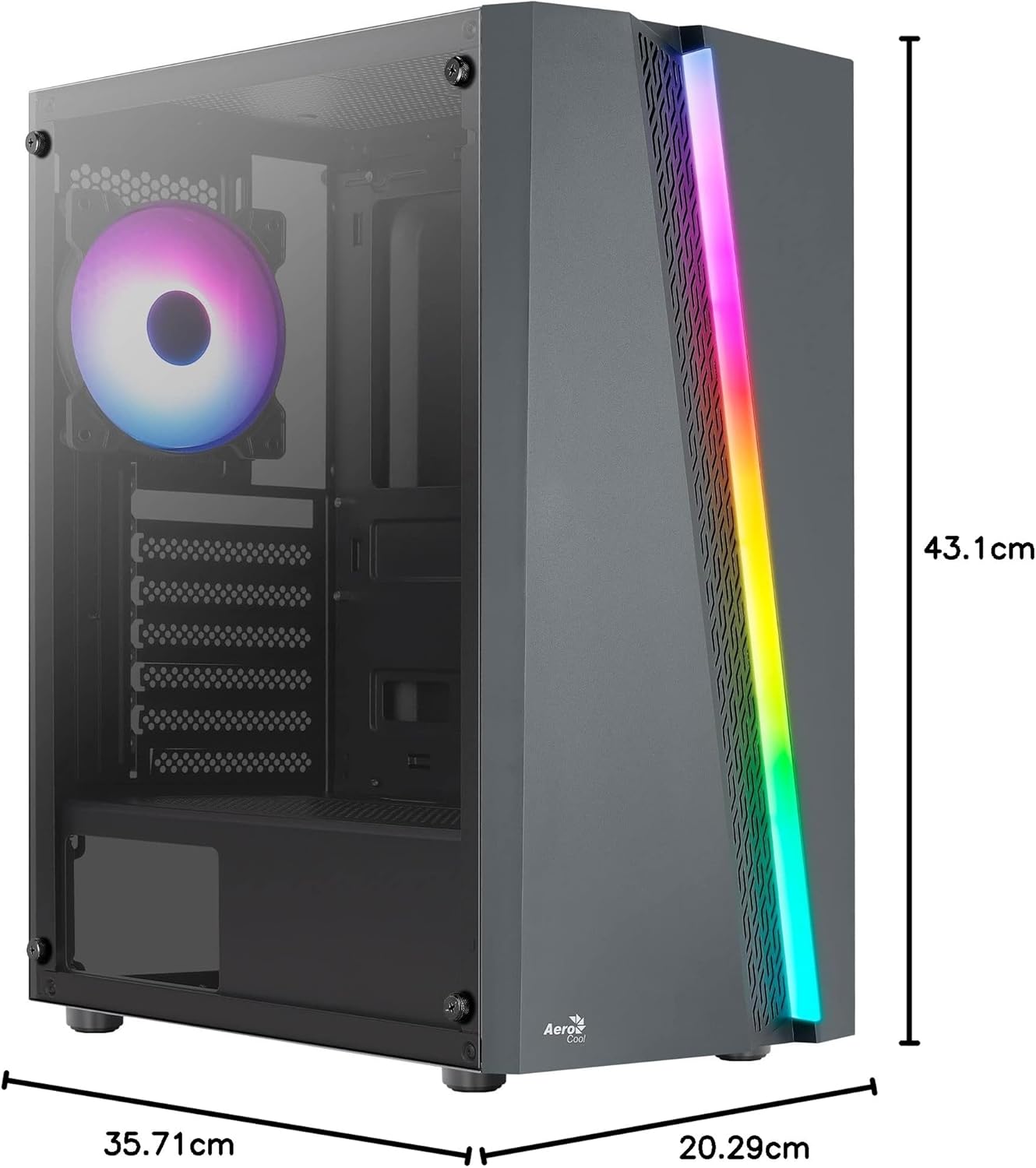
Figure 7.1: Dimensions of the AeroCool Blade PC Case.
| Caratteristica | Specificazione |
|---|---|
| Marca | AeroCool |
| Nome del modello | BLADEBK |
| Tipo di caso | Semi-Tower |
| Compatibilità della scheda madre | ATX, Micro ATX, Mini ITX |
| Materiale | Vetro temperato (pannello laterale) |
| Dimensioni del prodotto (L x P x A) | Dimensioni: 43.1 x 20.3 x 35.7 cm |
| Peso dell'articolo | 4 kg |
| Alloggiamenti unità | 2 x 3.5", 2 x 2.5" |
| Liquidazione GPU | Fino a 307 mm |
| Altezza del dispositivo di raffreddamento della CPU | Fino a 155 mm |
| Porte I / O anteriori | 1 x USB 3.0, 2 x USB 2.0, HD Audio, Mic, LED Control, Power |
| Ventole preinstallate | 1 x 120mm RGB Rear, 3 x 120mm Front |
| Metodo di raffreddamento | Aria |
8. Garanzia e supporto
Per informazioni sulla garanzia e supporto tecnico, fare riferimento al sito ufficiale AeroCool webo contattare il rivenditore locale. Conservare la prova d'acquisto per eventuali reclami in garanzia.
Informazioni sui contatti: Per ulteriore assistenza, visitare www.aerocool.io.


