Introduzione
The Docooler Bone Conduction Speaker is a compact, portable audio device designed to transform various surfaces into sound-producing diaphragms. Utilizing bone conduction technology, it offers a unique audio experience with enhanced bass and volume depending on the surface it is placed upon. This manual provides essential information for the safe and effective use of your speaker.
Informazioni sulla sicurezza
Si prega di leggere e seguire queste linee guida di sicurezza per evitare danni al dispositivo o lesioni personali:
- Non esporre l'altoparlante a temperature estreme o alla luce solare diretta.
- Evitare di far cadere o sottoporre il dispositivo a forti impatti.
- Keep the speaker away from water and liquids, as it is not waterproof.
- Non tentare di smontare, riparare o modificare il dispositivo. Ciò invaliderà la garanzia.
- Utilizzare solo il cavo di ricarica fornito e un adattatore di alimentazione compatibile.
- Evitare l'ascolto prolungato ad alto volume per prevenire danni all'udito.
Contenuto della confezione
Verifica che tutti gli articoli siano presenti nel tuo pacco:
- Docooler Bone Conduction Speaker (1 unit)
- Cavo di ricarica USB di tipo C (1 unità)
- Manuale dell'utente (questo documento)
- Adhesive Pads / Suction Cup (for mounting)
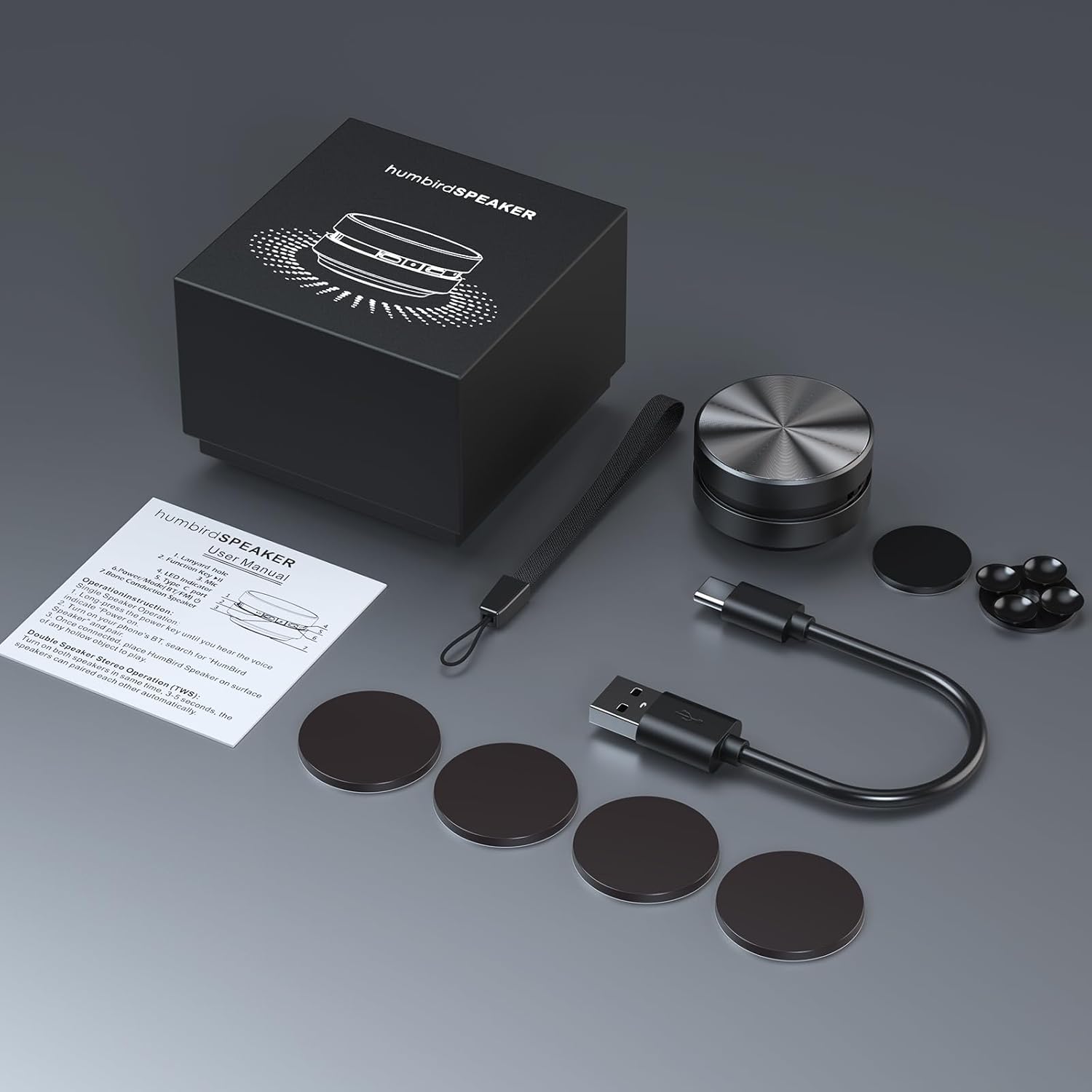
Image: Contents of the Docooler Bone Conduction Speaker package, showing the speaker, charging cable, and various adhesive pads for mounting.
Prodotto finitoview
The Docooler Bone Conduction Speaker is a compact device with a minimalist design. It features a durable aluminum alloy casing and a Type-C charging port. The speaker utilizes Bluetooth 5.0 for wireless connectivity and supports True Wireless Stereo (TWS) pairing for an enhanced audio experience.

Immagine: Frontale view of the Docooler Bone Conduction Speaker, highlighting its key features such as Bone Conduction technology, Bluetooth 5.0, TWS, Type-C Charging Port, Fast Charge, and Aviation Aluminum Alloy construction.
Impostare
1. Ricarica dell'altoparlante
- Collegare il cavo USB Type-C in dotazione alla porta di ricarica dell'altoparlante.
- Collegare l'altra estremità del cavo a una fonte di alimentazione USB compatibile (ad esempio, un adattatore da parete, una porta USB del computer).
- La spia luminosa indicherà lo stato di carica (per i dettagli, fare riferimento alla sezione relativa agli indicatori LED).
- Una carica completa richiede in genere circa 1-2 ore.
2. Accoppiamento Bluetooth (singolo altoparlante)
- Press and hold the power button on the speaker until the indicator light flashes, indicating pairing mode.
- Sul tuo smartphone o altro dispositivo abilitato Bluetooth, attiva il Bluetooth e cerca i dispositivi disponibili.
- Select "Humbird Speaker" (or similar name) from the list of devices.
- Once connected, the indicator light will remain solid, and you will hear a confirmation tone.
3. Accoppiamento True Wireless Stereo (TWS) (due altoparlanti)
For a stereo sound experience, you can pair two Docooler Bone Conduction Speakers together:
- Assicurarsi che entrambi gli altoparlanti siano completamente carichi e spenti.
- Power on both speakers simultaneously. They will automatically attempt to pair with each other within 3-5 seconds.
- Once successfully paired, one speaker will act as the master (left channel) and the other as the slave (right channel). The indicator lights will reflect their connected status.
- Now, connect your smartphone or Bluetooth device to the master speaker as described in the "Bluetooth Pairing (Single Speaker)" section.

Image: Two Docooler Bone Conduction Speakers positioned for True Wireless Stereo (TWS) pairing, demonstrating their ability to create a wider soundstage.
Istruzioni per l'uso
1. Accensione/spegnimento
- Accensione: Tieni premuto il pulsante di accensione per circa 3 secondi.
- Spegni: Tieni premuto il pulsante di accensione per circa 3 secondi.
2. Controllo della riproduzione
- Riproduci/Pausa: Premere brevemente il pulsante di accensione una volta.
- Traccia successiva: Premere due volte il pulsante di accensione.
- Traccia precedente: Premere tre volte il pulsante di accensione.
3. Regolazione del volume
Volume is primarily controlled via your connected Bluetooth device (smartphone, tablet, etc.). The speaker itself does not have dedicated volume buttons.
4. Using with Different Surfaces
The unique feature of this bone conduction speaker is its ability to use various surfaces as sound amplifiers. Experiment with different materials to discover unique sound profiles:
- Hollow Objects: Cardboard boxes, plastic containers, or hollow wooden surfaces often produce a fuller sound with enhanced bass.
- Superfici in vetro: Windows or glass tables can create a clear, crisp sound.
- Superfici in legno: Desks, guitars, or wooden panels can offer a warm, resonant tone.
- Car Dashboards: Can provide an immersive in-car audio experience.
Use the included adhesive pads or suction cup to securely attach the speaker to your chosen surface. The sound quality will vary significantly based on the material, size, and hollowness of the surface.

Image: The bone conduction speaker demonstrated on different surfaces, including a guitar, a kitchen countertop, a mirror, and a car dashboard, illustrating its versatility in sound production.
Manutenzione
To ensure the longevity and optimal performance of your Docooler Bone Conduction Speaker, follow these maintenance tips:
- Pulizia: Wipe the speaker with a soft, dry cloth. Do not use abrasive cleaners, alcohol, or solvents.
- Magazzinaggio: Quando non lo si utilizza, conservare l'altoparlante in un luogo fresco e asciutto, lontano dalla luce solare diretta e da temperature estreme.
- Cura della batteria: For best battery life, avoid fully discharging the speaker frequently. Charge it regularly, even if not used for extended periods.
Risoluzione dei problemi
| Problema | Possibile soluzione |
|---|---|
| L'altoparlante non si accende. | Assicurati che l'altoparlante sia completamente carico. Collegalo a una fonte di alimentazione e riprova. |
| Impossibile effettuare l'associazione tramite Bluetooth. | Make sure the speaker is in pairing mode (flashing indicator light). Turn off and on Bluetooth on your device. Ensure the speaker is within range (up to 10 meters). |
| Nessun suono o volume basso. | Increase the volume on your connected device. Ensure the speaker is placed on a suitable surface. Try a different surface. Check if the speaker is properly connected. |
| L'associazione TWS non è riuscita. | Ensure both speakers are powered off before attempting TWS pairing. Power them on simultaneously and wait for automatic pairing. Disconnect any existing Bluetooth connections before TWS pairing. |
| La qualità del suono è scadente. | Experiment with different surfaces. Hollow and resonant surfaces generally yield better results. Ensure the speaker is securely attached to the surface. |
Specifiche
| Caratteristica | Dettaglio |
|---|---|
| Nome del modello | Altoparlante a conduzione ossea |
| Numero di modello | RM |
| Marca | Docooler |
| Materiale | Alluminio |
| Dimensioni del prodotto | 2.76"P x 2.76"L x 1.97"A |
| Peso dell'articolo | 4.6 once (0.13 chilogrammi) |
| Tecnologia di connettività | Bluetooth |
| Portata Bluetooth | 10 metri |
| Modalità di uscita audio | Stereo (con associazione TWS) |
| Potenza massima in uscita dell'altoparlante | 3 Watt |
| Risposta in frequenza | 20KHz |
| Signal-to-Noise Ratio | 70 dB |
| Fonte di alimentazione | Alimentato a batteria |
| Capacità della batteria | 400 milioneamp Ore |
| Metodo di controllo | App (implied by product data, but primary control is physical buttons) |
| È impermeabile | FALSO |
Garanzia e supporto
The Docooler Bone Conduction Speaker comes with a limited warranty. For specific warranty details, please refer to the documentation included with your purchase or contact Docooler customer service.
If you encounter any issues or have questions not covered in this manual, please contact Docooler customer support through their official channels. Contact information can typically be found on the product packaging or the official Docooler websito.


