1. Introduzione
This manual provides detailed instructions for the operation and maintenance of your Raddy SD5 Emergency Radio. Please read this manual thoroughly before using the device to ensure proper function and safety. The Raddy SD5 is a versatile emergency device featuring DAB/DAB+/FM radio, a 5000mAh power bank, IPX5 water resistance, a flashlight, a reading lamp, a compass, and an SOS alarm, with multiple charging options.
Precauzioni di sicurezza
- Non esporre il dispositivo a temperature estreme o alla luce solare diretta per periodi prolungati.
- Evitare di far cadere o di sottoporre il dispositivo a urti violenti.
- Tenere il dispositivo lontano da forti campi magnetici.
- Non tentare di smontare o modificare il dispositivo. Ciò invaliderà la garanzia.
- Prima di procedere alla ricarica, assicurarsi che tutte le porte siano asciutte per evitare danni.
- Smaltire le batterie secondo le normative locali.
2. Prodotto finitoview
The Raddy SD5 is designed for reliability in various conditions. Familiarize yourself with its components:

Figura 2.1: Fronte view of the Raddy SD5 Emergency Radio, showing the display, controls, flashlight, solar panel, and a phone being charged via USB.
Componenti chiave:
- Radio DAB/DAB+/FM: For receiving digital and analog radio broadcasts.
- Power Bank da 5000 mAh: Integrated battery for charging external devices.
- Resistenza all'acqua IPX5: Protects against splashing water from any direction.
- Torcia elettrica: Fornisce illuminazione in condizioni di scarsa illuminazione.
- Lettura Lamp: Offers diffused light for reading or area illumination.
- Bussola: Integrato per l'assistenza alla navigazione.
- Allarme SOS: Attiva una sirena ad alto volume e una luce lampeggiante in caso di emergenza.
- Molteplici opzioni di ricarica: USB-C, pannello solare, manovella.
3. Impostazione
Carica iniziale
Before first use, fully charge the Raddy SD5 using the provided USB-C cable. Connect the USB-C cable to the device's USB-C input port and the other end to a standard USB power adapter (not included). The charging indicator will show the battery status. A full charge ensures optimal performance and readiness.
Estensione dell'antenna
For optimal radio reception, fully extend the telescopic antenna when listening to FM, DAB, or DAB+ broadcasts.
4. Istruzioni per l'uso
Accensione/spegnimento
Press and hold the Power button (usually marked with ★) to turn the device on or off.
Radio Tuning (DAB/DAB+/FM)

Figure 4.1: The Raddy SD5 radio displaying a frequency, indicating its DAB/DAB+/FM capabilities in an outdoor environment.
- Seleziona banda: Press the 'BAND' button to switch between FM, DAB, and DAB+ modes.
- Scansione automatica: In FM or DAB mode, press and hold the 'SCAN' button to automatically search for and save available stations.
- Sintonizzazione manuale: Use the '<' or '>' buttons to manually tune to frequencies or navigate through saved stations.
Controllo del volume
Utilizzare i pulsanti '+' e '-' per regolare il volume audio.
Funzionamento della torcia elettrica
Press the Flashlight button (often marked with a light icon) once to turn on the flashlight. Press again to cycle through different brightness modes or turn it off.
Lettura Lamp Operazione
Open the solar panel to reveal the reading lamp. Press the Reading Lamp button (if separate, or cycle through light modes) to activate it. This provides broader illumination.
SOS Alarm Activation

Figure 4.2: The Raddy SD5 radio with an SOS alarm feature, shown in an outdoor emergency scenario.
To activate the SOS alarm, locate the dedicated SOS button (often on the side or bottom, as indicated by an SOS symbol). Press and hold this button to trigger a loud siren and flashing light. Press again to deactivate.
Utilizzo della bussola
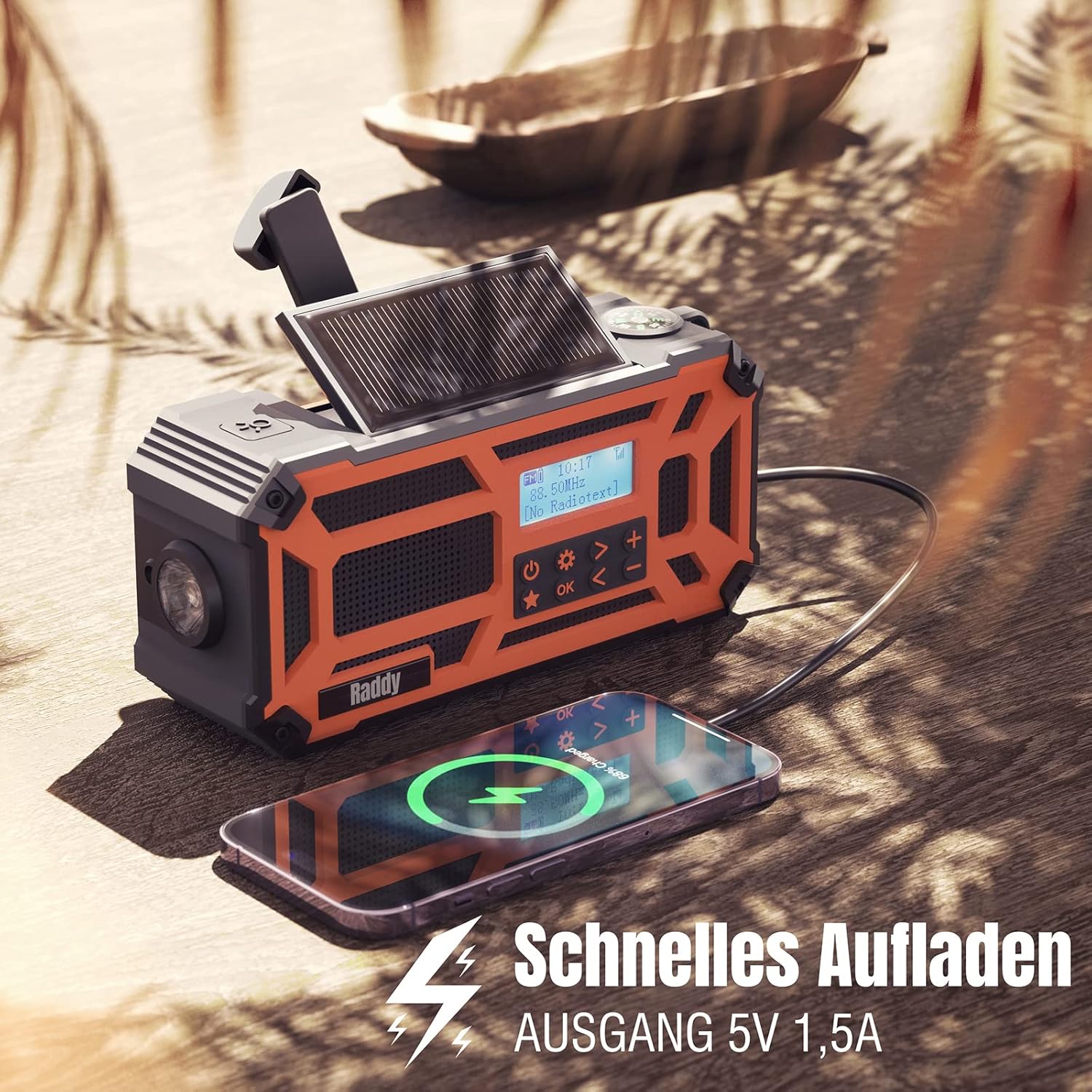
Figure 4.3: A close-up of the Raddy SD5, highlighting the integrated compass for navigation.
The integrated compass is located on the top of the device. Hold the radio horizontally and away from metallic objects to ensure accurate readings. The needle will point North.
Funzione Power Bank

Figure 4.4: The Raddy SD5 acting as a power bank, charging a smartphone, emphasizing its 5000mAh capacity.
Connect your external device (e.g., smartphone) to the USB-A output port of the Raddy SD5 using its charging cable. The radio's internal 5000mAh battery will begin charging your device. The output current is 1.5A for efficient charging.
5. Carica del dispositivo
The Raddy SD5 offers three methods for recharging its internal battery:

Figure 5.1: Illustration of the three charging methods for the Raddy SD5: USB-C input, hand crank, and solar panel.
Ricarica USB-C
Connect the provided USB-C cable to the USB-C input port on the radio and to a USB power source (e.g., wall adapter, computer USB port). This is the fastest and most efficient charging method.
Ricarica solare
Place the radio with its solar panel facing direct sunlight. The solar panel will convert sunlight into energy to slowly charge the internal battery. This method is ideal for maintaining charge or for emergency power in outdoor environments.
Ricarica a manovella
Unfold the hand crank handle and rotate it clockwise or counter-clockwise at a steady pace (approximately 120-150 RPM). Continuous cranking will generate power to charge the internal battery. This method is suitable for emergency power generation when other sources are unavailable.
6. Manutenzione
Pulizia
Pulire il dispositivo con un panno morbido, damp cloth. Do not use abrasive cleaners or solvents. Ensure all ports are closed and dry before cleaning.
Magazzinaggio
Store the Raddy SD5 in a cool, dry place away from direct sunlight and extreme temperatures. If storing for an extended period, ensure the battery is charged to approximately 50% to prolong its lifespan. Recharge every 3-6 months.
Resistenza all'acqua (IPX5)

Figure 6.1: The Raddy SD5 radio demonstrating its IPX5 waterproof rating under simulated rain conditions.
The Raddy SD5 is rated IPX5, meaning it is protected against low-pressure water jets from any direction. It is resistant to splashing water but should not be submerged in water.
7. Risoluzione Dei Problemi
- Nessun potere:
Assicurati che la batteria sia carica. Prova a caricarla tramite USB-C, energia solare o manovella. - Scarsa ricezione radio:
Fully extend the telescopic antenna. Try repositioning the radio. Perform an auto-scan to find available stations. - Dispositivo esterno non in carica:
Ensure the radio has sufficient battery charge. Check the connection cable. Some devices may require more power than the radio can provide. - Torcia/Lettura Lamp Non funziona:
Check battery level. Ensure the correct button is pressed or cycled through modes. - Hand Crank/Solar Charging Slow:
These methods are designed for emergency or supplemental charging and are slower than USB-C. Ensure direct sunlight for solar charging and consistent rotation for hand cranking.
8. Specifiche
| Marca | Radiodità |
| Numero di modello | SD5 |
| Colore | Arancia |
| Tecnologia di connettività | USB |
| Caratteristiche speciali | Durable, Rechargeable, Waterproof (IPX5) |
| Composizione della batteria | Agli ioni di litio |
| Batteria ricaricabile | Sì (1 ai polimeri di litio inclusa) |
| Tecnologia di messa a punto | FM, DAB, DAB+ |
| Fonte di alimentazione | Battery Powered (USB-C, Solar, Hand Crank) |
| Bande radio supportate | DAB, DAB+, FM |
| Componenti inclusi | 1 x USB Charging Cable, 1 x User Manual, 1 x SD5 Radio |
| Gamma di frequenza FM | Fino a 108 MHz |
9. Garanzia e supporto
Informazioni sulla garanzia
The Raddy SD5 Emergency Radio comes with a standard manufacturer's warranty. Please refer to the warranty card included in your product packaging for specific terms and conditions, including warranty duration and coverage details.
Assistenza clienti
For technical assistance, troubleshooting, or warranty claims, please contact Radioddity customer support. Contact information can typically be found on the official Radioddity websito o sulla confezione del prodotto.