Introduzione
This manual provides detailed instructions for the BearHoHo Room Escape RFID Reader IC Card System. This device is designed as a game prop for escape rooms, allowing for a unique puzzle experience where specific IC cards must be matched to corresponding sensors to unlock an electromagnetic (EM) lock.
The system operates by matching designated IC cards to their respective sensors. When the correct sequence or combination of cards is placed on the sensors, the connected EM lock will disengage. This particular model is the "Without Audio" version and includes 3 IC card sensors.
Prodotto finitoview e componenti
The BearHoHo Room Escape RFID Reader IC Card System comes with the following components:
- 1 x controller
- 1 adattatore di alimentazione 12V
- N x IC Card and Sensor Set (This specific model includes 3 IC card sensors and corresponding cards)
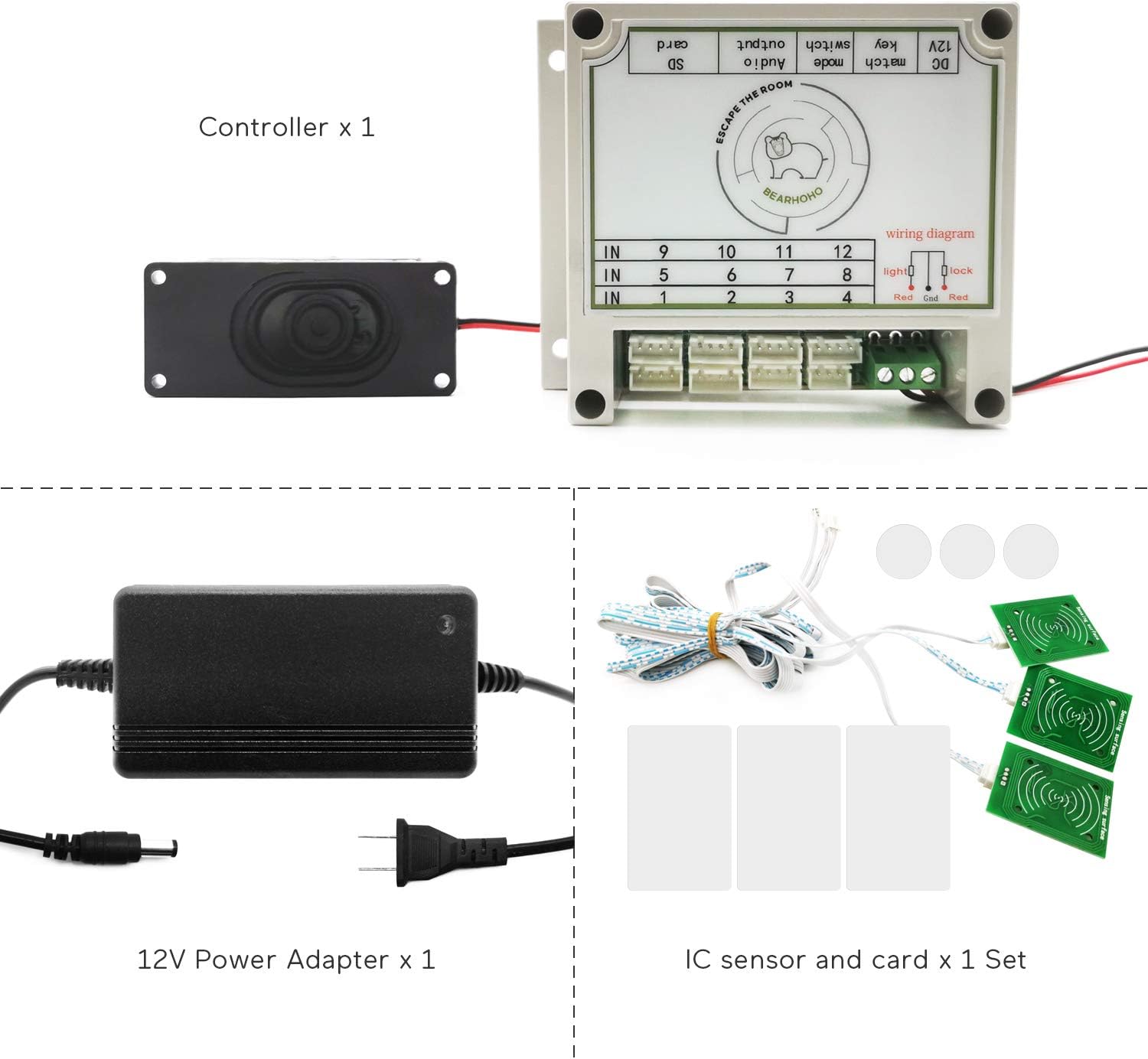
Descrizione dell'immagine: This image displays the main components included in the package. It shows the central controller unit, a 12V power adapter with its plug, and a set of IC card sensors along with their corresponding IC cards. The controller is labeled "Controller x 1", the power adapter "12V Power Adapter x 1", and the cards/sensors "IC sensor and card x 1 Set".

Descrizione dell'immagine: This image shows the BearHoHo RFID Reader IC Card System fully assembled and connected. The central white controller unit is visible with wires extending from its ports. A black 12V power adapter is plugged into the controller. Three green IC card sensors are shown connected to the controller via white cables, with some IC cards placed near them. This provides a visual representation of the complete system setup.
Istruzioni di installazione
Follow these steps to set up your RFID Reader IC Card System:
- Connetti alimentazione: Plug the 12V power adapter into the DC 12V Power Port on the controller. Then, connect the power adapter to a suitable power outlet.
- Connect IC Sensors: Connect the IC card sensors to the designated input channels on the controller. This model supports up to 8 sensors, and your specific unit comes with 3. Ensure each sensor is securely connected.
- Connect EM Lock (Optional, Not Included): If you are using an EM lock, connect its wires to the output wiring interface on the controller. The black wire of the EM lock should be connected to the COM port, and the red wire to the NC port of the controller. The system is designed to control a 12V EM lock.

Descrizione dell'immagine: Questa immagine fornisce un primo piano view of the BearHoHo controller, highlighting its various ports and dimensions. Labels indicate the Speaker Connection (though this model is without audio), External Audio Output Port, USB Interface (for modifying voice files in audio versions), Setting Button, DC 12V Power Port, Input Channels (numbered 1-12), and Output Wiring Interface (Light, Lock, NO, COM, NC). Dimensions are shown as 3.54 inches (9 cm) in height and 4.53 inches (11.5 cm) in width.

Descrizione dell'immagine: This diagram illustrates how to connect an EM lock to the BearHoHo controller. It shows the EM lock with its black and red wires. The black wire (12V "- Negative") from the EM lock is connected to the "COM" port on the controller. The red wire (12V "+ Positive") from the EM lock is connected to the "NC" port on the controller. This setup ensures the EM lock is controlled by the system's output.
Operazione
The core function of this system involves matching specific IC cards to their corresponding sensors to trigger an event, typically unlocking an EM lock.
- IC Card Matching: The system is configured for one-to-one matching. For example, if you have cards A1, A2, A3 and sensors A1, A2, A3, you must place card A1 on sensor A1, card A2 on sensor A2, and card A3 on sensor A3 simultaneously.
- Meccanismo di sblocco: Once all required IC cards are correctly placed on their corresponding sensors, the EM lock connected to the controller will unlock. The sensor is highly sensitive, with an effective distance of 3-4 cm, and the unlock process takes approximately 2 seconds.
- Puzzle Integration: In an escape room scenario, players must locate the hidden sensors and the specific IC cards, then correctly match them to solve the puzzle and unlock the chamber.

Descrizione dell'immagine: This image illustrates the core operation of the system. It shows three pairs of IC cards (A1, A2, A3) and their corresponding IC card sensors (A1, A2, A3). The text explains that the player must place each IC card on its corresponding sensor (e.g., A1 card on A1 sensor). Upon successful matching, the door lock will open after a 2-second delay. The image also shows how removing any one card will reset the system.

Descrizione dell'immagine: This image provides the dimensions of the IC card sensor and the two types of IC cards (one big, one small). The rectangular IC card sensor measures approximately 1.57 inches by 1.97 inches. The small circular IC card has a diameter of 0.98 inches. The larger rectangular IC card measures approximately 3.35 inches by 2.17 inches. These dimensions are useful for planning placement within an escape room setup.
Procedure di ripristino
There are three methods to reset the system after a successful unlock or during operation:
- Ripristino automatico: After a successful unlock, the system will automatically reset after 30 seconds.
- Manual IC Card Reset: To manually reset the props, simply remove any one of the IC cards from its sensor. This will immediately reset the system to its initial state.
- Power Cycle Reset: Turn off the controller by disconnecting its power supply, wait a few seconds, and then power it on again. This will perform a hard reset.
Specifiche
| Caratteristica | Dettaglio |
|---|---|
| Produttore | BearHoHo |
| Dimensioni del prodotto | 5 x 4.47 x 3.99 cm (Controller) |
| Numero di modello | DC-ERP011 |
| Versione | Senza audio |
| IC Card Sensors Included | 3 |
| Alimentazione elettrica | Adattatore di alimentazione da 12 V (incluso) |
| Batteria richiesta | NO |
| ASIN | B0BCFN2ZHD |
| IC Sensor Sensitivity | 3-4 cm (small sensor 2-3 cm, large sensor 4-5 cm) |
| Sblocca il tempo | ca. 2 secondi |
Risoluzione dei problemi
- Il sistema non si accende:
Ensure the 12V power adapter is securely connected to both the controller and a working power outlet. Verify the power outlet is active.
- EM Lock not unlocking:
- Confirm all required IC cards are placed on their esatto corresponding sensors simultaneously.
- Check the wiring of the EM lock to the controller's output ports (COM and NC). Ensure correct polarity.
- Verify the EM lock itself is functional and compatible with a 12V power supply.
- Ensure the IC cards are within the sensor's effective range (3-4 cm).
- System not resetting:
- For manual reset, ensure at least one IC card is completely removed from its sensor.
- If automatic reset is not occurring, try a power cycle reset (disconnect and reconnect power).
- IC sensors not responding:
- Check the connections of the IC sensors to the controller's input channels.
- Ensure you are using the correct IC cards provided with the system.
- Avoid placing the sensors or cards near strong electromagnetic interference.
Garanzia e supporto
BearHoHo products are designed for reliability and performance. For specific warranty information, please refer to the documentation provided at the time of purchase or contact your retailer. For technical support or inquiries, please reach out to the manufacturer or seller directly. Keep your purchase receipt as proof of purchase for any warranty claims.
This product is intended for use as a game prop in escape room scenarios. Any modifications or uses outside of its intended purpose may void the warranty and could lead to improper operation.


