1. Introduzione
The AC Infinity RJ11/12 to UIS Port Type-A Adapter Dongle (Model AC-ADL7) is designed to integrate third-party grow lights with RJ11 or RJ12 connectors into the AC Infinity UIS controller system. This adapter enables advanced control features such as automated light cycles, scheduling, and dynamic responses to environmental conditions when used with compatible UIS controllers.
2. Informazioni sulla sicurezza
- Prima di accendere qualsiasi apparecchiatura, assicurarsi che tutti i collegamenti siano saldi.
- Do not expose the adapter to excessive moisture or extreme temperatures.
- Always disconnect power to your grow light and controller before making or changing connections.
- This adapter is intended for use with grow lights utilizing PWM or 0-10V dimming protocols. Verify your light's compatibility before use.
3. Contenuto della confezione
- AC Infinity RJ11/12 to UIS Port Type-A Adapter Dongle (AC-ADL7)
- 10-foot RJ11/12 Extension Cord
4. Prodotto finitoview
The Type-A Adapter Dongle facilitates communication between your UIS controller and compatible grow lights. It features a UIS connector on one end for connection to an AC Infinity controller and an RJ11/12 port on the other for your grow light.

Figure 1: AC Infinity RJ11/12 to UIS Port Type-A Adapter Dongle. This image shows the compact design of the adapter dongle, highlighting its UIS connector and RJ11/12 port.
4.1 Enhanced Durability
The adapter is constructed with premium materials for long-lasting performance. This includes durable steel wire, premium copper wire, precision insulation, an aluminum inner shield, and a rubber TPU outer shield, ensuring a secure and reliable connection.
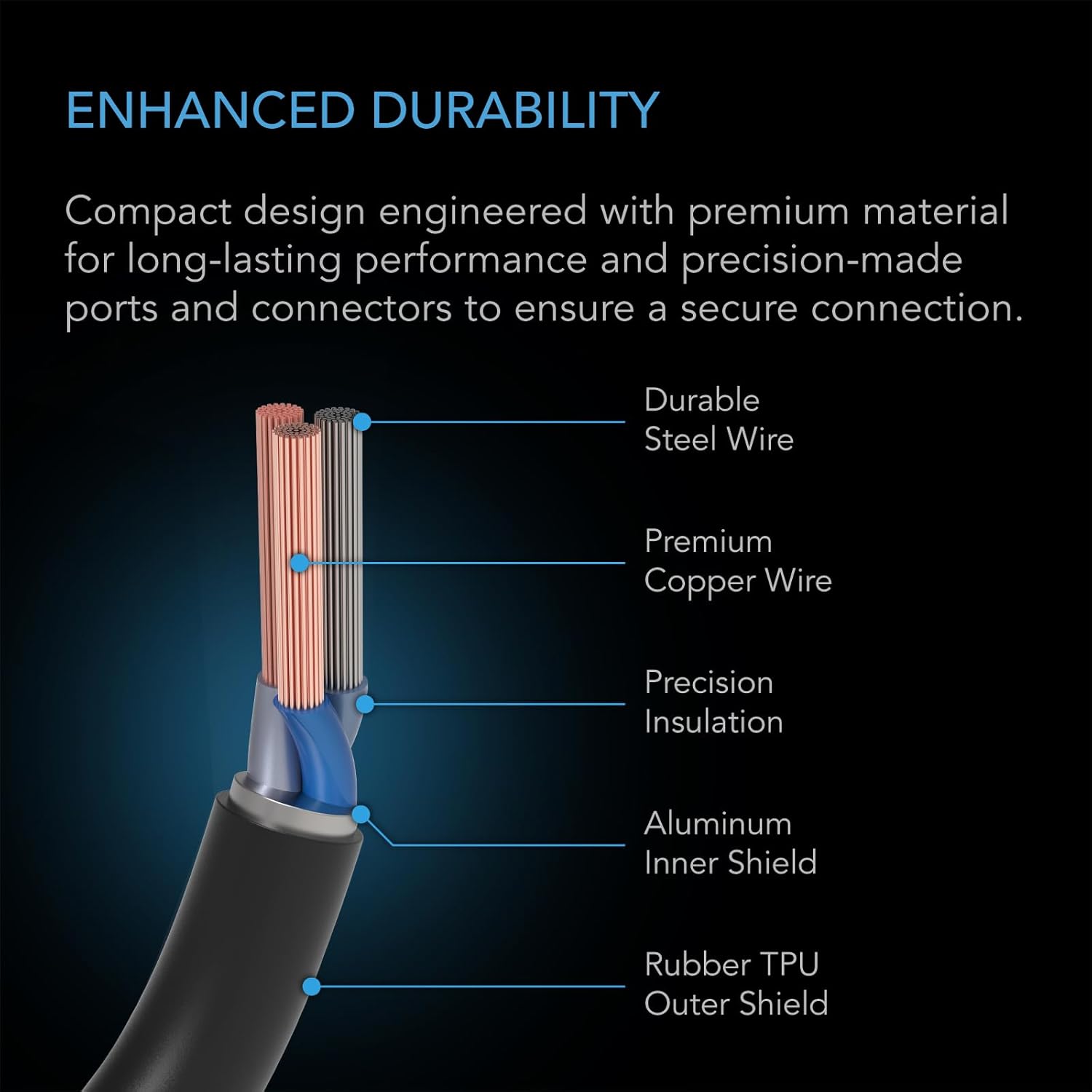
Figure 2: Enhanced Durability Cable Construction. A cross-section view illustrating the robust layers of the adapter cable, including steel wire, copper wire, insulation, aluminum shield, and rubber outer shield.
5. Impostazione
5.1 Collegamento dell'adattatore
- Ensure your AC Infinity UIS controller and grow light are powered off.
- Connect the UIS end of the Type-A Adapter Dongle to an available UIS port on your AC Infinity controller (e.g., CONTROLLER 69, CONTROLLER 69 WiFi, CONTROLLER 69 PRO, or Controller AI+).
- Connect the RJ11/12 end of the adapter to the dimming port of your compatible grow light. Use the included 10-foot RJ11/12 extension cord if additional length is required.
- Power on your UIS controller and grow light. The controller should now detect and allow control of the connected grow light.
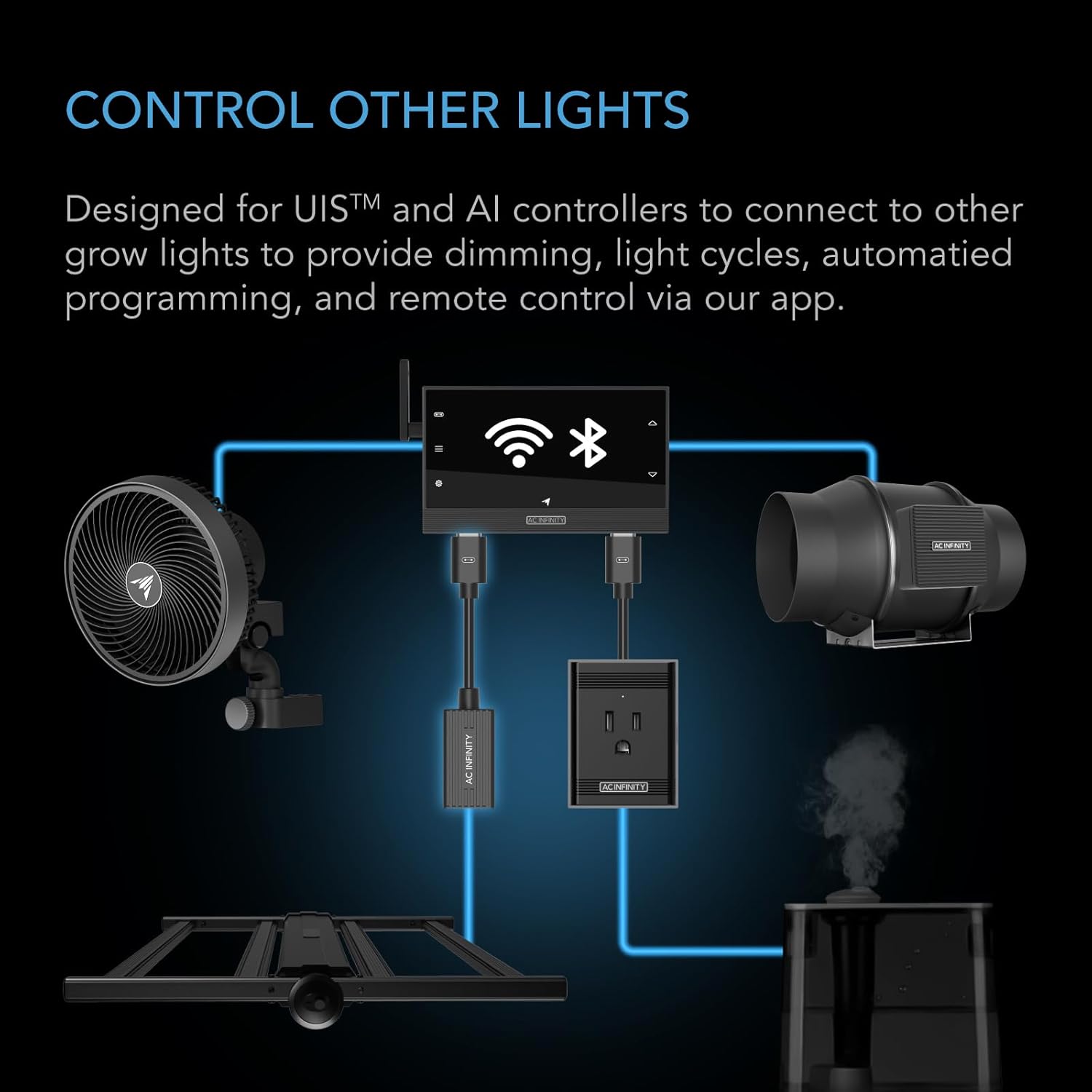
Figure 3: Connection Diagram. This diagram illustrates how the Type-A adapter connects an AC Infinity UIS controller to a third-party grow light, enabling integrated control.
5.2 Installazione Esample
The adapter and controller can be neatly integrated into your grow tent setup. Ensure cables are managed to prevent interference and maintain a tidy environment.

Figure 4: Grow Tent Installation. An example of the adapter and controller installed within a grow tent, demonstrating a typical setup for environmental control.
5.3 Understanding the UIS Platform
The AC Infinity UIS platform allows for comprehensive environmental control and automation of your grow space. This video provides an overview of the platform's capabilities.
Video 1: The AC Infinity UIS Platform. This video explains the features and benefits of the AC Infinity UIS platform, including how various devices integrate for automated environmental control.
6. Istruzioni per l'uso
6.1 Light Compatibility
The Type-A adapter is compatible with most RJ11 and RJ12 connector grow lights that use PWM (Pulse Width Modulation) or 0-10V dimming standards. Please note that dimming ranges may vary between manufacturers. Lights with spectrum control or resistor protocols are not compatible with this adapter.
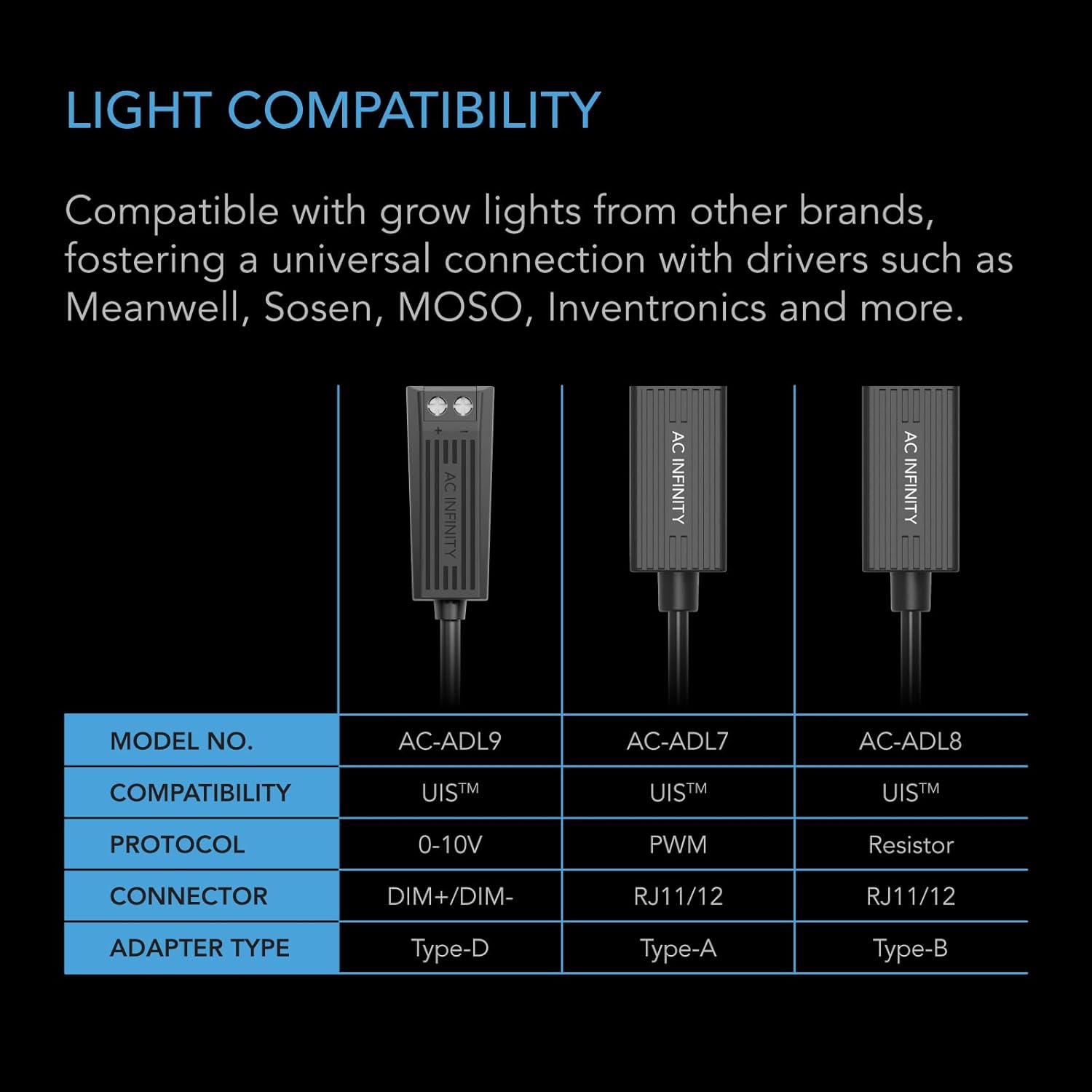
Figure 5: Adapter Compatibility Chart. This chart details the different AC Infinity adapter types (Type-D, Type-A, Type-B), their compatibility, protocol, and connector types. The Type-A adapter (AC-ADL7) is highlighted for PWM protocol and RJ11/12 connectors.
6.2 Using with UIS Controllers
Once connected, your UIS controller will allow you to automate light cycles, set schedules, and configure dynamic responses based on temperature and humidity. The AC Infinity app provides remote monitoring, control, data charts, and alert notifications.

Figure 6: Smart Controls Interface. This image displays the AC Infinity controller interface and a mobile app screen, illustrating climate predictions, energy-saving features, pattern recognition, deep learning, and future-ready capabilities for automated grow environments.
7. Manutenzione
The AC-ADL7 adapter requires minimal maintenance. Keep the connectors clean and free of dust or debris. Periodically check for any signs of wear or damage to the cable and connectors. If damage is observed, discontinue use and replace the adapter.
8. Risoluzione Dei Problemi
- Light not responding: Verify all connections are secure. Ensure your grow light uses a compatible PWM or 0-10V dimming protocol. Check if a firmware update is required for your UIS controller via the AC Infinity app.
- Limited dimming range: Some grow light manufacturers have different dimming protocols, which may result in a limited dimming range when used with the Type-A adapter. This is normal for certain models.
- Adapter not detected by controller: Ensure the UIS controller is powered and functioning correctly. Try connecting the adapter to a different UIS port if available.
9. Specifiche
| Caratteristica | Dettaglio |
|---|---|
| Modello | AC-ADL7 |
| Tipo di adattatore | Tipo A |
| Protocollo | PWM or 0-10V Control |
| connettore maschio | Interfaccia utente |
| Porto femminile | RJ11 / 12 |
| Colore | Nero |
| Lunghezza cavo adattatore | 10.00 pollici (25.4 cm) |
| Lunghezza di estensione | 120 inches (10 ft) |
| Dimensioni del prodotto | 10 x 0.8 x 0.2 pollici |
| Peso dell'articolo | 2.89 once |

Figure 7: Product Dimensions and Specifications. This image provides a visual representation of the adapter's dimensions and lists key specifications such as model, adapter type, protocol, and connector details.
10. Garanzia e supporto
AC Infinity products are designed with quality and durability in mind. For warranty information, technical support, or to register your product, please visit the official AC Infinity websito o contattare direttamente il servizio clienti. Conservare la ricevuta d'acquisto per eventuali reclami in garanzia.
Produttore: AC Infinito
Websito: www.acinfinity.com


