Introduzione
The One For All URC4810 is a dedicated replacement remote control designed specifically for Samsung televisions. This remote offers 100% compatibility with all Samsung TV models, providing a seamless and intuitive user experience. It features a quick setup process called SimpleSet and a learning function to transfer commands from your original remote, ensuring you retain all necessary functionalities.
Informazioni sulla sicurezza
- Tenere le batterie fuori dalla portata dei bambini.
- Non mischiare batterie vecchie e nuove o diversi tipi di batterie.
- Remove batteries if the remote control is not used for an extended period.
- Avoid exposing the remote control to direct sunlight, heat sources, or excessive moisture.
- Non tentare di smontare o modificare il telecomando.
Contenuto della confezione
Si prega di controllare la confezione per verificare la presenza dei seguenti elementi:
- One For All Samsung TV Replacement Remote Control (URC4810)
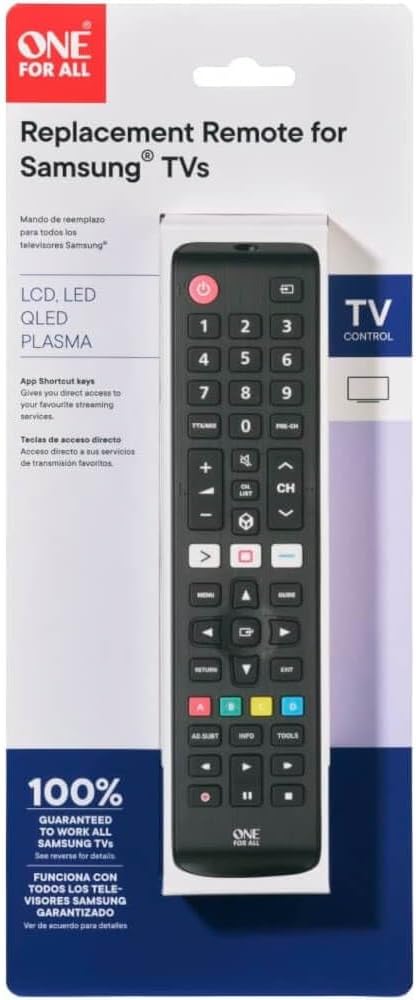
Image: The One For All URC4810 remote control displayed within its retail packaging, showing the product name and key features.
Impostare
1. Installazione della batteria
The URC4810 remote control requires 2x AAA batteries (not included). Follow these steps to install them:
- Aprire il coperchio del vano batterie sul retro del telecomando.
- Inserire due batterie AAA, assicurandosi che i terminali positivo (+) e negativo (-) siano allineati con le marcature all'interno del vano.
- Chiudere saldamente il coperchio del vano batterie.

Immagine: Un lato profile view of the One For All URC4810 remote control, illustrating its ergonomic design and the location of the battery compartment seam.
2. SimpleSet Setup
The URC4810 remote features SimpleSet, allowing for quick setup in under 30 seconds. No codes are needed.
- Assicurati che la tua TV Samsung sia accesa.
- Point the One For All remote at your Samsung TV.
- Premere e tenere premuto il tasto Energia button on the One For All remote until your TV turns off. This may take a few seconds.
- Una volta spenta la TV, rilasciare il Energia button immediately. The remote is now set up.
- Test other functions like Volume Up/Down and Channel Up/Down to confirm full functionality.

Immagine: Un fronte diretto view del telecomando One For All URC4810, mostratoasing its full button layout, including the power button at the top.
3. Learning Feature (Optional)
The learning feature allows you to copy functions from your original Samsung TV remote to the URC4810. This is useful for any specific buttons not covered by the default setup.
- Place the One For All remote and your original Samsung remote on a flat surface, facing each other, about 1-2 inches apart.
- On the One For All remote, press and hold the IMPOSTARE button (if available, otherwise refer to the specific manual for learning mode entry, typically a combination of buttons like SPOSTARE + IMPARARE or similar) until the LED blinks twice and then stays lit.
- Press the button on the One For All remote that you wish to program (e.g., a specific app button). The LED will blink rapidly.
- On your original Samsung remote, press the corresponding button you want to copy. The LED on the One For All remote will blink twice to confirm successful learning.
- Repeat steps 3 and 4 for any other buttons you wish to learn.
- Per uscire dalla modalità di apprendimento, premere il tasto IMPOSTARE button again (or the button used to enter learning mode). The LED will turn off.

Immagine: Un angolo view del telecomando One For All URC4810, mostratoasing its comfortable grip and button placement.
Istruzioni per l'uso
Once set up, the URC4810 remote functions like your original Samsung TV remote. Here are some common button functions:
- Accensione (pulsante rosso): Accende o spegne la TV.
- Tasti numerici (0-9): Selezione diretta del canale.
- Volume su/giù (+/-): Regola il volume del televisore.
- Canale su/giù (CH +/-): Cambia canale TV.
- Disattiva audio: Disattiva o riattiva l'audio della TV.
- Menu: Accede al menu principale del televisore.
- Navigation (Arrow Buttons): Naviga attraverso i menu e le opzioni.
- OK/Inserisci: Conferma le selezioni.
- Ritorno/Indietro: Torna alla schermata o al menu precedente.
- Uscita: Esce dal menu o dall'applicazione corrente.
- Pulsanti colorati (rosso, verde, giallo, blu): La funzionalità varia in base al modello di TV e all'applicazione.
- Smart Hub/Home: Accede allo Smart Hub o alla schermata Home della TV.
Manutenzione
Pulizia
To clean your remote control, use a soft, dry cloth. Do not use abrasive cleaners, waxes, or solvents. Avoid spraying liquids directly onto the remote.
Sostituzione della batteria
If the remote control's range decreases or buttons become unresponsive, it may be time to replace the batteries. Follow the "Battery Installation" steps in the Setup section to replace the old batteries with new AAA alkaline batteries.
Risoluzione dei problemi
| Problema |
Possibile causa |
Soluzione |
| Remote does not work after setup. |
Incorrect setup or dead batteries. |
Ensure batteries are correctly inserted and charged. Repeat the SimpleSet process carefully. |
| Alcuni pulsanti non funzionano. |
Button not recognized by SimpleSet or not learned. |
Use the Learning Feature to copy the function from your original remote. Ensure the remote is pointed directly at the TV. |
| La portata del telecomando è scarsa. |
Batterie scariche o ostruzione. |
Replace batteries. Ensure there are no obstructions between the remote and the TV's IR receiver. |
| Il LED sul telecomando non si accende. |
Batterie non presenti o inserite in modo errato. |
Controllare l'orientamento delle batterie e assicurarsi che siano nuove e inserite correttamente. |
Specifiche
| Marca |
Uno per tutti |
| Numero di modello |
URC4810 |
| Dispositivi compatibili |
Televisori Samsung |
| Fonte di alimentazione |
Alimentato a batteria (2x AAA, non incluse) |
| Colore |
White (Note: Product images show black, but specification states white. Please refer to product packaging for exact color.) |
| Peso dell'articolo |
3.52 once (circa 100 grammi) |
| Dimensioni del prodotto (L x P x A) |
Approx. 4"D x 3"W x 1"H (Note: Dimensions may refer to packaging or a specific part. Actual remote dimensions are typically longer and narrower.) |
| Codice UPC |
810209030940 |
Garanzia e supporto
One For All products are designed and manufactured to the highest standards. For information regarding warranty, technical support, or frequently asked questions, please visit the official One For All websito o contattare direttamente il servizio clienti.
For the most up-to-date support information, please refer to the manufacturer's official channels:
- Uno per tutti Websito: www.oneforall.com
- Assistenza clienti: Fare riferimento al websito per i dettagli di contatto regionali.
Introduzione
The One For All URC4810 is a dedicated replacement remote control designed specifically for Samsung televisions. This remote offers 100% compatibility with all Samsung TV models, providing a seamless and intuitive user experience. It features a quick setup process called SimpleSet and a learning function to transfer commands from your original remote, ensuring you retain all necessary functionalities.
Informazioni sulla sicurezza
- Tenere le batterie fuori dalla portata dei bambini.
- Non mischiare batterie vecchie e nuove o diversi tipi di batterie.
- Remove batteries if the remote control is not used for an extended period.
- Avoid exposing the remote control to direct sunlight, heat sources, or excessive moisture.
- Non tentare di smontare o modificare il telecomando.
Contenuto della confezione
Si prega di controllare la confezione per verificare la presenza dei seguenti elementi:
- One For All Samsung TV Replacement Remote Control (URC4810)
Image: The One For All URC4810 remote control displayed within its retail packaging, showing the product name and key features.
Impostare
1. Installazione della batteria
The URC4810 remote control requires 2x AAA batteries (not included). Follow these steps to install them:
- Aprire il coperchio del vano batterie sul retro del telecomando.
- Inserire due batterie AAA, assicurandosi che i terminali positivo (+) e negativo (-) siano allineati con le marcature all'interno del vano.
- Chiudere saldamente il coperchio del vano batterie.
Immagine: Un lato profile view of the One For All URC4810 remote control, illustrating its ergonomic design and the location of the battery compartment seam.
2. SimpleSet Setup
The URC4810 remote features SimpleSet, allowing for quick setup in under 30 seconds. No codes are needed.
- Assicurati che la tua TV Samsung sia accesa.
- Point the One For All remote at your Samsung TV.
- Premere e tenere premuto il tasto Energia button on the One For All remote until your TV turns off. This may take a few seconds.
- Una volta spenta la TV, rilasciare il Energia button immediately. The remote is now set up.
- Test other functions like Volume Up/Down and Channel Up/Down to confirm full functionality.
Immagine: Un fronte diretto view del telecomando One For All URC4810, mostratoasing its full button layout, including the power button at the top.
3. Learning Feature (Optional)
The learning feature allows you to copy functions from your original Samsung TV remote to the URC4810. This is useful for any specific buttons not covered by the default setup.
- Place the One For All remote and your original Samsung remote on a flat surface, facing each other, about 1-2 inches apart.
- On the One For All remote, press and hold the IMPOSTARE button (if available, otherwise refer to the specific manual for learning mode entry, typically a combination of buttons like SPOSTARE + IMPARARE or similar) until the LED blinks twice and then stays lit.
- Press the button on the One For All remote that you wish to program (e.g., a specific app button). The LED will blink rapidly.
- On your original Samsung remote, press the corresponding button you want to copy. The LED on the One For All remote will blink twice to confirm successful learning.
- Repeat steps 3 and 4 for any other buttons you wish to learn.
- Per uscire dalla modalità di apprendimento, premere il tasto IMPOSTARE button again (or the button used to enter learning mode). The LED will turn off.
Immagine: Un angolo view del telecomando One For All URC4810, mostratoasing its comfortable grip and button placement.
Istruzioni per l'uso
Once set up, the URC4810 remote functions like your original Samsung TV remote. Here are some common button functions:
- Accensione (pulsante rosso): Accende o spegne la TV.
- Tasti numerici (0-9): Selezione diretta del canale.
- Volume su/giù (+/-): Regola il volume del televisore.
- Canale su/giù (CH +/-): Cambia canale TV.
- Disattiva audio: Disattiva o riattiva l'audio della TV.
- Menu: Accede al menu principale del televisore.
- Navigation (Arrow Buttons): Naviga attraverso i menu e le opzioni.
- OK/Inserisci: Conferma le selezioni.
- Ritorno/Indietro: Torna alla schermata o al menu precedente.
- Uscita: Esce dal menu o dall'applicazione corrente.
- Pulsanti colorati (rosso, verde, giallo, blu): La funzionalità varia in base al modello di TV e all'applicazione.
- Smart Hub/Home: Accede allo Smart Hub o alla schermata Home della TV.
Manutenzione
Pulizia
To clean your remote control, use a soft, dry cloth. Do not use abrasive cleaners, waxes, or solvents. Avoid spraying liquids directly onto the remote.
Sostituzione della batteria
If the remote control's range decreases or buttons become unresponsive, it may be time to replace the batteries. Follow the "Battery Installation" steps in the Setup section to replace the old batteries with new AAA alkaline batteries.
Risoluzione dei problemi
| Problema |
Possibile causa |
Soluzione |
| Remote does not work after setup. |
Incorrect setup or dead batteries. |
Ensure batteries are correctly inserted and charged. Repeat the SimpleSet process carefully. |
| Alcuni pulsanti non funzionano. |
Button not recognized by SimpleSet or not learned. |
Use the Learning Feature to copy the function from your original remote. Ensure the remote is pointed directly at the TV. |
| La portata del telecomando è scarsa. |
Batterie scariche o ostruzione. |
Replace batteries. Ensure there are no obstructions between the remote and the TV's IR receiver. |
| Il LED sul telecomando non si accende. |
Batterie non presenti o inserite in modo errato. |
Controllare l'orientamento delle batterie e assicurarsi che siano nuove e inserite correttamente. |
Specifiche
| Marca |
Uno per tutti |
| Numero di modello |
URC4810 |
| Dispositivi compatibili |
Televisori Samsung |
| Fonte di alimentazione |
Alimentato a batteria (2x AAA, non incluse) |
| Colore |
White (Note: Product images show black, but specification states white. Please refer to product packaging for exact color.) |
| Peso dell'articolo |
3.52 once (circa 100 grammi) |
| Dimensioni del prodotto (L x P x A) |
Approx. 4"D x 3"W x 1"H (Note: Dimensions may refer to packaging or a specific part. Actual remote dimensions are typically longer and narrower.) |
| Codice UPC |
810209030940 |
Garanzia e supporto
One For All products are designed and manufactured to the highest standards. For information regarding warranty, technical support, or frequently asked questions, please visit the official One For All websito o contattare direttamente il servizio clienti.
For the most up-to-date support information, please refer to the manufacturer's official channels:
- Uno per tutti Websito: www.oneforall.com
- Assistenza clienti: Fare riferimento al websito per i dettagli di contatto regionali.
Introduzione
The One For All URC4810 is a dedicated replacement remote control designed specifically for Samsung televisions. This remote offers 100% compatibility with all Samsung TV models, providing a seamless and intuitive user experience. It features a quick setup process called SimpleSet and a learning function to transfer commands from your original remote, ensuring you retain all necessary functionalities.
Informazioni sulla sicurezza
- Tenere le batterie fuori dalla portata dei bambini.
- Non mischiare batterie vecchie e nuove o diversi tipi di batterie.
- Remove batteries if the remote control is not used for an extended period.
- Avoid exposing the remote control to direct sunlight, heat sources, or excessive moisture.
- Non tentare di smontare o modificare il telecomando.
Contenuto della confezione
Si prega di controllare la confezione per verificare la presenza dei seguenti elementi:
- One For All Samsung TV Replacement Remote Control (URC4810)
Image: The One For All URC4810 remote control displayed within its retail packaging, showing the product name and key features.
Impostare
1. Installazione della batteria
The URC4810 remote control requires 2x AAA batteries (not included). Follow these steps to install them:
- Aprire il coperchio del vano batterie sul retro del telecomando.
- Inserire due batterie AAA, assicurandosi che i terminali positivo (+) e negativo (-) siano allineati con le marcature all'interno del vano.
- Chiudere saldamente il coperchio del vano batterie.
Immagine: Un lato profile view of the One For All URC4810 remote control, illustrating its ergonomic design and the location of the battery compartment seam.
2. SimpleSet Setup
The URC4810 remote features SimpleSet, allowing for quick setup in under 30 seconds. No codes are needed.
- Assicurati che la tua TV Samsung sia accesa.
- Point the One For All remote at your Samsung TV.
- Premere e tenere premuto il tasto Energia button on the One For All remote until your TV turns off. This may take a few seconds.
- Una volta spenta la TV, rilasciare il Energia button immediately. The remote is now set up.
- Test other functions like Volume Up/Down and Channel Up/Down to confirm full functionality.
Immagine: Un fronte diretto view del telecomando One For All URC4810, mostratoasing its full button layout, including the power button at the top.
3. Learning Feature (Optional)
The learning feature allows you to copy functions from your original Samsung TV remote to the URC4810. This is useful for any specific buttons not covered by the default setup.
- Place the One For All remote and your original Samsung remote on a flat surface, facing each other, about 1-2 inches apart.
- On the One For All remote, press and hold the IMPOSTARE button (if available, otherwise refer to the specific manual for learning mode entry, typically a combination of buttons like SPOSTARE + IMPARARE or similar) until the LED blinks twice and then stays lit.
- Press the button on the One For All remote that you wish to program (e.g., a specific app button). The LED will blink rapidly.
- On your original Samsung remote, press the corresponding button you want to copy. The LED on the One For All remote will blink twice to confirm successful learning.
- Repeat steps 3 and 4 for any other buttons you wish to learn.
- Per uscire dalla modalità di apprendimento, premere il tasto IMPOSTARE button again (or the button used to enter learning mode). The LED will turn off.
Immagine: Un angolo view del telecomando One For All URC4810, mostratoasing its comfortable grip and button placement.
Istruzioni per l'uso
Once set up, the URC4810 remote functions like your original Samsung TV remote. Here are some common button functions:
- Accensione (pulsante rosso): Accende o spegne la TV.
- Tasti numerici (0-9): Selezione diretta del canale.
- Volume su/giù (+/-): Regola il volume del televisore.
- Canale su/giù (CH +/-): Cambia canale TV.
- Disattiva audio: Disattiva o riattiva l'audio della TV.
- Menu: Accede al menu principale del televisore.
- Navigation (Arrow Buttons): Naviga attraverso i menu e le opzioni.
- OK/Inserisci: Conferma le selezioni.
- Ritorno/Indietro: Torna alla schermata o al menu precedente.
- Uscita: Esce dal menu o dall'applicazione corrente.
- Pulsanti colorati (rosso, verde, giallo, blu): La funzionalità varia in base al modello di TV e all'applicazione.
- Smart Hub/Home: Accede allo Smart Hub o alla schermata Home della TV.
Manutenzione
Pulizia
To clean your remote control, use a soft, dry cloth. Do not use abrasive cleaners, waxes, or solvents. Avoid spraying liquids directly onto the remote.
Sostituzione della batteria
If the remote control's range decreases or buttons become unresponsive, it may be time to replace the batteries. Follow the "Battery Installation" steps in the Setup section to replace the old batteries with new AAA alkaline batteries.
Risoluzione dei problemi
| Problema |
Possibile causa |
Soluzione |
| Remote does not work after setup. |
Incorrect setup or dead batteries. |
Ensure batteries are correctly inserted and charged. Repeat the SimpleSet process carefully. |
| Alcuni pulsanti non funzionano. |
Button not recognized by SimpleSet or not learned. |
Use the Learning Feature to copy the function from your original remote. Ensure the remote is pointed directly at the TV. |
| La portata del telecomando è scarsa. |
Batterie scariche o ostruzione. |
Replace batteries. Ensure there are no obstructions between the remote and the TV's IR receiver. |
| Il LED sul telecomando non si accende. |
Batterie non presenti o inserite in modo errato. |
Controllare l'orientamento delle batterie e assicurarsi che siano nuove e inserite correttamente. |
Specifiche
| Marca |
Uno per tutti |
| Numero di modello |
URC4810 |
| Dispositivi compatibili |
Televisori Samsung |
| Fonte di alimentazione |
Alimentato a batteria (2x AAA, non incluse) |
| Colore |
White (Note: Product images show black, but specification states white. Please refer to product packaging for exact color.) |
| Peso dell'articolo |
3.52 once (circa 100 grammi) |
| Dimensioni del prodotto (L x P x A) |
Approx. 4"D x 3"W x 1"H (Note: Dimensions may refer to packaging or a specific part. Actual remote dimensions are typically longer and narrower.) |
| Codice UPC |
810209030940 |
Garanzia e supporto
One For All products are designed and manufactured to the highest standards. For information regarding warranty, technical support, or frequently asked questions, please visit the official One For All websito o contattare direttamente il servizio clienti.
For the most up-to-date support information, please refer to the manufacturer's official channels:
- Uno per tutti Websito: www.oneforall.com
- Assistenza clienti: Fare riferimento al websito per i dettagli di contatto regionali.