Introduzione
This manual provides detailed instructions for the proper use and maintenance of your Cellularline FINE Transparent TWS Wireless In-Ear Earbuds. Please read this manual thoroughly before using the product to ensure optimal performance and longevity.
The Cellularline FINE Transparent TWS Wireless In-Ear Earbuds feature a distinctive transparent design, showcasing the internal components of both the earbuds and their charging case. Designed for comfort and high-quality audio, these earbuds offer up to 3.5 hours of playtime per charge, extended to a total of 10 hours with the charging case. They include intuitive touch controls for managing calls and music, and an auto-pairing function for effortless connection. The Double Master function allows for independent use of either earbud.
Informazioni sulla sicurezza
- Non esporre gli auricolari o la custodia di ricarica a temperature estreme, umidità o liquidi.
- Avoid dropping, impacting, or disassembling the device. This may void the warranty.
- Tenere fuori dalla portata dei bambini e degli animali domestici.
- Utilizzare solo il cavo di ricarica fornito o un equivalente certificato.
- Per evitare danni all'udito, ascoltare a volume moderato.
- Non utilizzare gli auricolari in situazioni in cui l'impossibilità di udire i suoni ambientali potrebbe essere pericolosa (ad esempio, mentre si guida, si va in bicicletta, si cammina nel traffico).
Contenuto della confezione
Si prega di controllare la confezione per verificare la presenza dei seguenti elementi:
- Cellularline FINE Transparent TWS Wireless In-Ear Earbuds (Left and Right)
- Custodia di ricarica
- Cavo di ricarica USB
- Manuale d'uso
Prodotto finitoview
The Cellularline FINE earbuds are designed for ease of use and a distinctive aesthetic. Below is an overview dei componenti principali.
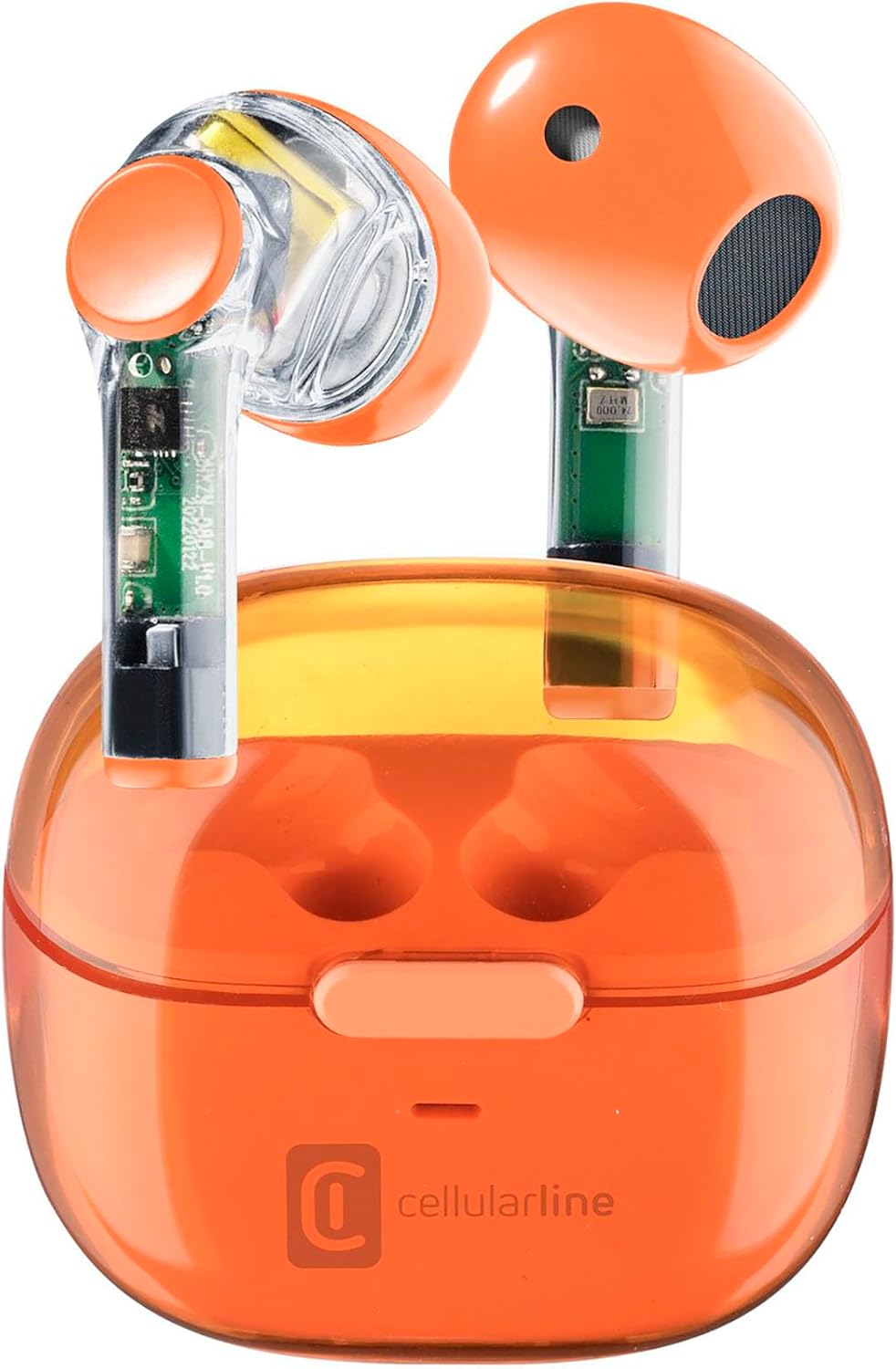
Image: Cellularline FINE Transparent TWS Wireless In-Ear Earbuds in their charging case. The earbuds and case feature a transparent orange design, revealing internal circuitry.

Immagine: Primo piano view highlighting the transparent design of the Cellularline FINE earbuds, showing the internal components.
Componenti:
- Earbuds: Left and Right, with touch control surfaces and microphones.
- Custodia di ricarica: Houses and charges the earbuds, with a charging port and LED indicator.
- Area di controllo touch: Situati sulla superficie esterna di ciascun auricolare, svolgono diverse funzioni.
- Microfono: Integrated into each earbud for calls.
Impostare
1. Ricarica degli auricolari e della custodia
Prima del primo utilizzo, caricare completamente gli auricolari e la custodia di ricarica.
- Inserisci entrambi gli auricolari nella custodia di ricarica. Assicurati che siano posizionati correttamente.
- Collegare il cavo di ricarica USB alla porta di ricarica sulla custodia e a una fonte di alimentazione USB compatibile (ad esempio, computer, adattatore da parete).
- The LED indicator on the charging case will show the charging status. Once fully charged, the indicator will change or turn off.
- A full charge provides approximately 3.5 hours of playtime for the earbuds, and the case can provide up to 4 additional charges, totaling 10 hours of playtime.

Image: Illustration showing the earbuds and charging case, indicating 3.5 hours of playtime per single charge and 10 hours of total playtime with the charging case.
2. Pairing with Your Device (Auto-Pairing)
The earbuds feature an auto-pairing function for quick and easy connection.
- Assicurati che il Bluetooth del tuo dispositivo sia attivato.
- Apri la custodia di ricarica e rimuovi entrambi gli auricolari. Si accenderanno automaticamente ed entreranno in modalità di associazione.
- On your device, search for Bluetooth devices and select "Cellularline FINE" (or similar name) from the list.
- Una volta effettuata la connessione, sentirai un segnale acustico di conferma e gli auricolari saranno pronti per l'uso.
- Per gli utilizzi successivi, gli auricolari si connetteranno automaticamente all'ultimo dispositivo associato quando vengono rimossi dalla custodia.

Image: A smartphone displaying a music player interface, with the Cellularline FINE earbuds and charging case nearby, illustrating the fast Bluetooth pairing process.
3. Indossare gli auricolari
Per una qualità audio e un comfort ottimali, assicurati che gli auricolari siano posizionati correttamente nelle orecchie.
- Inserire delicatamente ciascun auricolare nell'orecchio corrispondente (L per sinistro, R per destro).
- Regola l'auricolare finché non risulta sicuro e comodo.

Image: A woman smiling while wearing the Cellularline FINE earbuds, demonstrating comfort and stability during use.
Istruzioni per l'uso
Controlli touch
The Cellularline FINE earbuds feature intuitive touch controls on each earbud. The specific functions may vary slightly depending on your device and operating system.
| Azione | Funzione |
|---|---|
| Singolo tocco (Auricolare sinistro o destro) | Riproduci/Metti in pausa la musica, Rispondi/Termina chiamata |
| Doppio tocco (Auricolare destro) | Traccia successiva |
| Doppio tocco (auricolare sinistro) | Traccia precedente |
| Triplo tocco (Auricolare sinistro o destro) | Attiva l'Assistente Vocale |
| Pressione lunga (Auricolare destro) | Aumentare il volume |
| Pressione lunga (auricolare sinistro) | Diminuire il volume |
| Pressione prolungata (2 secondi) durante una chiamata in arrivo | Rifiuta chiamata |
Single Earbud Use (Double Master Function)
The Double Master function allows you to use either the left or right earbud independently. This is useful for calls or when you need to be aware of your surroundings.
- Simply remove one earbud from the charging case. It will automatically connect to your device.
- The other earbud can remain in the case or be used later.
- To switch back to stereo mode, simply remove the second earbud from the case.
Manutenzione
Pulizia
- Pulisci regolarmente gli auricolari e la custodia di ricarica con un panno morbido, asciutto e privo di lanugine.
- Non utilizzare detergenti abrasivi, alcol o solventi chimici.
- Rimuovere delicatamente eventuali residui di cerume o detriti dai puntali degli auricolari e dalla rete dell'altoparlante utilizzando una piccola spazzola morbida o un cotton fioc.
- Ensure the charging contacts on both the earbuds and the case are clean and free of dust.
Magazzinaggio
- Quando non li usi, riponi sempre nella custodia di ricarica per proteggerli e mantenerli carichi.
- Conservare il dispositivo in un luogo fresco e asciutto, lontano dalla luce solare diretta e da temperature estreme.
Risoluzione dei problemi
If you encounter any issues with your Cellularline FINE earbuds, refer to the following common solutions:
| Problema | Possibile soluzione |
|---|---|
| Gli auricolari non si associano o non si connettono |
|
| Un solo auricolare funzionante |
|
| Volume basso o scarsa qualità del suono |
|
| Gli auricolari non si caricano |
|
Specifiche
| Caratteristica | Dettaglio |
|---|---|
| Marca | Cellularline |
| Numero di modello | BTFINETWSO |
| Colore | Arancione trasparente |
| Posizionamento dell'orecchio | In-ear (auricolare) |
| Fattore di forma | In-ear (auricolare) |
| Isolamento del rumore | Isolamento acustico |
| Tecnologia di connettività | Wireless (Bluetooth) |
| Componenti inclusi | Auricolari |
| Batteria ricaricabile | Yes (Lithium-ion) |
| Caratteristiche speciali | Volume Control, Microphone Included |
| Metodo di controllo | Tocco |
| Usi consigliati | Music Listening, Phone Calls, Sports, Outdoor Leisure |
| Dispositivi compatibili | Laptops, Tablets, Mobile Phones, Music Production Equipment |
| Materiale | Plastica |
| Tempo di riproduzione degli auricolari | Fino a 3.5 ore |
| Tempo di riproduzione totale (con custodia) | Fino a 10 ore |
Garanzia e supporto
Cellularline products are designed and manufactured to the highest quality standards. For information regarding warranty coverage, technical support, or service, please refer to the official Cellularline webo contattare direttamente il servizio clienti. Conservare la prova d'acquisto per eventuali reclami in garanzia.
Per ulteriore assistenza, visitare: www.cellularline.com


