Introduzione
This manual provides comprehensive instructions for the Phomemo P12 PRO Bluetooth Label Maker. Please read this document carefully before operating the device to ensure proper use, optimal performance, and longevity of your label maker. This device is designed for creating personalized labels for home and office organization.
Contenuto della confezione
Dopo aver aperto la confezione, verificare che siano presenti tutti i seguenti elementi:
- 1 x Phomemo P12 PRO Label Maker
- 2 x Plastic Label Tapes (12mm x 4m, Black on White)
- 4 x Additional Label Tapes (White on Black, Gold on Black, Black on Gold, Black on Silver)
- 1 cavo di ricarica USB
- 1 x Manuale utente (questo documento)
Impostare
1. Carica del dispositivo
The Phomemo P12 PRO features a built-in 1000mAh lithium battery. Before first use, fully charge the device using the provided USB cable. Connect the cable to the label maker's charging port and a standard USB power adapter (not included). A full charge allows for approximately 2.5 hours of continuous use or up to 30 days of standby time.
2. Installing the Print Master App
The label maker operates via a mobile application. Download the "Print Master" app from your device's app store (compatible with iOS and Android). Cercare "Print Master" and follow the on-screen instructions to install.
3. Connessione tramite Bluetooth
- Ensure your label maker is powered on.
- Abilita il Bluetooth sul tuo smartphone o tablet.
- Open the "Print Master" app.
- Within the app, search for available devices and select "P12 PRO" to establish a connection. The app will indicate a successful connection.
4. Caricamento del nastro per etichette
Open the label compartment cover. Insert the label tape roll with the label side facing up, ensuring the tape end extends slightly past the cutter. Close the cover securely.
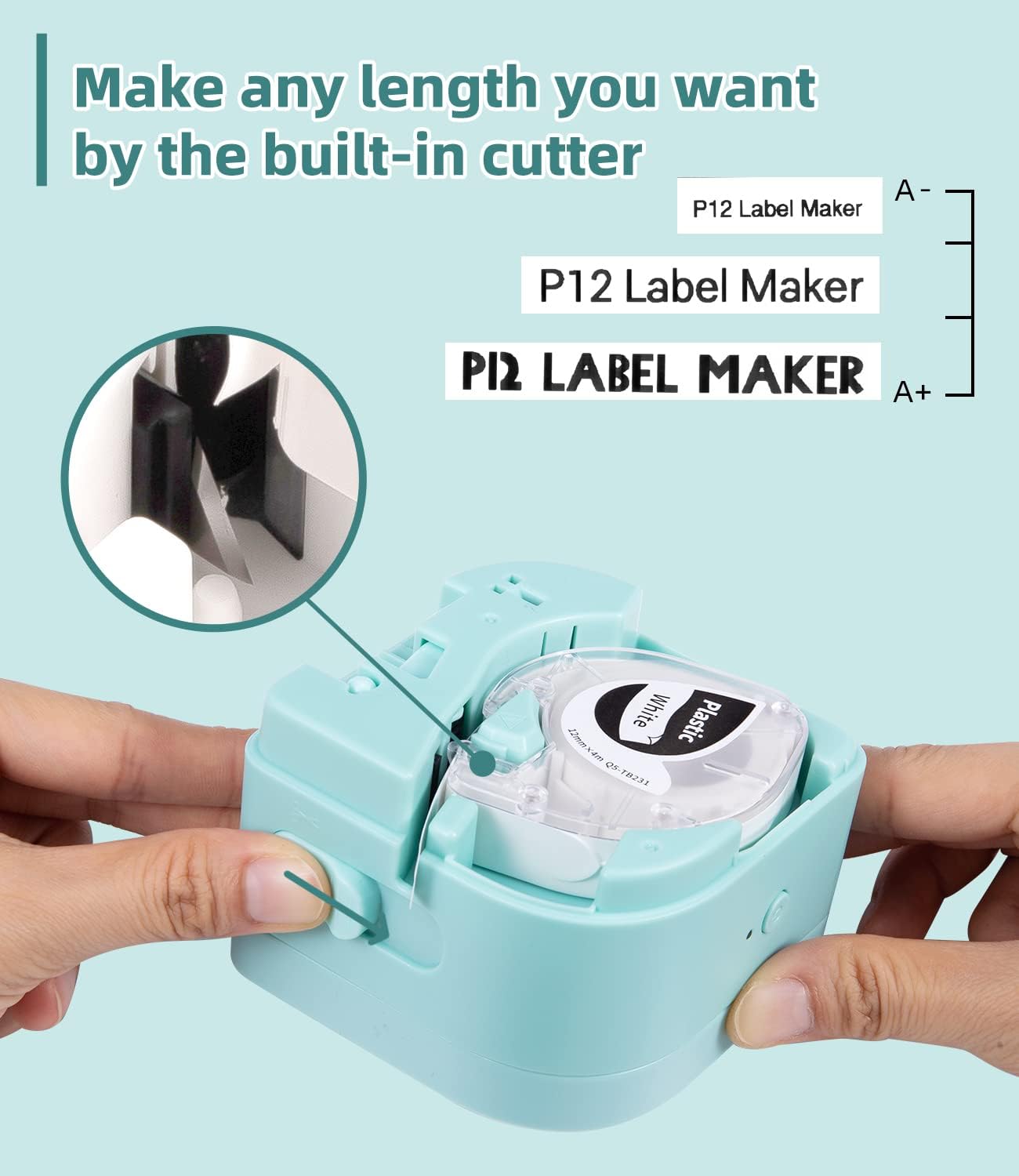
Figure 1: Loading label tape and the built-in cutter mechanism.
Istruzioni per l'uso
1. Creazione e modifica delle etichette
Utilize the "Print Master" app to design your labels. The app offers:
- Multiple Fonts and Symbols: Access 12 languages, 8 fonts, 62 frames, and 1048 symbols to personalize your labels.
- L'immissione di testo: Supports printing 1-3 lines of text.
- Template Saving: Create and save templates for future use.

Figure 2: Label maker connected to the Print Master app for design.
2. Stampa di etichette
Once your label design is complete in the app, tap the print button. The label maker will print the label. The P12 PRO supports both thermal labels and thermal transfer labels, offering versatility for various applications.
3. Taglio delle etichette
After printing, use the built-in cutter to cleanly separate the printed label from the roll. Pull the lever on the side of the device to activate the cutter.
4. Applicazione delle etichette
The label tapes feature a split-back design for easy peeling. Carefully peel off the backing and apply the label to a clean, dry surface.

Figure 3: Easy-peel split-back label design.
5. Label Material Compatibility and Durability
The P12 PRO is compatible with various label materials, including:
- Etichette in plastica: Durable, high-temperature resistant, cold-resistant, waterproof, and oil-proof.
- Iron-on Labels: Washable labels for fabric.
- Satin-ribbon Labels: Printable for decorative purposes.

Figura 4: Esamples of compatible label materials.

Figure 5: Durability features of Phomemo plastic labels.

Figure 6: Various uses for Phomemo P12 PRO labels.
Manutenzione
1. Pulizia della testina di stampa
Per mantenere la qualità di stampa, pulire periodicamente la testina di stampa. Utilizzare un panno morbido e privo di lanugine leggermenteampened with isopropyl alcohol. Gently wipe the print head surface. Ensure the device is powered off before cleaning.
2. Pulizia dell'esterno
Wipe the exterior of the label maker with a soft, dry cloth. Avoid using abrasive cleaners or solvents.
3. Conservazione
Store the label maker in a cool, dry place away from direct sunlight and extreme temperatures. Remove any label tape from the compartment if storing for an extended period.
Risoluzione dei problemi
1. Il dispositivo non si accende
- Ensure the battery is charged. Connect the label maker to a power source and allow it to charge for at least 30 minutes before attempting to power on again.
2. Impossibile connettersi tramite Bluetooth
- Verifica che il Bluetooth sia abilitato sul tuo dispositivo mobile.
- Ensure the label maker is within range (typically 10 meters or 33 feet).
- Riavviare sia l'etichettatrice che il dispositivo mobile.
- Check if the "Print Master" app has Bluetooth permissions enabled in your device settings.
3. Poor Print Quality or Blank Labels
- Controllare che il nastro delle etichette sia caricato correttamente e non inceppato.
- Ensure the label tape is not expired or damaged.
- Pulire la testina di stampa come descritto nella sezione Manutenzione.
- Verify that the correct label type is selected in the "Print Master" app if applicable.
4. Label Jamming
- Spegnere il dispositivo.
- Open the label compartment and carefully remove any jammed tape.
- Ensure the tape is loaded correctly and not twisted.
Specifiche
| Nome del modello | P12 PRO |
| Marca | Fomeo |
| Tecnologia di connettività | Bluetooth |
| Interfaccia Hardware | Bluetooth |
| Metodo di controllo | App (Print Master) |
| Tecnologia di stampa | Thermal, Thermal Transfer |
| Caratteristiche speciali | Portable, Rechargeable, Dual-mode printing |
| Uscita della stampante | Monochrome (with color tape options) |
| Tipo di controllore | iOS, Android |
| Stampa Media | Labels (Plastic, Iron-on, Satin-ribbon) |
| Batteria | Batteria al litio da 1000 mAh |
| ASIN | B0BF54JH68 |
| Data prima disponibilità | 13 settembre 2022 |
Garanzia e supporto
For warranty information, technical support, or customer service inquiries, please refer to the contact details provided on the product packaging or visit the official Phomemo websito. Conservare la ricevuta d'acquisto come prova d'acquisto per eventuali reclami in garanzia.


