Introduzione
This manual provides detailed instructions for the setup, operation, maintenance, and troubleshooting of your HOMPOW Native 1080P 4K Supported Bluetooth Projector. Please read this manual thoroughly before using the product to ensure proper function and longevity.
Cosa c'è nella scatola
- Telecomando
- Manuale d'uso
- Cavo di alimentazione
- Cavo HDMI
Caratteristiche principali
- 1080P Full HD High Performance: Native resolution of 1920*1080 with 6000:1 contrast ratio, supporting 4K input. Delivers 10% brighter images than similar projectors.
- Bluetooth Connection & HiFi Stereo Speaker: Supports various Bluetooth speakers and headphones for immersive sound. Features built-in HiFi stereo speakers for quality audio.
- Ampia compatibilità: Connects via HDMI to Laptops, TV Sticks, ROKU, PS4, Smartphones (adapter not included). Also features AV and USB ports for versatile connectivity.
- Keystone Correction & Zoom: Adjustable vertical and horizontal angles (±15°) via keystone correction. Zoom function allows image size reduction to 50% without moving the projector.
- Lungo Lamp Vita: LED bulb designed for 100,000 hours of lamp tutta la vita.
Impostare
1. Posizionamento
Place the projector on a stable, flat surface or mount it securely. Ensure adequate ventilation around the projector to prevent overheating. Consider the projection distance to achieve your desired screen size.

Figure 1: The projector supports various installation methods, including front projection on a table, ceiling mount, and rear projection.
2. Collegamento elettrico
Collegare il cavo di alimentazione all'ingresso di alimentazione del proiettore e quindi a una presa di corrente.
3. Collegamento dei dispositivi
Il proiettore offre molteplici opzioni di input:
- HDMI: Use the provided HDMI cable to connect your Laptop, TV Stick, ROKU, PS4, or other HDMI-enabled devices.
- USB: Insert a USB flash drive into the USB port to play videos or view pictures directly.
- AV: Use an AV cable to connect older devices like DVD players.
- Bluetooth: Abbinalo ad altoparlanti o cuffie Bluetooth esterni per un audio migliore.
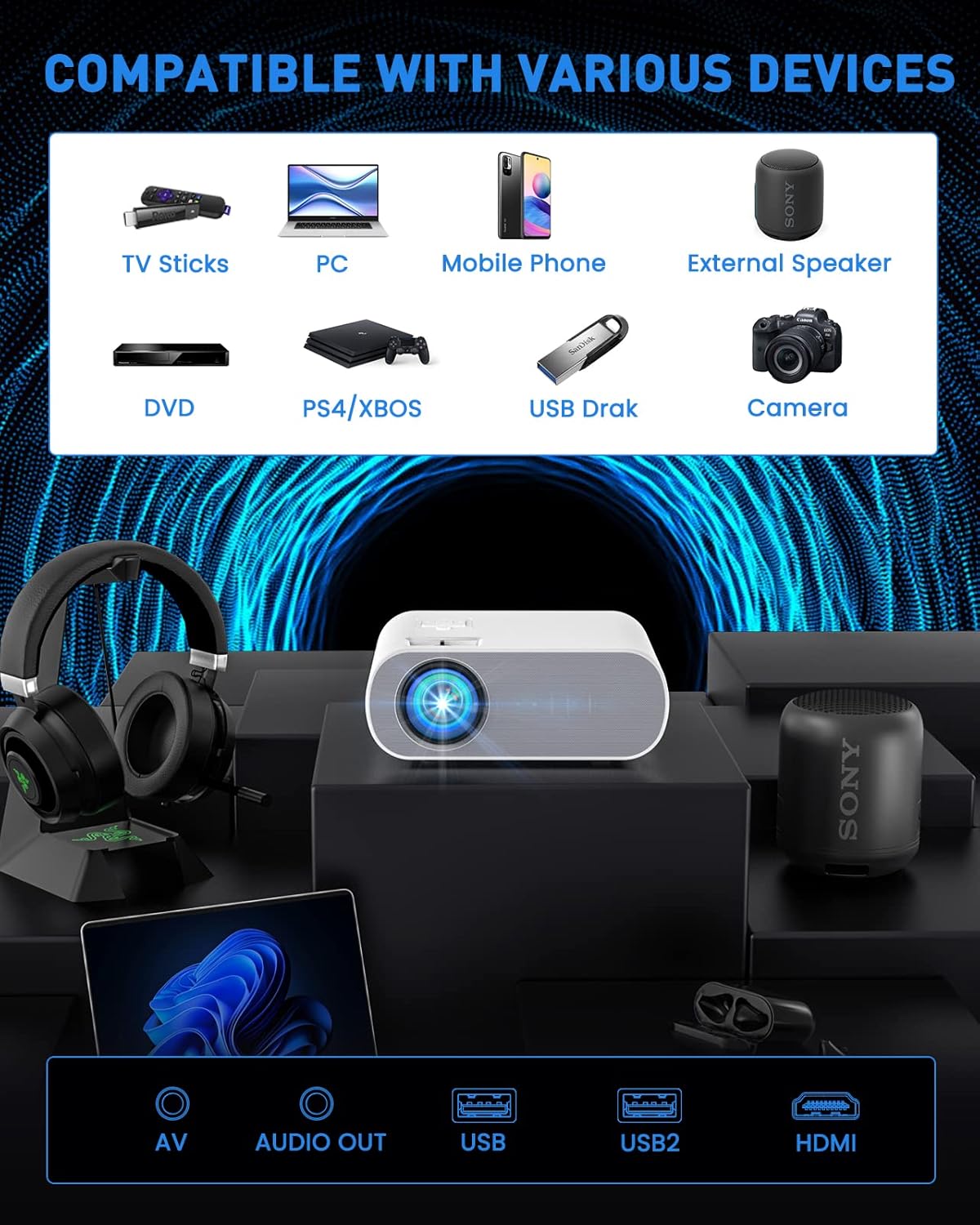
Figure 2: The projector is compatible with a wide range of devices via its multiple input ports.

Figure 3: Connect your smartphone or iPad using an HDMI adapter (not included) for screen mirroring.
4. Regolazione dell'immagine
- Messa a fuoco: Ruotare l'anello di messa a fuoco sull'obiettivo del proiettore finché l'immagine non risulta chiara e nitida.
- Correzione trapezoidale: Use the keystone correction function (manual ±15°) to adjust the vertical and horizontal angles of the image if it appears trapezoidal.
- Ingrandisci: Utilize the ZOOM function to reduce the image size to 50% without physically moving the projector.

Figure 4: Adjust focus and keystone correction for optimal image clarity and shape.
Istruzioni per l'uso
1. Accensione/spegnimento
Premere il pulsante di accensione sul proiettore o sul telecomando per accendere o spegnere l'unità.
2. Selezione della sorgente
Use the "Source" button on the remote or projector to select the desired input source (HDMI, USB, AV).
3. Impostazioni audio
The projector has built-in HiFi stereo speakers. For external audio, connect Bluetooth speakers or headphones via the Bluetooth pairing function in the projector's settings menu.

Figure 5: The projector features Bluetooth 5.0 for wireless audio connectivity.
4. Scenari di utilizzo
The HOMPOW projector is ideal for home cinema and video games. For optimal performance, use in a relatively dark room environment.

Figure 6: Enjoy immersive outdoor movie experiences with the HOMPOW projector.

Figure 7: Experience a large, immersive display up to 200 inches.
Manutenzione
1. Lamp Vita
Il LED del proiettore lamp has a lifespan of approximately 100,000 hours, reducing the need for frequent bulb replacements.
2. Pulizia
- Regularly clean the lens with a soft, lint-free cloth designed for optical surfaces.
- Keep the projector's ventilation openings clear of dust and debris to ensure proper airflow.
Risoluzione dei problemi
Se riscontri problemi con il proiettore, fai riferimento alle seguenti soluzioni comuni:
- Nessuna immagine/segnale:
- Ensure the correct input source is selected (HDMI, USB, AV).
- Controllare tutti i collegamenti dei cavi (HDMI, alimentazione) per accertarsi che siano saldi.
- Verificare che il dispositivo connesso (laptop, chiavetta TV) sia acceso e che emetta un segnale.
- Nessun suono:
- Regolare il volume sia sul proiettore che sul dispositivo collegato.
- Se si utilizzano altoparlanti esterni, assicurarsi che siano correttamente collegati o associati tramite Bluetooth.
- Note: The projector does not support Dolby sound. If playing videos from services like Netflix or Amazon Prime Video, ensure Dolby sound is turned off in your source device's audio settings (e.g., Settings > Display & Sounds > Audio > Dolby Digital Output > OFF).
- Immagine sfocata:
- Regolare l'anello di messa a fuoco sull'obiettivo del proiettore.
- Use the keystone correction to correct any trapezoidal distortion.
- Assicurarsi che la superficie di proiezione sia piana e liscia.
- Surriscaldamento:
- Ensure the projector has adequate ventilation and its vents are not blocked.
- Avoid operating the projector in excessively hot environments.
Specifiche
| Caratteristica | Dettaglio |
|---|---|
| Marca | HOMPOW |
| Numero di modello | C10 |
| Risoluzione nativa | 1920 x 1080 (1080P Full HD) |
| Supporto 4K | SÌ |
| Rapporto di contrasto | 6000:1 |
| Luminosità | 10% brighter than similar projectors (specific lumens not provided in feature bullets, but 6000L is mentioned in an image) |
| Tecnologia di connettività | Bluetooth (5.0), HDMI, USB, AV |
| Oratore | Altoparlante stereo HiFi integrato |
| Correzione Keystone | Manual ±15° (Vertical and Horizontal) |
| Funzione di zoom | Image size reduction to 50% |
| Lamp Vita | 100,000 ore |
| Peso dell'articolo | 4.33 libbre |
| Dimensioni del pacco | 12.01 x 9.88 x 5.47 pollici |
Garanzia e supporto
HOMPOW fornisce un Garanzia di 2 anno for this projector, along with lifetime professional technical support. For any problems or inquiries, please feel free to contact us anytime.

Figura 8: È disponibile un servizio di assistenza clienti dedicato.


