Introduzione
The FitNation by Echelon Pedal Pro Plus is a motorized seated elliptical designed to provide a convenient and effective way to exercise and aid in rehabilitation. It allows users to improve circulation, decrease joint pain, and engage in physical activity from the comfort of a chair, whether working, watching TV, or reading. This manual provides essential information for the setup, operation, maintenance, and troubleshooting of your device.
Caratteristiche principali
- Exercise and Rehab: Designed to improve circulation, decrease joint pain, and facilitate exercise while seated.
- Auto and Manual Settings: Easily switch between automated programs and manual control for varied workout intensity.
- Improve Range of Motion: Features two-directional movement (forward and reverse) for enhanced flexibility and strength building.
- Preset Training Programs: Built-in display allows for the creation of three separate preset training programs for consistent exercise routines.
- Telecomando incluso: A convenient remote control is provided for effortless adjustment of settings and programs.
- Schermo LCD: A clear digital display tracks key metrics including Speed, Time, Distance, Steps, and Calories burned.
Componenti del prodotto
Your FitNation Pedal Pro Plus package includes the following items:
- FitNation Pedal Pro Plus Unit
- Cavo di alimentazione
- Telecomando (richiede 2 batterie AAA, incluse)
- Manuale di istruzioni (questo documento)
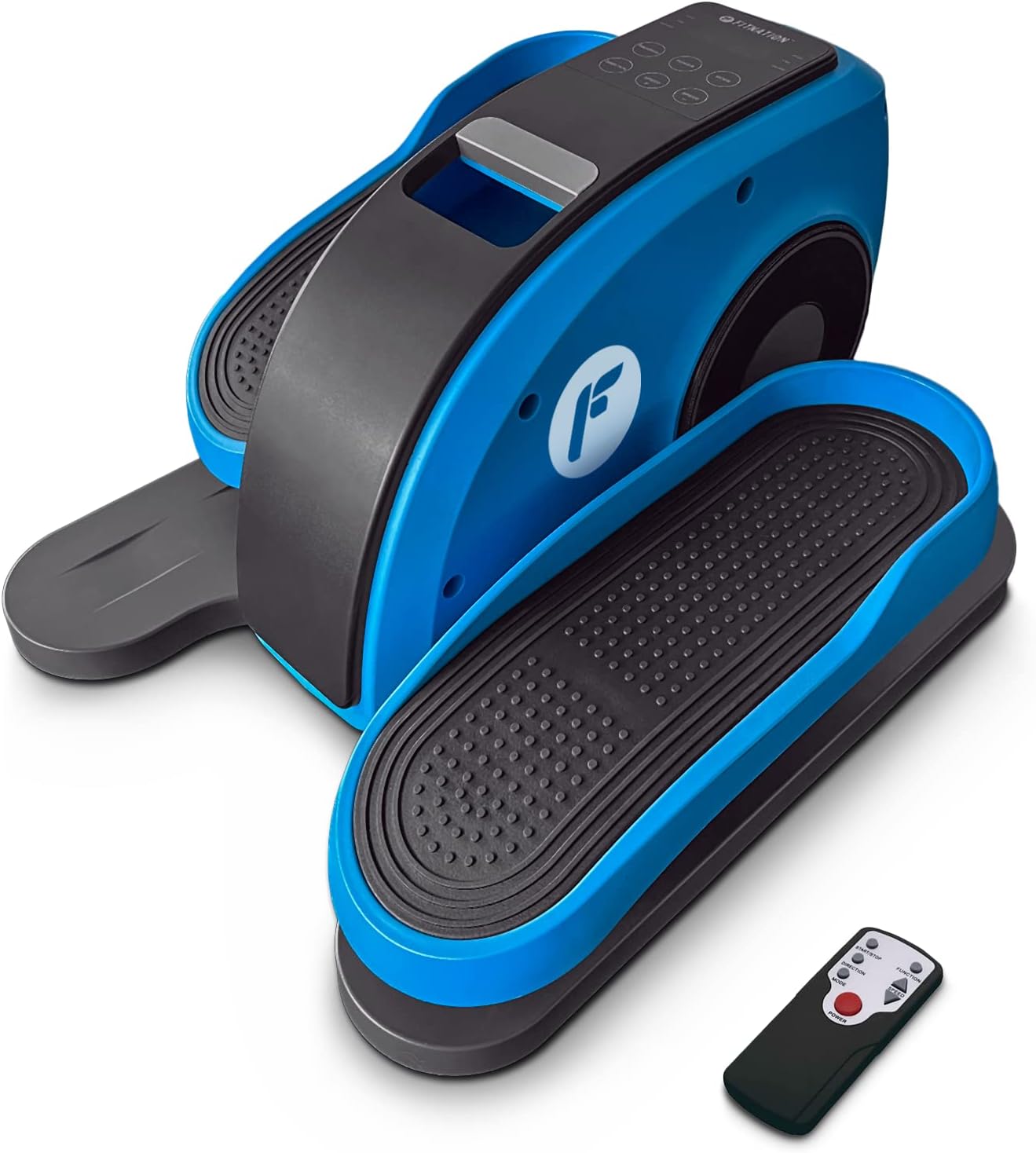
Figure 1: The FitNation Pedal Pro Plus unit with its remote control.
Impostare
- Disimballare l'unità: Rimuovere con cautela tutti i componenti dall'imballaggio. Conservare l'imballaggio per un eventuale stoccaggio o trasporto futuro.
- Posizionare l'unità: Position the Pedal Pro Plus on a flat, stable surface near a power outlet. Ensure there is enough space for comfortable leg movement. It can be placed under a desk or in front of a chair.
- Connetti alimentazione: Insert the power cord into the power input port located at the back of the unit. Plug the other end into a standard electrical outlet.

Figura 2: Posteriore view of the unit, highlighting the power input.
- Inserire le batterie del telecomando: Aprire il vano batterie sul retro del telecomando e inserire le due batterie AAA, prestando attenzione alla corretta polarità.

Figure 3: The remote control used to operate the elliptical.
Istruzioni per l'uso
The Pedal Pro Plus can be operated using the control panel on the unit or the included remote control.
Pannello di controllo e display

Figure 4: The main control panel and LCD display.
- Schermo LCD: Shows Speed, Time, Distance, Steps, and Calories.
- Pulsante di accensione: Accende o spegne l'unità.
- Pulsante MODE: Cycles through display metrics (Time, Distance, Steps, Calories).
- Pulsante PROGRAMMA: Selects between preset training programs (P1, P2, P3) or manual mode.
- DIRECTION Button: Cambia la direzione di rotazione del pedale (avanti o indietro).
- Pulsanti SPEED +/-: Adjusts the speed level (1-10).
Funzioni del telecomando
The remote control mirrors most functions of the main control panel for convenience.

Figura 5: Disposizione e funzioni dei pulsanti del telecomando.
- Pulsante di avvio/arresto: Initiates or pauses the elliptical movement.
- Pulsante funzione: Toggles between Auto and Manual programs.
- Pulsante di direzione: Reverses the pedal movement.
- Pulsanti di regolazione della velocità: Increases or decreases the speed level (1-10).
- Pulsante di accensione: Accende o spegne l'unità.
Utilizzando l'ellittica
- Ensure the unit is plugged in and the remote has batteries.
- Sit comfortably in a chair with the Pedal Pro Plus positioned in front of you. Place your feet securely on the pedals.
- Premere il tasto ENERGIA button on the unit or remote to turn it on. The LCD display will illuminate.
- Seleziona la modalità desiderata:
- Modalità manuale: Premere il tasto PROGRAMMA button until no program number (P1, P2, P3) is displayed. Use the VELOCITÀ +/- buttons to set your desired speed.
- Programmi preimpostati: Premere il tasto PROGRAMMA button to cycle through P1, P2, or P3. These programs have pre-defined speed variations.
- To change the direction of pedal movement, press the DIREZIONE pulsante.
- Begin pedaling. The display will show your workout metrics.
- Per interrompere l'allenamento, premere il tasto Avvio/Arresto pulsante sul telecomando o sul ENERGIA pulsante sull'unità.
- Al termine, premere il pulsante ENERGIA button to turn off the unit and unplug it from the wall outlet if not in use for an extended period.

Figure 6: The elliptical can be used discreetly under a desk.
Manutenzione
- Pulizia: Pulire l'unità con un panno morbido, damp panno dopo ogni utilizzo. Non utilizzare detergenti abrasivi o solventi.
- Magazzinaggio: Conservare l'unità in un luogo fresco e asciutto, lontano dalla luce solare diretta e da temperature estreme.
- Ispezione: Periodically check all connections and moving parts for any signs of wear or damage. If any issues are found, discontinue use and contact customer support.
Risoluzione dei problemi
| Problema | Possibile causa | Soluzione |
|---|---|---|
| L'unità non si accende. | Power cord not properly connected; No power from outlet; Remote batteries dead or incorrectly inserted. | Ensure power cord is securely plugged into unit and outlet. Test outlet with another device. Replace remote batteries, checking polarity. |
| I pedali non si muovono fluidamente. | Unit placed on uneven surface; Obstruction; Internal issue. | Ensure unit is on a flat, stable surface. Check for any objects obstructing pedal movement. If problem persists, contact customer support. |
| Il telecomando non risponde. | Dead or incorrectly inserted batteries; Obstruction between remote and unit; Remote out of range. | Replace remote batteries, checking polarity. Ensure clear line of sight to the unit's sensor. Move closer to the unit. |
| Display not showing correct metrics. | È stata selezionata la modalità errata. | Premere il tasto MODALITÀ button to cycle through the display metrics. |
Specifiche

Figure 7: Product dimensions and weight for easy reference.
| Attributo | Dettaglio |
|---|---|
| Nome del modello | Pedal Pro Plus Blue |
| Marca | ADATTAMENTO |
| Colore | BLU |
| Dimensioni del prodotto (P x L x A) | 17.5"P x 14.5"L x 10.5"A |
| Materiale | Steel, Plastic, Synthetic Leather |
| Meccanismo di resistenza | Magnetico |
| Peso massimo raccomandato | 100 chilogrammi (220 libbre) |
| Peso dell'articolo | 15.8 libbre (7.17 kg) |
| Numero di livelli di resistenza | 8 |
| Codice UPC | 810091983218 |
| Numero di modello (numero di parte) | PPP-FN-BLUE |
Garanzia e supporto
The FitNation Pedal Pro Plus comes with a Garanzia del produttore di 1 anniLa presente garanzia copre i difetti di materiali e di fabbricazione in normali condizioni di utilizzo.
For warranty claims, technical assistance, or any questions regarding your product, please contact FitNation customer support. Refer to the contact information provided on the product packaging or the official FitNation websito.
Please have your model number (PPP-FN-BLUE) and proof of purchase ready when contacting support.


