Introduzione
This manual provides comprehensive instructions for the MAUL M112 calculator. It covers setup, basic operations, advanced functions, maintenance, and troubleshooting to ensure optimal performance and longevity of your device. Please read this manual thoroughly before using the calculator.
Prodotto finitoview

Immagine 1: Davanti view of the MAUL M112 calculator, showcasing its 12-digit display and key layout. The calculator features a silver front panel and black keys with colored function buttons.
The MAUL M112 is a compact, 12-digit display calculator designed for office, home, and school use. It features both solar and battery power for reliable operation in various lighting conditions. Key functions include percentage and tax calculations, memory functions, and an automatic shutdown feature to conserve energy.

Immagine 2: The MAUL M112 calculator held in a hand, illustrating its compact size (approximately 11.9 cm x 7.0 cm x 1.0 cm). This image highlights its portability and ergonomic design.
Impostare
Fonte di alimentazione
The MAUL M112 calculator operates on a dual power system: solar and battery. This ensures continuous functionality even in low-light environments.
- Energia solare: The calculator primarily uses solar energy when sufficient light is available. Ensure the solar panel, located above the display, is exposed to light for optimal performance.
- Potenza della batteria: For use in dark conditions or when solar power is insufficient, the calculator automatically switches to battery power. One LR1130 battery is included with the device.
Utilizzo iniziale
Upon first use, the calculator should be ready for operation. If the display does not activate, ensure it is exposed to light or check the battery compartment.

Immagine 3: Posteriore view of the MAUL M112 calculator, displaying the battery compartment cover. This is where the LR1130 battery is housed and can be accessed for replacement.
Istruzioni per l'uso
Operazioni di base
- Accensione/Cancellazione: Premere ON C·CE to turn on the calculator or clear the current entry.
- Tutto a posto: Premere AC to clear all calculations and memory.
- Inserimento numero: Use the number keys (0-9) and the decimal point (.) per immettere valori.
- Operazioni aritmetiche: Utilizzo + (aggiunta), - (sottrazione), x (moltiplicazione), e ÷ (division) for calculations.
- Uguale a: Premere = per visualizzare il risultato di un calcolo.
- Double Zero: IL 00 button allows for quick entry of two zeros.
- Delete Last Digit: Premere il tasto → (backspace) button to delete the last entered digit.
Funzioni di memoria
The calculator includes a 3-button memory function:
- M+: Aggiunge il valore visualizzato alla memoria.
- M-: Sottrae il valore visualizzato dalla memoria.
- MRC: Recalls the memory content (first press) or clears the memory (second press).
Funzioni speciali
- % (percentualetage): Calcola la percentualetages.
- Example (Add Percentage): Inserisci il valore, premi +, inserisci percenttage, premere %.
- Example (Discount): Inserisci il valore, premi -, inserisci percenttage, premere %.
- TAX+ / TAX- (Calcolo delle imposte): These buttons are used for calculations involving tax rates.
- Impostazione dell'aliquota fiscale: Premere IMPOSTATO, then enter the tax rate (e.g., 5 for 5%), then press IMPOSTE+. The tax rate is now stored.
- Aggiungi tasse: Enter original price, press IMPOSTE+.
- Sottrai le tasse: Enter price including tax, press IMPOSTA-.
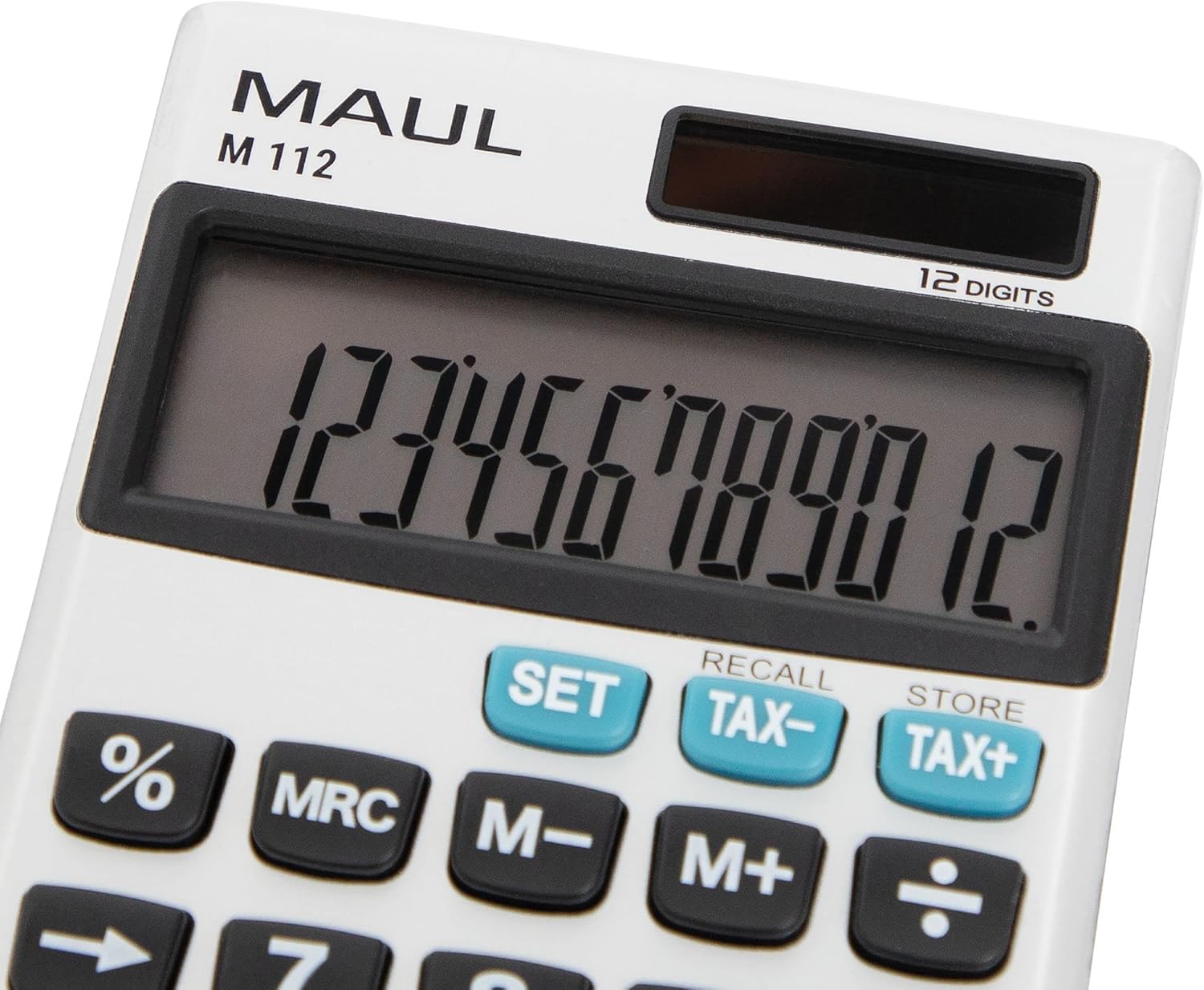
Immagine 4: Un dettagliato view of the MAUL M112 calculator's 12-digit LCD display and the function keys, including SET, TAX-, TAX+, %, MRC, M-, M+, and the arithmetic operators. This image highlights the clear labeling and distinct coloring of important keys.
Manutenzione
Pulizia
Per mantenere l'aspetto e la funzionalità della calcolatrice:
- Pulire la calcolatrice con un panno morbido e asciutto.
- Per sporco ostinato, leggermente dampLavare il panno con acqua. Evitare l'uso di prodotti chimici aggressivi o detergenti abrasivi.
- Ensure no liquid enters the calculator's internal components.
Sostituzione della batteria
When the display becomes dim or unresponsive in low light, the LR1130 battery may need replacement.
- Gira la calcolatrice.
- Locate the battery compartment cover (refer to Image 3).
- Carefully open the cover using a small screwdriver or coin.
- Remove the old LR1130 battery.
- Insert a new LR1130 battery, ensuring correct polarity (+/-).
- Riposizionare saldamente il coperchio del vano batteria.
Nota: Smaltire le batterie usate secondo le normative locali.
Risoluzione dei problemi
- Il display è vuoto:
- Assicurarsi che la calcolatrice sia esposta a una luce sufficiente per l'alimentazione solare.
- Check if the battery needs replacement (refer to Battery Replacement section).
- Premere ON C·CE per accendere il dispositivo.
- Calcoli errati:
- Premere AC to clear all previous entries and memory.
- Double-check your input values and the sequence of operations.
- I tasti non rispondono:
- Ensure the keys are clean and free from debris.
- Se il problema persiste, prova a sostituire la batteria.
Specifiche
| Nome del modello | Numero di modello: M112 |
| Display | 12-digit LCD, 1-line display |
| Fonte di alimentazione | Solar powered and battery operated (LR1130) |
| Dimensioni (L x P x A) | Dimensioni: 11.9 x 7.0 x 1.0 cm |
| Materiale | Plastic (front made of aluminium) |
| Funzioni di memoria | 3-button memory (M+, M-, MRC) |
| Funzioni speciali | percentualetage (%), Tax Calculation (TAX+, TAX-), Double Zero (00), Delete Last Digit (→) |
| Spegnimento automatico | SÌ |
| Produttore | Jakob Maul GmbH |
Garanzia
The MAUL M112 calculator comes with a Garanzia di 5 anno from the date of purchase. This warranty covers manufacturing defects under normal use. Please retain your proof of purchase for warranty claims. For detailed warranty terms and conditions, please refer to the official MAUL websito o contattare l'assistenza clienti.
Supporto
For further assistance, technical support, or inquiries regarding your MAUL M112 calculator, please visit the official MAUL websito web o contattare il servizio clienti. Le informazioni di contatto sono in genere reperibili sulla confezione del prodotto o sul cartellino del produttore. websito.
Produttore: Jakob Maul GmbH


