1. Introduzione
The Douk Audio Q4 is an upgraded Mini Bluetooth 5.0 Headphone Amplifier and USB DAC designed to enhance your audio experience. It functions as a stereo receiver, USB DAC player, and D/A audio converter, offering multiple input and output options for versatile connectivity with most home audio systems. The device supports bit-perfect 24Bit / 192KHz HD low-jitter signal transfer and incorporates an output protection circuit for reliable performance.
Key features include PC-USB and USB memory inputs, dual analog outputs, and tone controls for bass and treble adjustment. Its compact design and comprehensive functionality make it a practical addition to any audio setup.
2. Contenuto della confezione
Prima dell'installazione, assicurati che tutti gli elementi siano presenti nella confezione:
- Douk Audio Q4 Unit
- Remote Control (2*AAA batteries not included)
- Cavo di alimentazione USB
- Cavo dati USB
- Cavo ottico
- Antenna Bluetooth

Image: Douk Audio Q4 package contents, showing the main unit, remote control, USB power cable, USB data cable, optical cable, and Bluetooth antenna. Dimensions and weight are also indicated.
3. Istruzioni per l'installazione
Follow these steps to set up your Douk Audio Q4:
- Connetti alimentazione: Connect the provided USB power cable to the DC 5V Type-C input on the rear panel of the Q4 and plug the other end into a suitable 5V power source (e.g., USB wall adapter, computer USB port).
- Collegare l'antenna Bluetooth: Screw the included Bluetooth antenna into the 'BT' port on the rear panel.
- Collega l'uscita audio:
- Uscita RCA: Connect RCA cables from the L/R RCA outputs on the Q4 to your ampdiffusori acustici o attivi.
- Uscita cuffie: Plug your headphones into the 3.5mm headphone jack on the front panel. The Q4 can drive most 16-300Ω headphones.
- Connect Audio Input (Choose one or more):
- Bluetooth: Assicurarsi che l'antenna Bluetooth sia collegata.
- PC-USB: Connect the USB data cable from your computer (or OTG-enabled smartphone/tablet) to the 'PC-USB' input on the rear panel. For Android, an OTG cable is required. For iOS, a camera kit is required.
- Memoria USB: Insert a USB flash drive (up to 64GB, formatted with MP3/WMA/APE/WAV/FLAC files) into the 'USB' input on the rear panel.
- Ottico (OPT): Connect an optical cable from your audio source (e.g., TV, CD player) to the 'OPT' input.
- Coassiale (COAX): Connect a coaxial cable from your audio source to the 'COAX' input.
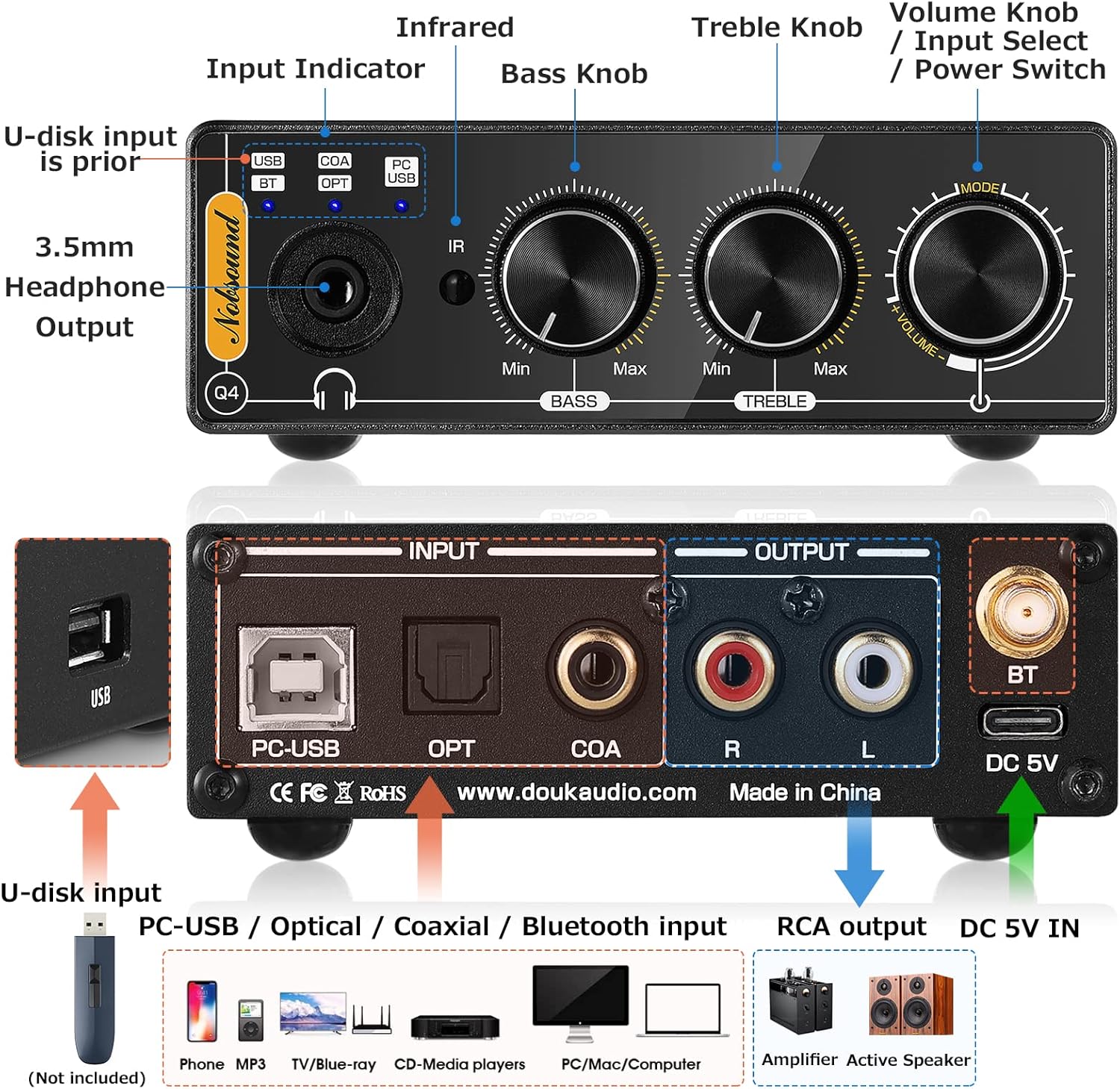
Image: Detailed diagram of the Douk Audio Q4's front and rear panels, illustrating all input and output ports (USB, PC-USB, Optical, Coaxial, Bluetooth, RCA, 3.5mm Headphone) and control knobs (Volume, Bass, Treble, Input Select).
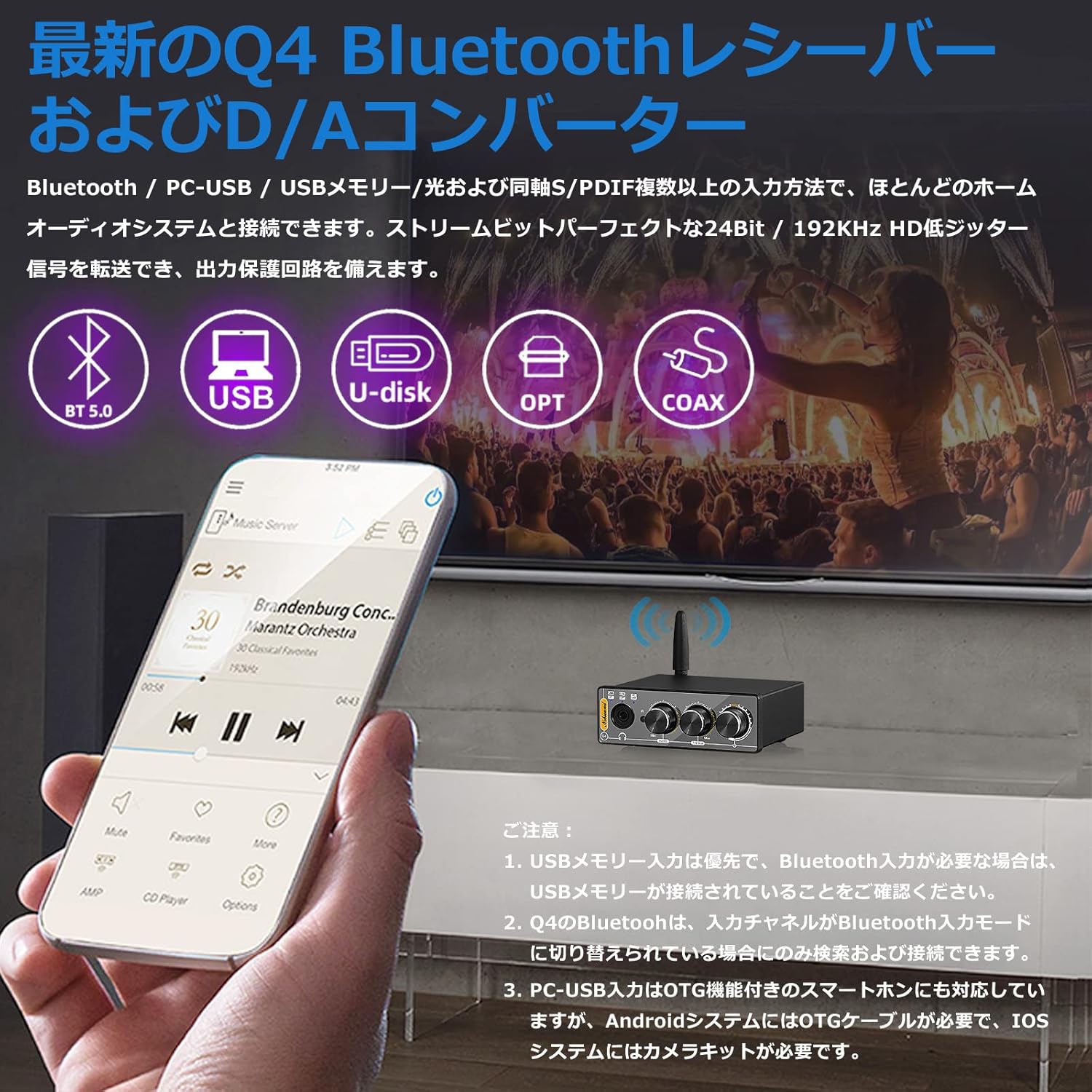
Image: The Douk Audio Q4 unit demonstrating its multiple input capabilities, including Bluetooth 5.0, USB, U-disk, Optical, and Coaxial connections, with a smartphone displaying music playback.

Image: The Douk Audio Q4 connected to a computer via PC-USB, with headphones plugged into the front jack. The image also illustrates RCA outputs connecting to an amplifier or active speakers, and the device being used in a car setup.
4. Istruzioni per l'uso
Once connected, operate your Douk Audio Q4 as follows:
- Accensione/spegnimento: Rotate the Volume knob clockwise to turn on the device. Rotate counter-clockwise until it clicks to turn off.
- Selezione input: Press the 'Input Select' button (integrated with the Volume knob) on the front panel, or use the 'SELECT' button on the remote control, to cycle through the available inputs (USB, BT, OPT, COAX, PC-USB). The independent input indicators on the front panel will light up to show the active input.
- Controllo del volume: Rotate the 'Volume' knob on the front panel or use the 'VOL+' / 'VOL-' buttons on the remote control to adjust the output volume.
- Controllo dei toni: Use the 'BASS' and 'TREBLE' knobs on the front panel to adjust the low and high frequencies to your preference (±6dB range).
- Accoppiamento Bluetooth:
- Switch the input mode to 'BT' (Bluetooth). The Bluetooth indicator will flash.
- On your device (smartphone, tablet, computer), search for Bluetooth devices and select 'Q4' to pair.
- Once paired, the Bluetooth indicator will remain solid.
- USB Memory Playback: Insert a USB flash drive into the 'USB' port. The device will automatically prioritize USB memory input if connected. Use the remote control for playback functions (play/pause, next/previous track).

Image: The Douk Audio Q4 unit showcasing its Bass, Treble, and Volume control knobs, allowing users to fine-tune their audio output. A music player interface is visible in the background.

Image: The Douk Audio Q4 unit on a desk, demonstrating its remote control functionality and the independent input indicators on the front panel that show the current operating status.
5. Manutenzione
To ensure the longevity and optimal performance of your Douk Audio Q4, follow these maintenance guidelines:
- Pulizia: Use a soft, dry cloth to clean the exterior of the device. Avoid using liquid cleaners, aerosols, or solvents, as they may damage the finish or internal components.
- Posizionamento: Place the unit on a stable, flat surface away from direct sunlight, heat sources, and excessive moisture. Ensure adequate ventilation around the device.
- Gestione: Maneggiare l'unità con cura. Evitare di farla cadere o di sottoporla a forti urti.
- Energia: Scollegare l'adattatore di alimentazione se l'unità non verrà utilizzata per un periodo prolungato.
6. Risoluzione Dei Problemi
If you encounter issues with your Douk Audio Q4, refer to the following common problems and solutions:
- Nessuna uscita audio:
- Ensure the unit is powered on and the volume is not set to minimum or muted.
- Verify that the correct input source is selected (check input indicators).
- Check all cable connections (input and output) are secure.
- Test with different audio sources and output devices (headphones/speakers).
- Problemi di connessione Bluetooth:
- Ensure the Q4's input channel is switched to 'BT' mode. The Bluetooth indicator should be flashing for pairing.
- Make sure no USB memory stick is connected, as USB memory input has priority over Bluetooth.
- Ensure your Bluetooth device is within range and not connected to another device.
- Prova a disaccoppiare e riassociare il Q4 dalle impostazioni Bluetooth del tuo dispositivo.
- USB Memory Playback Not Working:
- Ensure the USB memory stick is properly inserted and contains supported audio formats (MP3/WMA/APE/WAV/FLAC).
- Check if the USB memory capacity exceeds 64GB.
- Verify the input is set to 'USB'.
- PC-USB Input Not Recognized:
- Ensure the USB data cable is securely connected to both the Q4 and your computer/smartphone.
- For Android smartphones, an OTG cable is required. For iOS devices, a camera kit is necessary.
- No drivers or software are typically required for PC-USB connection.
- Suono distorto:
- Reduce the volume level on both the Q4 and your audio source.
- Verificare la presenza di connessioni dei cavi allentate.
- Assicurarsi che la sorgente audio fornisca un segnale pulito.
7. Specifiche
| Caratteristica | Specificazione |
|---|---|
| Ingressi audio | Bluetooth 5.0, PC-USB, USB Memory, Coaxial, Optical Fiber |
| Uscite audio | Stereo L/R RCA, jack per cuffie da 3.5 mm |
| PC-USB Samptasso di ling | 96 KHz/24 bit |
| Ottico/Coassiale Samptasso di ling | 192 KHz/24 bit |
| USB Memory Supported Formats | MP3, WMA, APE, WAV, FLAC |
| USB Memory Max Capacity | 64 GB |
| Treble/Bass Adjustment Range | ±6 dB |
| Risposta in frequenza | 20 Hz-22 KHz (± 0.5 dB) |
| Sistema operativo supportato da PC-USB | XP, W7, W8, W10, MAC, Linux |
| Distorsione | 0.0057% |
| Rapporto segnale / rumore (SNR) | ≥113 dB |
| Headphone Output Max Power | 110 mW a 32 Ω |
| Impedenza di corrispondenza delle cuffie | 16-300Ω |
| Livello di uscita RCA | 1.9V |
| Volume di eserciziotage | CC 5 V (tipo C) |
| Dimensioni (L*P*A) | 95 * 78 * 32 mm / 3.74 * 3.07 * 1.26 pollici |
| Peso netto | 235 g / 0.52 libbre |
| Peso del pacco | 500 g / 1.10 libbre |
8. Garanzia e supporto
Warranty information for the Douk Audio Q4 is not provided in the available product data. Please refer to the retailer or manufacturer's official websito per i dettagli riguardanti la copertura della garanzia e l'assistenza clienti.
For technical assistance or further inquiries, please contact Douk Audio customer service through their official channels.