1. Introduzione
Thank you for choosing the AgfaPhoto Powerstation PPS 600 Pro. This portable power bank is designed to provide reliable power for various devices during outdoor activities, travel, and emergency situations. This manual provides essential information for safe operation, setup, maintenance, and troubleshooting. Please read it thoroughly before using the product.
2. Istruzioni di sicurezza
- Non smontare, riparare o modificare l'unità. Un rimontaggio non corretto potrebbe causare incendi o lesioni.
- Non esporre l'unità al fuoco o a temperature estreme (superiori a 60°C / 140°F).
- Non utilizzare o conservare l'unità in un bagno o in un'area esposta ad acqua o umidità.
- Non far cadere, urtare o sottoporre l'unità a forti impatti.
- Tenere fuori dalla portata dei bambini.
- Utilizzare solo accessori e cavi di ricarica consigliati.
- Assicurare una ventilazione adeguata durante l'uso e la ricarica per evitare il surriscaldamento.
- In case of leakage from the battery, avoid contact with skin and eyes. Rinse affected areas with water and seek medical attention.
3. Contenuto della confezione
Verificare che tutti gli articoli siano presenti nella scatola:
- AgfaPhoto Powerstation PPS 600 Pro
- Power Cord (for AC charging)
- Car Cigarette Lighter Adapter
- Manuale d'uso
4. Prodotto finitoview
Familiarize yourself with the ports, buttons, and display of your Powerstation PPS 600 Pro.

Image: Front panel of the AgfaPhoto Powerstation PPS 600 Pro, showing the LCD screen, DC output, USB-A ports, USB-C port, and AC output switch.
The unit features a clear LCD display that shows battery level, input power, and output power. Various ports are available for charging different devices simultaneously.
- Schermo LCD: Mostra lo stato della batteria, l'ingresso/uscita wattage, e indicatori di errore.
- Uscita CC: For devices requiring DC power.
- Porte USB-A: Per caricare smartphone, tablet e altri dispositivi alimentati tramite USB.
- Porta USB-C: Per dispositivi compatibili con la ricarica rapida.
- Uscita CA: Standard wall outlet for appliances.
- Porta di ingresso: For charging the power station itself.
5. Impostazione
5.1 Carica iniziale
Before first use, fully charge your AgfaPhoto Powerstation PPS 600 Pro. This ensures optimal battery performance and longevity.
- Connect the provided power cord to the AC input port on the power station.
- Collegare l'altra estremità del cavo di alimentazione a una presa a muro standard.
- Il display LCD mostrerà lo stato di carica. L'unità è completamente carica quando l'indicatore della batteria mostra il 100%.
Charging can also be done via a solar panel (sold separately) or a car cigarette lighter adapter.

Image: Illustration of the three charging methods for the power station: via car cigarette lighter, AC wall adapter, and solar panel.
6. Istruzioni per l'uso
6.1 Accensione/Spegnimento
- To turn on the unit, press and hold the main power button for a few seconds. The LCD display will illuminate.
- Per spegnere l'unità, tenere nuovamente premuto il pulsante di accensione principale finché il display non si spegne.
6.2 Ricarica di dispositivi esterni
The Powerstation PPS 600 Pro offers multiple output options:
- Uscita USB: Connect your USB-powered devices (smartphones, tablets, drones, cameras) to the USB-A or USB-C ports. The unit will automatically detect and begin charging.
- Uscita CA: For devices requiring standard wall power (laptops, mini-refrigerators, LED TVs), press the AC ON/OFF button to activate the AC outlet. Plug your device into the AC outlet. Remember to turn off the AC output when not in use to conserve battery.
- Uscita CC: For 12V DC devices, connect them to the DC output port.

Image: The AgfaPhoto Powerstation PPS 600 Pro connected and charging a laptop, demonstrating its use for portable electronics.

Image: The power station in use during a power outage, providing light and charging a smartphone, highlighting its emergency backup capability.
7. Manutenzione
7.1 Conservazione
- Conservare la centrale elettrica in un luogo fresco e asciutto, lontano dalla luce solare diretta e da fonti di calore.
- Per un periodo di conservazione prolungato, caricare l'unità a circa il 50-80% ogni 3-6 mesi per preservare la salute della batteria.
- Evitare di conservare in ambienti con elevata umidità o temperature estreme.
7.2 Pulizia
- Utilizzare un panno morbido e asciutto per pulire l'esterno dell'unità.
- Non utilizzare detergenti abrasivi o solventi.
- Assicurarsi che tutte le porte siano libere da polvere e detriti.
8. Risoluzione Dei Problemi
If you encounter issues with your Powerstation PPS 600 Pro, refer to the following common problems and solutions:
| Problema | Possibile causa | Soluzione |
|---|---|---|
| L'unità non si accende | La batteria è completamente scarica. | Caricare l'unità utilizzando l'adattatore CA. |
| No output from AC port | AC output not activated. Device exceeds power limit. | Press the AC ON/OFF button. Check device wattage against unit specifications. |
| Ricarica lenta dei dispositivi esterni | Device requires higher current. Cable issue. | Ensure you are using the correct USB port (e.g., USB-C PD). Try a different cable. |
| L'unità si sta surriscaldando | Poor ventilation. Excessive load. | Ensure vents are clear. Reduce the number or power of connected devices. Allow unit to cool down. |
Se il problema persiste, contattare l'assistenza clienti.
9. Specifiche
Technical details for the AgfaPhoto Powerstation PPS 600 Pro:
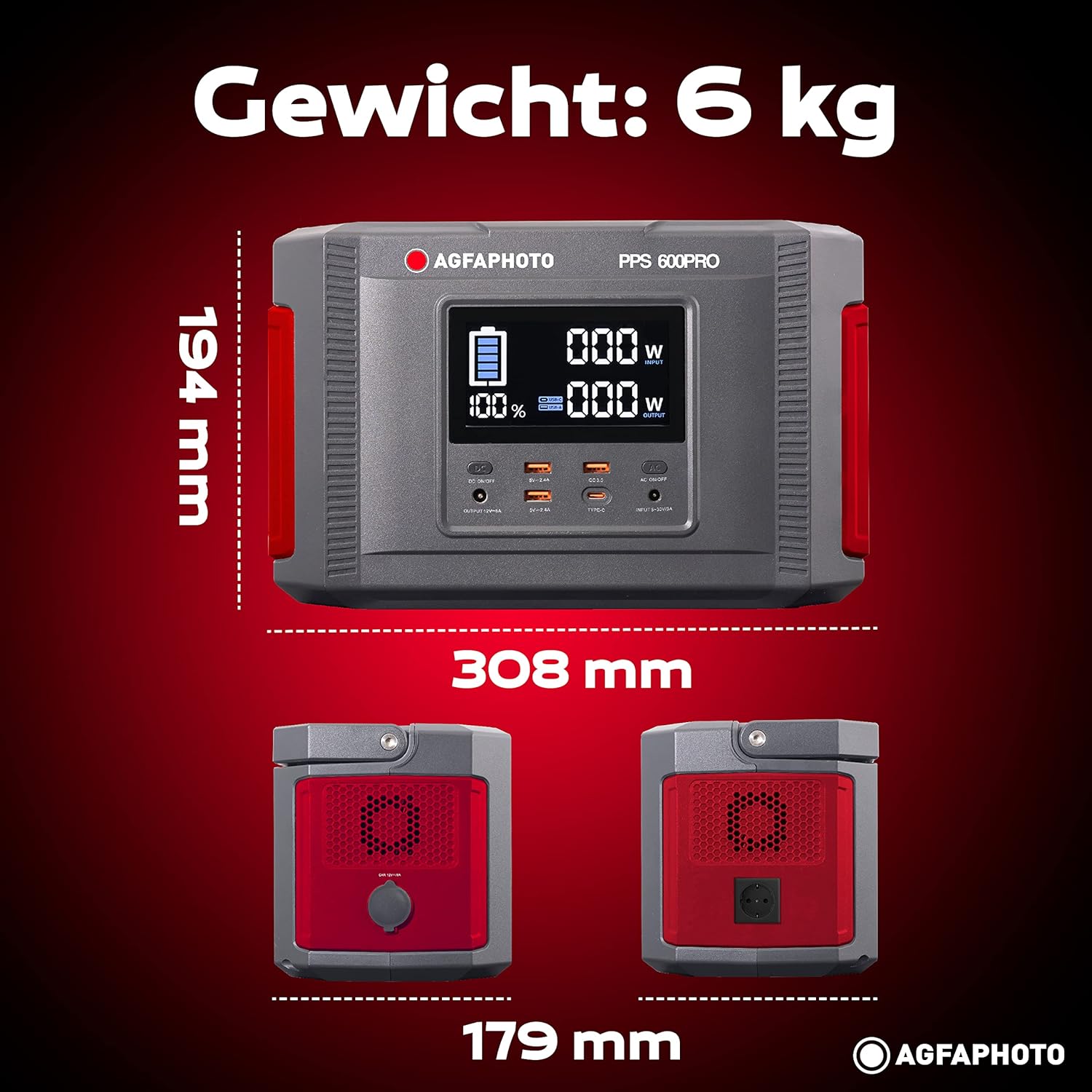
Image: Visual representation of the AgfaPhoto Powerstation PPS 600 Pro's dimensions (308 x 179 x 194 mm) and weight (6 kg).
| Caratteristica | Specificazione |
|---|---|
| Marca | AgfaFoto |
| Numero di modello | 717-854742 (PPS600) |
| Capacità della batteria | 644 Wh |
| Potenza di uscita (continua) | 600 L |
| Potenza in uscita (picco) | 1000 L |
| Voltage | 220 Volt |
| Peso dell'articolo | 6.1 chilogrammi |
| Dimensioni (L x P x A) | Dimensioni: 308 x 179 x 194 mm |
| Fonte di alimentazione | Battery Powered (Solaire, électricité) |
| Usi consigliati | Mobile phones, cameras, laptops, tablets |
| Componenti inclusi | Power cord, USB ports, LCD screen, car cigarette lighter adapter |
| Caratteristica speciale | Design compatto |
10. Garanzia e supporto
AgfaPhoto products are manufactured to high-quality standards and are covered by a manufacturer's warranty. For specific warranty terms and conditions, please refer to the warranty card included with your product or visit the official AgfaPhoto websito.
For technical support, troubleshooting assistance, or spare parts inquiries, please contact AgfaPhoto customer service. Contact details can typically be found on the product packaging or the official brand websito.


