Introduzione
This manual provides detailed instructions for the installation, operation, and maintenance of your Vine TJ-560 Smart Wi-Fi Thermostat. Please read this manual thoroughly before installation and use to ensure proper function and to maximize the benefits of your new thermostat.

The Vine TJ-560 Smart Wi-Fi Thermostat features a 4-inch full touch screen display.
Informazioni sulla sicurezza
Always follow basic safety precautions when installing and operating this product to reduce the risk of fire, electric shock, and personal injury.
- Disconnessione dell'alimentazione: Prima di installare o effettuare la manutenzione del termostato, disattivare sempre l'alimentazione del sistema di riscaldamento/raffreddamento tramite l'interruttore automatico.
- Installazione qualificata: In caso di dubbi su alcuni passaggi, l'installazione deve essere eseguita da un tecnico qualificato.
- Voltage: This thermostat is designed for 24-volt systems. Do not connect to line voltagsistemi e (120V/240V).
- Requisiti del filo C: A common wire (C-wire) is required for proper operation. If your system lacks a C-wire, consult a professional HVAC technician.
Cosa c'è nella scatola
Verificare che tutti i componenti siano presenti prima di iniziare l'installazione:
- Vine TJ-560 Smart Wi-Fi Thermostat Unit
- Piastra a muro
- Two Screws and Anchors
- Cacciavite a testa piatta
- Sensore di temperatura (integrato)
- Manuale dell'utente (questo documento)

All components included in the Vine TJ-560 Smart Wi-Fi Thermostat package.
Installazione
Compatibilità del sistema
The Vine TJ-560 thermostat is compatible with approximately 90% of HVAC systems. A C-wire (common wire) is required for all compatible systems.
- Sistemi convenzionali: 2 Heat / 2 Cool (Gas/Oil/Propane Furnace, Electric Furnace, Boiler/Radiant, Air Conditioner)
- Heat Pump Systems: 4 Heat / 2 Cool (with Auxiliary and Emergency Heat)
- Supports natural gas, electric, hot water, gas fireplaces (24 Volts), oil heat sources.
Incompatible Systems:
- Communicating/Proprietary Systems
- Linea Voltage / Two-Wire Systems
- Sistemi millivolt
- Systems requiring a remote sensor
- Whole home humidifiers/dehumidifiers
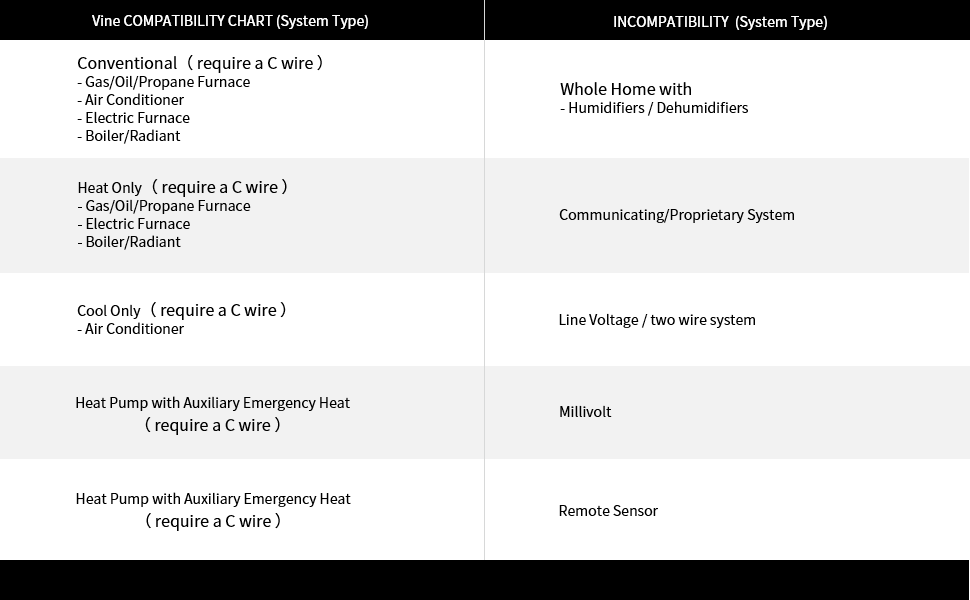
Detailed compatibility information for various HVAC system types.
Physical Installation (Approx. 20 minutes)
- Spegnimento dell'alimentazione: Individua l'interruttore automatico e spegni l'alimentazione del sistema di riscaldamento e raffreddamento.
- Rimuovere il vecchio termostato: Carefully remove your old thermostat from the wall. Take a picture of the existing wiring connections for reference. Label each wire with the corresponding terminal letter.
- Rimuovere la vecchia piastra a muro: Svitare e rimuovere la vecchia piastra a muro.
- Montare la nuova piastra a muro: Position the new Vine wall plate on the wall. Use the included screws and anchors to secure it. Ensure the wires can pass through the opening.
- Collegare i fili: Connect the labeled wires to the corresponding terminals on the new wall plate. Refer to your previously taken photo and the wiring diagram provided with your thermostat. Ensure the C-wire is connected.
- Install Thermostat Unit: Gently push the Vine TJ-560 thermostat unit onto the mounted wall plate until it clicks securely into place.
- Ripristina alimentazione: Riattivare la corrente tramite l'interruttore automatico.

Visual guide for the quick installation process of the Vine TJ-560 thermostat.
Configurazione app
After physical installation, set up the Vine Thermostat app for smart control:
- Scarica l'app: Download the "Vine Thermostat App" from your device's app store (iOS or Android).
- Creare un account: Open the app and create a new user account, then sign in.
- Aggiungi dispositivo: Follow the in-app instructions to add your new Vine TJ-560 thermostat. This typically involves selecting "Add Device" and following prompts to connect to your home Wi-Fi network.
- Connettiti al Wi-Fi: Ensure your phone's Bluetooth is enabled. The app will guide you through connecting the thermostat to your 2.4GHz Wi-Fi network.

Steps for downloading the Vine app and connecting the thermostat to your home Wi-Fi network.
Istruzioni per l'uso
Interfaccia touchscreen
The 4-inch high-resolution display automatically adjusts its brightness based on ambient light. You can view indoor temperature, humidity, and weather forecasts directly on the screen. Use the touch controls to adjust settings, change modes (Heat, Cool, Auto, Off), and set desired temperatures.

The thermostat's touchscreen provides easy access to temperature, humidity, and weather information.
Controllo dell'app
Control and monitor your Vine TJ-560 thermostat from anywhere using the Vine Thermostat app on your smartphone, tablet, or laptop. Adjust temperature, change schedules, and view energy history remotely.

The Vine Thermostat app allows for convenient remote control of your home's climate.
24/7 Programmable Schedule
Set 7-day programmable schedules to automatically adjust the temperature to suit your daily routine and energy saving preferences. Create different schedules for weekdays and weekends, or customize each day individually.

Customize your heating and cooling schedule for optimal comfort and energy efficiency.
Controllo vocale
The Vine TJ-560 is compatible with Amazon Alexa and Google Assistant for hands-free voice control. Connect your thermostat to your smart home ecosystem and use voice commands to adjust settings.
- Example Comandi:
- "Alexa, imposta il termostato a 72 gradi."
- "Hey Google, change thermostat mode to cool."

Control your thermostat conveniently using voice commands with Alexa or Google Assistant.
Funzionalità di risparmio energetico
Utilize the Energy History feature within the Vine Thermostat app to monitor your energy consumption. This data helps you understand your usage patterns and identify opportunities to save energy.

Review your energy usage history through the app to optimize savings.
Avvisi intelligenti
Receive notifications directly to your smartphone for important events, such as system malfunctions or when your indoor temperature falls outside your preferred range. This allows for proactive management of your home's climate.
Manutenzione
The Vine TJ-560 Smart Wi-Fi Thermostat requires minimal maintenance.
- Pulizia: Pulisci delicatamente lo schermo e l'esterno con un panno morbido eamp panno. Evitare detergenti abrasivi o solventi.
- Aggiornamenti software: Ensure your thermostat's firmware and the Vine Thermostat app are kept up-to-date for optimal performance and new features. Updates are typically managed through the app.
- Filtro dell'aria: Regularly check and replace your HVAC system's air filter as recommended by your system manufacturer. A dirty filter can impact system efficiency and thermostat readings.
Risoluzione dei problemi
If you encounter issues with your Vine TJ-560 thermostat, try the following steps:
- Nessuna alimentazione al termostato: Ensure the power to your HVAC system is on at the circuit breaker. Verify the C-wire connection.
- Disconnessione Wi-Fi: Check your home Wi-Fi network. Ensure the thermostat is within range of your router. Restart your router and the thermostat (by cycling power at the breaker) if necessary. Reconnect through the app.
- Lettura errata della temperatura: Assicurarsi che il termostato non sia esposto alla luce solare diretta, a correnti d'aria o a fonti di calore (ad esempio, lamps, appliances) that could affect its internal temperature sensor.
- Il sistema non risponde: Verify that the thermostat is set to the correct mode (Heat, Cool, Auto). Check wiring connections for looseness. If the issue persists, consult a professional HVAC technician.
- Problemi di controllo delle app: Ensure your smartphone has an active internet connection. Verify that the Vine Thermostat app is updated to the latest version.
Specifiche
| Caratteristica | Specificazione |
|---|---|
| Marca | Vite |
| Nome del modello | TJ-560 Wi-Fi thermostat |
| Dimensioni del prodotto | 3.54"P x 3.54"L x 0.98"A |
| Tipo di controllore | Amazon Alexa, Google Assistant, iOS, Android, Touchpad |
| Caratteristiche speciali | Auto Changeover, Fan Control, Filter Indicator |
| Colore | Bianco |
| Usi specifici | Air Conditioner, Furnace, Heat Pump |
| Tipo di controllo della temperatura | Riscaldamento, raffreddamento |
| Tecnologia di connettività | Wi-Fi (2.4 GHz) |
| Componenti inclusi | Two screws and anchors, Flathead screwdriver, Temperature Sensor |
| Fonte di alimentazione | Elettrico con filo (24 Volt) |
| Materiale | Acrilonitrile-butadiene-stirene (ABS), Policarbonato (PC) |
| Forma | Piazza |
| Tipo di visualizzazione | LCD |
| Dimensioni dello schermo | 4 pollici |
| Tipo di controllo | Controllo touchpad |
| Metodo di controllo | App, Telecomando, Touch |
| Tipo di montaggio | Montaggio a parete |
| Peso dell'articolo | 12.3 once |

Physical dimensions of the Vine TJ-560 thermostat.
Garanzia e supporto
Warranty information for the Vine TJ-560 Smart Wi-Fi Thermostat is typically included with the product packaging or available on the manufacturer's official websito. Per i dettagli sulla copertura e i termini della garanzia, fare riferimento a queste risorse.
For technical support, product inquiries, or assistance with installation and operation, please contact Vine customer support through their official channels. Contact information can usually be found in the product packaging or on the Vine Thermostat websito.


