1. Introduzione
The PGYTECH MantisPod 2.0 is a versatile and compact mini tripod designed for vlogging, photography, and videography. It offers multiple shooting modes, a quick-release system, and a detachable Bluetooth remote control for enhanced flexibility and creative control. This manual provides detailed instructions for setting up, operating, and maintaining your MantisPod 2.0.

Image 1.1: The PGYTECH MantisPod 2.0 in a typical vlogging setup, demonstrating its compact design and wireless control capabilities.
2. Componenti del prodotto
Familiarize yourself with the various parts of your MantisPod 2.0 to ensure proper usage and functionality.

Image 2.1: A detailed diagram illustrating the key components of the MantisPod 2.0, including the Arca-Swiss compatible plate, quick release system, panorama knob, 360° rotation ball, 1/4" screw, cold shoe mount, adjust button, Bluetooth remote control kit, sturdy legs, and the hook for Mantis Mode.
- Arca-Swiss Compatible Plate: For quick attachment and detachment of cameras.
- Sistema di sgancio rapido: Enables fast and secure mounting.
- Panorama Knob: For precise horizontal adjustments.
- 360° Rotation Ball: Consente un posizionamento flessibile della telecamera.
- Vite da 1/4": Standard mounting screw for cameras and accessories.
- Supporto per pattino freddo: For attaching external accessories like microphones or lights.
- Pulsante di regolazione: To modify tripod leg angles and modes.
- Bluetooth Remote Control Kit: Detachable remote for wireless camera operation.
- Gambe robuste: Provide stable support in various configurations.
- Hook for Mantis Mode: Integrated hook for hanging the tripod in Mantis Mode.
- Mini Phone Holder Storage Place: A dedicated slot in the tripod leg for an optional mini smartphone holder (purchased separately).
3. Impostazione
3.1 Attaching a Camera/Device
- Ensure the quick release plate is securely attached to your camera's 1/4" tripod socket. The PGYTECH Quick Release Plate features a patented anti-loosening screw with a thrust needle roller bearing for a sustained tight fit.
- Align the quick release plate on your camera with the quick release system on the MantisPod 2.0's ball head.
- Press down firmly until you hear a click, indicating the camera is securely locked in place.
- To detach, press the release button on the quick release system and lift the camera.
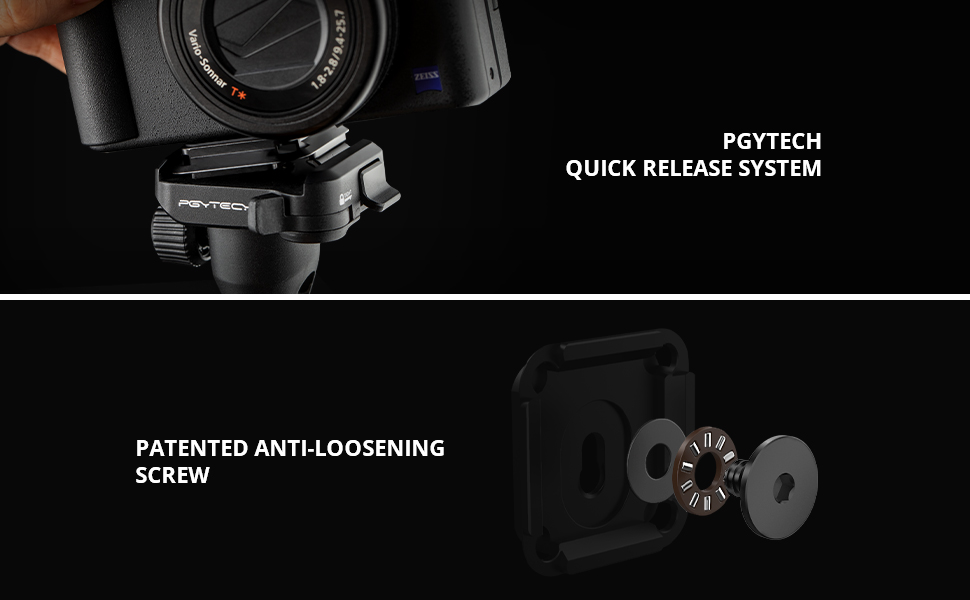
Image 3.1: Visual representation of the PGYTECH Quick Release System and the patented anti-loosening screw, highlighting the secure attachment mechanism for cameras.
3.2 Abbinamento del telecomando Bluetooth
The MantisPod 2.0 includes a detachable Bluetooth remote control for convenient wireless operation.
- Ensure the remote control is charged (if applicable) and powered on.
- Activate Bluetooth on your compatible camera or smartphone.
- On the remote, press and hold the pairing button (refer to Image 6.2 for button layout) until the connection indicator light flashes, indicating it's in pairing mode.
- Select 'PGYTECH Remote' or a similar name from your device's Bluetooth discovery list.
- Once paired, the indicator light will become solid, and you can control your device wirelessly.
3.3 Mini Phone Holder (Optional)
A mini smartphone holder (purchased separately) can be stored within one of the tripod legs for portability.
- To access the storage slot, gently open the designated leg of the tripod.
- Insert or remove the mini phone holder as needed.
- When using, attach the phone holder to the 1/4" screw on the ball head.

Image 3.2: The 1/4" screw on the top of the ball head for camera attachment and the integrated storage compartment for an optional mini smartphone holder within the tripod leg.
4. Modalità operative
The MantisPod 2.0 offers six distinct modes to accommodate various shooting scenarios.
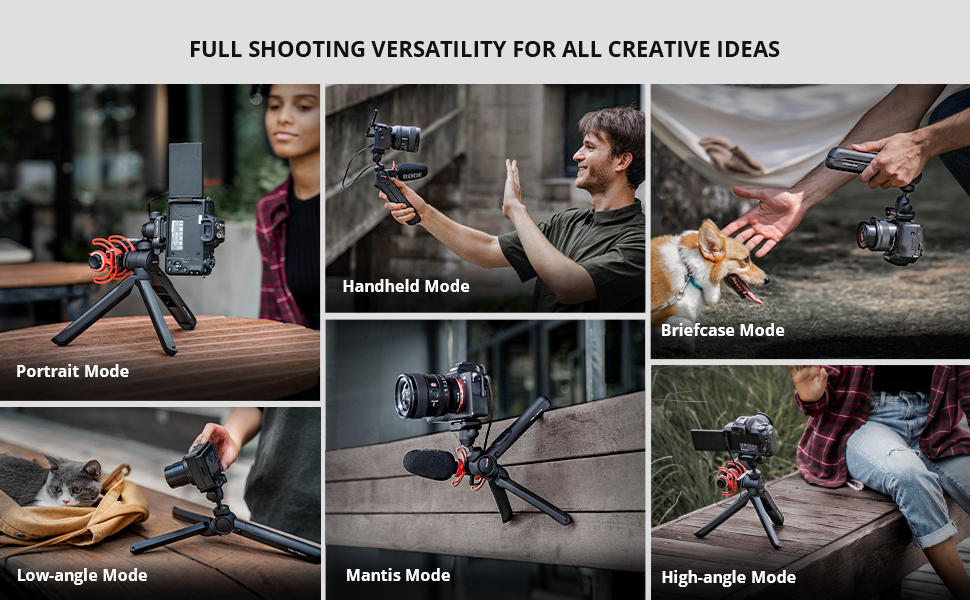
Immagine 4.1: Un overview of the six versatile shooting modes: Portrait Mode, Handheld Mode, Briefcase Mode, Low-angle Mode, Mantis Mode, and High-angle Mode.
4.1 Modalità portatile
Fold the legs together to use the MantisPod 2.0 as a comfortable handheld grip for vlogging or on-the-go shooting.

Image 4.2: Demonstrates the Handheld Mode (top), Low-angle Mode (bottom left), and High-angle Mode (bottom right) for diverse shooting perspectives.
4.2 Low-angle Mode
Extend the legs and position the tripod close to the ground for stable low-angle shots.
4.3 High-angle Mode
Extend the legs to their full length to achieve a higher perspective for your shots.
4.4 Modalità Ritratto
Adjust the ball head to orient your camera vertically for portrait-style content.

Image 4.3: Illustrates the Portrait Mode (top) for vertical framing and the Briefcase Mode (bottom) for a stable, low-profile presa.
4.5 Briefcase Mode
Hold the tripod by one leg, with the other two legs folded, resembling a briefcase handle, for a stable, low-profile presa.
4.6 Mantis Mode
Utilize the integrated hook on one leg to hang the tripod from various surfaces, such as railings or fences, for unique and stable shooting angles.

Image 4.4: The MantisPod 2.0 demonstrating its unique Mantis Mode, where it is securely hooked onto a ledge, providing a stable platform for shooting.
5. Utilizzo del telecomando Bluetooth
The magnetic Bluetooth remote control allows for convenient wireless operation of your camera's functions.

Image 5.1: The wireless control function of the MantisPod 2.0, showing the remote being used to control a camera from a distance.
5.1 Funzioni del telecomando

Immagine 5.2: Un primo piano view of the Bluetooth remote control, labeling its functions: Connection indication, Zoom in, Zoom out, Power indication, Picture button, Video button, and Charging indication.
- Pulsante di accensione: Premere per accendere/spegnere.
- Pulsante immagine: Premi per scattare una foto.
- Pulsante video: Premere per avviare/interrompere la registrazione video.
- Pulsanti Zoom avanti/indietro: Control the zoom function on compatible cameras.
- Indicatore di connessione: Mostra lo stato di associazione.
- Indicatore di carica: Mostra lo stato di carica.
6. Adjusting the Tripod Head
The MantisPod 2.0 features a versatile ball head for precise camera positioning.
- Rotazione 360°: Loosen the panorama knob to rotate your camera horizontally for panoramic shots.
- Regolazione dell'inclinazione di 120°: Loosen the main ball head knob to tilt your camera up, down, or sideways within a 120-degree range.
- Supporto per pattino freddo: The rotatable cold shoe on the side allows for easy attachment of accessories like external microphones or LED lights.

Image 6.1: Illustrates the 360-degree rotation capability of the ball head and the 120-degree tilt adjustment for flexible camera angles.
7. Compatibilità
The MantisPod 2.0 tripod is compatible with most vlogging devices weighing less than 2kg (4.4 lbs). The Bluetooth remote control has specific camera compatibility.

Image 7.1: A compatibility chart detailing cameras supported by the MantisPod 2.0 tripod and specifically the remote control functions. Note that an action camera quick release mount and phone holder may need to be purchased separately.
7.1 Compatibilità del telecomando
- Per Sony: Alpha 1, Alpha 7C, Alpha 7R IV, Alpha 7R III, Alpha 7S III, Alpha 9, Alpha 6600, Alpha 6100, Alpha 7 III, Alpha 7 IV, Alpha 6400, ZV-1, DSC-RX0M2, DSC-RX100M, FX3, ZV-E10
- Per Canon: EOS M6 Mark II, EOS M50, EOS M50 Mark II, EOS M200, PowerShot G5 X Mark II, PowerShot G7 X Mark III, EOS R, EOS R5, EOS R6, EOS RP
- Per GoPro: GoPro 5, 6, 7, 8, 9, 10, 11 (PGYTECH action camera quick release mount needs to be purchased separately)
8. Manutenzione
Proper maintenance ensures the longevity and optimal performance of your MantisPod 2.0.
- Pulizia: Pulire il treppiede con un panno morbido e asciutto dopo ogni utilizzo. Per lo sporco ostinato, utilizzare un panno leggermenteamp panno e sapone neutro, quindi asciugare accuratamente. Evitare prodotti chimici aggressivi.
- Magazzinaggio: Store the MantisPod 2.0 in a cool, dry place away from direct sunlight and extreme temperatures. Ensure all parts are clean and dry before storage.
- Evitare il sovraccarico: Do not exceed the maximum weight limit of 4.4 lbs (2 kg) to prevent damage to the tripod and your equipment.
9. Risoluzione Dei Problemi
If you encounter issues with your MantisPod 2.0, refer to the following common problems and solutions.
- Il telecomando non si associa:
- Assicurarsi che il telecomando sia carico e acceso.
- Verify Bluetooth is enabled on your camera/device.
- Try re-initiating pairing mode on the remote and re-scanning on your device.
- Check camera compatibility for the remote control functions.
- Instabilità del treppiede:
- Ensure all legs are fully extended and locked in position for the chosen mode.
- Verify the camera is securely attached to the quick release plate and the plate is locked into the ball head.
- Non superare il limite massimo di peso di 4.4 libbre (2 kg).
- La testa della sfera non mantiene la posizione:
- Ensure the main ball head knob is tightened sufficiently after adjusting the angle.
- Check that the camera's weight is within the specified limit.
10. Specifiche
| Nome del modello | MantisPod 2.0 |
| Numero modello articolo | QP-CG-085 |
| Marca | PGYTECH |
| Dimensioni del pacco | 9.65 x 5.67 x 2.01 pollici |
| Peso dell'articolo | 10.7 once (303.34 grammi) |
| Limite di peso | 4 libbre (circa 1.8 kg) |
| Altezza massima | 30.48 centimetri (circa 12 pollici) |
| Altezza minima | 12 pollici (circa 30.48 cm) |
| Tipo di testa del treppiede | Teste a sfera |
| Caratteristica speciale | Telecomando |
| Batterie | È necessaria 1 batteria AAAA (inclusa) |
11. Garanzia e supporto
PGYTECH products are designed for reliability and performance. For warranty information, technical support, or service inquiries, please visit the official PGYTECH websito o contattare il loro servizio clienti.
Ufficiale Websito: www.pgytech.com
Si prega di conservare la prova d'acquisto per eventuali reclami in garanzia.


